

现在很多项目对可视化数据要求越来越高了,涉及到地点的地方几乎都要能给地图展示,最近在项目中遇到了地图展示以及数据打点问题,特此总结一下。
附所参考百度地图api:
开发平台:lbsyun.baidu.com/
地图示例:lbsyun.baidu.com/jsdemo.htm#…
基础类:lbsyun.baidu.com/cms/jsapi/r…
BMapLib:api.map.baidu.com/library/Geo…
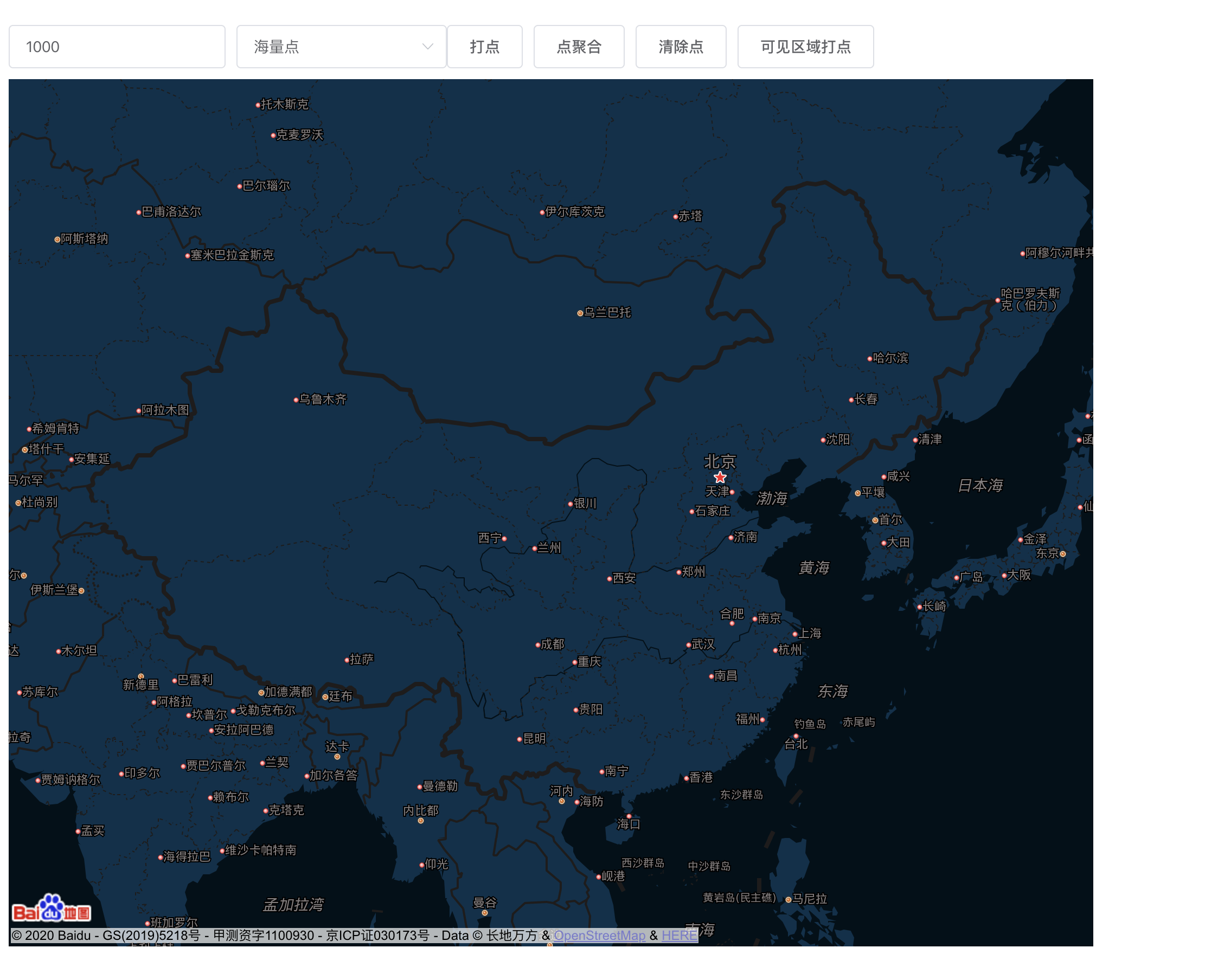
demo效果如下图:
引入百度地图
项目中引入百度地图,首先要注册成为百度地图开发者,然后获取ak密钥,直接按官网步骤就可以了,然后引入项目中
<script type="text/javascript" src="http://api.map.baidu.com/api?v=2.0&ak="></script> 这种方法的原理,就是直接给全局widow对象添加一个BMap对象,从而可以使我们在已经加载api的页面的任何地方,使用百度地图的api。
百度地图初始化
百度地图初始化要注意,一定要给地图div一定的宽高,要在mounted函数中进行。
<script>
    mounted(){
        this.mapInit(this.point);
    },
    methods:{
         mapInit(point) {
            let vue = this;
            vue.map = new BMap.Map(vue.$refs.myMap);
            let marker = new BMap.Point(vue.point.longitude, vue.point.latitude);
            // 设置中心点以及缩放级别
            vue.map.centerAndZoom(marker, this.zoom?this.zoom:11);
            if(this.controlShow){
                vue.map.addControl(new BMap.NavigationControl());
                //添加缩放控件
            }
             //滚轮控制缩放
            vue.map.enableScrollWheelZoom(true);
            //双击缩放控制
            vue.map.enableDoubleClickZoom(false);
            //自定义点标注样式 Icon()中有3个参数:
             String类型的图片地址url;Size类型的图片大小;
             和可选参数IconOptions
            if (this.addOverlay) {
                let myIcon = new BMap.Icon(img, new BMap.Size(202, 120), {
                    anchor: new BMap.Size(110, 65),
                })
                let marker = new BMap.Marker(point, {icon: myIcon});
                vue.map.addOverlay(marker);//打点
            }
            // 事件监听   获取点击点坐标 地图点击事件
            vue.map.addEventListener("click", (e) => {
                var center = vue.map.getCenter();
                if (vue.clickadd) {
                    this.addOneOverlay(e.point);
                }
                vue.$emit("mapClick", center);
            });
            // 设置地图风格样式  可自定义
            vue.map.setMapStyle(this.mapStyle);
           /**  tilesloaded 地图加载完成事件 */
            vue.map.addEventListener("tilesloaded", ()=>{
                let area = vue.map.getBounds();
                this.$emit("visibleArea",area);
                if(this.vevisibleFalg){
                    this.visibleAreaPonit();
                }
            });
            //对地图级别变化、移动结束后 监听获取可视区域
            vue.map.addEventListener("zoomend", ()=>{
                let area = vue.map.getBounds();
                let zoomSize = vue.map.getZoom();
                console.log(zoomSize);
                this.$emit("visibleArea",area);
                if(this.vevisibleFalg){
                    this.visibleAreaPonit();
                }
            });
            vue.map.addEventListener("moveend", ()=>{
                let area = vue.map.getBounds();
                this.$emit("visibleArea",area);
                if(this.vevisibleFalg){
                    this.visibleAreaPonit();
                }
            });
        },
    }
</script>
百度地图打点
百度地图打点三种:正常打点、海量点、点聚合。正常打点可以设置点坐标的样式,如图片,大小等,但是适合数量较少的打点需求,500到一千以内还不算太卡。对于大量点的渲染,可以用海量点完成,海量点不能自定义点icon,百度地图给了几种固定的样式供选择。百度地图还提供了点聚合功能,可以使一定区域内的点汇聚,显示更加直观。
需要注意的的是海量点、点聚合并没有在百度地图的默认包中,需要另外引入MarkerClusterer_min.js TextIconOverlay.js'
三种打点,代码如下:
// 创建点
createPoint(){
    this.points = [];
    let i = 0;
    for (; i < this.pointLength; i++) {
        let pt = new BMap.Point(Math.random() * 40 + 85, Math.random() * 30 + 21);
        pt.id = i+1;
        this.points.push(pt);
    }
},
//  正常打点
  addPoint(points){
           points.forEach(point => {
                let vue = this;
                let myIcon = new BMap.Icon(img, new BMap.Size(202, 120), {
                     anchor: new BMap.Size(110, 65),
                 })
                 let marker = new BMap.Marker(point,{icon: myIcon});
        // 创建标注
                  marker.addEventListener('click', function(){
                           console.log(point,'click');
                            vue.$emit('pointClick',point);
                  });
                  this.map.addOverlay(marker);
          });
 },
         //  海量点
 addMassivePoint(points,color){
     let vue = this;
    // 判断当前浏览器是否支持绘制海量点
     if (document.createElement('canvas').getContext) {
           let options = {
                 size: BMAP_POINT_SIZE_SMALL,
                 shape: BMAP_POINT_SHAPE_CIRCLE,
                color: color?color:'red',
           }
          let pointCollection = new BMap.PointCollection(points, options);
           // 初始化PointCollection
          pointCollection.addEventListener('click', function (e) {
                 // console.log(e)
                 // alert('单击点的坐标为:' + e.point.lng + ',' + e.point.lat);
                 // 监听点击事件
                let element = ''
                for (var i = 0; i < points.length; i++) {
                if (points[i].lng == e.point.lng && points[i].lat == e.point.lat)
                    {
                         element = points[i];
                         break;
                    }
                 }
                 vue.$emit('pointClick',element);
            });
                    this.map.addOverlay(pointCollection);  // 添加Overlay
      } else {
          alert('请在chrome、safari、IE8+以上浏览器查看本示例');
      }
},
       // 点聚合
 addAggreGationPoint(){
    console.log(BMapLib)
    this.createPoint();
    this.clearPonit();
    let markers = [];
    this.points.forEach(point => {
         let marker = new BMap.Marker(point);
            // 创建标注
         markers.push(marker)
   });
   this.markerClusterer = new BMapLib.MarkerClusterer(this.map, {markers:markers});
},
        // 清除点标记
clearPonit(){
    this.map.clearOverlays();// 清除原标记
        if(this.markerClusterer){
        this.markerClusterer.clearMarkers()
    }
},
大数据打点优化方案
1.分批请求,分批打点
我们项目打点数据目前有二十多万,需求要二十万点位全部显示在地图中,需要解决两个问题,一个是二十万数据点前后端传输问题,二是二十万点位打点地图卡顿问题,经研究采用ajax轮询,分批请求,分批带点的方案,每次请求五千数据,五千数据打点,依次完成二十万数据的打点,除此之外,后端给的数据还需要精简,经纬度用x、y代替,这样二十万数据可以控制到10m左右。
2.只显示可视区域内的点位
如果项目没有需求要显示所有点的话,可以每次只显示可视区域内的点,百度有相关的函数,核心代码如下:
需要注意的是:计算可视区域的点位方法并不在百度地图默认包中,需要另外引入:importBMapLib_GeoUtils.js
  /**  tilesloaded 地图加载完成事件 */
    vue.map.addEventListener("tilesloaded", ()=>{
         let area = vue.map.getBounds();
         this.$emit("visibleArea",area);
         if(this.vevisibleFalg){
              this.visibleAreaPonit();
         }
    });
    //对地图级别变化、移动结束后 监听获取可视区域
    vue.map.addEventListener("zoomend", ()=>{
          let area = vue.map.getBounds();
          let zoomSize = vue.map.getZoom();
          console.log(zoomSize);
          this.$emit("visibleArea",area);
          if(this.vevisibleFalg){
             this.visibleAreaPonit();
          }
    });
    vue.map.addEventListener("moveend", ()=>{
          let area = vue.map.getBounds();
          this.$emit("visibleArea",area);
          if(this.vevisibleFalg){
              this.visibleAreaPonit();
          }
    });
// 设置地图缩放级别
  setZoom(zoom){
      this.map.setZoom(zoom);
  },
  visibleAreaPonit(first){
      if(first)this.setZoom(11);
      this.createPoint();
      this.clearPonit();
      this.vevisibleFalg = true;
      let j = 0;
      for(let i=0;i<this.points.length;i++){
          let point = this.points[i];
          let marker = new BMap.Marker(point);
          let result = BMapLib.GeoUtils.isPointInRect(point, this.map.getBounds());
          // if(result == true && j<10)
          if(result == true)
          {
              this.map.addOverlay(marker);
              ++j;
          }
          // else if(result == true && j>=10)
          // {
          //     ++j;
          //     this.map.removeOverlay(marker);
          // }
          else this.map.removeOverlay(marker);
     }
  }
当数据达到一定量级以后,个人认为一次性显示所有点其实没什么意义,用户看到的也只是密密麻麻的一片,没有任何价值。具体项目如何打点,这取决于具体项目需求。
demo完整代码如下:
<template>
    <div class="map-point">
        <div class="button">
            <el-input class="input-number" v-model="pointLength"
                 placeholder="请输入生成点数量" type="number">
            </el-input>
            <el-select v-model="select_data.value"
               :placeholder="select_data.placeholder">
               <el-option
                    v-for="item in select_data.options"
                    :key="item.value"
                    :label="item.label"
                    :value="item.value">
                </el-option>
            </el-select>
            <el-button @click="addOneOverlayBatch">打点</el-button>
            <el-button @click="addAggreGationPoint">点聚合</el-button>
            <el-button @click="clearPonit">清除点</el-button>
            <el-button @click="visibleAreaPonit(true)">可见区域打点</el-button>
        </div>
        <div ref="myMap" :style="mapStyle" id="myMap" class="myMap"></div>
    </div>
</template>
<script>
import '../assets/js/mapJs/MarkerClusterer_min.js'
import '../assets/js/mapJs/TextIconOverlay.js'
import '../assets/js/mapJs/BMapLib_GeoUtils.js'
import img from "../assets/imgs/marker.png";
export default {
    name:'mapPoint',
    props:{
        controlShow:{// 是否显示缩放控件
            type:Boolean,
            default:false,
        },
        point:{           // 中心点
            type:Object,
            default(){
                return {
                    longitude: '105.000',
                    latitude: '38.000'
                }
            }
       },
        clickadd:{        // 点击打点
            type:Boolean,
            default:false,
        },
        zoom:{           // 缩放级别
           type:Number,
            default:5
        }
    },
    data(){
        return {
            map: '',
            mapStyle: {style: "midnight"},
            pointLength:1000,
            points:[],
            select_data:{
                placeholder:'请选择打点模式',
                options:[
                    {value:'1',label:'正常点'},
                    {value:'2',label:'海量点'},
                ],
                value:'2',
            },
            vevisibleFalg:false,
        }
    },
    mounted(){
        this.mapInit(this.point);
    },
    methods:{
        mapInit(point) {
            let vue = this;
            vue.map = new BMap.Map(vue.$refs.myMap);
            let marker = new BMap.Point(vue.point.longitude, vue.point.latitude);
            // 设置中心点以及缩放级别
            vue.map.centerAndZoom(marker, this.zoom?this.zoom:11);
            if(this.controlShow){
                vue.map.addControl(new BMap.NavigationControl());    //添加缩放控件
            }
            vue.map.enableScrollWheelZoom(true);                 //滚轮控制缩放
           vue.map.enableDoubleClickZoom(false);                //双击缩放控制
           //自定义点标注样式 Icon()中有3个参数:String类型的图片地址url;
           //Size类型的图片大小;和可选参数IconOptions
            if (this.addOverlay) {
                let myIcon = new BMap.Icon(img, new BMap.Size(202, 120), {
                    anchor: new BMap.Size(110, 65),
                })
                let marker = new BMap.Marker(point, {icon: myIcon});
                vue.map.addOverlay(marker);      //打点
            }
            // 事件监听   获取点击点坐标 地图点击事件
            vue.map.addEventListener("click", (e) => {
                var center = vue.map.getCenter();
                if (vue.clickadd) {
                    this.addOneOverlay(e.point);
                }
                vue.$emit("mapClick", center);
            });
            // 设置地图风格样式  可自定义
            vue.map.setMapStyle(this.mapStyle);
            /**  tilesloaded 地图加载完成事件 */
            vue.map.addEventListener("tilesloaded", ()=>{
                let area = vue.map.getBounds();
                this.$emit("visibleArea",area);
                if(this.vevisibleFalg){
                    this.visibleAreaPonit();
                }
            });
            //对地图级别变化、移动结束后 监听获取可视区域
            vue.map.addEventListener("zoomend", ()=>{
                let area = vue.map.getBounds();
                let zoomSize = vue.map.getZoom();
                console.log(zoomSize);
                this.$emit("visibleArea",area);
                if(this.vevisibleFalg){
                    this.visibleAreaPonit();
                }
            });
            vue.map.addEventListener("moveend", ()=>{
                let area = vue.map.getBounds();
                this.$emit("visibleArea",area);
                if(this.vevisibleFalg){
                    this.visibleAreaPonit();
                }
            });
            // 坐标是否在可视区域范围内
            // let result = BMapLib.GeoUtils.isPointInRect(markers[i].point, map.getBounds());
        },
       // 创建点
        createPoint(){
            this.points = [];
            let i = 0;
            for (; i < this.pointLength; i++) {
                let pt = new BMap.Point(Math.random() * 40 + 85, Math.random() * 30 + 21);
                pt.id = i+1;
                this.points.push(pt);
            }
        },
        // 批量打点
        addOneOverlayBatch(){
            this.createPoint();
            this.clearPonit();
            if(this.select_data.value === '1')           // 正常打点
            {
                this.addPoint(this.points)
            }else if(this.select_data.value === '2')       // 海量点
            {
                this.addMassivePoint(this.points)
            }
        },
        //  正常打点
        addPoint(points){
                points.forEach(point => {
                      let vue = this;
                      let myIcon = new BMap.Icon(img, new BMap.Size(202, 120), {
                            anchor: new BMap.Size(110, 65),
                      })
                      let marker = new BMap.Marker(point,{icon: myIcon});        // 创建标注
                      marker.addEventListener('click', function(){
                            console.log(point,'click');
                            vue.$emit('pointClick',point);
                      });
                      this.map.addOverlay(marker);
               });
        },
         //  海量点
        addMassivePoint(points,color){
                let vue = this;
                if (document.createElement('canvas').getContext) {  // 判断当前浏览器是否支持绘制海量点
                    let options = {
                        size: BMAP_POINT_SIZE_SMALL,
                        shape: BMAP_POINT_SHAPE_CIRCLE,
                        color: color?color:'red',
                    }
                    let pointCollection = new BMap.PointCollection(points, options);  // 初始化PointCollection
                    pointCollection.addEventListener('click', function (e) {
                        // console.log(e)
                        // alert('单击点的坐标为:' + e.point.lng + ',' + e.point.lat);
                       // 监听点击事件
                        let element = ''
                       for (var i = 0; i < points.length; i++) {
                            if (points[i].lng == e.point.lng && points[i].lat == e.point.lat) {
                                element = points[i];
                                break;
                            }
                        }
                        vue.$emit('pointClick',element);
                    });
                    this.map.addOverlay(pointCollection);  // 添加Overlay
                } else {
                    alert('请在chrome、safari、IE8+以上浏览器查看本示例');
                }
       },
        // 点聚合
       addAggreGationPoint(){
            console.log(BMapLib)
            this.createPoint();
            this.clearPonit();
            let markers = [];
            this.points.forEach(point => {
                    let marker = new BMap.Marker(point);        // 创建标注
                     markers.push(marker)
            });
            this.markerClusterer = new BMapLib.MarkerClusterer(this.map, {markers:markers});
        },
       // 清楚点标记
        clearPonit(){
            this.map.clearOverlays();// 清除原标记
            if(this.markerClusterer){
               this.markerClusterer.clearMarkers()
            }
        },
        // 设置地图缩放级别
        setZoom(zoom){
            this.map.setZoom(zoom);
        },
        visibleAreaPonit(first){
           if(first)this.setZoom(11);
            this.createPoint();
            this.clearPonit();
            this.vevisibleFalg = true;
            let j = 0;
            for(let i=0;i<this.points.length;i++){
                let point = this.points[i];
                let marker = new BMap.Marker(point);
                  let result = BMapLib.GeoUtils.isPointInRect(point, this.map.getBounds());
                // if(result == true && j<10)
                 if(result == true)
                 {
                    this.map.addOverlay(marker);
                    ++j;
                }
                else this.map.removeOverlay(marker);
            }
        }
    },
    }
</script>
<style lang="less" scoped>
.map-point{
    .button{
        text-align: left;
        margin-bottom: 10px;
        .input-number{
            width: 200px;
            margin-right: 10px;
        }
    }
    .myMap{
        width: 1000px;
        height: 800px;
    }
}
</style>
--------------------------------------------------------------------------------
git地址:https://github.com/aicai0/test_components.git
如有问题,欢迎探讨,如果满意,请手动点赞,谢谢!🙏
及时获取更多姿势,请您关注!!!
