第一步:下载siege
wget http://download.joedog.org/siege/siege-4.0.4.tar.gz
第二步:安装并编译
tar  -xzf  siege-4.0.4.tar.gz

cd  siege-4.0.4/

./configure

make  &&  make  install
上面是四条命令:一个一个地执行。
siege相关的用法:
get请求
siege -c 100 -t 2s http://demo.xx.cn/
解释:指定demo.xx.cn的并发数为100,指定2秒内完成。

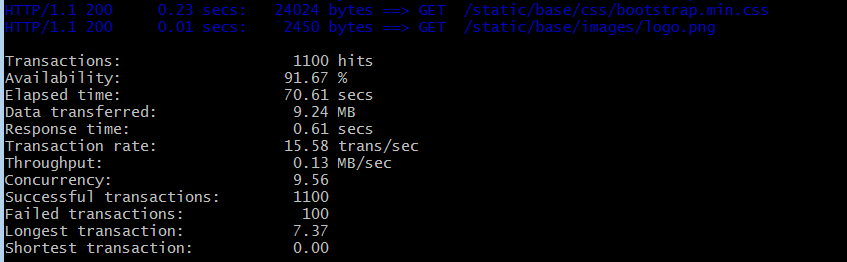
解释:
Transactions:                   1100 hits  #交易:1100支安打
Availability:                  91.67 %       #可用性:91.67%
Elapsed time:                  70.61 secs   #运行时间:70.61秒
Data transferred:               9.24 MB  #传输的数据:9.24 MB
Response time:                  0.61 secs  #响应时间:0.61秒
Transaction rate:              15.58 trans/sec  #交易速率:15.58转/秒
Throughput:                     0.13 MB/sec  #吞吐量:0.13 MB /秒
Concurrency:                    9.56             #并发性:9.56
Successful transactions:        1100        #成功的交易:1100
Failed transactions:             100            #失败的事务:100
Longest transaction:            7.37           #最长的事务:7.37
Shortest transaction:           0.00            #最短的事务:0.00