从根本上而言,Android系统和Windows一样,属于消息驱动型系统,而消息驱动型的系统主要有一下四大要素:
- 接收消息的“消息队列”
- 阻塞式的从消息队列中接收消息并进行处理的“线程”
- 可发送的“消息格式”
- 消息发送函数
那安卓与之对应的实现就是:
| 角色 | Android对应 |
|---|---|
| MessageQueue | 接收消息的“消息队列” |
| Thread+Looper | 阻塞式的从消息队列中接收消息并进行处理的“线程” |
| Meaasge | 可发送的"消息格式" |
| Handler的post&sendMessage | 消息发送函数 |
消息机制可以说是安卓开发中必不可少的内容了。从开发角度而言,Handler作为消息机制的上层接口,在开发的时候只需要使用Handler中提供的方法,完成具体的业务需求即可。他的主要工作就是可以再子线程和主线程之间进行灵活的切换。
Handler在日常开发中经常被用来进行UI更新,但是他的功能并不仅仅局限于此。
消息机制的使用场景
主要用于多线程之间的通信,在Android开发中最常见的使用情况就是: 在子线程中执行一些耗时操作,然后通知主线程进行UI的更新。那这个时候就需要用到消息机制来完成子线程和主线程的通讯。
@SuppressLint("HandlerLeak")
    private Handler mHandler = new Handler(){

        //重写handlerMessage方法
        @Override
        public void handleMessage(Message msg) {
            super.handleMessage(msg);
            mText.setText(msg.what);
        }
    };
    @Override
    protected void onCreate(Bundle savedInstanceState) {
        super.onCreate(savedInstanceState);
        setContentView(R.layout.activity_test);

        mText = findViewById(R.id.exe_text);

        new Thread(new Runnable() {
            @Override
            public void run() {
                try {
                    Thread.sleep(10);
                } catch (InterruptedException e) {
                    e.printStackTrace();
                }
                Message msg = new Message();
                msg.obj = Thread.currentThread().getName();
                mHandler.sendMessage(msg.obtain());
            }
        }).start();
    }
那在Android的消息机制中,主要有四个角色一起共同作用完成了整个消息传递的功能:
- Handler
- Looper
- Message
- MessageQueue
Handler
先从Handler说起,这个主要用于和用户之间进行交互,主要作用:
- 跨进程通信
- 跨线程更新UI
- 与Looper,MessageQueue一起构建了Android的消息循环模型
Handler的工作主要包含消息的发送和接受过程。消息的发送就是通过post系列方法以及send方法来实现的,而post系列的方法其底层就是通过send来实现的
Handler的创建
无参构造
/**
     * Default constructor associates this handler with the {@link Looper} for the
     * current thread.
     *
     * If this thread does not have a looper, this handler won't be able to receive messages
     * so an exception is thrown.
     */

    public Handler() {
        this(null, false);
    }
通过阅读源码不难发现Handler的其他一些形式的构造方法最终执行的都是以下的这个构造方法
 public Handler(Callback callback, boolean async) {
        //匿名内部类,内部类或者是本地类必须声明为static,否则就会警告可能会出现内存泄漏
        //1.检查是否会出现内存泄漏
        if (FIND_POTENTIAL_LEAKS) {
            final Class<? extends Handler> klass = getClass();
            if ((klass.isAnonymousClass() || klass.isMemberClass() || klass.isLocalClass()) &&
                    (klass.getModifiers() & Modifier.STATIC) == 0) {
                Log.w(TAG, "The following Handler class should be static or leaks might occur: " +
                    klass.getCanonicalName());
            }
        }

        //创建Looper对象
         mLooper = Looper.myLooper();
        //如果Looper为null则会抛出一个异常
        if (mLooper == null) {
            throw new RuntimeException(
                "Can't create handler inside thread " + Thread.currentThread()
                        + " that has not called Looper.prepare()");
        }
        //实现了Looper与MessageQueue之间的绑定
        mQueue = mLooper.mQueue;
        //回调方法
        mCallback = callback;
        //设置消息是否为异步处理的方式
        mAsynchronous = async;
    }
有参构造函数
 public Handler(Looper looper, Callback callback) {
        this(looper, callback, false);
    }

 public Handler(Looper looper, Callback callback, boolean async) {
        mLooper = looper;
        mQueue = looper.mQueue;
        mCallback = callback;
        mAsynchronous = async;
    }
Handler可以再有参构造函数汇总指定要绑定的Looper,callBack回调方法以及消息的处理方式(同步或者是异步)
Looper
prepare:
无参数的前提下默认调用的prepare(true)方法,表示的是这个looper允许退出,如果参数是false的话则表示当前的Looper不循序退出,一般主线程中的looper是不允许退出的。
private static void prepare(boolean quitAllowed) {
    //每个线程只允许创建一次Looper对象,否则就会报错
    if (sThreadLocal.get() != null) {
        throw new RuntimeException("Only one Looper may be created per thread");
    }
    //创建Looper对象,并保存到当前线程的TLS区域
    sThreadLocal.set(new Looper(quitAllowed));
}

    //这个方法是主线程Looper初始化的代码,即APP初始化的时候就会被调用
    public static void prepareMainLooper() {
    //不允许Looper退出
    prepare(false);
    synchronized (Looper.class) {
        //将当前的Looper保存为主Looper,每个线程只允许执行一次。
        if (sMainLooper != null) {
            throw new IllegalStateException("The main Looper has already been prepared.");
        }
        sMainLooper = myLooper();
    }
}
- 首先每个线程都只能创建一个Looper对象,并且与线程绑定,在prepare方法中Looper新建了一个MessageQueue对象和 Looper对象
- Looper中有一个ThreadLocal类型的sThreadLocal静态字段,Looper通过他的set()方法和get()方法来赋值和取值
- 由于ThreadLocal与线程是绑定的,所以我们只要把Looper和ThreadLocal绑定了,那么也就间接的实现了Looper和Thread的绑定了
Looper除了prepare方法之外,台提供了prepareMainLooper方法,这个方法只要给ActivityThread创建Looper使用的,其本质也是通过prepare方法来实现的。由于主线程的Looper比较特殊,所以Looper提供了一个getMainLooper方法,通过这个方法可以再任何地方获取主线程的Looper.
Looper如何确保线程单例的
在每次调用Looper的prepare()方法,在本线程的TSL中查询是否有Looper实例,如果有的话就抛出异常提示用户一个线程只能有一个Looper
Looper提供了两个方法:
- quit:可以直接退出
- quitSafely:值设定了一个退出标识,然后把消息队列中已有的消息处理完毕之后才安全的退出。
Looper退出之后,通过Handler发送的消息会失败,这时候Handler的send方法就会返回false.
在子线程中,如果手动的为他创建Looper,那么所有的事件完成之后应该调用quit方法false来终止消息循环,否则这个县城就会一直处于等待的状态,而如果退出Looper之后,这个线程就会立即终止,因此建议在不需要的时候终止Looper。
loop():
死循环,唯一跳出循环的方式是MessageQueue的next方法返回null。当quit方法被调用的时候,Looper就会调用MessageQueue的quit或者quitSafely方法来通知消息队列退出,当消息队列标记为退出状态的时候,next方法就会返回null。
public static void loop() {
    final Looper me = myLooper();  //获取TLS存储的Looper对象
    if (me == null) {
        throw new RuntimeException("No Looper; Looper.prepare() wasn't called on this thread.");
    }
    final MessageQueue queue = me.mQueue;  //获取Looper对象中的消息队列

    Binder.clearCallingIdentity();
    final long ident = Binder.clearCallingIdentity();

    for (;;) { //死循环
        Message msg = queue.next(); //可能会阻塞
        if (msg == null) { //没有消息,则退出循环
            return;
        }
        //默认为null,可通过setMessageLogging()方法来指定输出,用于debug功能
        Printer logging = me.mLogging;
        if (logging != null) {
            logging.println(">>>>> Dispatching to " + msg.target + " " +
                    msg.callback + ": " + msg.what);
        }
        //msg.target是一个Handler对象,回调Handler.dispatchMessage(msg)
        msg.target.dispatchMessage(msg);
        ...
        msg.recycleUnchecked();  //将Message放入消息池,用以复用
    }
}
- 读取MessageQueue中的下一条Message
- 把Message分发给相应的Handler
- 将Message回收到消息池中,以便重复利用
quit():
public void quit() {
    mQueue.quit(false); //消息移除
}

public void quitSafely() {
    mQueue.quit(true); //安全地消息移除
}


void quit(boolean safe) {
        // 主线程的MessageQueue.quit()行为会抛出异常,
        if (!mQuitAllowed) {
            throw new IllegalStateException("Main thread not allowed to quit.");
        }
        synchronized (this) {
            if (mQuitting) { //防止多次执行退出操作
                return;
            }
            mQuitting = true;
            if (safe) {
                removeAllFutureMessagesLocked(); //移除尚未触发的所有消息
            } else {
                removeAllMessagesLocked(); //移除所有的消息
            }
             // We can assume mPtr != 0 because mQuitting was previously false.
            nativeWake(mPtr);
        }
    }
其他方法
Looper.myLooper()  //获取当前线程
public static @Nullable Looper myLooper() {
    return sThreadLocal.get();
}

Looper.getMainLooper() //获取主线程

//判断当前线程是不是主线程
Looper.myLooper() == Looper.getMainLooper()
Looper.getMainLooper().getThread() == Thread.currentThread()
Looper.getMainLooper().isCurrentThread()
Handler消息发送以及处理
Handler发送消息的过程:
- 向消息队列中插入一条消息
- MessageQeue的next方法Juin返回这条消息给Looper
- Looper在接收到消息之后开始处理该消息
- 消息最终会交由Hander进行处理(dispatchMessage(Message msg)方法)
消息添加到消息队列的过程
无论Handler使用的是post系列的方法还是send系列的方法,最终都会调用Handler的sendMessageAtTime()方法
public boolean sendMessageAtTime(Message msg, long uptimeMillis) {
    MessageQueue queue = mQueue;
    if (queue == null) {
        RuntimeException e = new RuntimeException(
                this + " sendMessageAtTime() called with no mQueue");
        Log.w("Looper", e.getMessage(), e);
        return false;
    }
    //Message进入到队列的入口方法
    return enqueueMessage(queue, msg, uptimeMillis);
}
private boolean enqueueMessage(MessageQueue queue, Message msg, long uptimeMillis) {
    msg.target = this;
    if (mAsynchronous) {
        msg.setAsynchronous(true);
    }
    return queue.enqueueMessage(msg, uptimeMillis);
}
Message是通过该方法进入到MessageQueue的msg.target = this;
Message prev;
for (;;) {
    prev = p;
    p = p.next;
    if (p == null || when < p.when) {
        break;
    }
    if (needWake && p.isAsynchronous()) {
        needWake = false;
    }
}
msg.next = p; // invariant: p == prev.next
prev.next = msg;
P代表的是MessageQueue的队列头部,而prev指的是p指向的Message的前一条。在for循环中,prev和p从队列的头部一直索引到队列的尾部,当跳出for循环的时候,如果p指向的是null,则说明最后一条信息就是prev所指向的Message,当两个表达式执行完毕之后,msg被添加到队列的尾部,至此,Message向MessageQueue中添加消息完毕。
Looper轮询获取消息
for (;;) {
    Message msg = queue.next(); // might block
    if (msg == null) {
        // No message indicates that the message queue is quitting.
        return;
    }

    // This must be in a local variable, in case a UI event sets the logger
    final Printer logging = me.mLogging;
    if (logging != null) {
        logging.println(">>>>> Dispatching to " + msg.target + " " +
                msg.callback + ": " + msg.what);
    }

    final long slowDispatchThresholdMs = me.mSlowDispatchThresholdMs;

    final long traceTag = me.mTraceTag;
    if (traceTag != 0 && Trace.isTagEnabled(traceTag)) {
        Trace.traceBegin(traceTag, msg.target.getTraceName(msg));
    }
    final long start = (slowDispatchThresholdMs == 0) ? 0 : SystemClock.uptimeMillis();
    final long end;
    try {
        msg.target.dispatchMessage(msg);
        end = (slowDispatchThresholdMs == 0) ? 0 : SystemClock.uptimeMillis();
    } finally {
        if (traceTag != 0) {
            Trace.traceEnd(traceTag);
        }
    }
 Message msg = queue.next(); // might block
 msg.target.dispatchMessage(msg);
Looper不停的从MessageQueue中获取队列头部的Message,然后再获取这个Message的target并且执行dispatchMessage()方法。通过查看Handler的enqueueMessage的源码不难发现Message的target的值就是一个Handler,也就是说发送Message的这个Handler。至此,兜兜转转,Message还是交给了Handler进行处理
Handler如何处理消息的
handler在获取到Message之后就会将其交给Handler进行处理,并且执行这个Handler的dispatchMessage()方法
public void dispatchMessage(Message msg) {
    if (msg.callback != null) {
        handleCallback(msg);
    } else {
        if (mCallback != null) {
            if (mCallback.handleMessage(msg)) {
                return;
            }
        }
        handleMessage(msg);
    }
}
这个方法逻辑如下:
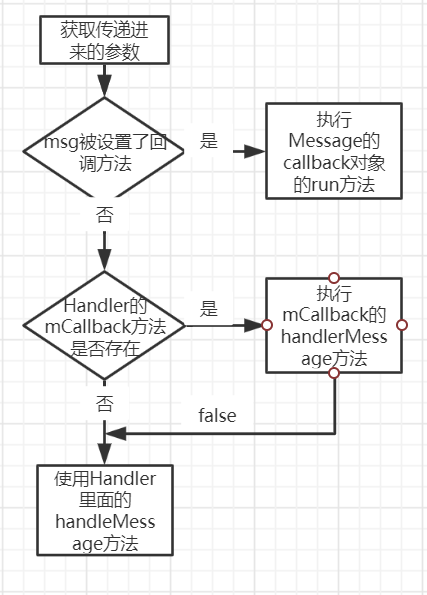
至此,整个消息机制传递以及处理的过程就结束了。
MessageQueue
主要包括两个主要的操作,就是插入和删除。而读取操作的本身就伴随着删除的操作,插入和读入对应的方法分别为enqueueMessage和next,其中enqueueMessage的作用就是网消息队列中插入一条消息,而next的作用是从消息队列中取出一条消息并将其从消息队列中移除。
虽然MessageQueue叫做消息队列,但是其实际就是由单链表的数据结构实现的,因为单链表在插入和删除上比较有优势。
总结
Android中的消息处理机制的四个主要角色:
- 创建消息队列
- 消息循环
- 消息发送
- 消息处理
主要涉及三个类:
- MessageQueue
- Looper
- Handler
Android应用程序每启动一个线程,都会为其创建一个消息队列,然后进入到一个无限循环的状态。然后不断检查队列中是否有新的消息需要处理。如果没有,线程就会进入睡眠状态呢,反之会对消息进行分发处理。
创建消息队列
这个创建过程涉及两个类:MessageQueue和Looper。他们C++层有两个对应的类:NativeMessageQueue和Looper。
创建过程:
- Looper的prepare或者prepareMainLooper静态方法调用,将一个Looper对象保存在ThreadLocal里面
- Looper对象的初始化方法里,首先会创建一个MessageQueue对象
- MessageQueue对象的初始化方法通过JNI初始化C++层的NativeMessageQueue对象
- NativeMessageQueue对象在创建的过程中,会初始化一个C++层的Looper对象
- C++层的Looper对象在创建的过程中,会在内部创建一个管道,并将这个管道的读写fd都会保存在mWakeReadFd和mWakeWritePipeFd中。
然后新建一个epoll实例,并将两个fd注册进去
- 利用epool的机制,可以做到当管道没有消息,线程睡眠在读端的fd上,当其他线程网管道写数据是,本线程便会被唤醒进行消息处理。
消息循环
-
首先通过调用Looper的loop方法可以消息监听。loop方法里会调用MessageQueue的next方法。next方法会堵塞线程指导线程到来为止。
-
next方法通过调用nativePollOnce方法来监听时间。next方法内部逻辑如下:
- 进入死循环,以参数timeout = 0调用nativePollOnce方法
- 如果消息队列中消息,nativePollOnce方法会将消息保存在mMessage成员中。nativePollOnce方法返回后立即检查mMessage成员时候为空
- 如果mMessage不为空,那么检查他指定的运行时间。如果比当前时间要少,则立马返回这个mMessage,否则设置timeout为两者之差进入到下一次循环
- 如果mMessage为空,那么设置timeout为-1,即下次循环nativePollOnce将永久堵塞。
- nativePollOnce方法内部利用epoll机制在之前建立的挂到上等到数据写入,接收到数据之后立马读取并返回结果。
消息发送
消息发送的过程是由Handler对象来驱动
-
Handler对象在创建时会保存当前线程的looper消息MessageQueue,如果传入Callback的话也会保存起来
-
用户调用Handler对象的sendMessage方法,传入msg对象。Handler通过调用MessageQueue的enqueueMessage方法将消息压入MessageQueue
-
enqueueMessage方法会传入的消息对象根据处罚时间插入到MessageQueue中。然后判断是否要唤醒等待中的队列。
- 如果插入到队列中间,则说明消息不需要立即处理,不需要由这个消息唤醒队列
- 如果插在队列头部,则表明要马上处理这个消息。如果当前队列正在阻塞,则需要唤醒他进行处理
-
如果需要唤醒队列,则通过nativewake方法,往前面提到的管道中写入一个“W”字符,令nativePollOnce方法返回
消息处理
Looper对象中的loop方法里面的queue.next方法如果返回了message,那么handler的dispatchMessage会被调用
- 如果创建Handler的时候传入了callback实例,那么callback的handleMessage方法会被调用
- 如果是通过post方法向handler传入runnable对象的,那么runnable对象的run方法会被调用
- 其他情况下,handler方法的handleMessage会被调用。
其他补充
可不可以在子线程进行UI的更新
其实子线程试了一下进行UI更新的,但是由于UI控件不是线程安全的额,如果在多线程中国并发访问可能会导致UI控件处于不可预期的状态
为什么不对UI控件的访问采用锁机制 缺点有两个: ①加锁会让UI访问逻辑变得复杂 ②锁机制会降低UI访问的效率,因为锁机制会阻塞某些线程的执行
鉴于以上的亮点,最简单且高效的方法就是采用单线程模型来处理UI操作,对于开发者而言不是很麻烦只需要使用Handler切换线程即可。