上代码,Scaffold 下面 效果如下
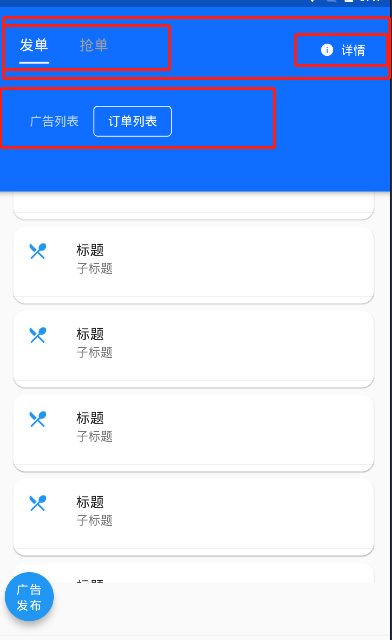
        appBar: AppBar(
            elevation: 0.0,
            toolbarOpacity: 0.0,
            bottom: PreferredSize( // 自定义bottom里面的widget
                preferredSize: Size.fromHeight(ScreenUtil().setHeight(40)),
                child: Container(
                    padding: EdgeInsets.only(
                        left: ScreenUtil().setSp(20),
                         right: ScreenUtil().setSp(20)),
                    child: Row(
                    mainAxisAlignment: MainAxisAlignment.spaceBetween,
                    children: <Widget>[
                        Container(
                            width: ScreenUtil().setWidth(330),
                             child: TabBar(
                            // indicator:BoxDecoration(
                            //   border: Border(bottom:BorderSide(width: 0.5,color: Colors.white))
                            // ),  //可自定义选中的边框 颜色样式
                            controller: _tabController,
                            unselectedLabelColor: Colors.grey[500],
                            indicatorColor: Colors.white,
                            // labelStyle:TextStyle(fontSize: ScreenUtil().setSp(70)),
                            indicatorSize: TabBarIndicatorSize.label,
                            indicatorWeight: 2.0,
                            labelColor: Colors.white,
                            tabs: <Widget>[
                              Container(
                                  // decoration: BoxDecoration(
                                  //   border: Border.all(width: 1)
                                  // ),
                                  padding: EdgeInsets.only(
                                      bottom: ScreenUtil().setSp(20)),
                                  child: Text(
                                    "111",
                                    style: TextStyle(
                                        fontSize: ScreenUtil().setSp(40)),
                                  )),
                              Container(
                                  padding: EdgeInsets.only(
                                      bottom: ScreenUtil().setSp(20)),
                                  child: Text(
                                    "222",
                                    style: TextStyle(
                                        fontSize: ScreenUtil().setSp(40)),
                                  )),
                            ]),
                      ),
                      Expanded(
                          child: Container(
                        alignment: Alignment.centerRight,
                        child: FlatButton.icon(
                            icon: Icon(
                              Icons.info,
                              color: Colors.white,
                              size: ScreenUtil().setSp(40),
                            ),
                            label: Text(
                              "详情",
                              style: TextStyle(color: Colors.white),
                            ),
                            onPressed: () => showModalBottomSheet(
                                context: context,
                                builder: (context) {
                                  return _showNomalWid(context);
                            })),
                      ))
                    ],
                  ),
                ))),