看这个文章之前,如果没有接触过k8s的同学,建议先简单了解一些k8s的基本概念。kubernetes官网,开始之前,先列一下我自己本地搭建环境的一些清单吧,因为不是生产环境,只能用vagrant+vm创建虚拟机器,打造所需的集群环境,详见:
| 名称 | IP | 配置 | 备注 |
|---|---|---|---|
| k8s master节点 | 192.168.1.103 | 系统:centos、内存:2G、 CPU核数:2 | master节点至少需要的最低配置,不然运行会很卡,而且CPU低于2的话是启动不起来的 |
| k8s node节点 | 192.168.1.104 | 系统:centos、内存:512M、 CPU核数:1 | |
| harbor服务 | 192.168.1.108 | 系统:centos、内存:512M、 CPU核数:1 |
用docker创建nginx-php镜像
请参考网上文章:www.cnblogs.com/tu6ge/p/804…
安装harbor镜像仓库
请参考往期教程【harbor的简单应用】或其他网上教程
安装kubeadm集群
请参考往期教程【利用kubeadm搭建kubernetes集群】或其他网上教程
在k8s node节点配置docker私有仓库,也就是我们部署的harbor服务地址。
vim /etc/docker/daemon.json
{
  "insecure-registries":["http://harbor.cn"],
}
systemctl daemon-reload
systemctl resatrt docker
准备好需要configMap.yaml文件,文件配置如下:
- nginx的配置文件nginx-php-nginxconfigmap.yaml(映射在pod容器中的/usr/local/nginx/conf/conf.d),如下
apiVersion: v1
kind: ConfigMap
metadata:
    name: nginx-php-nginxconfig
data:
    www.conf: |
        server {
            listen       80;
            server_name  nginx.test.com;
            root   /usr/share/nginx/html;
            access_log  /usr/local/nginx/logs/host_access.log;
            error_log  /usr/local/nginx/logs/host_error.log debug;
            location / {
            root   /usr/share/nginx/html;
            index  index.html index.htm index.php;
            }
            error_page   500 502 503 504  /50x.html;
            location = /50x.html {
            root   /usr/share/nginx/html;
            }

            location ~ \.php$ {
              fastcgi_pass   0.0.0.0:9000;
              fastcgi_index  index.php;
              fastcgi_param  SCRIPT_FILENAME  $document_root$fastcgi_script_name;
              include        fastcgi_params;
             }
            }
- php-fpm的配置文件nginx-php-php-fpm-wwwconfig-configmap.yaml(映射在pod容器中的/usr/local/php/etc/php-fpm.d),如下:
apiVersion: v1
kind: ConfigMap
metadata:
    name: nginx-php-php-fpm-wwwconfig
data:
    www.conf: |
           [www]
           user = www
           group = www
           listen = 0.0.0.0:9000
           pm = dynamic
           pm.max_children = 30
           pm.start_servers = 2
           pm.min_spare_servers = 1
           pm.max_spare_servers = 20
           ;access.log = log/$pool.access.log
           ;slowlog = log/$pool.log.slow
创建configMap:
kubectl apply -f nginx-php-nginxconfigmap.yaml
kubectl apply -f nginx-php-php-fpm-wwwconfig-configmap.yaml
准备好需要部署的deloyment.yaml文件配置nginx-php-deployment.yaml,如下:
apiVersion: apps/v1
kind: Deployment
metadata:
    name: nginx-php-deployment
spec:
    selector:
        matchLabels:
            app: nginx-php
    replicas: 1
    template:
        metadata:
            labels:
                app: nginx-php
        spec:
            containers:
                - name: nginx-php
                  image: tanjj.harbor.com/nginx-php/nginx-php-v1:v1
                  ports:
                      - containerPort: 80
                      - containerPort: 9000
                  volumeMounts:
                      - name: nginx-php-nginxconfig
                        mountPath: /usr/local/nginx/conf/conf.d
                      - name: web-root
                        mountPath: /usr/share/nginx/html
                      - name: nginx-log
                        mountPath: /usr/local/nginx/logs
                      - name: nginx-php-php-fpm-wwwconfig
                        mountPath: /usr/local/php/etc/php-fpm.d
            volumes:
                - name: nginx-php-nginxconfig
                  configMap:
                      name: nginx-php-nginxconfig
                - name: web-root
                  hostPath:
                      path: /var/data/nginx-php
                - name: nginx-log
                  hostPath:
                      path: /var/log/nginx-php
                - name: nginx-php-php-fpm-wwwconfig
                  configMap:
                      name: nginx-php-php-fpm-wwwconfig
启动deployment
kubectl apply -f nginx-php-deployment.yaml
查看是否启动成功:
kubectl get pods

NAME                                   READY   STATUS    RESTARTS   AGE
nginx-php-deployment-f97dd787d-mdfr5   1/1     Running   0          56m
准备好需要service.yaml文件nginx-php-service.yaml,如下:
apiVersion: v1
kind: Service
metadata:
  labels:
    app: nginx-php
  name: nginx-php
spec:
  ports:
  - name: 80-80
    port: 80
    protocol: TCP
    targetPort: 80
  selector:
    app: nginx-php
  type: NodePort
status:
  loadBalancer: {}
启动nginx-php服务,这次我们是以NodePort类型的服务启动。
kubectl apply -f nginx-php-service.yaml
查看服务是否启动成功:
kubectl get svc

NAME         TYPE        CLUSTER-IP      EXTERNAL-IP   PORT(S)        AGE
kubernetes   ClusterIP   10.96.0.1       <none>        443/TCP        5h28m
nginx-php    NodePort    10.96.101.213   <none>        80:31185/TCP   148m
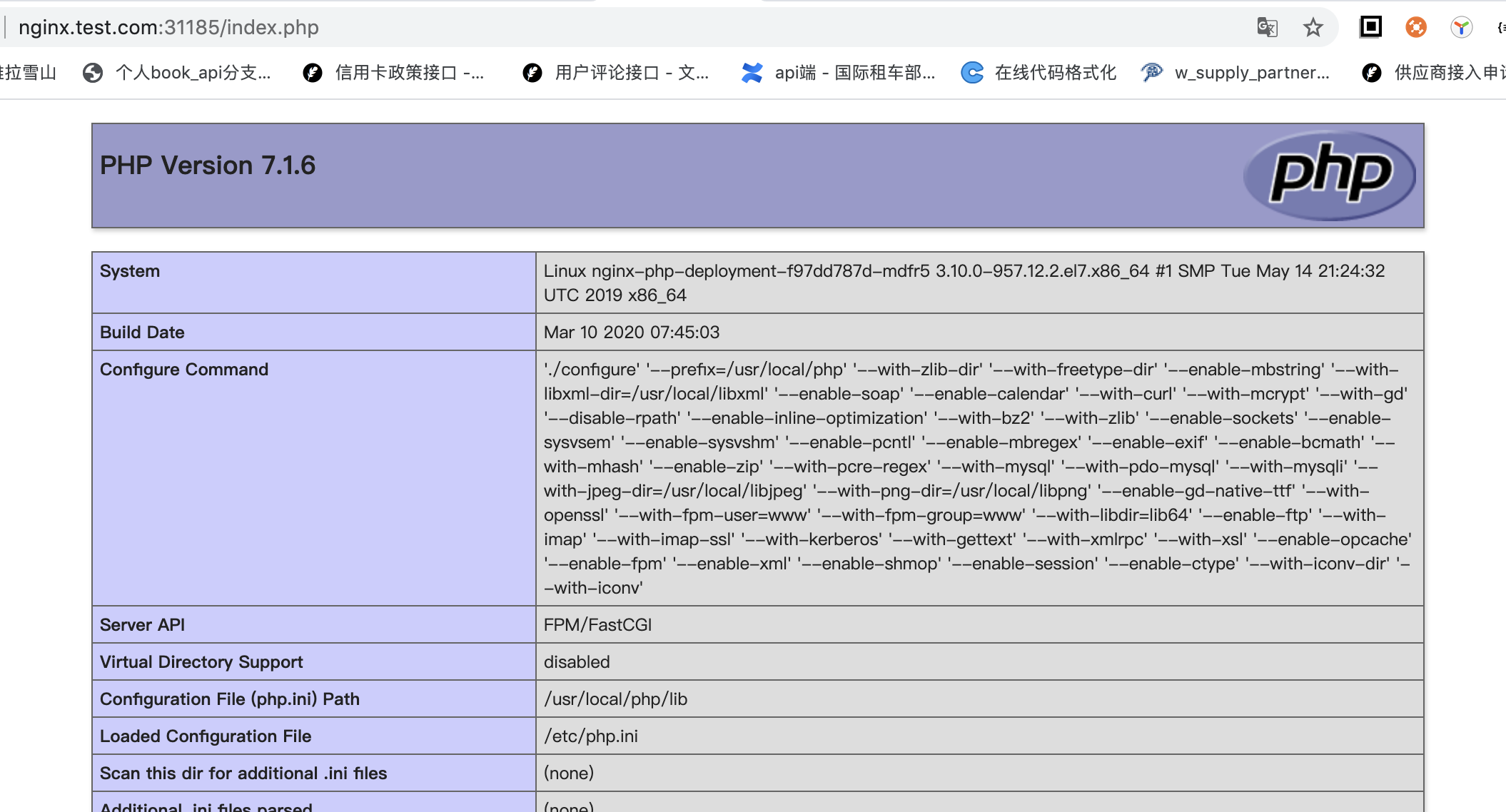
当服务启动成功后,我们可以用k8s node节点IP + 暴露服务的NodePort端口访问,这里的地址是:192.168.1.104:31185。访问结果如图: