文档: Cameras and Media Capture档
整体结构
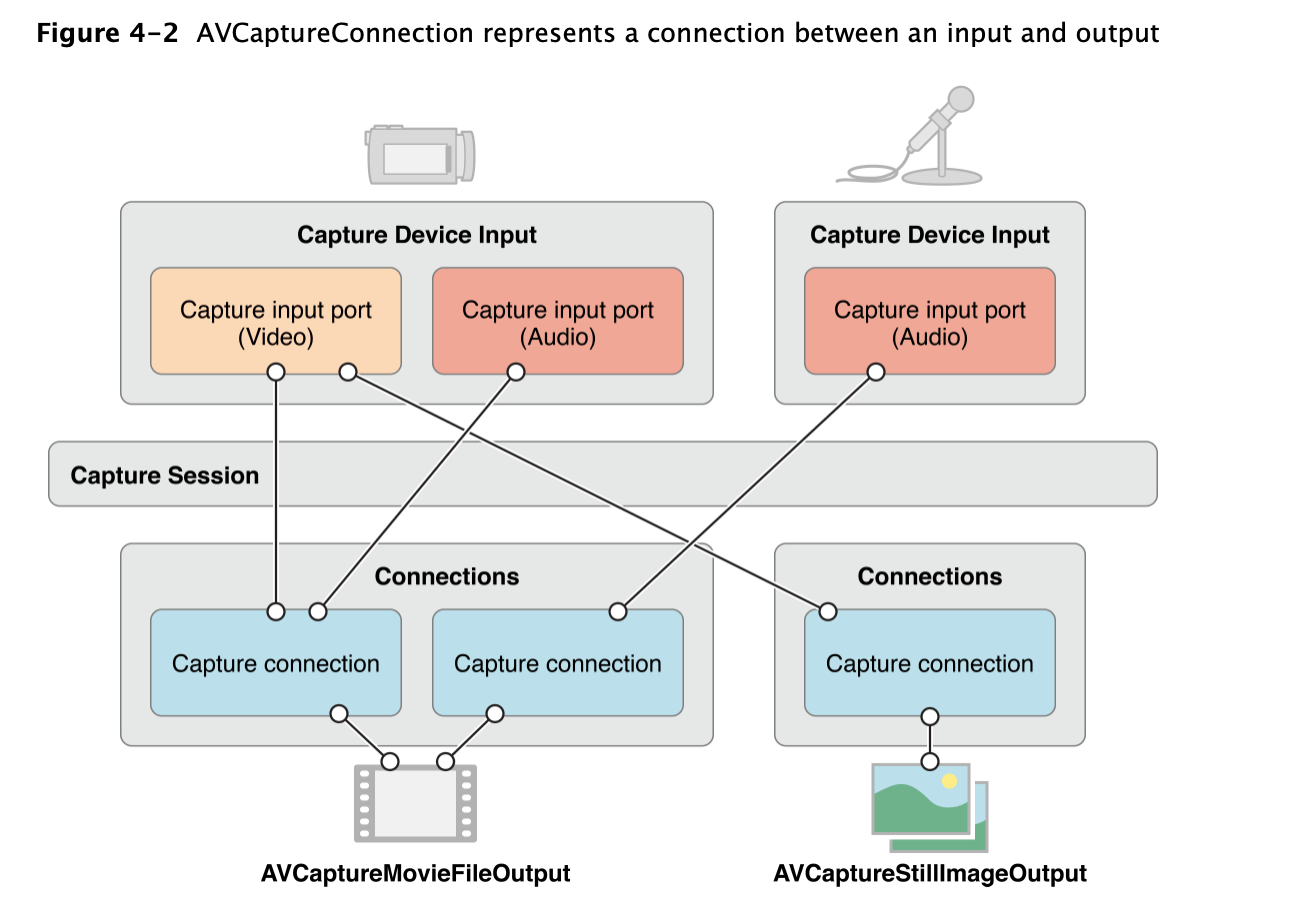
- AV Foundation 捕捉栈核心类是AVCaptureSession。一个捕捉会话相当于一个虚拟的“插线板”。用于连接输入和输出的资源。
捕捉设备
- AVCaptureDevice为摄像头、麦克风等物理设备提供接口。大部分我们使用的设备都是内置于MAC或者iPhone、iPad上的。当然也可能出现外部设备。但是AVCaptureDevice 针对物理设备提供了大量的控制方法。比如控制摄像头聚焦、曝光、白平衡、闪光灯等。
捕捉设备的输入
- 注意:为捕捉设备添加输入,不能添加到AVCaptureSession 中,必须通过将它封装到一个AVCaptureDeviceInputs实例中。这个对象在设备输出数据和捕捉会话间扮演接线板的作用。
捕捉的输出
- AVCaptureOutput 是一个抽象类。用于为捕捉会话得到的数据寻找输出的目的地。框架定义了一些抽象类的高级扩展类。例如 AVCaptureStillImageOutput 和 AVCaptureMovieFileOutput类。使用它们来捕捉静态照片、视频。例如 AVCaptureAudioDataOutput 和 AVCaptureVideoDataOutput ,使用它们来直接访问硬件捕捉到的数字样本。
捕捉连接
- AVCaptureConnection类.捕捉会话先确定由给定捕捉设备输入渲染的媒体类型,并自动建立其到能够接收该媒体类型的捕捉输出端的连接。
捕捉预览
- 如果不能在影像捕捉中看到正在捕捉的场景,那么应用程序用户体验就会很差。幸运的是框架定义了AVCaptureVideoPreviewLayer 类来满足该需求。这样就可以对捕捉的数据进行实时预览。
操作步骤
会话类AVCaptureSession
- 创建会话
- 会话添加输入
- 会话添加输出
- 开启会话
/// 设置session
- (BOOL)setupSession:(NSError **)error {
    //创建session
    self.captureSession = [[AVCaptureSession alloc] init];
    self.captureSession.sessionPreset = AVCaptureSessionPresetHigh;
    //添加输入
    AVCaptureDevice *videoDevice = [AVCaptureDevice defaultDeviceWithMediaType:AVMediaTypeVideo];
    AVCaptureDeviceInput *videoInput = [AVCaptureDeviceInput deviceInputWithDevice:videoDevice error: error];
    if (videoInput){
        //是否可以添加
        if ([self.captureSession canAddInput:videoInput]){
            [self.captureSession addInput:videoInput];
            self.activeVideoInput = videoInput;
        }
    }else{
        return NO;
    }
     AVCaptureDevice *audioDevice = [AVCaptureDevice defaultDeviceWithMediaType:AVMediaTypeAudio];
     AVCaptureDeviceInput *audioInput = [AVCaptureDeviceInput deviceInputWithDevice:audioDevice error:error];
     if (audioInput) {
         if ([self.captureSession canAddInput:audioInput])
         {
             [self.captureSession addInput:audioInput];
         }
     }else
     {
         return NO;
     }
    //添加输出
    //图片输出
    self.imageOutput = [[AVCaptureStillImageOutput alloc] init];
    //输出配置: 图片类型
    self.imageOutput.outputSettings = @{AVVideoCodecKey: AVVideoCodecJPEG};
    if ([self.captureSession canAddOutput:self.imageOutput]){
        [self.captureSession addOutput:self.imageOutput];
    }
    //视频:AVCaptureMovieFileOutput 实例,用于将Quick Time 电影录制到文件系统
    self.movieOutput = [[AVCaptureMovieFileOutput alloc] init];
    if ([self.captureSession canAddOutput:self.movieOutput]){
        [self.captureSession addOutput:self.movieOutput];
    }
    //queue
    self.videoQueue = dispatch_queue_create("pl.VideoQueue", NULL);
    return YES;
}
/// 开启会话
-(void)startSession{
    //检查运行状态
    if (![self.captureSession isRunning]){
        //使用异步方式
        dispatch_async(self.videoQueue, ^{
            [self.captureSession startRunning];
        });
    }
}
拍摄图片
图片输出类AVCaptureStillImageOutput
- 设置输出和输出之间的连接
- 设置连接的方向(与设备方向一致)
- 设置输出执行捕捉方法
- (void)captureStillImage{
    // 链接
    AVCaptureConnection *connection = [self.imageOutput connectionWithMediaType:AVMediaTypeVideo];
    //支持方向
    if (connection.isVideoOrientationSupported){
        connection.videoOrientation = [self currentVideoOrientation];
    }
    //图片的回调处理
    id handle = ^(CMSampleBufferRef sampleBuffer, NSError *error){
        if (sampleBuffer != NULL){
            NSData *imageData = [AVCaptureStillImageOutput jpegStillImageNSDataRepresentation:sampleBuffer];
            UIImage *image = [[UIImage alloc] initWithData:imageData];
            [self writeImageToAssetsLibrary:image];
        }else{
            NSLog(@"NULL sampleBuffer:%@",[error localizedDescription]);
        }
    };
    //捕捉图片
    [self.imageOutput captureStillImageAsynchronouslyFromConnection:connection completionHandler:handle];
}
//获取设备方向值
- (AVCaptureVideoOrientation)currentVideoOrientation {
    AVCaptureVideoOrientation orientation;
    //获取UIDevice 的 orientation
    switch ([UIDevice currentDevice].orientation) {
        case UIDeviceOrientationPortrait:
            orientation = AVCaptureVideoOrientationPortrait;
            break;
        case UIDeviceOrientationLandscapeRight:
            orientation = AVCaptureVideoOrientationLandscapeLeft;
            break;
        case UIDeviceOrientationPortraitUpsideDown:
            orientation = AVCaptureVideoOrientationPortraitUpsideDown;
            break;
        default:
            orientation = AVCaptureVideoOrientationLandscapeRight;
            break;
    }
    return orientation;
    return 0;
}
拍摄视频
输出分类
- movie flie输出类AVCaptureMovieFileOutput
- A capture output that records video and audio to a QuickTime movie file.
- 文件格式.
- 视频帧输出类AVCaptureVideoDataOutput
- A capture output that records video and provides access to video frames for processing.
- 提供视频帧处理,可以编码操作.
AVCaptureMovieFileOutput
输出设置
- 设置输出和输出之间的连接
- 设置连接的属性
- 设置设备的属性
- 设置输出执行捕捉方法
- 拍摄视频结果的代理回调
- (void)startRecording {

    if (![self isRecording]) {
        AVCaptureConnection * videoConnection = [self.movieOutput connectionWithMediaType:AVMediaTypeVideo];
        //方向
        if([videoConnection isVideoOrientationSupported]){
            videoConnection.videoOrientation = [self currentVideoOrientation];
        }
        //判断是否支持视频稳定 可以显著提高视频的质量。只会在录制视频文件涉及
        if([videoConnection isVideoStabilizationSupported]){
            videoConnection.enablesVideoStabilizationWhenAvailable = YES;
        }
        AVCaptureDevice *device = [self activeCamera];
        //摄像头可以进行平滑对焦模式操作。即减慢摄像头镜头对焦速度。当用户移动拍摄时摄像头会尝试快速自动对焦。
        if (device.isSmoothAutoFocusEnabled) {
            NSError *error;
            if ([device lockForConfiguration:&error]) {
                device.smoothAutoFocusEnabled = YES;
                [device unlockForConfiguration];
            }else
            {
                [self.delegate deviceConfigurationFailedWithError:error];
            }
        }
        //查找写入捕捉视频的唯一文件系统URL.
        self.outputURL = [self uniqueURL];
        //在捕捉输出上调用方法 参数1:录制保存路径  参数2:代理
        [self.movieOutput startRecordingToOutputFileURL:self.outputURL recordingDelegate:self];
    }
}
//返回当前激活的摄像头
- (AVCaptureDevice *)activeCamera {
    return self.activeVideoInput.device;
}
代理回调
#pragma mark - AVCaptureFileOutputRecordingDelegate
- (void)captureOutput:(nonnull AVCaptureFileOutput *)output didFinishRecordingToOutputFileAtURL:(nonnull NSURL *)outputFileURL fromConnections:(nonnull NSArray<AVCaptureConnection *> *)connections error:(nullable NSError *)error {
    if (error){
        [self.delegate mediaCaptureFailedWithError:error];
    }else{
        //文件处理(写入相册)
        [self writeVideoToAssetsLibrary:[self.outputURL copy]];
    }
    self.outputURL = nil;
}
AVCaptureVideoDataOutput
设置内容:
- 设置输入
- 设置输出(像素的格式格式及代理)
- 会话添加输入输出,和分辨率.
- 设置预览(后续...)
- (void)setupVideo{
    //所有video设备
    NSArray *videoDevices = [AVCaptureDevice devicesWithMediaType:AVMediaTypeVideo];
    //前置摄像头
    self.frontCamera = [AVCaptureDeviceInput deviceInputWithDevice:videoDevices.lastObject error:nil];
    self.backCamera = [AVCaptureDeviceInput deviceInputWithDevice:videoDevices.firstObject error:nil];
    //设置当前设备为前置
    self.videoInputDevice = self.backCamera;
    //视频输出
    self.videoDataOutput = [[AVCaptureVideoDataOutput alloc] init];
    [self.videoDataOutput setSampleBufferDelegate:self queue:self.captureQueue];
    [self.videoDataOutput setAlwaysDiscardsLateVideoFrames:YES];
    //kCVPixelBufferPixelFormatTypeKey它指定像素的输出格式,这个参数直接影响到生成图像的成功与否
   // kCVPixelFormatType_420YpCbCr8BiPlanarFullRange  YUV420格式.

    [self.videoDataOutput setVideoSettings:@{
                                             (__bridge NSString *)kCVPixelBufferPixelFormatTypeKey:@(kCVPixelFormatType_420YpCbCr8BiPlanarFullRange)
                                             }];
    //配置
    [self.captureSession beginConfiguration];
    if ([self.captureSession canAddInput:self.videoInputDevice]) {
        [self.captureSession addInput:self.videoInputDevice];
    }
    if([self.captureSession canAddOutput:self.videoDataOutput]){
        [self.captureSession addOutput:self.videoDataOutput];
    }
    //分辨率
    [self setVideoPreset];
    [self.captureSession commitConfiguration];
    //commit后下面的代码才会有效
    self.videoConnection = [self.videoDataOutput connectionWithMediaType:AVMediaTypeVideo];
    //设置视频输出方向
    self.videoConnection.videoOrientation = AVCaptureVideoOrientationPortrait;
    //fps
    /*
     FPS是图像领域中的定义,是指画面每秒传输帧数,通俗来讲就是指动画或视频的画面数。
     FPS是测量用于保存、显示动态视频的信息数量。每秒钟帧数愈多,所显示的动作就会越流畅。通常,要避免动作不流畅的最低是30。某些计算机视频格式,每秒只能提供15帧。

     */
    [self updateFps:25];
    //设置预览
    [self setupPreviewLayer];
}
代理回调
-(void)captureOutput:(AVCaptureOutput *)captureOutput didOutputSampleBuffer:(CMSampleBufferRef)sampleBuffer fromConnection:(AVCaptureConnection *)connection{
    //视频帧处理,编码待续...
}
动态识别(二维码,人脸)
输出类 AVCaptureMetadataOutput
- 机器码AVMetadataMachineReadableCodeObject(一/二维码)
- 人脸AVMetadataFaceObject
与捕获图片视频的不同之处:
- 输出设置
- 指定输出的具体数据类型,如人脸,机器码.
- 结果输出代理
设置输出
- (BOOL)setupSessionOutputs:(NSError **)error {

    //获取输出设备
    self.metadataOutput = [[AVCaptureMetadataOutput alloc]init];
    //判断是否能添加输出设备
    if ([self.captureSession canAddOutput:self.metadataOutput]) {
        //添加输出设备
        [self.captureSession addOutput:self.metadataOutput];


        //机器码
        NSArray *types = @[AVMetadataObjectTypeQRCode,AVMetadataObjectTypeAztecCode,AVMetadataObjectTypeDataMatrixCode,AVMetadataObjectTypePDF417Code];
        self.metadataOutput.metadataObjectTypes = types;

        //人脸
        //NSArray *metadatObjectTypes = @[AVMetadataObjectTypeFace];
       // self.metadataOutput.metadataObjectTypes = metadatObjectTypes;

        //设置委托代理
        dispatch_queue_t mainQueue = dispatch_get_main_queue();
        [self.metadataOutput setMetadataObjectsDelegate:self queue:mainQueue];

    }else
    {
        //错误时,存储错误信息
        NSDictionary *userInfo = @{NSLocalizedDescriptionKey:@"Faild to add metadata output."};
        *error = [NSError errorWithDomain:THCameraErrorDomain code:THCameraErrorFailedToAddOutput userInfo:userInfo];
        return NO;
    }
    return YES;
}
代理回掉
- (void)captureOutput:(AVCaptureOutput *)captureOutput
didOutputMetadataObjects:(NSArray *)metadataObjects
       fromConnection:(AVCaptureConnection *)connection {

      //机器码数据
      for (AVMetadataMachineReadableCodeObject *code in metadataObjects) {
          //获得code.stringValue
          NSLog(@"%@", code.stringValue);
      }

    //人脸数据
    //for (AVMetadataFaceObject *face in metadataObjects) {
   //     NSLog(@"Face detected with ID:%li",(long)face.faceID);
   //     NSLog(@"Face bounds:%@",NSStringFromCGRect(face.bounds));
   // }

    //具体处理方法
    [self.codeDetectionDelegate didDetectCodes:metadataObjects];
}