1. composer 安装
安装命令:
composer require tecnickcom/tcpdf
2. 使用
<?php
namespace pdf;
use app\common\logic\Oss;
use Dompdf\Dompdf;
class Pdf {
    /**
     * @param $html 生成pdf 的html 代码
     * @param $file 保存的文件名称
     * @return string
     */
    public function createPdf($html,$file)
    {
        $pdf = new \TCPDF(PDF_PAGE_ORIENTATION, PDF_UNIT, PDF_PAGE_FORMAT, true, 'UTF-8', false);
        $pdf->SetCreator(PDF_CREATOR);
        $pdf->SetAuthor('Nicola Asuni');
        $pdf->SetTitle('TCPDF Example 001');
        $pdf->SetSubject('TCPDF Tutorial');
        $pdf->SetKeywords('TCPDF, PDF, example, test, guide');
        // 设置头部,比如header_logo,header_title,header_string及其属性
        //$pdf->SetHeaderData(PDF_HEADER_LOGO, PDF_HEADER_LOGO_WIDTH, PDF_HEADER_TITLE.' 001', PDF_HEADER_STRING, array(0,64,255), array(0,64,128));
        // 设置尾部        $pdf->setFooterData(array(0,64,0), array(0,64,128));
        // 设置页头字体        $pdf->setHeaderFont(Array(PDF_FONT_NAME_MAIN, '', PDF_FONT_SIZE_MAIN));
        // 设置页尾字体        $pdf->setFooterFont(Array(PDF_FONT_NAME_DATA, '', PDF_FONT_SIZE_DATA));
        // 设置默认等宽字体        $pdf->SetDefaultMonospacedFont(PDF_FONT_MONOSPACED);
        // 设置margins 参考css的margins        $pdf->SetMargins(PDF_MARGIN_LEFT, PDF_MARGIN_TOP, PDF_MARGIN_RIGHT);
        // 设置页头margins        $pdf->SetHeaderMargin(PDF_MARGIN_HEADER);
        // 设置页脚margins        $pdf->SetFooterMargin(PDF_MARGIN_FOOTER);
        // 设置自动分页        $pdf->SetAutoPageBreak(TRUE, PDF_MARGIN_BOTTOM);
        // 设置调整图像自适应比例        $pdf->setImageScale(PDF_IMAGE_SCALE_RATIO);
        // ---------------------------------------------------------
        // 设置默认字体子集模式
        $pdf->setFontSubsetting(true);
        // Set font
        // dejavusans is a UTF-8 Unicode font, if you only need to
        // print standard ASCII chars, you can use core fonts like
        // helvetica or times to reduce file size.
        // 设置字体
        $pdf->SetFont('cid0cs', '', 8);
        // Add a page
        // This method has several options, check the source code documentation for more information.
        // 增加一个页面
        $pdf->AddPage();
        // 设置文字阴影效果
        $pdf->setTextShadow(array('enabled'=>true, 'depth_w'=>0.2, 'depth_h'=>0.2, 'color'=>array(196,196,196), 'opacity'=>1, 'blend_mode'=>'Normal'));
        // 设置 边距        $pdf->SetMargins(15,27,15);//        // 使用writeHTML打印文本
        $pdf->writeHTML($html, true, false, true, false, '');        // reset pointer to the last page
        $pdf->lastPage();        // ---------------------------------------------------------
        // This method has several options, check the source code documentation for more information.
        $file_path = './uploads/pdf/'.$file.'.pdf';
        $pdf->Output($file_path, 'F');
        if (OSS_UPLOAD) {
            //oss上传
            $object = 'uid' . WID . '/applet/' . date("Ymd") . '/' . $file.'.pdf';
            $Oss = new Oss();
            $oss = $Oss->ossUploadFile($object, $file_path, true);
            $url = $oss['info']['url'];
            return $url;
        }
        return  $file_path;
    }
}
注:以上代码如果出现以下报错
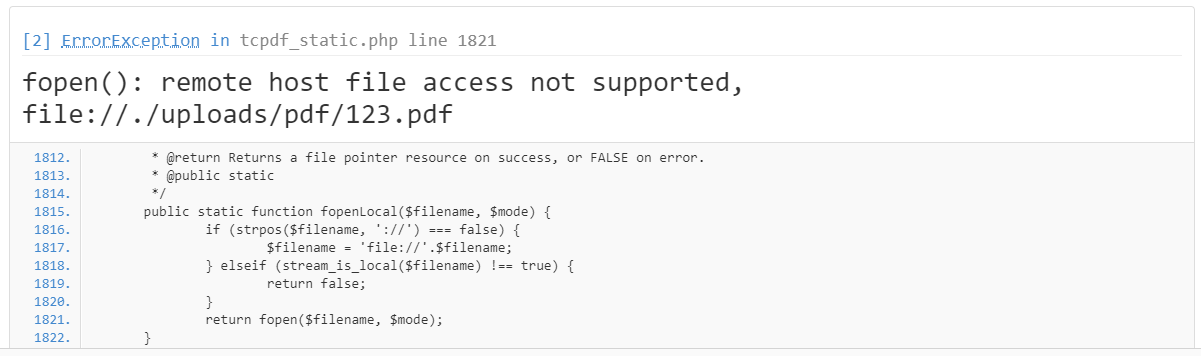
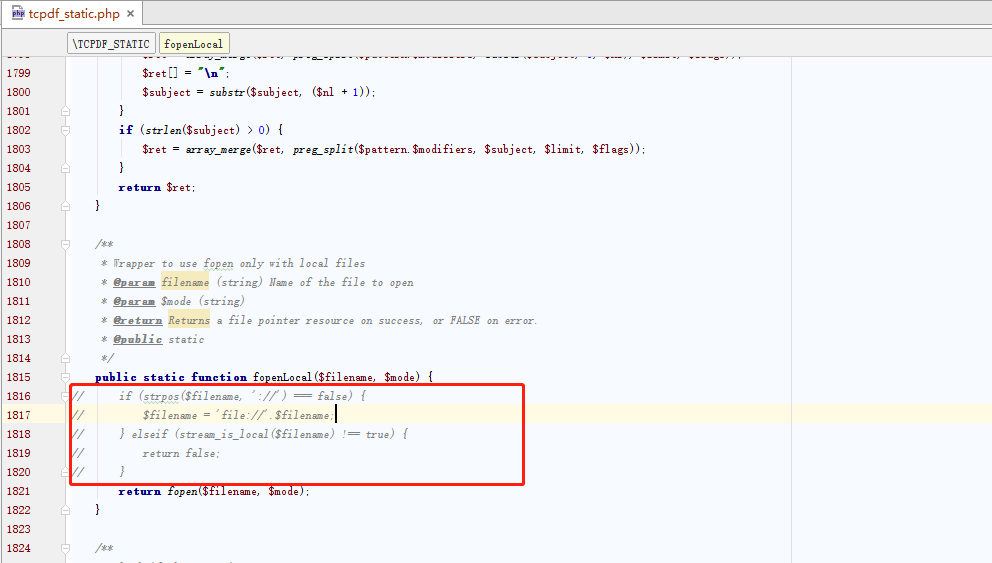
找到下面的文件将标红处屏蔽