

前言
由于容器技术的发展,使用docker能很快地搭建出所需的latex编译环境而不占用主机资源,而且支持多平台。联系上vscode就无敌了,下面主要说一下步骤。
步骤
安装 docker 、vscode
具体的安装方法请看官网。 以mac为例,安装都使用homebrew。
安装 LaTeX Workshop 插件
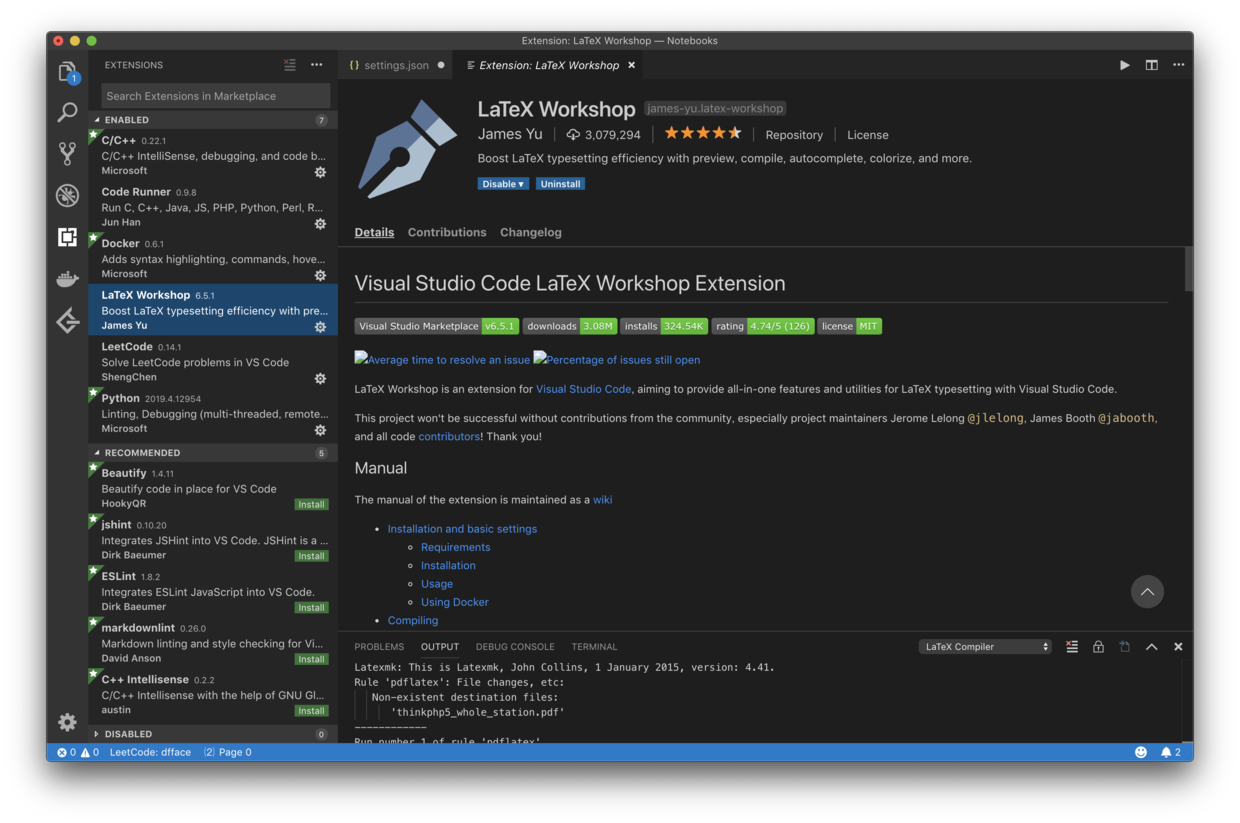
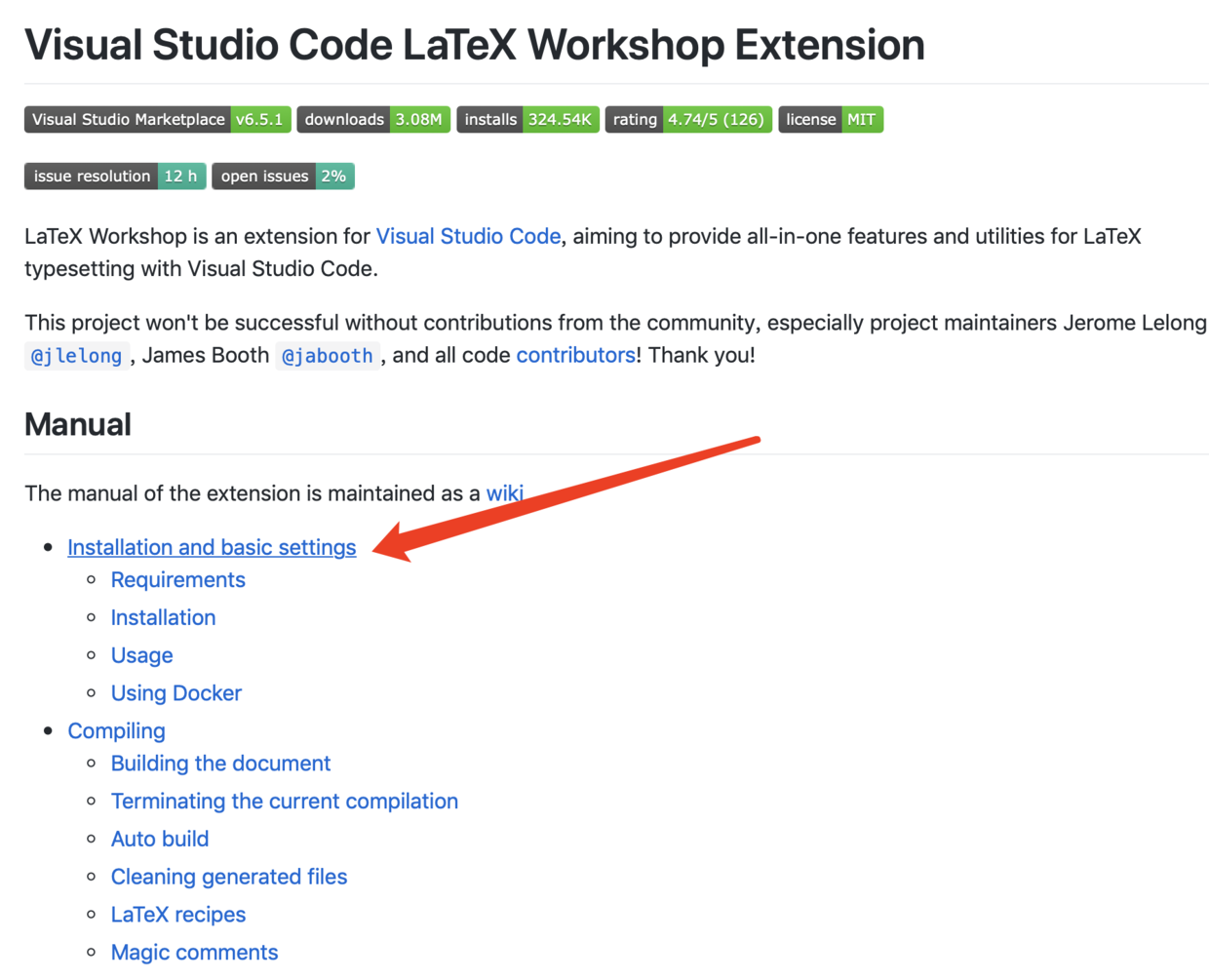
访问GitHub获取插件的更多信息:LaTeX-Workshop
拉取镜像
docker pull tianon/latex
➜  ~ docker pull tianon/latex
Using default tag: latest
latest: Pulling from tianon/latex
27833a3ba0a5: Already exists
0967e3dee126: Pull complete
Digest: sha256:d9d5378ae77df3352aba36f9672a4c2d5c82861475508a1fae46b40369ed6ac9
Status: Downloaded newer image for tianon/latex:latest
官方说明:Using Docker
Starting with release 5.3.0, there is an experimental implementation on Docker support following the idea of @Arxisos. You can set latex-workshop.docker.enabled to true to use tianon/latex. It is advised that the image is 'pre-'pulled.
@Arxisos created snippets for LaTeX binaries in docker, and @lippertmarkus had another short description on how to use Docker with LaTeX Workshop.
所以还是用官方构建的镜像tianon/latex吧,具体在插件中是如何运行的?大致就是根据那个issue说的一样,使用docker run --rm 后面跟一些参数(--rm是Automatically remove the container when it exits,要知道使用docker run是运行一个新容器当执行完毕后容器被自动终止,这个--rm就是确认终止后是不是要自动删除),在GitHub上script文件夹中的源代码是这样写的:docker run -i --rm -w "$(pwd)" -v "$(pwd):$(pwd)" $LATEXWORKSHOP_DOCKER_LATEX latexmk "$@"。
插件设置
- vscode 设置
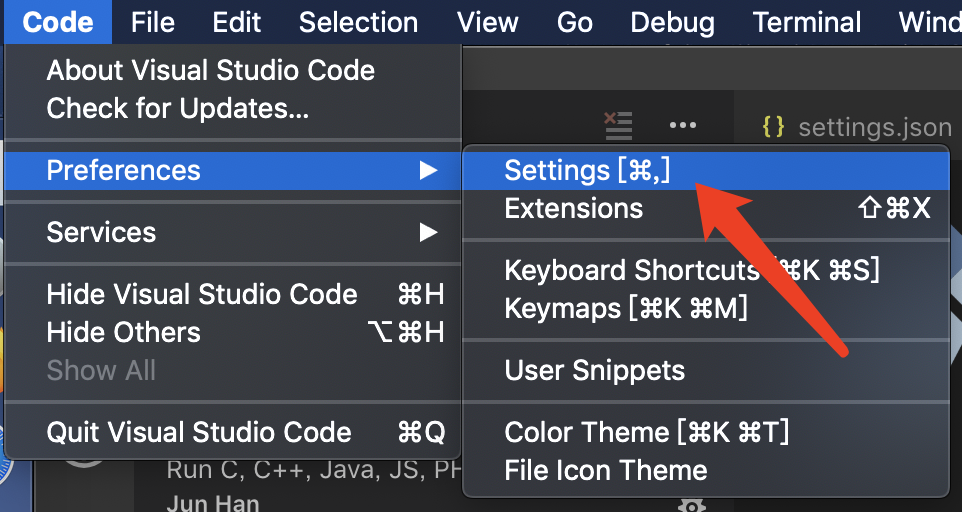
- 开启docker
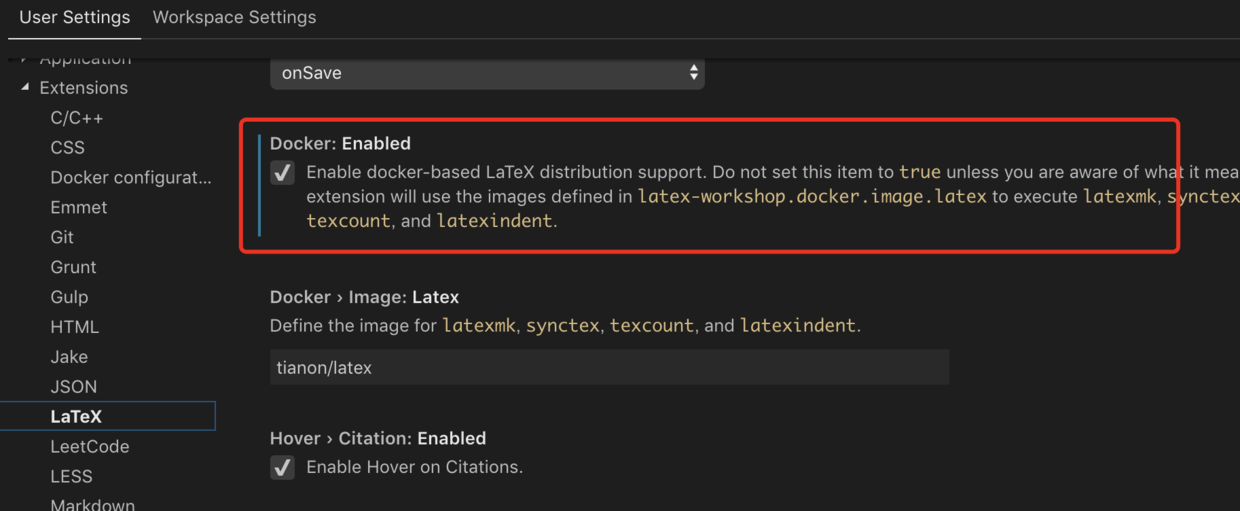
- latex recipe 的个人设置
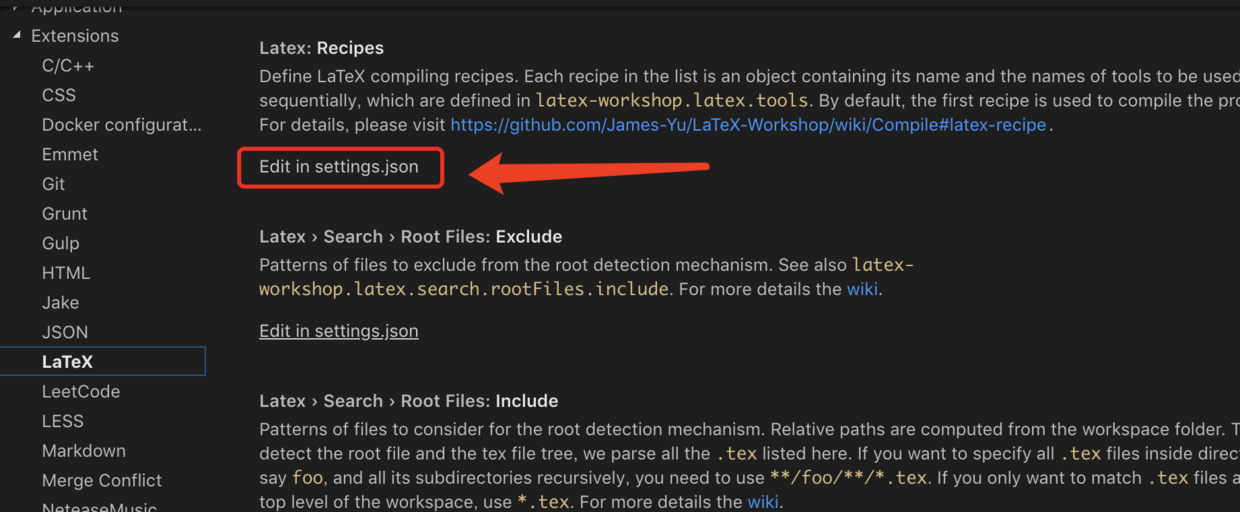
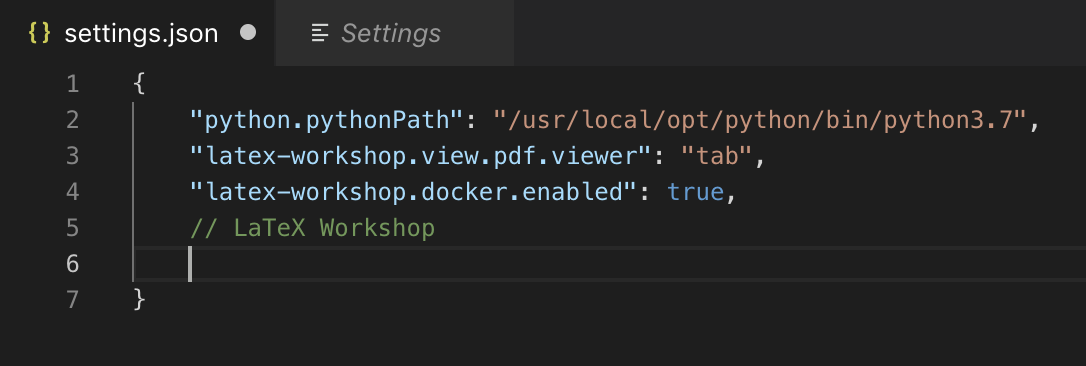
主要是参照说明=》Compile,以及scripts : Resolve#673 customizable docker image进行更改,目前似乎只支持“Define the image for latexmk, synctex, texcount, and latexindent.”这四个,我选用的 是 latexmk 作为第一个也是默认的recipe,改动大致有:
- 把pdflatex换成xelatex以防止ctex宏包出错,使用
"-xelatex"。 - Cleaning generated files,清除掉生成的不需要的文件,使用
"-c"(注意这个要加在其他命令的后面,不推荐!!!在产生目录和交叉引用等时,需要编译两次才能获得正确结果,第二次编译需要第一次编译的中间文件做支持,所以不建议使用这种清除功能),你可能会想用官方所说的“Cleaning generated files”中的vscode编辑器中的一些设置如latex-workshop.latex.autoClean.run,也是不好的。清除的功能由于要用到交叉引用,暂时不考虑吧。
关键部分就在于:
"name": "latexmk",
            "command": "latexmk",
            "args": [
            "-synctex=1",
            "-interaction=nonstopmode",
            "-file-line-error",
            "-xelatex",
            "-outdir=%OUTDIR%",
            "%DOCFILE%"
            ],
            "env": {}
目前我的vscode的整体配置如下:
{
    "python.pythonPath": "/usr/local/opt/python/bin/python3.7",
    // LaTeX Workshop
    "latex-workshop.view.pdf.viewer": "tab",
    "latex-workshop.docker.enabled": true,
    "latex-workshop.intellisense.package.enabled": true,
    "latex-workshop.latex.recipes": [
        {
            "name": "latexmk 🔃",
            "tools": [
            "latexmk"
            ]
        },
        {
            "name": "xelatex ➞ bibtex ➞ xelatex`×2",
            "tools": [
            "xelatex",
            "bibtex",
            "xelatex",
            "xelatex"
            ]
        }
    ],
    "latex-workshop.latex.tools": [
        {
            "name": "latexmk",
            "command": "latexmk",
            "args": [
            "-synctex=1",
            "-interaction=nonstopmode",
            "-file-line-error",
            "-xelatex",
            "-outdir=%OUTDIR%",
            "%DOCFILE%"
            ],
            "env": {}
        },
        {
            "name": "xelatex",
            "command": "xelatex",
            "args": [
            "-synctex=1",
            "-interaction=nonstopmode",
            "-file-line-error",
            "%DOCFILE%"
            ],
            "env": {}
        },
        {
            "name": "bibtex",
            "command": "bibtex",
            "args": [
            "%DOCFILE%"
            ],
            "env": {}
        }
    ]
}
Note that you can't use the
%DOC%variable in the settings as it contains the path on the local machine instead of the one in the container.
Each recipe in the list is an object containing its name and the names of tools to be used sequentially, which are defined in latex-workshop.latex.tools. **By default, the first recipe is used to compile the project. **
Each tool is labeled by its
name. When invoked,commandis spawned with arguments defined inargsand environment variables defined inenv. Typically no spaces should appear in each argument unless in paths. Placeholders%DOC%,%DOCFILE%,%DIR%,%TMPDIR%and%OUTDIR%are available. For details, please visit github.com/James-Yu/La….
测试
- 编写 tex 文件
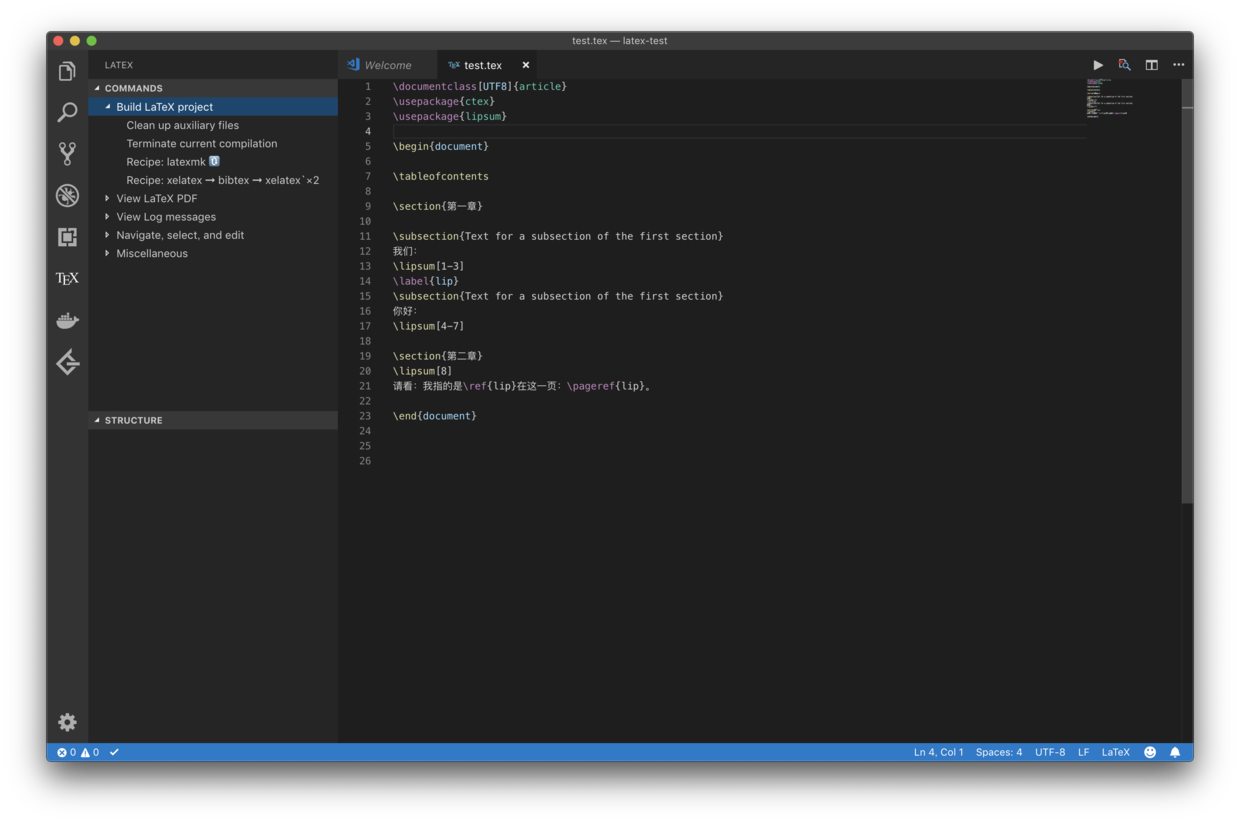
\documentclass[UTF8]{article}
\usepackage{ctex}
\usepackage{lipsum}

\begin{document}

\tableofcontents

\section{第一章}

\subsection{Text for a subsection of the first section}
我们:
\lipsum[1-3]
\label{lip}
\subsection{Text for a subsection of the first section}
你好:
\lipsum[4-7]

\section{第二章}
\lipsum[8]
请看:我指的是\ref{lip}在这一页:\pageref{lip}。

\end{document}
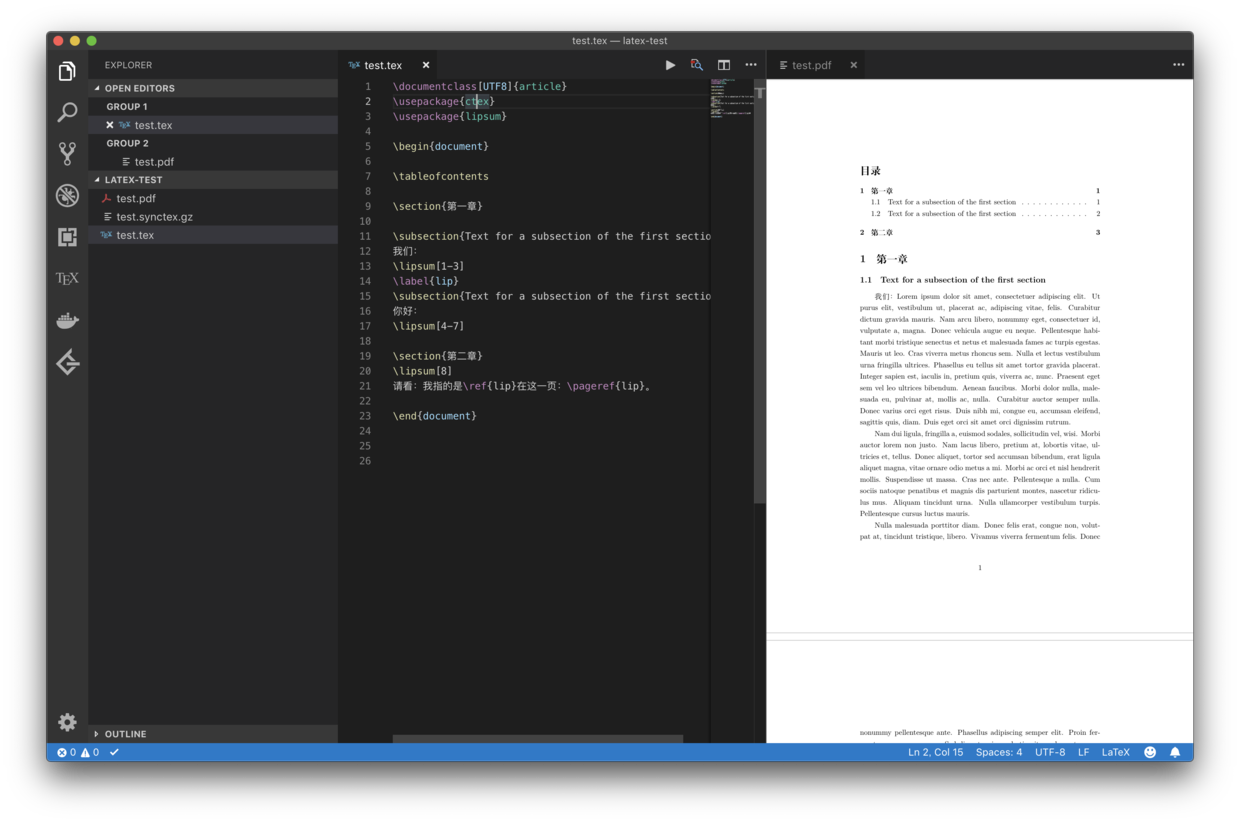
- build 大功告成!
参考
- LaTeX-Workshop
- Compile
- 非常全的VsCode快捷键
- Using docker for building documents
- scripts : Resolve#673 customizable docker image
latexmk --help及 vscode 的settings
结语
我忙活了好多天,从学习docker花了9天,到今天一个上午和半个下午都在研究vscode的配置,看了很多资料,主要是看懂script和Linux中--help一下,想一想原理,然后基本就成了,别在清除残余文件上花时间不值得啊。不得不说vscode上的插件真的是很强大啊。总共花了十多天就为了用docker搭出一个能写latex的环境,真的是耗时太久了!还有好多事情没做,真的是亚历山大!!!
2019.6.4 更新
使用 elegantbook 写作时,缺少 gbt7714.sty ,以及安装的字体的问题(应看官方说明)。
$ sudo apt install ttf-mscorefonts-installer # 安装 需要更换软件源,如tuna的
$ sudo fc-cache # 生效
gbt7714.sty如下:
%%
%% This is file `gbt7714.sty',
%% generated with the docstrip utility.
%%
%% The original source files were:
%%
%% gbt7714.dtx  (with options: `package')
%% -------------------------------------------------------------------
%% GB/T 7714-2015 BibTeX Style
%% https://github.com/CTeX-org/gbt7714-bibtex-style
%% Version: 2019/01/02 v1.1
%% -------------------------------------------------------------------
%% Copyright (C) 2016-2019 by Zeping Lee <zepinglee AT gmail.com>
%% -------------------------------------------------------------------
%% This file may be distributed and/or modified under the
%% conditions of the LaTeX Project Public License, either version 1.3c
%% of this license or (at your option) any later version.
%% The latest version of this license is in
%%    https://www.latex-project.org/lppl.txt
%% and version 1.3c or later is part of all distributions of LaTeX
%% version 2005/12/01 or later.
%% -------------------------------------------------------------------
\NeedsTeXFormat{LaTeX2e}[1999/12/01]
\ProvidesPackage{gbt7714}
  [2019/01/02 v1.1 GB/T 7714-2015 BibTeX Style]

\newif\if@gbt@mmxv
\newif\if@gbt@numerical
\newif\if@gbt@super
\DeclareOption{2015}{\@gbt@mmxvtrue}
\DeclareOption{2005}{\@gbt@mmxvfalse}
\DeclareOption{super}{\@gbt@numericaltrue\@gbt@supertrue}
\DeclareOption{numbers}{\@gbt@numericaltrue\@gbt@superfalse}
\DeclareOption{authoryear}{\@gbt@numericalfalse}
\DeclareOption*{\PassOptionsToPackage{\CurrentOption}{natbib}}
\ExecuteOptions{2015,super}
\ProcessOptions\relax
\if@gbt@numerical
  \PassOptionsToPackage{sort&compress}{natbib}
\fi
\RequirePackage{natbib}
\RequirePackage{etoolbox}
\RequirePackage{url}
\newcommand\bibstyle@super{\bibpunct{[}{]}{,}{s}{,}{\textsuperscript{,}}}
\newcommand\bibstyle@numbers{\bibpunct{[}{]}{,}{n}{,}{,}}
\newcommand\bibstyle@authoryear{\bibpunct{(}{)}{;}{a}{,}{,}}
\newcommand\gbtbibstyle[1]{%
  \ifstrequal{#1}{numerical}{%
    \if@gbt@mmxv
      \bibliographystyle{gbt7714-unsrt}%
    \else
      \bibliographystyle{gbt7714-2005-unsrt}%
    \fi
  }{%
    \ifstrequal{#1}{authoryear}{%
      \if@gbt@mmxv
        \bibliographystyle{gbt7714-plain}%
      \else
        \bibliographystyle{gbt7714-2005-plain}%
      \fi
    }{%
      \PackageError{gbt7714}{Unknown argument #1.}%
      {It should be `numerical' or `authoryear'.}%
    }%
  }%
}
\if@gbt@numerical
  \if@gbt@super
    \citestyle{super}%
    \gbtbibstyle{numerical}%
  \else
    \citestyle{numbers}
    \gbtbibstyle{numerical}%
  \fi
\else
  \citestyle{authoryear}
  \gbtbibstyle{authoryear}%
\fi
\newcommand\gbt@patchfailure[1]{%
  \PackageError{gbt7714}{Failed to patch command \protect#1}{}%
}
\patchcmd{\NAT@citexnum}{%
  \@ifnum{\NAT@ctype=\z@}{%
    \if*#2*\else\NAT@cmt#2\fi
  }{}%
  \NAT@mbox{\NAT@@close}%
}{%
  \NAT@mbox{\NAT@@close}%
  \@ifnum{\NAT@ctype=\z@}{%
    \if*#2*\else\textsuperscript{#2}\fi
  }{}%
}{}{\gbt@patchfailure{\NAT@citexnum}}
\renewcommand\NAT@citesuper[3]{\ifNAT@swa
  \if*#2*\else#2\NAT@spacechar\fi
\unskip\kern\p@\textsuperscript{\NAT@@open#1\NAT@@close\if*#3*\else#3\fi}%
   \else #1\fi\endgroup}
\patchcmd{\NAT@citex}{%
  \if*#2*\else\NAT@cmt#2\fi
  \if\relax\NAT@date\relax\else\NAT@@close\fi
}{%
  \if\relax\NAT@date\relax\else\NAT@@close\fi
  \if*#2*\else\textsuperscript{#2}\fi
}{}{\gbt@patchfailure{\NAT@citex}}
\renewcommand\NAT@cite%
    [3]{\ifNAT@swa\NAT@@open\if*#2*\else#2\NAT@spacechar\fi
        #1\NAT@@close\if*#3*\else\textsuperscript{#3}\fi\else#1\fi\endgroup}
\patchcmd{\NAT@citexnum}{%
  \ifx\NAT@last@yr\relax
    \def@NAT@last@yr{\@citea}%
  \else
    \def@NAT@last@yr{--\NAT@penalty}%
  \fi
}{%
  \def@NAT@last@yr{-\NAT@penalty}%
}{}{\gbt@patchfailure{\NAT@citexnum}}
\renewcommand\@biblabel[1]{[#1]\hfill}
\def\UrlBreaks{%
  \do\/%
  \do\a\do\b\do\c\do\d\do\e\do\f\do\g\do\h\do\i\do\j\do\k\do\l%
     \do\m\do\n\do\o\do\p\do\q\do\r\do\s\do\t\do\u\do\v\do\w\do\x\do\y\do\z%
  \do\A\do\B\do\C\do\D\do\E\do\F\do\G\do\H\do\I\do\J\do\K\do\L%
     \do\M\do\N\do\O\do\P\do\Q\do\R\do\S\do\T\do\U\do\V\do\W\do\X\do\Y\do\Z%
  \do0\do1\do2\do3\do4\do5\do6\do7\do8\do9\do=\do/\do.\do:%
  \do\*\do\-\do\~\do\'\do\"\do\-}
\Urlmuskip=0mu plus 0.1mu
dfface 的版权声明:所有文章除特别声明外,均采用 CC BY-NC-SA 4.0 许可协议。转载请注明出处,严禁商业用途!
