

Scaffold小部件允许我们为我们的应用快速搭建appbar以及底部导航栏,接下来,将会介绍如何使用flutter搭建bottomNavigationBar。
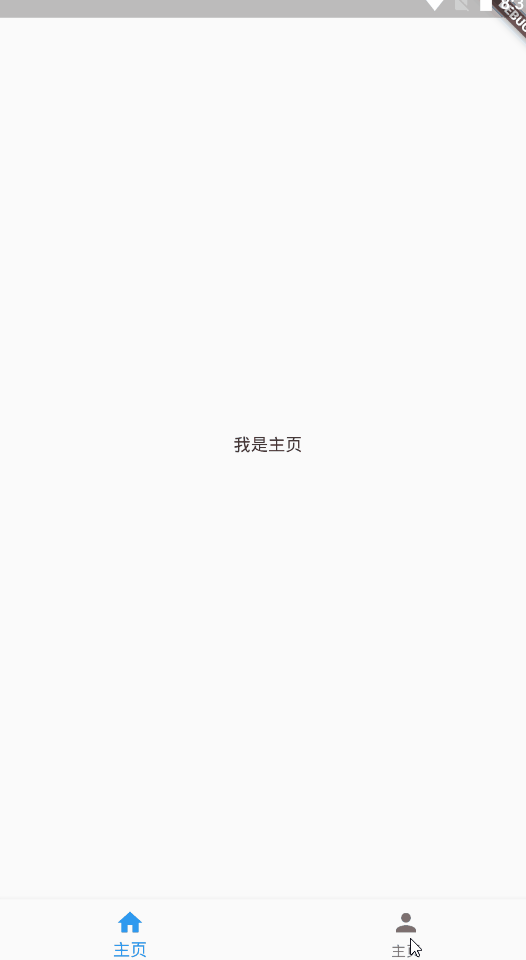
如果喜欢本文,请给小编一个赞动图展示
1 新建主文件
快速输入结构代码import 'package:flutter/material.dart';
void main()=>runApp(MyApp());
class MyApp extends StatefulWidget {
@override
_MyAppState createState() => _MyAppState();
}
class _MyAppState extends State<MyApp> {
@override
Widget build(BuildContext context) {
return Container();
}
}
动态图演示流程
1.引入material材料包
2.输入st,选择有状态类,按下回车键即可。
  import 'package:flutter/material.dart';

class Main extends StatefulWidget {
  @override
  _MainState createState() => _MainState();
}

void main()=>runApp(Main());              //new line

class _MainState extends State<Main> {
  @override
  Widget build(BuildContext context) {
    return Container( );
  }
}
2 MaterialApp
把Container部件改为MaterialApp小部件,这样,我们可以通过给MaterialApp小部件添加home属性,接着给home属性使用Scaffold小部件。 return MaterialAp(
home: Scaffold() //new line
3Scaffold
使用Scaffold脚手架为app添加bottomNavigationBar小部件 ```dart home: Scaffold( bottomNavigationBar: BottomNavigationBar() //new line ), ```4添加items属性
给BottomNavigationBar添加items属性,items对应的是一个数组,数组的每一项对应的就是底部导航栏的每一项。这里,我主要创建了主页以及我的两个页面。 bottomNavigationBar: BottomNavigationBar(
items:[
BottomNavigationBarItem(
icon: Icon(Icons.home),
title: Text("主页")
),
BottomNavigationBarItem(
icon: Icon(Icons.person),
title: Text("我的")
)
],
效果

5增加两个参数
现在我们静态的导航栏制作好了,但是还没有导航功能,所以,接下来,我们需要增加导航功能,我们需要定义两个参数。一个是组件数组,我们进行切换的不仅仅是一个页面,而是两个甚至是多个页面,所以,这里我使用了数组存储相应的页面。
另一个是定义下标,目标是为了更好地进行页面切换。
class _MainState extends State<Main> {
  int _currentIdx=0;    //new line
  List<Widget> _childWidgets=[];   //new line

  @override
6关联
将主体页面与导航按钮关联起来,桥梁就是下标_currentIdx home: Scaffold(
body:_childWidgets[_currentIdx], //new line 初始化当前页面,通过下表控制当前页面显示
bottomNavigationBar: BottomNavigationBar(
currentIndex: _currentIdx, //new line 关联导航栏下标
items:[
BottomNavigationBarItem(
7创建相关页面
主页 index.dartimport 'package:flutter/material.dart';
class Index extends StatelessWidget {
@override
Widget build(BuildContext context) {
return Center(
child: Text("我是主页"),
);
}
}
我的页面 mine.dart
import 'package:flutter/material.dart';

class Mine extends StatelessWidget {
 @override
 Widget build(BuildContext context) {
   return Center(
     child: Text("我是我的页面"),
   );
 }
}
8 完善组件数组
import 'package:tmall/index.dart';
import 'package:tmall/mine.dart';

....

 final List<Widget> _childWidgets=[
   Index(),Mine()    //new line
 ];
9 控制切换
给BottomNavigationBar添加ontap事件属性,定义新的方法
bottomNavigationBar: BottomNavigationBar(
            currentIndex: _currentIdx,
            onTap: onchanged,  //new line
            items:[
              BottomNavigationBarItem(
10 定义事件函数
通过setState方法更新_currentIdx的值,从而修改当前显示页面以及导航栏选项
    );
  }
  void onchanged(int value) {
      setState(() {
         _currentIdx=value;
      });
  }
主页完整代码
import 'package:flutter/material.dart';
import 'package:tmall/index.dart';
import 'package:tmall/mine.dart';
class Main extends StatefulWidget {
  @override
  _MainState createState() => _MainState();
}

void main()=>runApp(Main());

class _MainState extends State<Main> {
  int _currentIdx=0;
 final List<Widget> _childWidgets=[
    Index(),Mine()
  ];

  @override
  Widget build(BuildContext context) {
    return MaterialApp(
      home: Scaffold(
          body:_childWidgets[_currentIdx],
          bottomNavigationBar: BottomNavigationBar(
            currentIndex: _currentIdx,
            onTap: onchanged,
            items:[
              BottomNavigationBarItem(
                icon: Icon(Icons.home),
                title: Text("主页")
              ),
              BottomNavigationBarItem(
                  icon: Icon(Icons.person),
                  title: Text("主页")
              )
            ],
          ),
      ),
    );
  }
  void onchanged(int value) {
      setState(() {
         _currentIdx=value;
      });
  }
}
