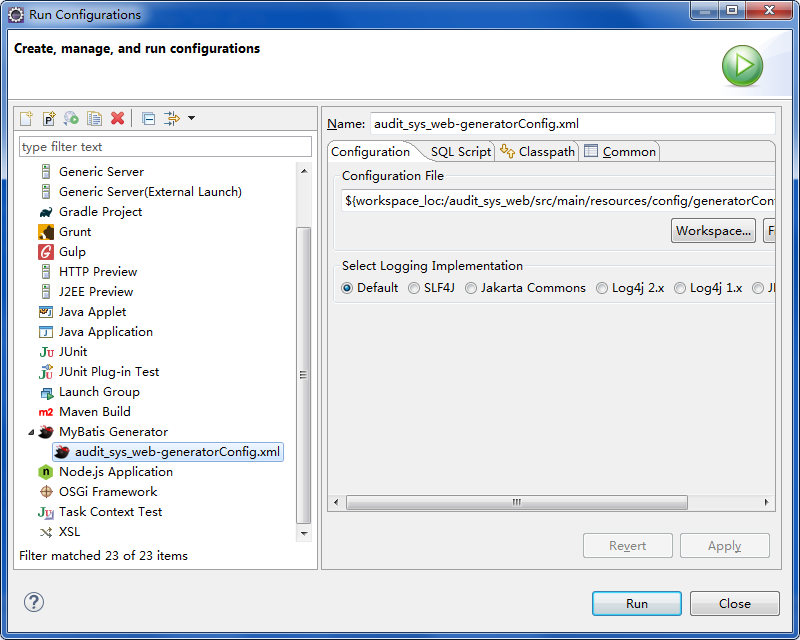
下载并安装Mybatis Generator插件,可在eclipse marketplace下载安装
点击'New--other',即可找到mybatis在eclipse中的插件
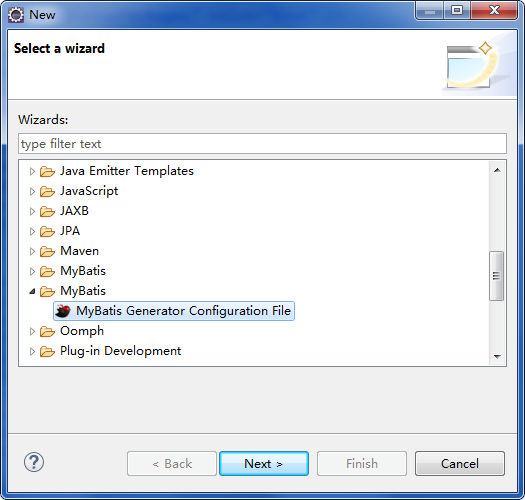
选中Mybatis Generator Configuration File 点击 next 创建配置文件信息
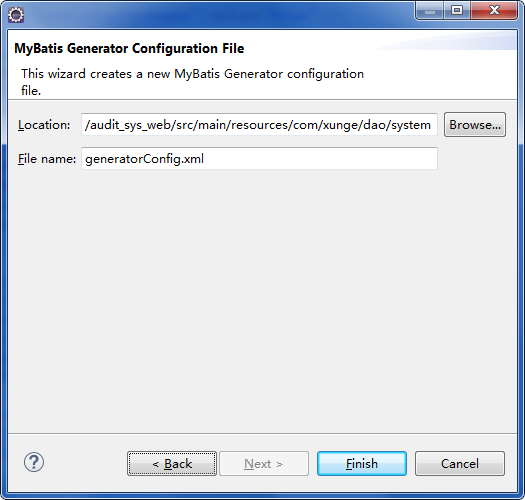
在创建的文件中配置响应信息:generatorConfig.xml
<?xml version="1.0" encoding="UTF-8"?><!DOCTYPE generatorConfiguration PUBLIC "-//mybatis.org//DTD MyBatis Generator Configuration 1.0//EN" "http://mybatis.org/dtd/mybatis-generator-config_1_0.dtd"><generatorConfiguration> <!-- 引入配置文件 --> <!-- <properties resource="db.properties"/> --> <!-- 指定数据连接驱动jar地址 --> <classPathEntry location="D:/software/apache-maven-3.2.2/maven_repo/mysql/mysql-connector-java/5.1.29/mysql-connector-java-5.1.29.jar" /> <!-- 一个数据库一个context --> <context id="context1"> <!-- 注释 --> <commentGenerator> <property name="suppressAllComments" value="false" /><!-- 是否取消注释 --> <property name="supperssDate" value="true" /><!-- 是否生成注释代码时间戳 --> </commentGenerator> <!-- jdbc连接 --> <jdbcConnection connectionURL="jdbc:mysql://172.19.2.220:8066/shdb" driverClass="com.mysql.jdbc.Driver" userId="root" password="app123" /> <!-- 类型转换 --> <javaTypeResolver> <!-- 是否使用bigdecimals,true,可自动转换以下类型(long,integer,short,ets) --> <property name="forceBigDecimals" value="true" /> </javaTypeResolver> <!-- 生成实体类地址 --> <javaModelGenerator targetPackage="com.xunge.mappertest.model" targetProject="audit_sys_web"> <property name="enableSupPackages" value="true" /> <property name="trimStrings" value="true" /> </javaModelGenerator> <!-- 生成map.xml文件 --> <sqlMapGenerator targetPackage="com.xunge.mappertest.mapping" targetProject="audit_sys_web"> <property name="enableSupPackages" value="true" /> </sqlMapGenerator> <javaClientGenerator targetPackage="com.xunge.mappertest.dao" targetProject="audit_sys_web" type="XMLMAPPER"> <property name="enableSupPackages" value="true" /> </javaClientGenerator> <table schema="shdb" tableName="rent_billamount" domainObjectName="RentBillamount" enableCountByExample="true" enableDeleteByExample="true" enableDeleteByPrimaryKey="true" enableInsert="true"> <!-- <columnOverride column="price" property="double" /> --> </table> <!-- 批量生成 <table schema="shdb" tableName="tb_content_category"></table> <table schema="shdb" tableName="tb_item"></table> <table schema="shdb" tableName="tb_item_cat"></table> <table schema="shdb" tableName="tb_item_desc"></table> <table schema="shdb" tableName="tb_item_param"></table> <table schema="shdb" tableName="tb_item_param_item"></table> <table schema="shdb" tableName="tb_order"></table> <table schema="shdb" tableName="tb_order_item"></table> <table schema="shdb" tableName="tb_order_shipping"></table> <table schema="shdb" tableName="tb_user"></table> --> </context></generatorConfiguration>逆向生成代码:右键--Run as --Run configuration