通过 this.$route 访问当前路由(当前路由信息对象)
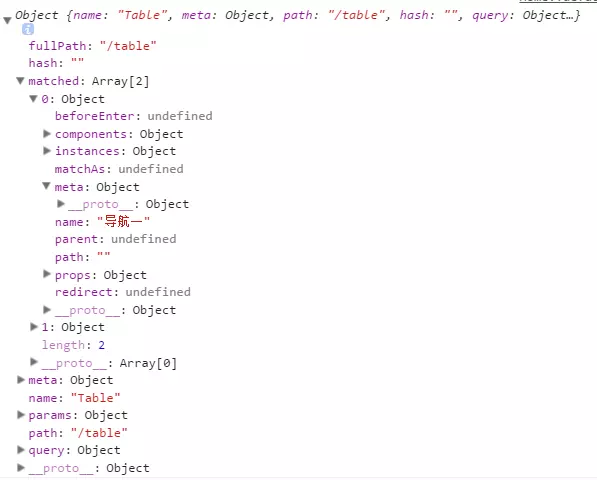
**1.$route.path**
      字符串,对应当前路由的路径,总是解析为绝对路径,如 "/foo/bar"。
**2.$route.params**
      一个 key/value 对象,包含了 动态片段 和 全匹配片段,
      如果没有路由参数,就是一个空对象。
**3.$route.query**
      一个 key/value 对象,表示 URL 查询参数。
      例如,对于路径 /foo?user=1,则有 $route.query.user == 1,
      如果没有查询参数,则是个空对象。
**4.$route.hash**
      当前路由的 hash 值 (不带 #) ,如果没有 hash 值,则为空字符串。锚点
**5.$route.fullPath**
      完成解析后的 URL,包含查询参数和 hash 的完整路径。
**6.$route.matched**
      数组,包含当前匹配的路径中所包含的所有片段所对应的配置参数对象。
**7.$route.name    当前路径名字**
**8.$route.meta  路由元信息
注意,当 对应的路由匹配成功,将自动设置 class 属性值 .router-link-active
一个“路径参数”使用冒号 : 标记。当匹配到一个路由时,参数值会被设置到 this.$route.params
iot/timeExceptionInfo/:devCode/:deptName/:warehouseName/:brand/:category/:model

    beforeRouteEnter(to, from, next) {
        next(vm => {
            vm.deptName = vm.$route.params.deptName;
            vm.warehouseName = vm.$route.params.warehouseName;
            vm.brand = vm.$route.params.brand;
            vm.category = vm.$route.params.category;
            vm.model = vm.$route.params.model;
            vm.currentDevCode = vm.$route.params.devCode;
        });
    },
    beforeRouteUpdate(to, from, next) {
    // 在当前路由改变,但是该组件被复用时调用
    // 举例来说,对于一个带有动态参数的路径 /foo/:id,在 /foo/1 和 /foo/2 之间跳转的时候,
    // 由于会渲染同样的 Foo 组件,因此组件实例会被复用。而这个钩子就会在这个情况下被调用。
    // 可以访问组件实例 `this`
        this.deptName = to.params.deptName;
        this.warehouseName = to.params.warehouseName;
        this.brand = to.params.brand;
        this.category = to.params.category;
        this.model = to.params.model;
        this.currentDevCode = to.params.devCode;
        next();
    },
    beforeRouteLeave (to, from, next) {
    // 导航离开该组件的对应路由时调用,  这个离开守卫通常用来禁止用户在还未保存修改前突然离开
    // 可以访问组件实例 `this`
  }

完整的导航解析流程
导航被触发。
在失活的组件里调用离开守卫。
调用全局的 beforeEach 守卫。
在重用的组件里调用 beforeRouteUpdate 守卫 (2.2+)。
在路由配置里调用 beforeEnter。
解析异步路由组件。
在被激活的组件里调用 beforeRouteEnter。
调用全局的 beforeResolve 守卫 (2.5+)。
导航被确认。
调用全局的 afterEach 钩子。
触发 DOM 更新。
用创建好的实例调用 beforeRouteEnter 守卫中传给 next 的回调函数。
模板中: 出厂编号:{{currentDevCode}}
js中: devCode:this.$route.params.devCode || null,
router-link不会重新加载页面,如果需要加载,放到beforeRouteEnter()中
vue-router 默认 hash 模式 —— 使用 URL 的 hash 来模拟一个完整的 URL,于是当 URL 改变时,页面不会重新加载。
当你使用 history 模式时,URL 就像正常的 url,例如 yoursite.com/user/id,也好看…
当使用一个通配符时,$route.params 内会自动添加一个名为 pathMatch 参数。它包含了 URL 通过通配符被匹配的部分:
// 给出一个路由 { path: '/user-*' }
this.$router.push('/user-admin')
this.$route.params.pathMatch // 'admin'
// 给出一个路由 { path: '*' }
this.$router.push('/non-existing')
this.$route.params.pathMatch // '/non-existing'
匹配的优先级:同一个路径可以匹配多个路由,此时,匹配的优先级就按照路由的定义顺序:谁先定义的,谁的优先级就最高。
嵌套路由:专注一件事