我们在网站开发的过程中,需要提供静态资源,例如:上传的文件,css,js。那么gin是如何做的呢?
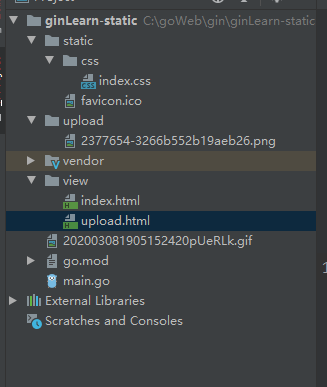
结构讲解
- static下面放静态文件,凡是以“/static”开头的文件都会到这个文件夹下面加载,而且是动态加载的,只要放进来就可以通过HTTP服务访问。例如:/static/css/index.css
- upload是我规划的,用于加载用户上传文件,凡是以“/upload”开头的文件都会到这个文件夹下面加载,而且是动态加载的,只要放进来就可以通过HTTP服务访问。例如:/upload/2377654-3266b552b19aeb26.png(2377654-3266b552b19aeb26.png为上传上来的文件)。
- favicon.ico。谷歌浏览器会默认加载这个文件,作为浏览器上方显示的小图标。
后端代码
package main

import (
	"fmt"
	"github.com/gin-gonic/gin"
	"net/http"
)

func main() {
	router := gin.Default()
	router.LoadHTMLFiles("./view/index.html", "./view/upload.html")
	//加载静态资源,例如网页的css、js
	router.Static("/static", "./static")

	//加载静态资源,一般是上传的资源,例如用户上传的图片
	router.StaticFS("/upload", http.Dir("upload"))

	//加载单个静态文件
	router.StaticFile("/favicon.ico", "./static/favicon.ico")
	router.GET("/", func(context *gin.Context) {
		context.HTML(http.StatusOK, "index.html", nil)
	})
	router.POST("/upload", func(context *gin.Context) {
		file, _ := context.FormFile("file")
		// 上传文件至指定目录
		if err := context.SaveUploadedFile(file, "./upload/"+file.Filename); err != nil {
			fmt.Println(err)
		}
		context.HTML(http.StatusOK, "upload.html", gin.H{"file": "/upload/" + file.Filename})
	})
	router.Run(":8080")
}
文件上传页面
<!DOCTYPE html>
<html lang="en">
<head>
    <meta charset="UTF-8">
    <title>首页</title>
    <link href="/static/css/index.css" rel="stylesheet">
</head>
<body>
<form method="post" action="/upload" enctype="multipart/form-data">
    <input type="file" name="file">
    <input type="submit">
</form>
</body>
</html>
图片展示页面
<!DOCTYPE html>
<html lang="en">
<head>
    <meta charset="UTF-8">
    <title>Title</title>
</head>
<body>
<img src="{{.file}}">
</body>
</html>
上传成功后,图片的访问地址http://127.0.0.1:8080/upload/2377654-3266b552b19aeb26.png

链接:pan.baidu.com/s/10fVlywK7… 提取码:ssol