

这一次我们先来聊聊Surface的跨进程传输,我们知道view的绘制其实是在一块Surface上进行绘制,那么这个Surface的信息是如何进行跨进程传输的呢?
下面,我们围绕以下问题进行分析:
- 怎么理解Surface,它是一块buffer吗?
- 如果不是,那surface和buffer是什么关系?
- surface是怎么实现跨进程传递的?
一、Surface源码分析
public class Surface implements Parcelable {
    private static final String TAG = "Surface";
    // Guarded state.
    final Object mLock = new Object(); // protects the native state
    private String mName;
    long mNativeObject; // package scope only for SurfaceControl access
    private long mLockedObject;
    private int mGenerationId; // incremented each time mNativeObject changes
    private final Canvas mCanvas = new CompatibleCanvas();
    }
我们可以看到,surface是parcelable的,这意味着它是可以跨进程传递的。
既然是parcelable,那么就离不开两个函数:
- writeToParcel
- readFromParcel
下面具体看看这两个函数的实现。
1.1 writeToParcel()
 @Override
    public void writeToParcel(Parcel dest, int flags) {
        if (dest == null) {
            throw new IllegalArgumentException("dest must not be null");
        }
        synchronized (mLock) {
            // NOTE: This must be kept synchronized with the native parceling code
            // in frameworks/native/libs/Surface.cpp
            dest.writeString(mName);
            dest.writeInt(mIsSingleBuffered ? 1 : 0);
            nativeWriteToParcel(mNativeObject, dest);
        }
        if ((flags & Parcelable.PARCELABLE_WRITE_RETURN_VALUE) != 0) {
            release();
        }
    }
这里的代码很简单,就几行:
- 写入name
- 写入是否是singleBuffer
- 写入一个native层的指针
关键在于nativeWriteToParcel这个函数:
---》/frameworks/base/core/jni/android_view_Surface.cpp

static void nativeWriteToParcel(JNIEnv* env, jclass clazz,
   jlong nativeObject, jobject parcelObj) {
   Parcel* parcel = parcelForJavaObject(env, parcelObj);
    if (parcel == NULL) {
       doThrowNPE(env);
      return;
   }
   //通过Java层的指针,还原出Native层的surface对象
   sp<Surface> self(reinterpret_cast<Surface *>(nativeObject));
   parcel->writeStrongBinder( self != 0 ? IInterface::asBinder(self->getIGraphicBufferProducer()) : NULL);
}
看源码网址:xref
在这里我们也可以看到,其实surface对象是一对的,应用层有一个surface,native层也有一个。如果看过Handler机制源码应该知道,MesageQueue和Looper也是一样的,java层有一个,native层还有一个。不过这里就不过多展开了,我们继续往下看。
1.2 self->getIGraphicBufferProducer()
----> /frameworks/av/media/libstagefright/filters/GraphicBufferListener.h


sp<IGraphicBufferProducer> getIGraphicBufferProducer() const {
        return mProducer;
}
我们这里看到得到了个IGraphicBufferProducer对象,这个对象是什么呢?
我们先在这里打住,先去看看readFromParcel这个方法,结合这个方法我们来看IGraphicBufferProducer这个类的作用、
1.3 readFromParcel()
   public void readFromParcel(Parcel source) {
        if (source == null) {
            throw new IllegalArgumentException("source must not be null");
        }

        synchronized (mLock) {
           mName = source.readString();
            mIsSingleBuffered = source.readInt() != 0;
            setNativeObjectLocked(nativeReadFromParcel(mNativeObject, source));
        }
它做的事情也很简单:
- 读取到Name
- 读取是否是singleBuffer,并设置给mIsSingleBuffered
- 读取native层的一个指针,并赋值给mNativeObject这个变量
1.4 nativeReadFromParcel()
static jlong nativeReadFromParcel(JNIEnv* env, jclass clazz,
    jlong nativeObject, jobject parcelObj) {
     ....
     Parcel* parcel = parcelForJavaObject(env, parcelObj);
      sp<Surface> self(reinterpret_cast<Surface *>(nativeObject));
    sp<Surface> sur;
    if (surfaceShim.graphicBufferProducer != nullptr) {
        // we have a new IGraphicBufferProducer, create a new Surface for it
        sur = new Surface(surfaceShim.graphicBufferProducer, true);
    ...
    }
这一段的逻辑就是:
- 根据java层的parcel对象,拿到native层的parcel对象
- 根据指针拿到native层的surface对象
- 从parcel中读出一个Binder对象,这个Binder对象就是一个
IGraphicBufferProducer对象 - 之后,根据这个
IGraphicBufferProducer又重新构造了一个Surface对象 - 最后,返回这个新创建的surface对象
到这里,不知道有没有看晕,我们来简单总结一下:
- 对于java层的surface来说,它的核心在于Native层的surface对象
- 对于Native层的surface对象来说,它的核心又在于
IGraphicBufferProducer
由于这一次不打算把Surface的绘制也讲了,所以关于IGraphicBufferProducer这个Binder对象的分析就留到下次(如果我记得填坑的话~~~)
二、Activity的Surface怎么传输?
我们知道,应用想进行绘制,是需要向SurfaceFlinger去申请一块内存的,大致流程如下:
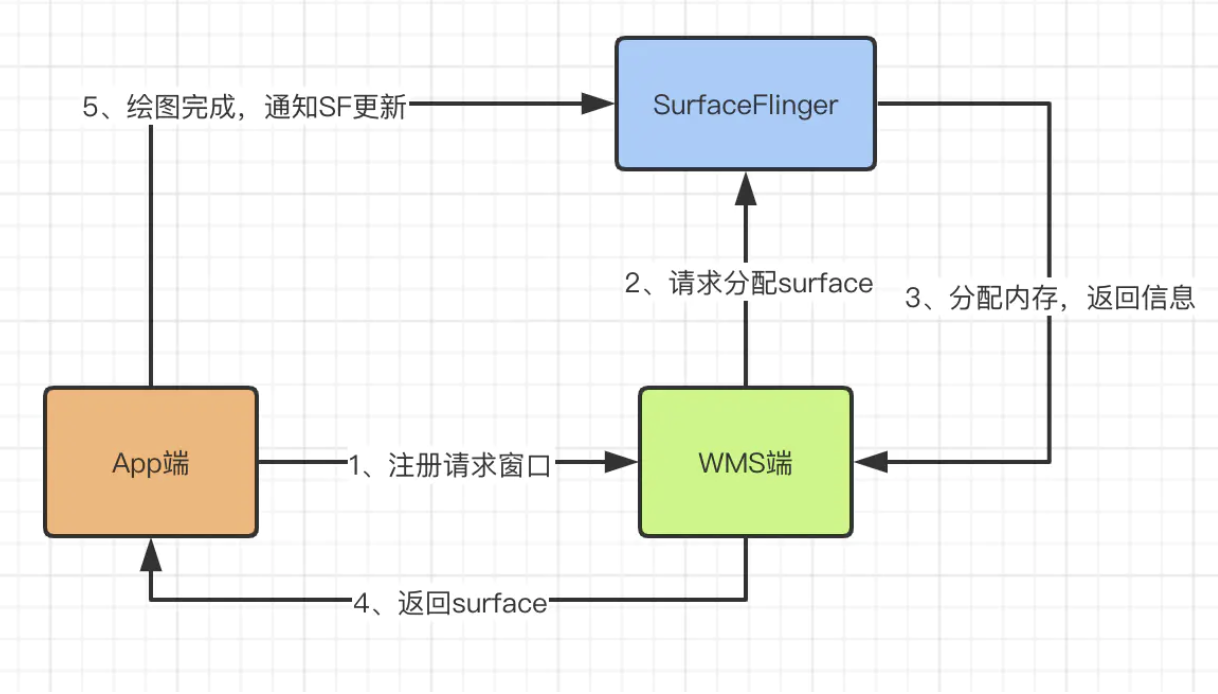
这个申请的流程会涉及到surface的传递,那么surface是怎么传递到应用端的呢?
我们现在就撸起袖子研究一下。
2.1 performTraversals()
 -----> 类:ViewRootImpl
//1
    private void performTraversals() {
        // cache mView since it is used so much below...
        final View host = mView;
    ....
   relayoutResult = relayoutWindow(params, viewVisibility, insetsPending);
   ...

    }

    //2
        private int relayoutWindow(WindowManager.LayoutParams params, int viewVisibility,
            boolean insetsPending) throws RemoteException {
            //注意看最后一个参数mSurface
            int relayoutResult = mWindowSession.relayout(mWindow, mSeq, params,
                (int) (mView.getMeasuredWidth() * appScale + 0.5f),
                (int) (mView.getMeasuredHeight() * appScale + 0.5f), viewVisibility,
                insetsPending ? WindowManagerGlobal.RELAYOUT_INSETS_PENDING : 0, frameNumber,
                mWinFrame, mPendingOverscanInsets, mPendingContentInsets, mPendingVisibleInsets,
                mPendingStableInsets, mPendingOutsets, mPendingBackDropFrame, mPendingDisplayCutout,
                mPendingMergedConfiguration, mSurface);

            }
这里,一个新的对象出现了————WindowSession,它是干嘛的呢?
2.2 IWindowSession
/frameworks/base/core/java/android/view/IWindowSession.aidl

interface IWindowSession {
    int add(IWindow window, int seq, in WindowManager.LayoutParams attrs,
            in int viewVisibility, out Rect outContentInsets, out Rect outStableInsets,
            out InputChannel outInputChannel);
    int addToDisplay(IWindow window, int seq, in WindowManager.LayoutParams attrs,
            in int viewVisibility, in int layerStackId, out Rect outContentInsets,
            out Rect outStableInsets, out Rect outOutsets, out InputChannel outInputChannel);
    int addWithoutInputChannel(IWindow window, int seq, in WindowManager.LayoutParams attrs,
            in int viewVisibility, out Rect outContentInsets, out Rect outStableInsets);
    int addToDisplayWithoutInputChannel(IWindow window, int seq, in WindowManager.LayoutParams attrs,
            in int viewVisibility, in int layerStackId, out Rect outContentInsets,
            out Rect outStableInsets);
    void remove(IWindow window);
}
WindowSessioin原来是个AIDL文件,它是跟WMS进行通信的对象,相当于打开了一条通信通道。
我们接下来看一下IWindowSession是如何初始化的:
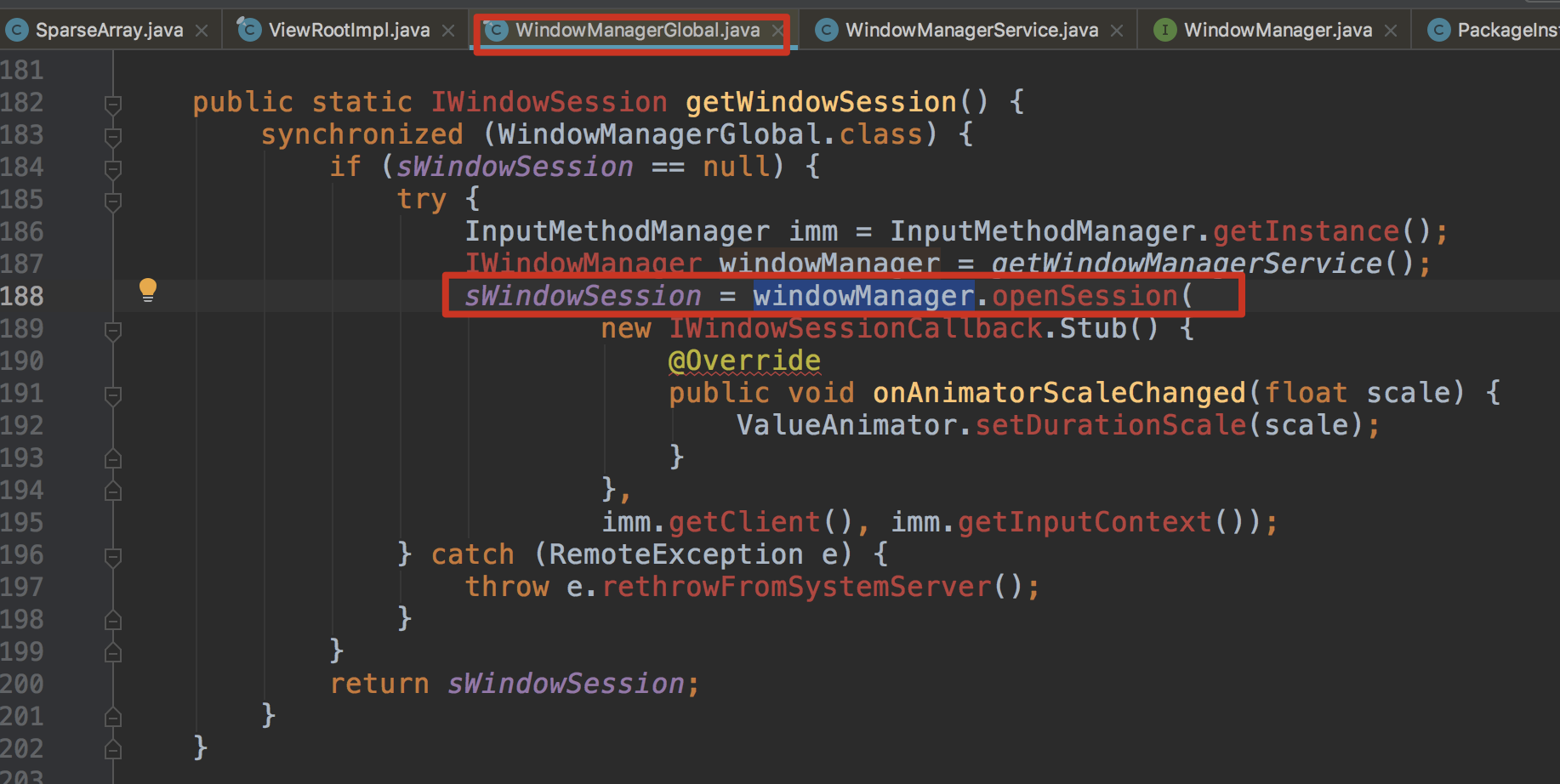
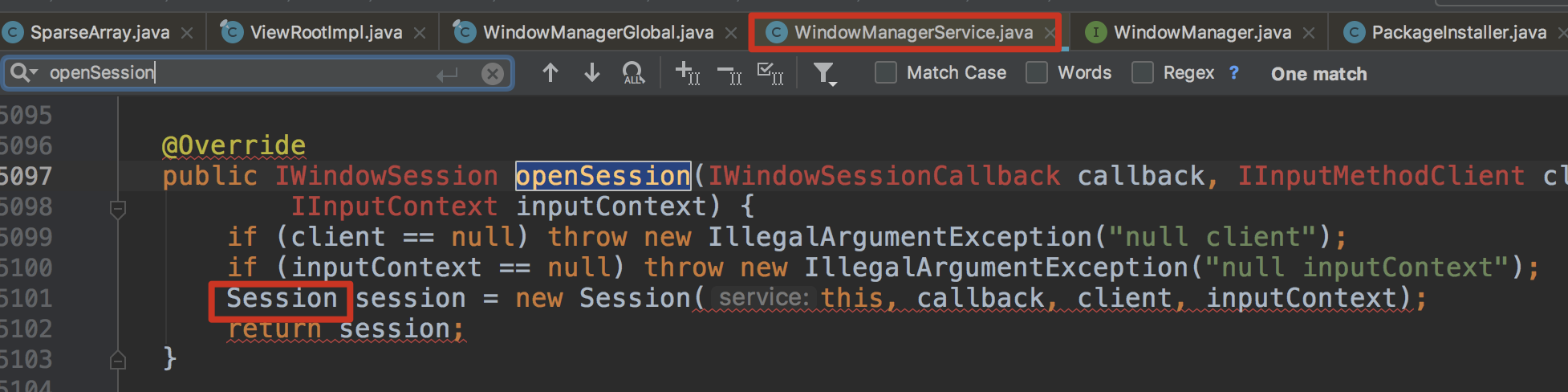
可以看到它的实现类是Session,那接下来就可以继续跟踪了。
2.3 relayout(..)
class Session extends IWindowSession.Stub implements IBinder.DeathRecipient {
     @Override
    public int relayout(IWindow window, int seq, WindowManager.LayoutParams attrs,
            int requestedWidth, int requestedHeight, int viewFlags, int flags, long frameNumber,
            Rect outFrame, Rect outOverscanInsets, Rect outContentInsets, Rect outVisibleInsets,
            Rect outStableInsets, Rect outsets, Rect outBackdropFrame,
            DisplayCutout.ParcelableWrapper cutout, MergedConfiguration mergedConfiguration,
            Surface outSurface) {
            ....
                int res = mService.relayoutWindow(this, window, seq, attrs,
                requestedWidth, requestedHeight, viewFlags, flags, frameNumber,
                outFrame, outOverscanInsets, outContentInsets, outVisibleInsets,
                outStableInsets, outsets, outBackdropFrame, cutout,
                mergedConfiguration, outSurface);
                ...
            }
}
可以看到,它最终是调用到了WMS的relayoutWindow方法,大家重点关注一下最后传递的参数:outSurface。
这个outSurface此时其实是空的,这里只是传递了一个壳过去给WMS。
接下来,我们就要去看看传递给空壳给WMS,那WMS是怎么处理这个空壳的?怎么给它填充数据的?
2.4 service.relayoutWindow(..)
----> 类:WindowManagerService.java

 public int relayoutWindow(Session session, IWindow client, int seq, LayoutParams attrs,
            int requestedWidth, int requestedHeight, int viewVisibility, int flags,
            long frameNumber, Rect outFrame, Rect outOverscanInsets, Rect outContentInsets,
            Rect outVisibleInsets, Rect outStableInsets, Rect outOutsets, Rect outBackdropFrame,
            DisplayCutout.ParcelableWrapper outCutout, MergedConfiguration mergedConfiguration,
            Surface outSurface) {
            ...
                result = createSurfaceControl(outSurface, result, win, winAnimator);
                if (surfaceController != null) {
            surfaceController.getSurface(outSurface);
            if (SHOW_TRANSACTIONS) Slog.i(TAG_WM, "  OUT SURFACE " + outSurface + ": copied");
        }
                ...
            }


-----》 WindowSurfaceController.java
    void getSurface(Surface outSurface) {
        outSurface.copyFrom(mSurfaceControl);
    }
上面这一段代码的逻辑是:
- 创建一个
SurfaceControl - 从
SurfaceControl中拷贝数据到之前的空壳的Surface中
那它是如何实现这个复制的过程的呢?
我们继续看copyFrom()函数:
2.5 surface.copyFrom()
---->Surface.java

 public void copyFrom(SurfaceControl other) {
        ...
        long surfaceControlPtr = other.mNativeObject;
        ...
        long newNativeObject = nativeGetFromSurfaceControl(surfaceControlPtr);
       ...
         setNativeObjectLocked(newNativeObject);
        }
    }
分析这几行代码实现的功能:
- 从
SurfaceControl对象中获取到一个native对象的指针 - 通过这个native层对象创建一个native层的
surface对象 - 然后把这个native层
surface对象跟java层的surface对象绑定在一起
这里放上native层代码,大家就会更清楚了:
-----> /frameworks/base/core/jni/android_view_Surface.cpp

static jlong nativeGetFromSurfaceControl(JNIEnv* env, jclass clazz,
        jlong surfaceControlNativeObj) {
    /*
     * This is used by the WindowManagerService just after constructing
     * a Surface and is necessary for returning the Surface reference to
     * the caller. At this point, we should only have a SurfaceControl.
     大家看这个注释,很清楚地讲解了这个方法是被WMS调用,用于返回native层Surface的指针给到Java层
     */

    sp<SurfaceControl> ctrl(reinterpret_cast<SurfaceControl *>(surfaceControlNativeObj));
    sp<Surface> surface(ctrl->getSurface());
    if (surface != NULL) {
        surface->incStrong(&sRefBaseOwner);
    }
    return reinterpret_cast<jlong>(surface.get());
}
-----> /frameworks/native/libs/gui/SurfaceControl.cpp
sp<Surface> SurfaceControl::getSurface() const
{
    Mutex::Autolock _l(mLock);
    if (mSurfaceData == 0) {
        return generateSurfaceLocked();
    }
    return mSurfaceData;
}


sp<Surface> SurfaceControl::generateSurfaceLocked() const
{
    // This surface is always consumed by SurfaceFlinger, so the
    // producerControlledByApp value doesn't matter; using false.
    //使用GraphicBufferProducer创建了一个Surface
    mSurfaceData = new Surface(mGraphicBufferProducer, false);

    return mSurfaceData;
}
好了,到这一步,Surface跨进程通信的整个流程就结束了。
我们最后总结回顾一下。
三、总结
- 应用通过
ViewRootImpl创建一个空的Surface - 通过
IWindowSession将这个空的Surface传递给WMS WMS通过SurfaceControl创建一个native层Surface,并通过指针将Surface跟Java层的Surface进行绑定,从而完成Surface的跨进程传输
四、问题解答
surface它只是一个壳子,而不是buffer对象,surface里面包含了一个能生产buffer的binder对象,也就是GraphicBufferProducersurface跨进程传递,本质是GraphicBufferProducer的传递surface跨进程传输流程如上总结
