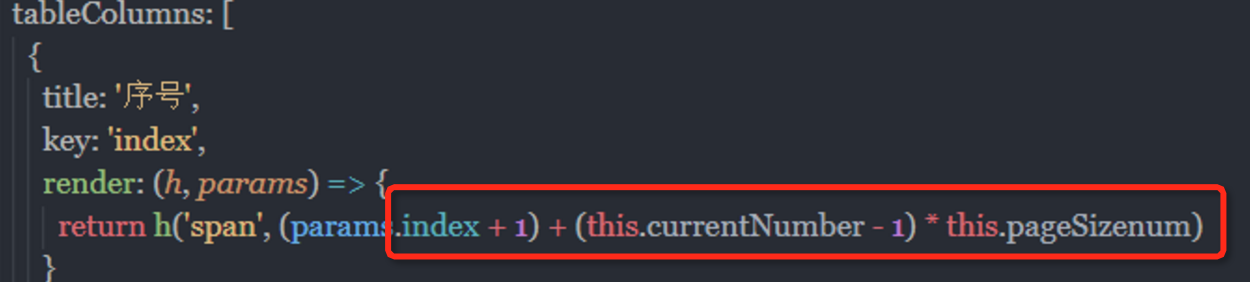
时间替换格式repelace
replace(/-/g, "/"); replace(/\//g, "-")触发页面resize
var myEvent = new Event('resize');window.dispatchEvent(myEvent);小数相加
let nums = (a) => {

  if (a != null && a.toString() != "") {

    let r = /^-?(0|[1-9]+\d*|[1-9]+\d*\.\d+|0\.\d+)$/;

    if (r.test(a.toString())) {

      return true;

    }

  }

  return false;

}


let plus = (a, b) => {

  if (!nums(a) || !nums(b)) {

    return null;

  }

  let c, d, m;

  try {

    c = a.toString().split(".")[1].length;

  } catch (e) {

    c = 0;

  }

  try {

    d = b.toString().split(".")[1].length;

  } catch (e) {

    d = 0;

  }

  m = Math.pow(10, Math.max(c, d));

  return (a * m + b * m) / m;

}
小数相减
//减法let minus = (a, b) => {if(!num(a) || !num(b)) {return null;}let c, d, m, n;try {c = a.toString().split(".")[1].length;} catch(e) {c = 0;}try {d = b.toString().split(".")[1].length;} catch(e) {d = 0;}m = Math.pow(10, Math.max(c, d));return(a * m - b * m) / m;// n = (c >= d) ? c : d;// return((a * m - b * m) / m).toFixed(n);//数字转换字符串,保留n位小数}小数相乘
let multiply = (a, b) => {let m = 0,c = a.toString(),d = b.toString();try {m += c.split(".")[1].length} catch(e) {}try {m += d.split(".")[1].length} catch(e) {}return Number(c.replace(".", "")) * Number(d.replace(".", "")) / Math.pow(10, m)}相除
let division = (a, b) => {if(!num(a) || !num(b)) {return null;}let c, d, f, g;try {c = a.toString().split(".")[1].length;} catch(e) {c = 0;}try {d = b.toString().split(".")[1].length;} catch(e) {d = 0;}with(Math) {f = Number(a.toString().replace(".", ""));g = Number(b.toString().replace(".", ""));return(f / g) * pow(10, d - c);}}转码解码
const encode_url = encodeURIComponent(redirect_uri)// 解码// decodeURIComponent(encode_url)根据字母排序
const sortList = this.data.openCityList.sort((a, b) => { const first = a.sort.toUpperCase(); const second = b.sort.toUpperCase(); if (first < second) { return -1; } if (first > second) { return 1; } return 0; });是否为刘海屏
checkIsBangScreen(width, height) { if (width && height) { // 比 iPhone 8 还长的手机都算刘海屏(简单计算) return height / width > 667 / 375; } // 兜底为“不算作刘海屏” return false;}二维数组变一维数组
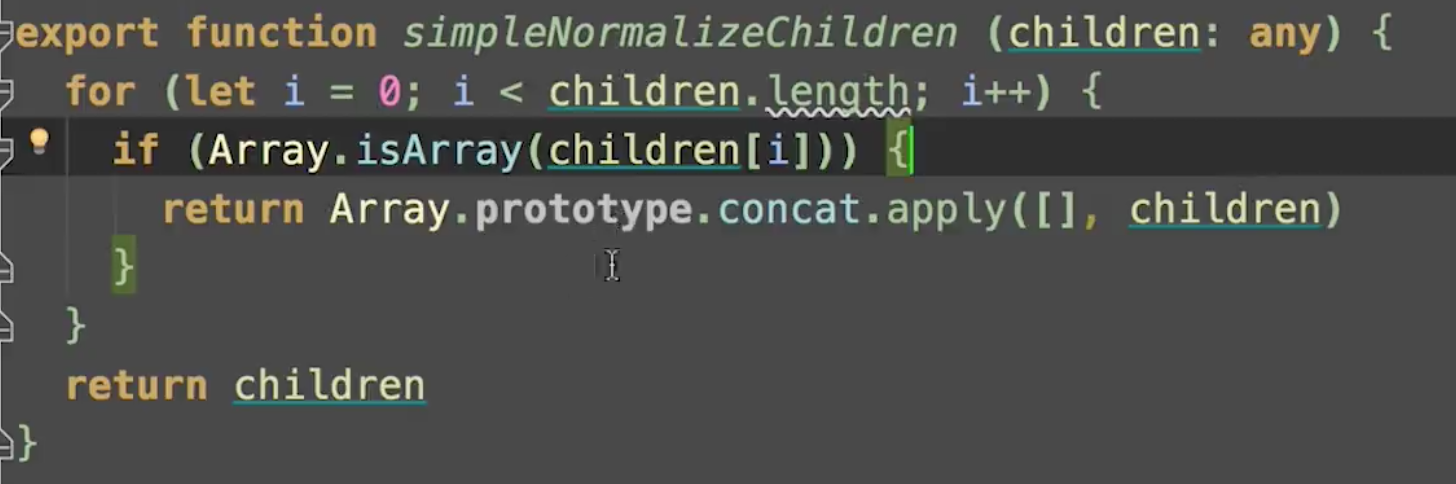
两个对象是否相等来去重
isEqualObj(obj1, obj2) { const keys1 = Object.keys(obj1) const keys2 = Object.keys(obj2) if (keys1.length !== keys2.length) { return false } return keys1.every(key => obj1[key] === obj2[key])}不相等就添加新数组addPeers(newPeers) { newPeers.forEach(peer => { // 保证节点是不能重复的 // 新节点如果不存在就添加 if (!this.peers.find(v => this.isEqualObj(v, peer))) { this.peers.push(peer) } })}抛出错误
throw 'not valid wallet.json'指定时间倒计时
countDownNum 倒计时总时间self.props.timeInfo 拿到当前时间后30分钟 倒计时 秒var now = new Date();var time = now.getTime() + 1000*60*30;console.log(new Date(time).getTime())function CountDown () { timeGap = (self.props.timeInfo - new Date().getTime()) / 1000; let minutes = Math.floor(timeGap / 60); let seconds = Math.floor(timeGap % 60); if (minutes < 10) { minutes = '0' + minutes; } if (seconds < 10) { seconds = '0' + seconds; } let msg = minutes + ':' + seconds; self.setData({ countDownNum: msg }); --timeGap; if (timeGap <= 0) { clearInterval(timer); self.props.onDeadline(); }} timer = setInterval(CountDown, 1000);判断是否在指定区间时间内
@pamse开始时间 @pamse结束时间function func(time1,time2) { var time = Date.parse( new Date()); var date1 = Date.parse(new Date(time1.replace(/-/g, '/'))); var date2 = Date.parse(new Date(time2.replace(/-/g, '/'))); if (date1 < time && date2 > time) { return true; }; return false; }标准时间格式 2019/10/16 最后的结果join一下
formattingTime = function(str) { if (typeof str !== 'string') return 'noString'; let newArr = str.split(''); if (!Array.isArray(newArr)) return 'noArray'; newArr.map((item, i) => { if (item === '-') { newArr.splice(i, 1, '/') } }) return newArr;}获取标准时间var time = "2017-06-23 17:00:00";time = time.replace(/-/g,':').replace(' ',':');time = time.split(':');var time1 = new Date(time[0],(time[1]-1),time[2],time[3],time[4],time[5]);去掉string前后引号
replace(/['"]+/g, '')网页顶部距离适配手机透明标题
计算屏幕某个滚动区域的高度,不出滚动条正好是设备的剩余高度移动端
my.getSystemInfo({ success: function(res) { self.setData({ listHeight: (res.windowHeight * 750 / res.windowWidth - 657 ) + "rpx" }); } })走马灯
getLeft () { return Math.abs(parseFloat(this.$container[0].style.marginLeft)); } /** * 滚动 */ scroll () { $('#dollsClone').html($('#dollsList').html()); const $clone = $('#dollsClone')[0]; const self = this; const offsetLeft = $clone.offsetLeft; let pos = 10; this.speed = 100; this.rolling = () => { const marginLeft = this.getLeft(); if (marginLeft >= offsetLeft) { pos = 10; } else { pos += 5; } self.$container[0].style.marginLeft = `-${pos}px`; }; this.timer = setInterval(this.rolling, this.speed); }截掉开头结尾两个字
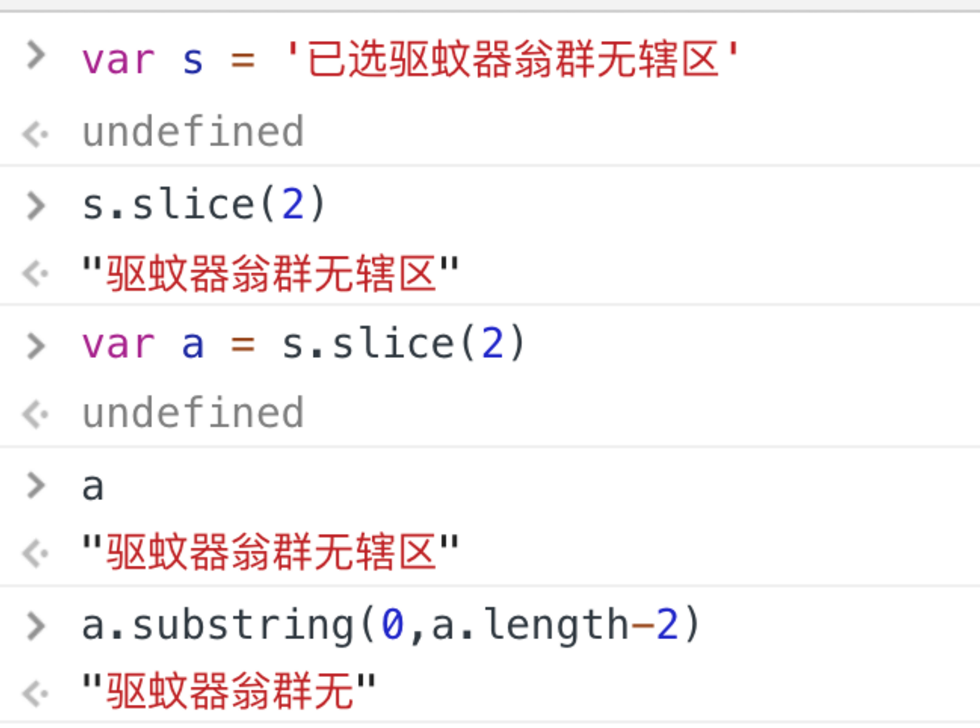
得到所有的样式
window.getComputedStyle(div);是否是一个伪数组
要检测他的constructor === Array
类数组转换为数组、数组的其他方法
var childNodes = nodes[o].childNodes;var s = Array.prototype.slice.call(childNodes);[...childNodes]或者Array.from()判断一个对象是否为空 是否是函数
JSON.stringify({}) === '{}' ? true : falsefor (x in object) {} 不执行循环就是空a.toString() "[object object]"Object.prototype.toString.call(a) // "[object object]"if (!Object.key(x).length)  返回false就是空typeof a === "function"

 "[object Object]" 从第8位截取到 -1 得到 "Object"  Object.prototype.toString.call(a).slice(8, -1)
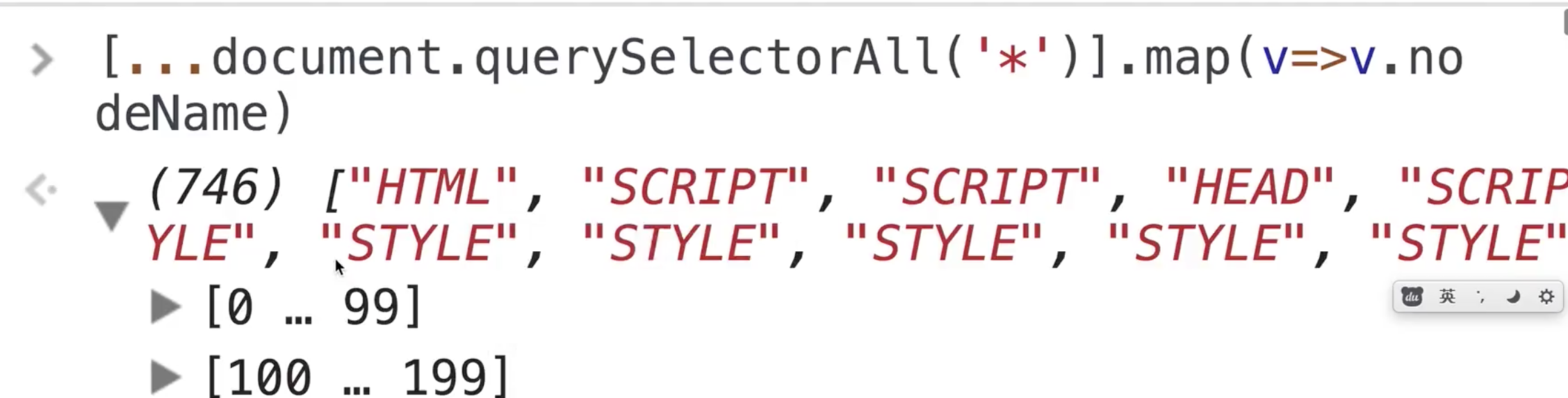
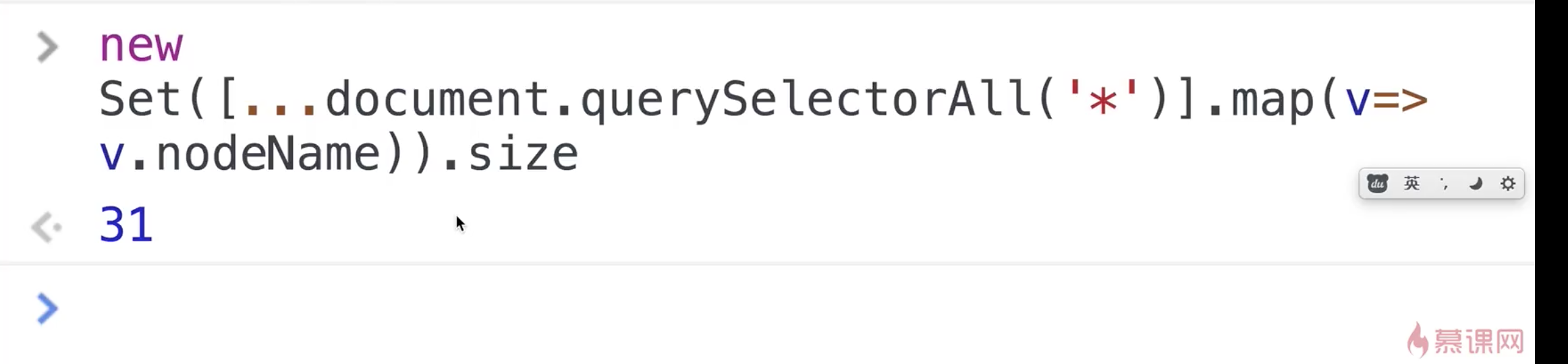
得到页面所有标签的种类
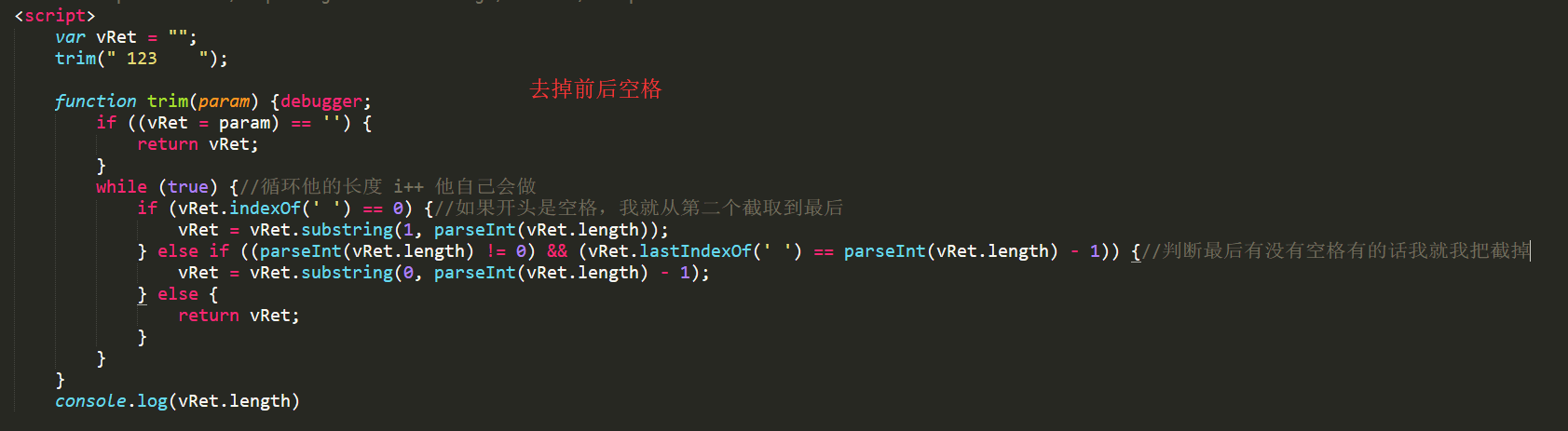
去掉字符串前后空格
 数组去重
数组去重
function uniq(array){ var temp = {}, r = [], len = array.length, val, type; for (var i = 0; i < len; i++) { val = array[i]; type = typeof val; if (!temp[val]) { temp[val] = [type]; r.push(val); } else if (temp[val].indexOf(type) < 0) { temp[val].push(type); r.push(val); } } return r;}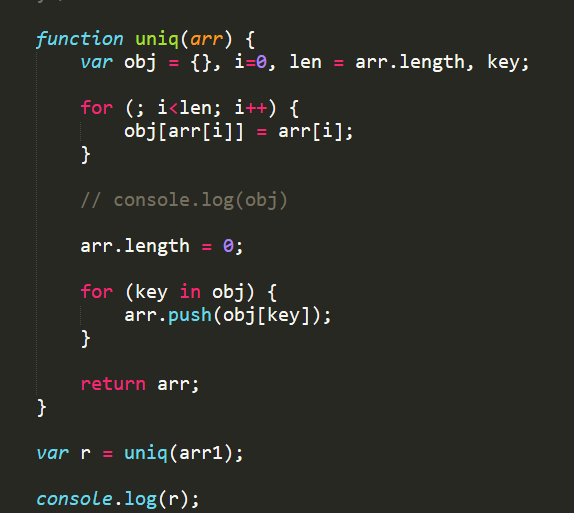
DuplicateRemoval: function (ArrFir, ArrSec) { console.log('去重操作'); for (var a = 0; a < ArrFir.length; a++) { for (var b = 0; b < ArrSec.length; b++) { if (ArrFir[a].id === ArrSec[b].id) { ArrSec.splice(b, 1); } } } ArrFir = ArrFir.concat(ArrSec); }给数组内对象去重,是属于一类的去掉
util.reducer = function(arr,type) { if (arr.length == 0) { return arr; } else { if (type) { var obj = {} var newArr = arr.reduce((cur,next) => { console.log(cur) obj[next.name]? "" : obj[next.name] = true && cur.push(next); return cur; },[]) return newArr; } else { return Array.from(new Set(arr)); } }}数组扁平化
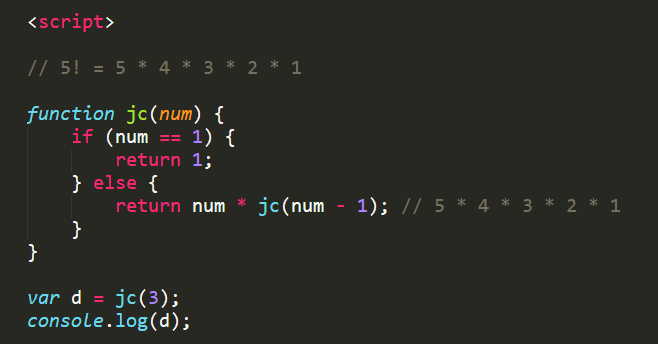
var a = [1,2,3,[4,5,6]]Array.prototype.concat.apply([], a)递归、阶乘
获取滚动条当前的位置/使用滚动条
onScroll: function (DOMID) {Z('#' + DOMID).scroll(() => {console.log(document.getElementById(DOMID).scrollHeight + ':scrollHeight' + ' ' + DOMID);// 内容可视区域的高度加上溢出(滚动)的距离。console.log(document.getElementById(DOMID).clientHeight + ':clientHeight' + ' ' + DOMID);// 内容可视区域console.log(document.getElementById(DOMID).scrollTop + ':scrollTop' + ' ' + DOMID); // 滚动距离var clientHeight = document.getElementById(DOMID).clientHeight;var scrollHeight = document.getElementById(DOMID).scrollHeight;var scrollTop = document.getElementById(DOMID).scrollTop;if (scrollTop + 100 + clientHeight >= scrollHeight) {console.log('到底部了,需要加载');this._loadMore();}});},setTimeout(() => window.scroll(0, 875), 0)拿到随机的一组文案
getZhiContent () {let result = {preContent: '小伙伴们,给大家发红包喽!人人可领,天天可领,领完就能用。祝大家领取的红包金额大大大!#吱口令#长按复制此消息,打开支付宝就能领取!',endContent: '',channel: ''};const list = window.__config.zhiContentList;if (list.length) {const index = Math.round(Math.random() * (list.length - 1));const content = list[index].text.split('#token#');let channel;list[index].channel && (channel = '_' + list[index].channel);result.preContent = content[0] || result.preContent;result.endContent = content[1] || '';result.channel = channel;}return result;}页面加载状态改变时
let mySwiper;document.onreadystatechange = loadingChange;//当页面加载状态改变的时候执行这个方法.function loadingChange() {// $("#btn").trigger("click");if(document.readyState == "complete"){ //当页面加载状态为完全结束时进入// alert(1)}} 禁止用户多次点击
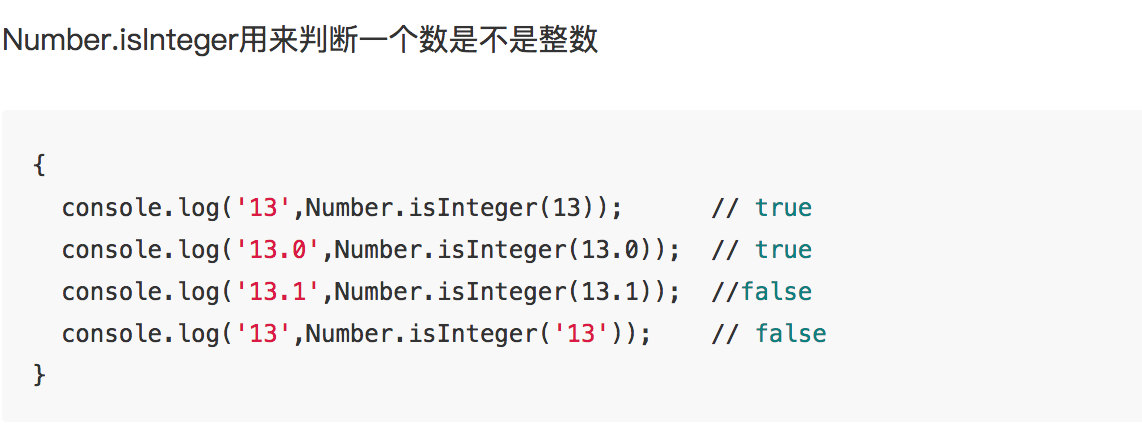
<script>$(document).ready(function(){ $("#submit").click(function(){ var nowTime = new Date().getTime(); var clickTime = $(this).attr("ctime"); if( clickTime != 'undefined' && (nowTime - clickTime < 5000)){ alert('操作过于频繁,稍后再试'); return false; }else{ $(this).attr("ctime",nowTime); alert('提交成功'); } }); });</script>是不是整数
去除一个数的小数部分

Math.sign方法用来判断一个数到底是正数、负数、还是零。对于非数值,会先将其转换为数值

禁止页面拖动
// 禁止页面拖动let node = document.querySelector('.index-frame');node.addEventListener('touchmove', function (e) { e.preventDefault();}, false);
千位分隔符
function numFormat(num){ num=num.toString().split("."); // 分隔小数点 var arr=num[0].split("").reverse(); // 转换成字符数组并且倒序排列 var res=[]; for(var i=0,len=arr.length;i<len;i++){ if(i%3===0&&i!==0){ res.push(","); // 添加分隔符 } res.push(arr[i]); } res.reverse(); // 再次倒序成为正确的顺序 if(num[1]){ // 如果有小数的话添加小数部分 res=res.join("").concat("."+num[1]); }else{ res=res.join(""); } return res;}节流防抖
// 简单的节流函数function throttle(func, wait, mustRun) { var timeout, startTime = new Date(); return function() { var context = this, args = arguments, curTime = new Date(); clearTimeout(timeout); // 如果达到了规定的触发时间间隔,触发 handler if(curTime - startTime >= mustRun){ func.apply(context,args); startTime = curTime; // 没达到触发间隔,重新设定定时器 }else{ timeout = setTimeout(func, wait); } };};// 实际想绑定在 scroll 事件上的 handlerfunction realFunc(){ console.log("Success");}// 采用了节流函数window.addEventListener('scroll',throttle(realFunc,500,1000));例子2function debounce(fn, wait) { var timeout; return function() { var ctx = this, args = arguments; clearTimeout(timeout); timeout = setTimeout(function() { fn.apply(ctx, args); }, wait); };}vue 防抖3export const debounce = (fn, delay = 500) => { let timer; return function() { let args = arguments; if(timer) { clearTimeout(timer); } timer = setTimeout(() => { fn.apply(this, args); }, delay); };}methods内写方法名字 : 防抖函数 传入thiscommitDialog: debounce((dialogTitle, self) => {分页序号