

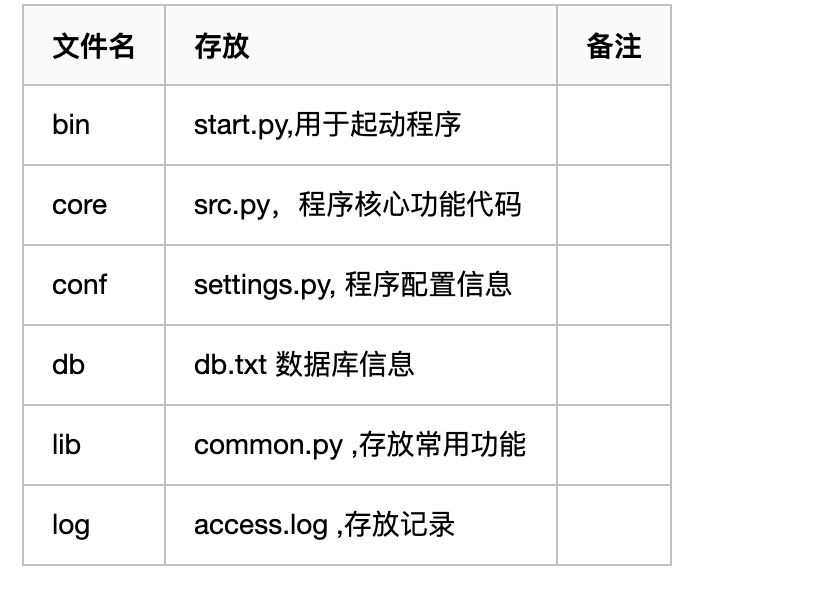
start.py :
[Python]
纯文本查看
复制代码
01 02 03 04 05 06 07 08 09 10 11 12 13 14 15 16 17 18 19 20 21 22 23 24 25 26 27 28 29 30 31 32 33 34 35 36 37 38 39 40 41 42 43 44 45 46 47 48 49 50 51 52 53 54 55 56 57 58 59 | import sys,os #应该把项目的根目录添加到环境变量中BASE_DIR=os.path.dirname(os.path.dirname(__file__)#os.path.dirname(__file__) 获取当前文件上一级路径名sys.path.append(BASE_DIR) #拿到ATM所在的文件夹from core import srcsrc.run()sys.path.append(r'D:\code\SH_fullstack_s1\day15\ATM') 添加的是绝对路径,不支持移植到别的硬件上运行src.py :from conf import settingsfrom lib import commonlogger1=common.get_logger('atm')def login(): print('登录....') with open(settings.DB_PATH,encoding='utf-8') as f: for line in f: print(line)def register(): print('注册....')def shop(): print('购物....')def pay(): print('支付...')def transter(): print('转账...') common.logger('xxxx给他爹xx转账10000') logger1.debug('xxxx给他爹xx转账10000') logger1.error('xxxx给他爹xx转账10000,转账失败')def run(): while True: print(""" 1 登录 2 注册 3 购物 4 支付 5 转账 """) choice=input('>>: ').strip() if choice == '1': login() elif choice == '2': register() elif choice == '3': shop() elif choice == '4': pay() elif choice == '5': transter() else: print('输入错误指令') |
settings.py:
[Python]
纯文本查看
复制代码
1 2 3 | DB_PATH=r'D:\code\SH_fullstack_s1\day15\ATM\db\db.txt' #自定义设置的文件路径LOG_PATH=r'D:\code\SH_fullstack_s1\day15\ATM\log\access.log'LOGGING_DIC = {.....} #log配置字典 |
common.py :
[Python]
纯文本查看
复制代码
01 02 03 04 05 06 07 08 09 10 11 12 13 14 15 | from conf import settingsdef logger(msg): with open(settings.LOG_PATH,'a',encoding='utf-8') as f: f.write('%s\n' %msg) import logging.configimport loggingfrom conf import settingsdef get_logger(name): #name='atm' logging.config.dictConfig(settings.LOGGING_DIC) # 导入上面定义的logging配置 l1=logging.getLogger(name) return l1 |
logging 模块
[Python]
纯文本查看
复制代码
01 02 03 04 05 06 07 08 09 10 11 12 | import logginglogging.basicConfig( #为logging模板指定全局配置,针对所有logger有效,控制打印到文件中filename='access.log', # /stream=sys.stdout 打印在屏幕上,但和filename只能存在其一format='%(asctime)s - %(name)s - %(levelname)s -%(module)s: %(message)s',datefmt='%Y-%m-%d %H:%M:%S %p',level=40)logging.debug('debug...') # 10logging.info('info....') #20logging.warning('.....') #30logging.error('......') # 40logging.critical('.....') #50 |
[Python]
纯文本查看
复制代码
01 02 03 04 05 06 07 08 09 10 11 12 13 14 15 16 17 18 19 20 21 22 23 24 25 26 27 28 29 30 31 32 33 34 35 36 37 38 39 40 41 42 43 44 45 46 47 48 49 50 51 52 53 54 55 56 57 58 59 60 61 62 63 64 65 66 67 | 6.51 logging模块的四类对象logger:负责产生日志logger1=logging.getLogger('xxx')filter:过滤日志(不常用)handler:控制日志打印到文件or终端fh1=logging.FileHandler(filename='a1.log',encoding='utf-8')fh2=logging.FileHandler(filename='a2.log',encoding='utf-8')sh=logging.StreamHandler()formatter:控制日志的格式formatter1=logging.Formatter(fmt='%(asctime)s - %(name)s - %(levelname)s -%(module)s: %(message)s',datefmt='%Y-%m-%d %H:%M:%S %p',)formatter2=logging.Formatter(fmt='%(asctime)s - %(message)s',)logger ---->多个file handler <----多个formatter绑定关系:1.为logger1对象绑定handler: |

