

登录认证 For Java
使用Java程序发送Http请求进行o2server登录认证 o2server向外提供了非常完整的restful服务,用户可以使用任何语言,编写代码发起http请求来进行o2server功能和业务的操作。大多数服务的调用,都需要进行登录认证,本篇详细介绍如何使用其他语言来发送http请求进行服务器认证。
发送用户名使用SSO进行登录认证
此示例演示如何通过登录用户名,和SSO相关的配置,使用单点认证的方式进行O2Server的登录认证,获取xtoken信息
涉及到加密解密,请使用非中文的唯一标识进行登录 ,中文登录 有可能会有找不到用户的问题。
一、o2Server平台SSO配置
1、使用管理员(或者xadmin)登录O2OA
2、打开系统菜单->控制面板->系统设置->SSO配置
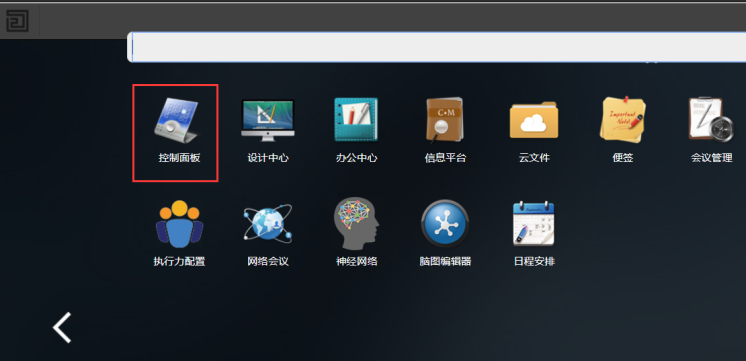
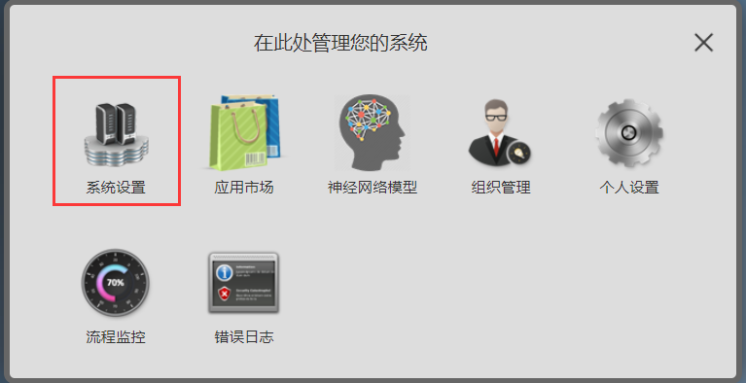
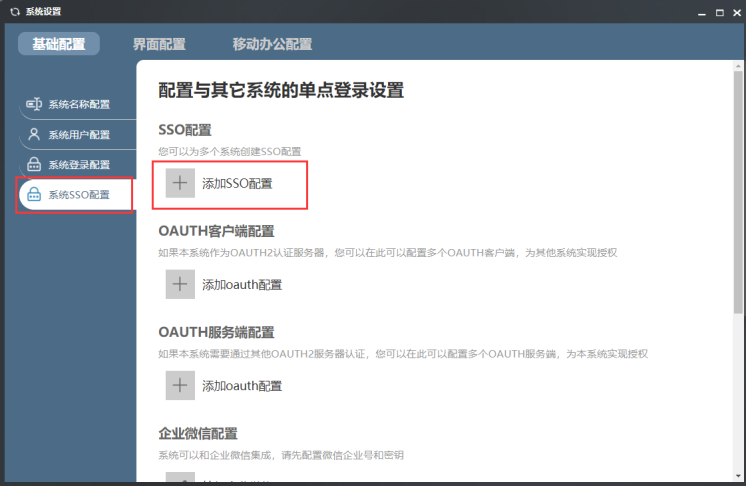
3、添加SSO配置
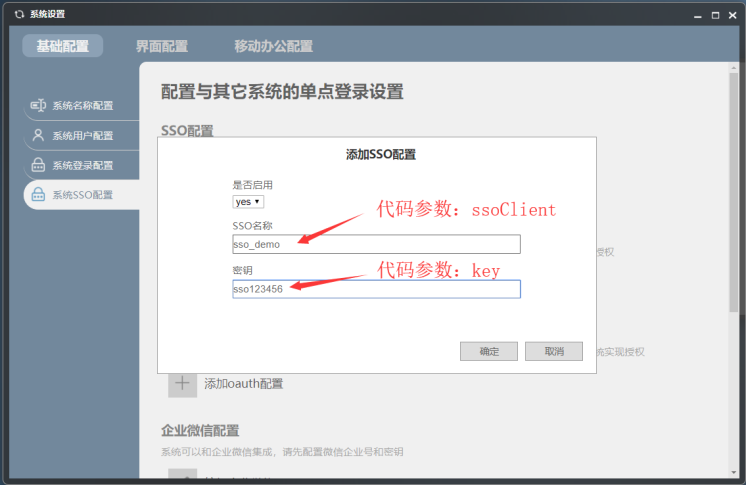
4、重启o2server
二、编写登录代码
完整代码内容:
package net.o2oa.demos;
import java.io.BufferedReader;
import java.io.IOException;
import java.io.InputStreamReader;
import java.io.PrintWriter;
import java.net.URL;
import java.net.URLConnection;
import java.util.Date;
import org.apache.commons.codec.binary.StringUtils;
import org.json.JSONObject;
import net.o2oa.util.Crypto;
/**
 * 此示例演示如何通过登录用户名,和SSO相关的配置,使用单点认证的方式进行O2Server的登录认证,获取xtoken信息
 * 涉及到加密解密,请使用非中文的唯一标识进行登录 ,中文登录 有可能会有找不到用户的问题。
 * @author O2OA
 */
public class Demo_LoginWithSSO {
	static final String  URL_SSOLOGIN="/x_organization_assemble_authentication/jaxrs/sso";
	public static void main( String[] args ) {
		String applicationServer = "127.0.0.1";
		Integer applicationPort = 20020;
		String userName = "13533441287";
		String ssoClient = "sso_demo";
		String key = "sso123456";
		try {
			LoginResult result = login(applicationServer, applicationPort, userName, ssoClient, key);
			if( StringUtils.equals( "success", result.getType() )) {
				System.out.println("xtoken=" + result.getToken() );
			}else {
				System.out.println("message:" + result.getMessage() );
			}
		} catch (Exception e) {
			// TODO Auto-generated catch block
			e.printStackTrace();
		}
	}
	//服务地址:http://127.0.0.1:20020/x_organization_assemble_authentication/jaxrs/sso
	//{"token":"xadmin","client":"sso_demo"}
	/**
	 * 使用登录认证的接口进行服务器登录,获取xtoken信息
	 * @param applicationServer  127.0.0.1
	 * @param applicationPort     20020
	 * @param userName             张三
	 * @param client                    sso_demo
	 * @param key                       sso123456
	 * @return
	 * @throws Exception
	 */
public static LoginResult login( String applicationServer, Integer applicationPort, String userName, String client, String key ) throws Exception {
//参数
    	String loginUrl = "http://" + applicationServer + ":" + applicationPort + URL_SSOLOGIN ;
    	String xtoken = Crypto.encrypt( userName + "#" + new Date().getTime(), key );
        String loginParams = String.format("{'token':'%s','client':'%s'}", xtoken, client );
        String responseData = sendPost( loginUrl, loginParams );
/**
         * 成功响应结果
         * {
			  "type": "success",
			  "data": {
			    "token": "Xb9XTOjIQJa5AVRfHfIbNMFvhYdVfLgaipZBZBiUF7aNHeLrQ4vOu9YgprWeK2E1YsxApE_z4f1mvqvStFQI5CW7Pk31ulroUVAeR5jUybQ",
			    "roleList": [],
			    "id": "1cb47e12-18ad-4363-a55f-4514edb76215",
			    "genderType": "m",
			    "signature": "",
			    "pinyin": "lisi",
			    "pinyinInitial": "ls",
			    "description": "",
			    "name": "李四",
			    "employee": "",
			    "unique": "c93b7fb8-6820-466c-ab9c-f0637b8a3682",
			    "distinguishedName": "李四@c93b7fb8-6820-466c-ab9c-f0637b8a3682@P",
			    "orderNumber": 56649305,
			    "controllerList": [],
			    "superior": "",
			    "changePasswordTime": "2019-10-18",
			    "mail": "",
			    "weixin": "",
			    "qq": "",
			    "mobile": "13533441287",
			    "officePhone": "",
			    "createTime": "2019-10-18 15:55:05",
			    "updateTime": "2019-10-18 15:55:05"
			  },
			  "message": "",
			  "date": "2019-10-19 15:12:10",
			  "spent": 141,
			  "size": -1,
			  "count": 0,
			  "position": 0
			}**/
/**
         * 失败响应结果
         * {
			    "readyState": 4,
			    "responseText": "{\n  \"type\": \"error\",\n  \"message\": \"用户不存在或者密码错误.\",\n  \"date\": \"2019-10-19 14:34:34\",\n  \"spent\": 9,\n  \"size\": -1,\n  \"count\": 0,\n  \"position\": 0,\n  \"prompt\": \"com.x.organization.assemble.authentication.jaxrs.authentication.ExceptionPersonNotExistOrInvalidPassword\"\n}",
			    "responseJSON": {
			        "type": "error",
			        "message": "用户不存在或者密码错误.",
			        "date": "2019-10-19 14:34:34",
			        "spent": 9,
			        "size": -1,
			        "count": 0,
			        "position": 0,
			        "prompt": "com.x.organization.assemble.authentication.jaxrs.authentication.ExceptionPersonNotExistOrInvalidPassword"
			    },
			    "status": 500,
			    "statusText": "Internal Server Error"
			}
**/
JSONObject result = new JSONObject(responseData);
        String type = result.getString("type");
if( StringUtils.equals( "success", type )) {
	//登录成功
        	JSONObject data = result.getJSONObject("data");
            String token = data.getString( "token" );
return new LoginResult("success", token, "登录成功!");
}else {
	//登录失败
	return new LoginResult("error", null, "用户登录失败!");
}
}
/**
     * 发送POST请求
     *
	 * @param url  地址
	 * @param param   传入的数据
	 * @return
     */
public static String sendPost( String url, String param ) {
        PrintWriter out = null;
        BufferedReader in = null;
        String result = "";
try {
            URL realUrl = new URL(url);
            URLConnection conn = realUrl.openConnection();
            conn.setRequestProperty("accept", "*/*");
            conn.setRequestProperty("connection", "Keep-Alive");
            conn.setRequestProperty("Content-Type", "application/json; charset=utf-8");
            conn.setRequestProperty("user-agent", "Mozilla/4.0 (compatible; MSIE 6.0; Windows NT 5.1;SV1)");
            conn.setDoOutput(true);
            conn.setDoInput(true);
            out = new PrintWriter(conn.getOutputStream());
            out.print(param);
            out.flush();
            in = new BufferedReader( new InputStreamReader(conn.getInputStream()));
            String line;
while ((line = in.readLine()) != null) {
                result += line;
}
} catch (Exception e) {
            e.printStackTrace();
} finally {
try {
if (out != null) {
                    out.close();
}
if (in != null) {
                    in.close();
}
} catch (IOException ex) {
                ex.printStackTrace();
}
}
return result;
}
public static class LoginResult{
	private String type;
	private String token;
	private String message;
		public LoginResult(String type, String token, String message) {
			super();
			this.type = type;
			this.token = token;
			this.message = message;
		}
		public String getType() {
			return type;
		}
		public void setType(String type) {
			this.type = type;
		}
		public String getToken() {
			return token;
		}
		public void setToken(String token) {
			this.token = token;
		}
		public String getMessage() {
			return message;
		}
		public void setMessage(String message) {
			this.message = message;
		}
}
}
数据加密辅助类:
Crypto.java
package net.o2oa.util;
import java.io.IOException;
import java.net.URLDecoder;
import java.net.URLEncoder;
import java.security.SecureRandom;
import javax.crypto.Cipher;
import javax.crypto.SecretKey;
import javax.crypto.SecretKeyFactory;
import javax.crypto.spec.DESKeySpec;
import org.apache.commons.codec.binary.Base64;
import org.apache.commons.lang3.StringUtils;
/**
 * 数据加密辅助类
 * @author O2OA
 *
 */
public class Crypto {
	private static final String utf8 = "UTF-8";
	private final static String DES = "DES";
	private final static String cipher_init = "DES";
	public static String encrypt(String data, String key) throws Exception {
		byte[] bt = encrypt(data.getBytes(), key.getBytes());
		String str = Base64.encodeBase64URLSafeString(bt);
		return URLEncoder.encode( str, utf8 );
	}
	public static byte[] encrypt(byte[] data, byte[] key) throws Exception {
		// 生成一个可信任的随机数源
		SecureRandom sr = new SecureRandom();
		// 从原始密钥数据创建DESKeySpec对象
		DESKeySpec dks = new DESKeySpec(key);
		// 创建一个密钥工厂,然后用它把DESKeySpec转换成SecretKey对象
		SecretKeyFactory keyFactory = SecretKeyFactory.getInstance(DES);
		SecretKey securekey = keyFactory.generateSecret(dks);
		// Cipher对象实际完成加密操作
		Cipher cipher = Cipher.getInstance(cipher_init);
		// 用密钥初始化Cipher对象
		cipher.init(Cipher.ENCRYPT_MODE, securekey, sr);
		return cipher.doFinal(data);
	}
	public static String decrypt(String data, String key) throws IOException, Exception {
		if (StringUtils.isEmpty(data)) {
			return null;
		}
		String str = URLDecoder.decode(data, utf8);
		byte[] buf = Base64.decodeBase64(str);
		byte[] bt = decrypt(buf, key.getBytes());
		return new String(bt);
	}
	public static byte[] decrypt(byte[] data, byte[] key) throws Exception {
		// 生成一个可信任的随机数源
		SecureRandom sr = new SecureRandom();
		// 从原始密钥数据创建DESKeySpec对象
		DESKeySpec dks = new DESKeySpec(key);
		// 创建一个密钥工厂,然后用它把DESKeySpec转换成SecretKey对象
		SecretKeyFactory keyFactory = SecretKeyFactory.getInstance(DES);
		SecretKey securekey = keyFactory.generateSecret(dks);
		// Cipher对象实际完成解密操作
		Cipher cipher = Cipher.getInstance(cipher_init);
		// 用密钥初始化Cipher对象
		cipher.init(Cipher.DECRYPT_MODE, securekey, sr);
		return cipher.doFinal(data);
pom.xml内容:
<project xmlns="http://maven.apache.org/POM/4.0.0"
	xmlns:xsi="http://www.w3.org/2001/XMLSchema-instance"
	xsi:schemaLocation="http://maven.apache.org/POM/4.0.0 http://maven.apache.org/xsd/maven-4.0.0.xsd">
	<modelVersion>4.0.0</modelVersion>
	<groupId>net.o2oa.demos</groupId>
	<artifactId>test_o2oa_java_demo</artifactId>
	<version>0.0.1-SNAPSHOT</version>
	<packaging>jar</packaging>
	<name>test_start_process_demo</name>
	<url>http://maven.apache.org</url>
	<properties>
		<project.build.sourceEncoding>UTF-8</project.build.sourceEncoding>
	</properties>
	<dependencies>
		<!-- https://mvnrepository.com/artifact/org.apache.httpcomponents/httpclient -->
		<dependency>
			<groupId>org.apache.httpcomponents</groupId>
			<artifactId>httpclient</artifactId>
			<version>4.5.10</version>
		</dependency>
		<!-- https://mvnrepository.com/artifact/org.apache.httpcomponents/httpcore-nio -->
		<dependency>
			<groupId>org.apache.httpcomponents</groupId>
			<artifactId>httpcore-nio</artifactId>
			<version>4.4.12</version>
		</dependency>
		<!-- https://mvnrepository.com/artifact/org.apache.httpcomponents/httpcore -->
		<dependency>
			<groupId>org.apache.httpcomponents</groupId>
			<artifactId>httpcore</artifactId>
			<version>4.4.12</version>
		</dependency>
		<!-- https://mvnrepository.com/artifact/org.apache.httpcomponents/httpmime -->
		<dependency>
			<groupId>org.apache.httpcomponents</groupId>
			<artifactId>httpmime</artifactId>
			<version>4.5.10</version>
		</dependency>
		<dependency>
			<groupId>org.apache.commons</groupId>
			<artifactId>commons-lang3</artifactId>
			<version>3.9</version>
		</dependency>
		<dependency>
			<groupId>com.google.code.gson</groupId>
			<artifactId>gson</artifactId>
			<version>2.8.5</version>
		</dependency>
		<!-- https://mvnrepository.com/artifact/org.json/json -->
		<dependency>
			<groupId>org.json</groupId>
			<artifactId>json</artifactId>
			<version>20190722</version>
		</dependency>
		<dependency>
			<groupId>junit</groupId>
			<artifactId>junit</artifactId>
			<version>3.8.1</version>
			<scope>test</scope>
		</dependency>
	</dependencies>
</project>
发送用户账号密码进行登录认证
此示例演示如何使用java发送Http请求来登录o2server,获取登录认证xtoken信息
完整代码示例:
使用账号密码发送请求登录
package net.o2oa.demos;
import java.io.BufferedReader;
import java.io.IOException;
import java.io.InputStreamReader;
import java.io.PrintWriter;
import java.net.URL;
import java.net.URLConnection;
import org.apache.commons.codec.binary.StringUtils;
import org.json.JSONObject;
/**
 * 此示例演示如何使用java发送Http请求来登录o2server,获取登录认证xtoken信息 * @author O2OA
 */
public class Demo_LoginToServer {
static final String URL_LOGIN = "/x_organization_assemble_authentication/jaxrs/authentication";
public static void main(String[] args) {
        String applicationServer = "127.0.0.1";
        Integer applicationPort = 20020;
        String userName = "张三";
        String password = "o2";
try {
            LoginResult result = login(applicationServer, applicationPort, userName, password);
if (StringUtils.equals("success", result.getType())) {
                System.out.println("xtoken=" + result.getToken());
} else {
                System.out.println("message:" + result.getMessage());
}
} catch (Exception e) {
            e.printStackTrace();
}
}
//服务地址:http://127.0.0.1:20020/x_organization_assemble_authentication/jaxrs/authentication
// {"credential":"xadmin","password":"o2"}
/**
     * 使用登录认证的接口进行服务器登录,获取xtoken信息
     * @param applicationServer  127.0.0.1
     * @param applicationPort     20020
     * @param userName             张三
     * @param password              o2
     * @return
     * @throws Exception
     */
public static LoginResult login(String applicationServer, Integer applicationPort, String userName, String password) throws Exception {
//参数
        String loginUrl = "http://" + applicationServer + ":" + applicationPort + URL_LOGIN;
        String loginParams = String.format("{'credential':'%s','password':'%s'}", userName, password);
        String responseData = sendPost(loginUrl, loginParams);
        JSONObject result = new JSONObject(responseData);
        String type = result.getString("type");
if (StringUtils.equals("success", type)) {
//登录成功
            JSONObject data = result.getJSONObject("data");
            String token = data.getString("token");
return new LoginResult("success", token, "登录成功!");
} else {
//登录失败
return new LoginResult("error", null, "用户不存在或者密码错误!");
}
}
/**
     * 发送POST请求     * 	 * @param url  地址	 * @param param   传入的数据	 * @return
     */
public static String sendPost(String url, String param) {
        PrintWriter out = null;
        BufferedReader in = null;
        String result = "";
try {
            URL realUrl = new URL(url);
            URLConnection conn = realUrl.openConnection();
            conn.setRequestProperty("accept", "*/*");
            conn.setRequestProperty("connection", "Keep-Alive");
            conn.setRequestProperty("Content-Type", "application/json; charset=utf-8");
            conn.setRequestProperty("user-agent", "Mozilla/4.0 (compatible; MSIE 6.0; Windows NT 5.1;SV1)");
            conn.setDoOutput(true);
            conn.setDoInput(true);
            out = new PrintWriter(conn.getOutputStream());
            out.print(param);
            out.flush();
            in = new BufferedReader(new InputStreamReader(conn.getInputStream()));
            String line;
while ((line = in.readLine()) != null) {
                result += line;
}
} catch (Exception e) {
            e.printStackTrace();
} finally {
try {
if (out != null) {
                    out.close();
}
if (in != null) {
                    in.close();
}
} catch (IOException ex) {
                ex.printStackTrace();
}
}
return result;
}
public static class LoginResult {
private String type;
private String token;
private String message;
public LoginResult(String type, String token, String message) {
super();
this.type = type;
this.token = token;
this.message = message;
}
public String getType() {
return type;
}
public void setType(String type) {
this.type = type;
}
public String getToken() {
return token;
}
public void setToken(String token) {
this.token = token;
}
public String getMessage() {
return message;
}
public void setMessage(String message) {
this.message = message;
}
}
}
成功响应结果
{
"type": "success",
"data": {
"tokenType": "manager",
"token": "HeEoZIVgPjQAuhSAF5z5qKCO-_-iWowwEIdiuKMfurQ",
"roleList": [
"Manager",
"OrganizationManager",
"MeetingManager",
"ProcessPlatformManager"
],
"id": "xadmin",
"name": "xadmin",
"employee": "xadmin",
"distinguishedName": "xadmin@o2oa@P",
"mail": "xadmin@o2oa.net",
"weixin": "",
"qq": "",
"mobile": ""
},
"message": "",
"date": "2019-10-19 14:15:17",
"spent": 18,
"size": -1,
"count": 0,
"position": 0
}
失败响应结果
{
"readyState": 4,
"responseText": "{\"type\": \"error\",\"message\": \"用户不存在或者密码错误.\",\"date\": \"2019-10-19 14:34:34\",\"spent\": 9,  \"size\": -1,  \"count\": 0,  \"position\": 0,   \"prompt\":\"com.x.organization.assemble.authentication.jaxrs.authentication.ExceptionPersonNotExistOrInvalidPassword\"  }",
"responseJSON": {
"type": "error",
"message": "用户不存在或者密码错误.",
"date": "2019-10-19 14:34:34",
"spent": 9,
"size": -1,
"count": 0,
"position": 0,
"prompt": "com.x.organization.assemble.authentication.jaxrs.authentication.ExceptionPersonNotExistOrInvalidPassword"
},
"status": 500,
"statusText": "Internal Server Error"
}
pom.xml
<project xmlns="http://maven.apache.org/POM/4.0.0" xmlns:xsi="http://www.w3.org/2001/XMLSchema-instance"
         xsi:schemaLocation="http://maven.apache.org/POM/4.0.0 http://maven.apache.org/xsd/maven-4.0.0.xsd">
<modelVersion>4.0.0</modelVersion>
<groupId>net.o2oa.demos</groupId>
<artifactId>test_start_process_demo</artifactId>
<version>0.0.1-SNAPSHOT</version>
<packaging>jar</packaging>
<name>test_start_process_demo</name>
<url>http://maven.apache.org</url>
<properties>
<project.build.sourceEncoding>UTF-8</project.build.sourceEncoding>
</properties>
<dependencies>        <!-- https://mvnrepository.com/artifact/org.apache.httpcomponents/httpclient -->
<dependency>
<groupId>org.apache.httpcomponents</groupId>
<artifactId>httpclient</artifactId>
<version>4.5.10</version>
</dependency>        <!-- https://mvnrepository.com/artifact/org.apache.httpcomponents/httpcore-nio -->
<dependency>
<groupId>org.apache.httpcomponents</groupId>
<artifactId>httpcore-nio</artifactId>
<version>4.4.12</version>
</dependency>        <!-- https://mvnrepository.com/artifact/org.apache.httpcomponents/httpcore -->
<dependency>
<groupId>org.apache.httpcomponents</groupId>
<artifactId>httpcore</artifactId>
<version>4.4.12</version>
</dependency>        <!-- https://mvnrepository.com/artifact/org.apache.httpcomponents/httpmime -->
<dependency>
<groupId>org.apache.httpcomponents</groupId>
<artifactId>httpmime</artifactId>
<version>4.5.10</version>
</dependency>
<dependency>
<groupId>org.apache.commons</groupId>
<artifactId>commons-lang3</artifactId>
<version>3.9</version>
</dependency>
<dependency>
<groupId>com.google.code.gson</groupId>
<artifactId>gson</artifactId>
<version>2.8.5</version>
</dependency>        <!-- https://mvnrepository.com/artifact/org.json/json -->
<dependency>
<groupId>org.json</groupId>
<artifactId>json</artifactId>
<version>20190722</version>
</dependency>
<dependency>
<groupId>junit</groupId>
<artifactId>junit</artifactId>
<version>3.8.1</version>
<scope>test</scope>
</dependency>
</dependencies>
</project>
流程控制 For Java
使用Java语言开发第三方程序对O2OA流程进行控制
启动一个新的流程实例(工单)
本例使用Java语言发送请求,向服务器进行认证后,启动一个新的流程,创建一个工单
完整代码:
Demo_StartProcess.java
package net.o2oa.demos;
import java.io.BufferedReader;
import java.io.IOException;
import java.io.InputStreamReader;
import java.io.PrintWriter;
import java.net.URL;
import java.net.URLConnection;
import java.util.ArrayList;
import java.util.HashMap;
import java.util.List;
import java.util.Map;
import org.apache.commons.codec.binary.StringUtils;
import org.json.JSONArray;
import org.json.JSONObject;
import net.o2oa.demos.Demo_LoginToServer.LoginResult;
/**
* 本例使用Java语言发送请求,向服务器进行认证后,启动一个新的流程,创建一个工单
* @author O2OA
*
*/
public class Demo_StartProcess {
static final String URL_LOGIN="/x_processplatform_assemble_surface/jaxrs/work/process/";
public static void main( String[] args ) {
String applicationServer = "127.0.0.1";
Integer applicationPort = 20020;
String userName = "张三";
String password = "o2";
String identity ="测试部门 张三@9659e75d-b3f3-4eb3-bf26-52812d9228ec@I";
String processFlag = "bc4b0018-edee-4225-838e-1b2db5c24f25";
String processData = "{\"latest\":\"false\",\"title\":\"使用Java启动流程示例一\",\"identity\":\""+identity+"\",\"data\":\"{'name':'这是Name参数'}\"}";
try {
LoginResult result = Demo_LoginToServer.login(applicationServer, applicationPort, userName, password);
if( StringUtils.equals( "success", result.getType() )) {
//成功登录 到O2Server
System.out.println("成功登录到O2Server!xtoken=" + result.getToken() );
//启动指定的流程
start( applicationServer, applicationPort, processFlag, processData, result.getToken() );
}else {
//登录失败
System.out.println("登录失败!message:" + result.getMessage() );
}
} catch (Exception e) {
e.printStackTrace();
}
}
public static List<String> start( String applicationServer, Integer applicationPort, String processFlag, String processData, String xtoken ) throws Exception {
//将xtoken添加到httpHeader里,调用服务一定要添加认证过的token
Map<String, String> headMap = getHeader( xtoken );
String path = "http://" + applicationServer + ":" + applicationPort + URL_LOGIN + processFlag ;
String responseData = sendPost( path, processData, headMap);
/**
* {
"type": "success",
"data": [
{
"taskCompletedList": [],
"taskList": [
{
"id": "773c19e8-46b8-4fd5-b998-618e9a259958",
"job": "8baa58cb-914c-4c30-b32f-d9c23cf1cf7f",
"title": "测试----123321",
"startTime": "2019-10-19 15:41:48",
"startTimeMonth": "2019-10",
"work": "a3e0d9c6-aa73-4346-8ad9-d929903477d4",
"application": "a34ea9d9-cceb-45d4-8e55-d81b932ee438",
"applicationName": "测试应用",
"applicationAlias": "发文管理",
"process": "bc4b0018-edee-4225-838e-1b2db5c24f25",
"processName": "李义测试",
"processAlias": "",
"serial": "",
"person": "张三@0b31209b-cc14-46c6-afcb-d3823d0abfb7@P",
"identity": "张三@9659e75d-b3f3-4eb3-bf26-52812d9228ec@I",
"unit": "测试部门@b3a3a25b-6a10-45ed-8dc5-b354d7449c59@U",
"activity": "5596e264-7bd7-4d51-ad2d-1a0cf152695f",
"activityName": "拟稿",
"activityAlias": "",
"activityDescription": "",
"activityType": "manual",
"activityToken": "9d79104c-dfce-4407-8bd1-cb4981787267",
"creatorPerson": "张三@0b31209b-cc14-46c6-afcb-d3823d0abfb7@P",
"creatorIdentity": "张三@9659e75d-b3f3-4eb3-bf26-52812d9228ec@I",
"creatorUnit": "测试部门@b3a3a25b-6a10-45ed-8dc5-b354d7449c59@U",
"expired": false,
"urged": false,
"routeList": [
"cadae125-ff16-41e1-89dd-0e04f43295f0"
],
"routeNameList": [
"送核稿"
],
"routeOpinionList": [
""
],
"routeDecisionOpinionList": [
""
],
"routeName": "",
"opinion": "",
"modified": false,
"viewed": false,
"first": true,
"createTime": "2019-10-19 15:41:48",
"updateTime": "2019-10-19 15:41:48"
}
],
"currentTaskIndex": 0,
"id": "322e82e0-b5d6-45a9-9cb3-e4c93ea71150",
"job": "8baa58cb-914c-4c30-b32f-d9c23cf1cf7f",
"work": "a3e0d9c6-aa73-4346-8ad9-d929903477d4",
"completed": false,
"fromActivity": "5596e264-7bd7-4d51-ad2d-1a0cf152695f",
"fromActivityType": "manual",
"fromActivityName": "拟稿",
"fromActivityAlias": "",
"fromActivityToken": "9d79104c-dfce-4407-8bd1-cb4981787267",
"fromTime": "2019-10-19 15:41:48",
"application": "a34ea9d9-cceb-45d4-8e55-d81b932ee438",
"applicationName": "测试应用",
"process": "bc4b0018-edee-4225-838e-1b2db5c24f25",
"processName": "李义测试",
"connected": false,
"splitting": false,
"splitTokenList": [],
"createTime": "2019-10-19 15:41:48",
"updateTime": "2019-10-19 15:41:48"
}
],
"message": "",
"date": "2019-10-19 15:41:48",
"spent": 192,
"size": 1,
"count": 0,
"position": 0
}
*/
JSONObject jsonObj = new JSONObject( responseData );
JSONArray dataArray = jsonObj.getJSONArray("data");
List<String> workIds = new ArrayList<>();
if( dataArray != null && dataArray.length() > 0 ) {
for (int i = 0; i < dataArray.length(); i++) {
JSONObject data = (JSONObject) dataArray.get(i);
String workid = data.getString("work");
workIds.add( workid );
System.out.println("流程启动完成,生成workId=" + workid);
}
}
return workIds;
}
public static String sendPost( String url, String param, Map<String,String> headers ) {
PrintWriter out = null;
BufferedReader in = null;
String result = "";
try {
URL realUrl = new URL(url);
URLConnection conn = realUrl.openConnection();
headers.entrySet().forEach( header->{
conn.setRequestProperty(header.getKey(),header.getValue());
});
conn.setDoOutput(true);
conn.setDoInput(true);
out = new PrintWriter(conn.getOutputStream());
out.print(param);
out.flush();
in = new BufferedReader(
new InputStreamReader(conn.getInputStream()));
String line;
while ((line = in.readLine()) != null) {
result += line;
}
} catch (Exception e) {
System.out.println(" POST" + e);
e.printStackTrace();
} finally {
try {
if (out != null) {
out.close();
}
if (in != null) {
in.close();
}
} catch (IOException ex) {
ex.printStackTrace();
}
}
return result;
}
public static Map<String, String> getHeader( String xtoken ) {
Map<String, String> headMap = new HashMap<String, String>();
headMap.put("x-token", xtoken );
headMap.put("Cookie", "x-token=" + xtoken );
headMap.put("accept", "*/*");
headMap.put("connection", "Keep-Alive");
headMap.put("Content-Type", "application/json; charset=utf-8");
headMap.put("user-agent", "Mozilla/4.0 (compatible; MSIE 6.0; Windows NT 5.1;SV1)");
return headMap;
}
}
pom.xml
<project xmlns="http://maven.apache.org/POM/4.0.0"
	xmlns:xsi="http://www.w3.org/2001/XMLSchema-instance"
	xsi:schemaLocation="http://maven.apache.org/POM/4.0.0 http://maven.apache.org/xsd/maven-4.0.0.xsd">
	<modelVersion>4.0.0</modelVersion>

	<groupId>net.o2oa.demos</groupId>
	<artifactId>test_o2oa_java_demo</artifactId>
	<version>0.0.1-SNAPSHOT</version>
	<packaging>jar</packaging>

	<name>test_start_process_demo</name>
	<url>http://maven.apache.org</url>

	<properties>
		<project.build.sourceEncoding>UTF-8</project.build.sourceEncoding>
	</properties>

	<dependencies>
		<!-- https://mvnrepository.com/artifact/org.apache.httpcomponents/httpclient -->
		<dependency>
			<groupId>org.apache.httpcomponents</groupId>
			<artifactId>httpclient</artifactId>
			<version>4.5.10</version>
		</dependency>
		<!-- https://mvnrepository.com/artifact/org.apache.httpcomponents/httpcore-nio -->
		<dependency>
			<groupId>org.apache.httpcomponents</groupId>
			<artifactId>httpcore-nio</artifactId>
			<version>4.4.12</version>
		</dependency>
		<!-- https://mvnrepository.com/artifact/org.apache.httpcomponents/httpcore -->
		<dependency>
			<groupId>org.apache.httpcomponents</groupId>
			<artifactId>httpcore</artifactId>
			<version>4.4.12</version>
		</dependency>
		<!-- https://mvnrepository.com/artifact/org.apache.httpcomponents/httpmime -->
		<dependency>
			<groupId>org.apache.httpcomponents</groupId>
			<artifactId>httpmime</artifactId>
			<version>4.5.10</version>
		</dependency>
		<dependency>
			<groupId>org.apache.commons</groupId>
			<artifactId>commons-lang3</artifactId>
			<version>3.9</version>
		</dependency>
		<dependency>
			<groupId>com.google.code.gson</groupId>
			<artifactId>gson</artifactId>
			<version>2.8.5</version>
		</dependency>

		<!-- https://mvnrepository.com/artifact/org.json/json -->
		<dependency>
			<groupId>org.json</groupId>
			<artifactId>json</artifactId>
			<version>20190722</version>
		</dependency>


		<dependency>
			<groupId>junit</groupId>
			<artifactId>junit</artifactId>
			<version>3.8.1</version>
			<scope>test</scope>
		</dependency>
	</dependencies>
</project>
