

机器学习首先面临的一个问题就是准备数据,数据的来源大概有这么几种:公司积累数据,购买,交换,政府机构及企业公开的数据,通过爬虫从网上抓取。本篇介绍怎么写一个爬虫从网上抓取公开的数据。
很多语言都可以写爬虫,但是不同语言的难易程度不同,Python作为一种解释型的胶水语言,上手简单、入门容易,标准库齐全,还有丰富的各种开源库,语言本身提供了很多提高开发效率的语法糖,开发效率高,总之“人生苦短,快用Python”(Life is short, you need Python!)。在Web网站开发,科学计算,数据挖掘/分析,人工智能等很多领域广泛使用。
开发环境配置,Python3.5.2,Scrapy1.2.1,使用pip安装scrapy,命令:pip3 install Scrapy,此命令在Mac下会自动安装Scrapy的依赖包,安装过程中如果出现网络超时,多试几次。
创建工程
首先创建一个Scrapy工程,工程名为:kiwi,命令:scrapy startproject kiwi,将创建一些文件夹和文件模板。
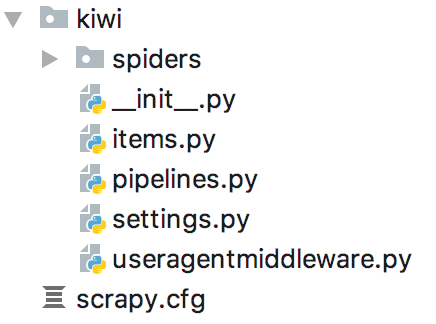
定义数据结构
settings.py是一些设置信息,items.py用来保存解析出来的数据,在此文件里定义一些数据结构,示例代码:
[url=] [/url]
[/url]1
#
-*- coding: utf-8 -*-
2
3
#
Define here the models for your scraped items
4
#
5
#
See documentation in:
6
#
http://www.smpeizi.com/en/latest/topics/items.html
7
8
import
scrapy 9
10
11
class
AuthorInfo(scrapy.Item):12
authorName = scrapy.Field() #
作者昵称
13
authorUrl = scrapy.Field() #
作者Url
14
15
class
ReplyItem(scrapy.Item):16
content = scrapy.Field() #
回复内容
17
time = scrapy.Field() #
发布时间
18
author = scrapy.Field() #
回复人(AuthorInfo)
19
20
class
TopicItem(scrapy.Item):21
title = scrapy.Field() #
帖子标题
22
url = scrapy.Field() #
帖子页面Url
23
content = scrapy.Field() #
帖子内容
24
time = scrapy.Field() #
发布时间
25
author = scrapy.Field() #
发帖人(AuthorInfo)
26
reply = scrapy.Field() #
回复列表(ReplyItem list)
27
replyCount = scrapy.Field() #
回复条数
[url=][/url]
[/url]上面TopicItem中嵌套了AuthorInfo和ReplyItem list,但是初始化类型必须是scrapy.Field(),注意这三个类都需要从scrapy.Item继续。
创建爬虫蜘蛛
工程目录spiders下的kiwi_spider.py文件是爬虫蜘蛛代码,爬虫代码写在这个文件里。示例以爬豆瓣群组里的帖子和回复为例。
[url=][/url]
[/url] 1
#
-*- coding: utf-8 -*-
2
from
scrapy.selector import
Selector 3
from
scrapy.spiders import
CrawlSpider, Rule 4
from
scrapy.linkextractors import
LinkExtractor 5
6
from
kiwi.items import
TopicItem, AuthorInfo, ReplyItem 7
class
KiwiSpider(CrawlSpider): 8
name = "
kiwi
"
9
allowed_domains = ["
douban.com
"
] 10
11
anchorTitleXPath = '
a/text()
'
12
anchorHrefXPath = '
a/@href
'
13
14
start_urls = [ 15
"
https://www.pzzs168.com/group/topic/90895393/?start=0
"
, 16
] 17
rules = ( 18
Rule( 19
LinkExtractor(allow=(r'
/group/[^/]+/discussion\?start=\d+
'
,)), 20
callback='
parse_topic_list
'
, 21
follow=True 22
), 23
Rule( 24
LinkExtractor(allow=(r'
/group/topic/\d+/$
'
,)), #
帖子内容页面
25
callback='
parse_topic_content
'
, 26
follow=True 27
), 28
Rule( 29
LinkExtractor(allow=(r'
/group/topic/\d+/\?start=\d+
'
,)), #
帖子内容页面
30
callback='
parse_topic_content
'
, 31
follow=True 32
), 33
) 34
35
#
帖子详情页面
36
def
parse_topic_content(self, response): 37
#
标题XPath
38
titleXPath = '
//html/head/title/text()
'
39
#
帖子内容XPath
40
contentXPath = '
//div[@class="topic-content"]/p/text()
'
41
#
发帖时间XPath
42
timeXPath = '
//div[@class="topic-doc"]/h3/span[@class="color-green"]/text()
'
43
#
发帖人XPath
44
authorXPath = '
//div[@class="topic-doc"]/h3/span[@class="from"]
'
45
46
item = TopicItem() 47
#
当前页面Url
48
item['
url
'
] = response.url 49
#
标题
50
titleFragment = Selector(response).xpath(titleXPath) 51
item['
title
'
] = str(titleFragment.extract()[0]).strip() 52
53
#
帖子内容
54
contentFragment = Selector(response).xpath(contentXPath) 55
strs = [line.extract().strip() for
line in
contentFragment] 56
item['
content
'
] = '
\n
'
.join(strs) 57
#
发帖时间
58
timeFragment = Selector(response).xpath(timeXPath) 59
if
timeFragment: 60
item['
time
'
] = timeFragment[0].extract() 61
62
#
发帖人信息
63
authorInfo = AuthorInfo() 64
authorFragment = Selector(response).xpath(authorXPath) 65
if
authorFragment: 66
authorInfo['
authorName
'
] = authorFragment[0].xpath(self.anchorTitleXPath).extract()[0] 67
authorInfo['
authorUrl
'
] = authorFragment[0].xpath(self.anchorHrefXPath).extract()[0] 68
69
item['
author
'
] = dict(authorInfo) 70
71
#
回复列表XPath
72
replyRootXPath = r'
//div[@class="reply-doc content"]
'
73
#
回复时间XPath
74
replyTimeXPath = r'
div[@class="bg-img-green"]/h4/span[@class="pubtime"]/text()
'
75
#
回复人XPath
76
replyAuthorXPath = r'
div[@class="bg-img-green"]/h4
'
77
78
replies = [] 79
itemsFragment = Selector(response).xpath(replyRootXPath) 80
for
replyItemXPath in
itemsFragment: 81
replyItem = ReplyItem() 82
#
回复内容
83
contents = replyItemXPath.xpath('
p/text()
'
) 84
strs = [line.extract().strip() for
line in
contents] 85
replyItem['
content
'
] = '
\n
'
.join(strs) 86
#
回复时间
87
timeFragment = replyItemXPath.xpath(replyTimeXPath) 88
if
timeFragment: 89
replyItem['
time
'
] = timeFragment[0].extract() 90
#
回复人
91
replyAuthorInfo = AuthorInfo()92
authorFragment = replyItemXPath.xpath(replyAuthorXPath) 93
if
authorFragment: 94
replyAuthorInfo['
authorName
'
] = authorFragment[0].xpath(self.anchorTitleXPath).extract()[0] 95
replyAuthorInfo['
authorUrl
'
] = authorFragment[0].xpath(self.anchorHrefXPath).extract()[0] 96
97
replyItem['
author
'
] = dict(replyAuthorInfo) 98
#
添加进回复列表
99
replies.append(dict(replyItem))100
101
item['
reply
'
] = replies102
yield
item103
104
#
帖子列表页面
105
def
parse_topic_list(self, response):106
#
帖子列表XPath(跳过表头行)
107
topicRootXPath = r'
//table[@class="olt"]/tr[position()>1]
'
108
#
单条帖子条目XPath
109
titleXPath = r'
td[@class="title"]
'
110
#
发帖人XPath
111
authorXPath = r'
td[2]
'
112
#
回复条数XPath
113
replyCountXPath = r'
td[3]/text()
'
114
#
发帖时间XPath
115
timeXPath = r'
td[@class="time"]/text()
'
116
117
topicsPath = Selector(response).xpath(topicRootXPath)118
for
topicItemPath in
topicsPath:119
item = TopicItem()120
titlePath = topicItemPath.xpath(titleXPath)121
item['
title
'
] = titlePath.xpath(self.anchorTitleXPath).extract()[0]122
item['
url
'
] = titlePath.xpath(self.anchorHrefXPath).extract()[0]123
#
发帖时间
124
timePath = topicItemPath.xpath(timeXPath)125
if
timePath:126
item['
time
'
] = timePath[0].extract()127
#
发帖人
128
authorPath = topicItemPath.xpath(authorXPath)129
authInfo = AuthorInfo()130
authInfo['
authorName
'
] = authorPath[0].xpath(self.anchorTitleXPath).extract()[0]131
authInfo['
authorUrl
'
] = authorPath[0].xpath(self.anchorHrefXPath).extract()[0]132
item['
author
'
] = dict(authInfo)133
#
回复条数
134
replyCountPath = topicItemPath.xpath(replyCountXPath)135
item['
replyCount
'
] = replyCountPath[0].extract()136
137
item['
content
'
] = ''
138
yield
item139
140
parse_start_url = parse_topic_content[url=][/url]
[/url]特别注意
1、KiwiSpider需要改成从CrawlSpider类继承,模板生成的代码是从Spider继承的,那样的话不会去爬rules里的页面。
2、parse_start_url = parse_topic_list 是定义入口函数,从CrawlSpider类的代码里可以看到parse函数回调的是parse_start_url函数,子类可以重写这个函数,也可以像上面代码那样给它赋值一个新函数。
3、start_urls里是入口网址,可以添加多个网址。
4、rules里定义在抓取到的网页中哪些网址需要进去爬,规则和对应的回调函数,规则用正则表达式写。上面的示例代码,定义了继续抓取帖子详情首页及分页。
5、注意代码里用dict()包装的部分,items.py文件里定义数据结构的时候,author属性实际需要的是AuthorInfo类型,赋值的时候必须用dict包装起来,item['author'] = authInfo 赋值会报Error。
6、提取内容的时候利用XPath取出需要的内容,有关XPath的资料参看:XPath教程。开发过程中可以利用浏览器提供的工具查看XPath,比如Firefox 浏览器中的FireBug、FirePath插件,对于https://www.aiidol.com/group/python/discussion?start=0这个页面,XPath规则“//td[@class="title"]”可以获取到帖子标题列表,示例:
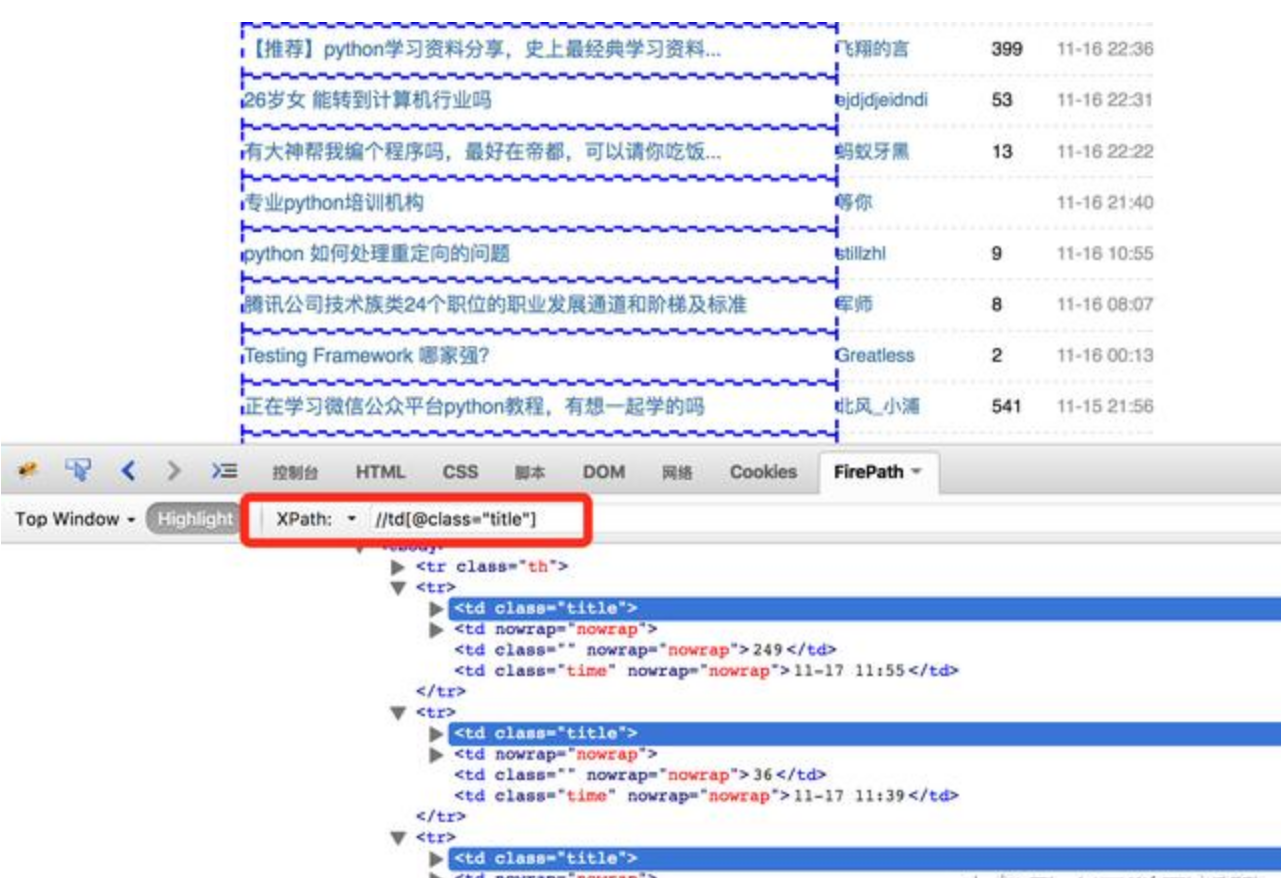
上图红框中可以输入XPath规则,方便测试XPath的规则是否符合要求。新版Firefox可以安装 Try XPath 这个插件 查看XPath,Chrome浏览器可以安装 XPath Helper 插件。
使用随机UserAgent
为了让网站看来更像是正常的浏览器访问,可以写一个Middleware提供随机的User-Agent,在工程根目录下添加文件useragentmiddleware.py,示例代码:
[url=][/url]
[/url]1
#
-*-coding:utf-8-*-
2
3
import
random 4
from
scrapy.downloadermiddlewares.useragent import
UserAgentMiddleware 5
6
7
class
RotateUserAgentMiddleware(UserAgentMiddleware): 8
def
__init__
(self, user_agent=''
): 9
self.user_agent = user_agent10
11
def
process_request(self, request, spider):12
ua = random.choice(self.user_agent_list)13
if
ua:14
request.headers.setdefault('
User-Agent
'
, ua)15
16
#
for more user agent strings,you can find it in http://www.idiancai.com/pages/useragentstring.php
17
user_agent_list = [ \18
"
Mozilla/5.0 (Windows NT 6.1; WOW64) AppleWebKit/537.1 (KHTML, like Gecko) Chrome/22.0.1207.1 Safari/537.1
"
\19
"
Mozilla/5.0 (X11; CrOS i686 2268.111.0) AppleWebKit/536.11 (KHTML, like Gecko) Chrome/20.0.1132.57 Safari/536.11
"
, \20
"
Mozilla/5.0 (Windows NT 6.1; WOW64) AppleWebKit/536.6 (KHTML, like Gecko) Chrome/20.0.1092.0 Safari/536.6
"
, \21
"
Mozilla/5.0 (Windows NT 6.2) AppleWebKit/536.6 (KHTML, like Gecko) Chrome/20.0.1090.0 Safari/536.6
"
, \22
"
Mozilla/5.0 (Windows NT 6.2; WOW64) AppleWebKit/537.1 (KHTML, like Gecko) Chrome/19.77.34.5 Safari/537.1
"
, \23
"
Mozilla/5.0 (X11; Linux x86_64) AppleWebKit/536.5 (KHTML, like Gecko) Chrome/19.0.1084.9 Safari/536.5
"
, \24
"
Mozilla/5.0 (Windows NT 6.0) AppleWebKit/536.5 (KHTML, like Gecko) Chrome/19.0.1084.36 Safari/536.5
"
, \25
"
Mozilla/5.0 (Windows NT 6.1; WOW64) AppleWebKit/536.3 (KHTML, like Gecko) Chrome/19.0.1063.0 Safari/536.3
"
, \26
"
Mozilla/5.0 (Windows NT 5.1) AppleWebKit/536.3 (KHTML, like Gecko) Chrome/19.0.1063.0 Safari/536.3
"
, \27
"
Mozilla/5.0 (Macintosh; Intel Mac OS X 10_8_0) AppleWebKit/536.3 (KHTML, like Gecko) Chrome/19.0.1063.0 Safari/536.3
"
, \28
"
Mozilla/5.0 (Windows NT 6.2) AppleWebKit/536.3 (KHTML, like Gecko) Chrome/19.0.1062.0 Safari/536.3
"
, \29
"
Mozilla/5.0 (Windows NT 6.1; WOW64) AppleWebKit/536.3 (KHTML, like Gecko) Chrome/19.0.1062.0 Safari/536.3
"
, \30
"
Mozilla/5.0 (Windows NT 6.2) AppleWebKit/536.3 (KHTML, like Gecko) Chrome/19.0.1061.1 Safari/536.3
"
, \31
"
Mozilla/5.0 (Windows NT 6.1; WOW64) AppleWebKit/536.3 (KHTML, like Gecko) Chrome/19.0.1061.1 Safari/536.3
"
, \32
"
Mozilla/5.0 (Windows NT 6.1) AppleWebKit/536.3 (KHTML, like Gecko) Chrome/19.0.1061.1 Safari/536.3
"
, \33
"
Mozilla/5.0 (Windows NT 6.2) AppleWebKit/536.3 (KHTML, like Gecko) Chrome/19.0.1061.0 Safari/536.3
"
, \34
"
Mozilla/5.0 (X11; Linux x86_64) AppleWebKit/535.24 (KHTML, like Gecko) Chrome/19.0.1055.1 Safari/535.24
"
, \35
"
Mozilla/5.0 (Windows NT 6.2; WOW64) AppleWebKit/535.24 (KHTML, like Gecko) Chrome/19.0.1055.1 Safari/535.24
"
36
][url=][/url]
[/url]修改settings.py,添加下面的设置,
DOWNLOADER_MIDDLEWARES = {
'
kiwi.useragentmiddleware.RotateUserAgentMiddleware
'
: 1,}同时禁用cookie,COOKIES_ENABLED = False。
运行爬虫
切换到工程根目录,输入命令:scrapy crawl kiwi,console窗口可以看到打印出来的数据,或者使用命令“scrapy crawl kiwi -o result.json -t json”将结果保存到文件里。
上述代码中FundEquity类的属性值使用getter/setter函数方式定义的,这种方式可以对值进行检查。__str__(self)函数类似其它语言里的toString()。
在命令行运行fund_spider.py代码,console窗口会输出净值数据。
小结
从以上的示例代码中可见少量代码就能把豆瓣网上小组中的帖子和回复数据抓取、内容解析、存储下来,可见Python语言的简洁、高效。
例子的代码比较简单,唯一比较花时间的是调 XPath规则,借助于浏览器辅助插件工具能大大提高效率。
例子中没有提及Pipeline(管道)、Middleware(中间件) 这些复杂东西。没有考虑爬虫请求太频繁导致站方封禁IP(可以通过不断更换HTTP Proxy 方式破解),没有考虑需要登录才能抓取数据的情况(代码模拟用户登录破解)。
实际项目中提取内容的XPath规则、正则表达式 这类易变动的部分不应该硬编码写在代码里,网页抓取、内容解析、解析结果的存储等应该使用分布式架构的方式独立运行。总之实际生产环境中运行的爬虫系统需要考虑的问题很多,github上也有一些开源的网络爬虫系统,可以参考。
更多java技术资讯可关注:itheimaGZ获取

