关于垂直居中的问题:
1、使用flex布局垂直居中:
最简单的方式是使用比较流行的flex布局方式,但是flex布局不能满足兼容IE浏览器等低版本浏览器的需求
 display: flex;
 flex: 1;
 flex-direction: column;
 justify-content: center;
2、使用display:inline-block;vertical-align:middle;
- 通过verticle-align:middle实现CSS垂直居中。
但是有一点需要格外注意,vertical属性生效的前提是元素的display:inline-block。
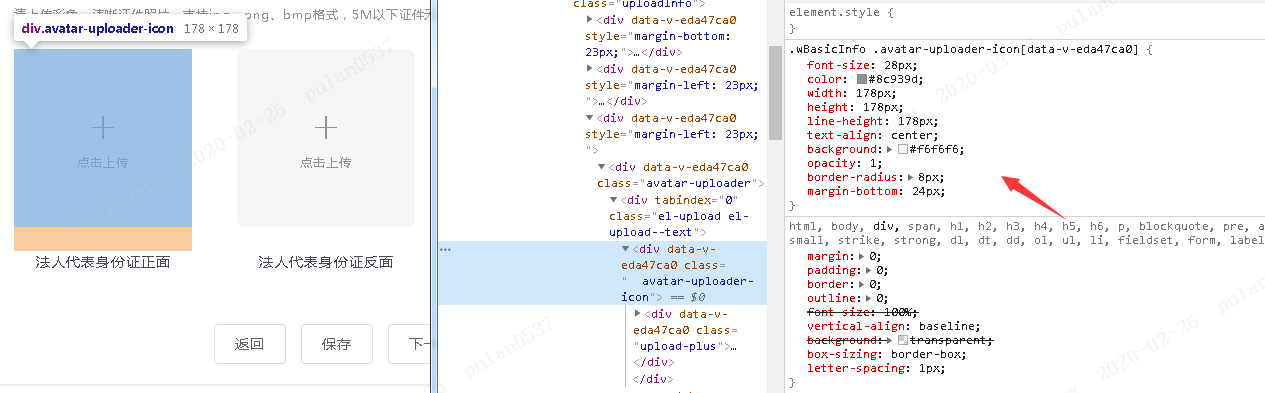
<template>
    <div  class="  avatar-uploader-icon">
    		<div class="upload-plus">
    				<div><i class="el-icon-plus"></i></div>
    				<div><span class="upload-button">点击上传</span></div>
    		</div>
    </div>
</template>

<style>
       .avatar-uploader-icon {
                font-size: 28px;
                color: #8c939d;
                width: 178px;
                height: 178px;
                line-height: 178px;
                text-align: center;
                background: #f6f6f6;
                opacity: 1;
                border-radius: 8px;
                margin-bottom: 24px;

                .upload-plus{
		height: auto;
		width: inherit;
		line-height: 100%;
		display: inline-block;
		vertical-align: middle;
		/* display: flex; */
		/* flex: 1; */
		/* flex-direction: column; */
		/* justify-content: center;*/
            }

            }

</style>