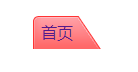
- 滑动门
- 我想要文字有链接,那就必须放在a里面
span里面是放的是文字
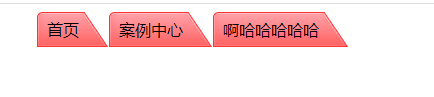
        .nav {
            width: 800px;
            height: 33px;
            margin: 0 auto;
        }
        .left,.center,.right {
            height: 35px;
            float: left;
            line-height: 35px;
        }
        .left {
            width: 10px;
            background: url("./img/left.png") no-repeat;
        }
        .center {
            background: url("./img/center.png") repeat-x;
        }
        .right {
            width: 30px;
            background: url("./img/right.png");
        }
        /* 滑动门:核心原理就是两侧固定中间自适应(两侧是固定大小的,中间是根据内容的多少来展开的。) */

    <div class="nav">
        <div class="left"></div>
        <div class="center">首页</div>
        <div class="right"></div>
        <div class="left"></div>
        <div class="center">案例中心</div>
        <div class="right"></div>
        <div class="left"></div>
        <div class="center">啊哈哈哈哈哈</div>
        <div class="right"></div>
    </div>
        a {
            text-decoration: none;
        }
        li {
            list-style: none;
        }
        .nav {
            width: 800px;
            margin: 0 auto;
            height: 33px;
        }
        ul li {
            float: left;
        }
        a,span {
            display: block;
            height: 33px;
            line-height: 33px;
        }
        a {
            padding-left: 8px;
            background: url("./img/left01.png") no-repeat;
        }
        span {
            padding-right: 30px;
            background: url("./img/right01.png") right top;
        }
        <!-- a标签给左边背景,文字padding-left 往右移动 -->
        <!-- span标签给右边背景,文字padding-right 往左移动 -->
    <div class="nav">
        <ul>
            <li><a href=""><span>首页</span></a></li>
        </ul>
    </div>