

⼩程序的配置分为全局配置、⻚⾯配置以及sitemap 配置
一、全局配置
小程序根目录下的 app.json 文件用来对微信小程序进行全局配置,决定页面文件的路径、窗口表现、设置网络超时时间、设置多 tab 等。文件的内容为一个JSON对象。
PS: JSON对象中,key与value一定要加双引号
以下是一个包含了部分常用配置选项的 app.json
{
 "pages": [
   "pages/index/index",
   "pages/logs/index"
 ],
 "window": {
   "navigationBarTitleText": "Demo"
 },
 "tabBar": {
   "list": [{
     "pagePath": "pages/index/index",
     "text": "首页"
   }, {
     "pagePath": "pages/logs/index",
     "text": "日志"
   }]
 },
 "networkTimeout": {
   "request": 10000,
   "downloadFile": 10000
 },
 "debug": true,
 "navigateToMiniProgramAppIdList": [
   "wxe5f52902cf4de896"
 ]
}
以下是各个配置项的介绍
| 属性 | 类型 | 必填 | 描述 | 最低版本 |
|---|---|---|---|---|
| pages | string[] | 是 | 页面路径列表 | |
| window | Object | 否 | 全局的默认窗口表现 | |
| tabBar | Object | 否 | 底部 tab 栏的表现 | |
| networkTimeout | Object | 否 | 网络超时时间 | |
| debug | boolean | 否 | 是否开启 debug 模式,默认关闭 | |
| functionalPages | boolean | 否 | 是否启用插件功能页,默认关闭 | 2.1.0 |
| subpackages | Object[] | 否 | 分包结构配置 | 1.7.3 |
| workers | string | 否 | Worker 代码放置的目录 | 1.9.90 |
| requiredBackgroundModes | string[] | 否 | 需要在后台使用的能力,如「音乐播放」 | |
| plugins | Object | 否 | 使用到的插件 | 1.9.6 |
| preloadRule | Object | 否 | 分包预下载规则 | 2.3.0 |
| resizable | boolean | 否 | iPad 小程序是否支持屏幕旋转,默认关闭 | 2.3.0 |
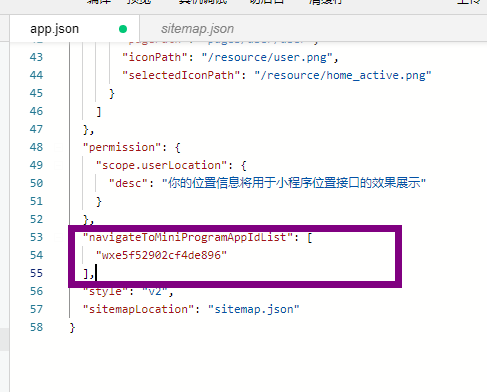
| navigateToMiniProgramAppIdList | string[] | 否 | 需要跳转的小程序列表,详见 wx.navigateToMiniProgram | 2.4.0 |
| usingComponents | Object | 否 | 全局自定义组件配置 | 开发者工具 1.02.1810190 |
| permission | Object | 否 | 小程序接口权限相关设置 | 微信客户端 7.0.0 |
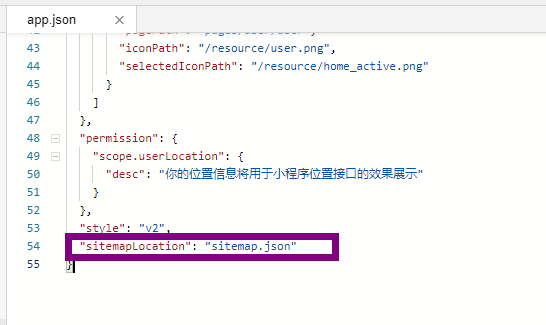
| sitemapLocation | string | 是 | 指明 sitemap.json 的位置 | |
| style | string | 否 | 指定使用升级后的weui样式 | 2.8.0 |
| useExtendedLib | Object | 否 | 指定需要引用的扩展库 | 2.2.1 |
| entranceDeclare | Object | 否 | 微信消息用小程序打开 | 微信客户端7.0.9 |
接下来介绍一些常用的配置选项
1.1 Pages
⽤于指定⼩程序由哪些⻚⾯组成,每⼀项都对应⼀个⻚⾯的路径(含⽂件名)信息。⽂件名不需要写⽂件后缀,框架会⾃动去寻找对于位置的 .json, .js, .wxml, .wxss 四个⽂件进⾏处理
在app.json中配置如下
{
    "pages": [
    "pages/index/index",
    "pages/logs/index",
    "pages/user/user"
  ]
}
则在开发目录中显示为:
├── app.js
├── app.json
├── app.wxss
├── pages
│   │── index
│   │   ├── index.wxml
│   │   ├── index.js
│   │   ├── index.json
│   │   └── index.wxss
│   │── user
│   │   ├── user.wxml
│   │   ├── user.js
│   │   ├── user.json
│   │   └── user.wxss
│   └── logs
│       ├── logs.wxml
│       ├── logs.js
│       ├── logs.json
│       └── logs.wxss
└── utils
有多少个页面,pages的数组中就应该有多少项
数组的第一项代表小程序的初始页面(首页)。小程序中新增/减少页面,都需要对 pages 数组进行修改。
开发小技巧:
直接在pages选项中写⻚⾯路径,即可创建相应的⻚⾯
1.2 Widows
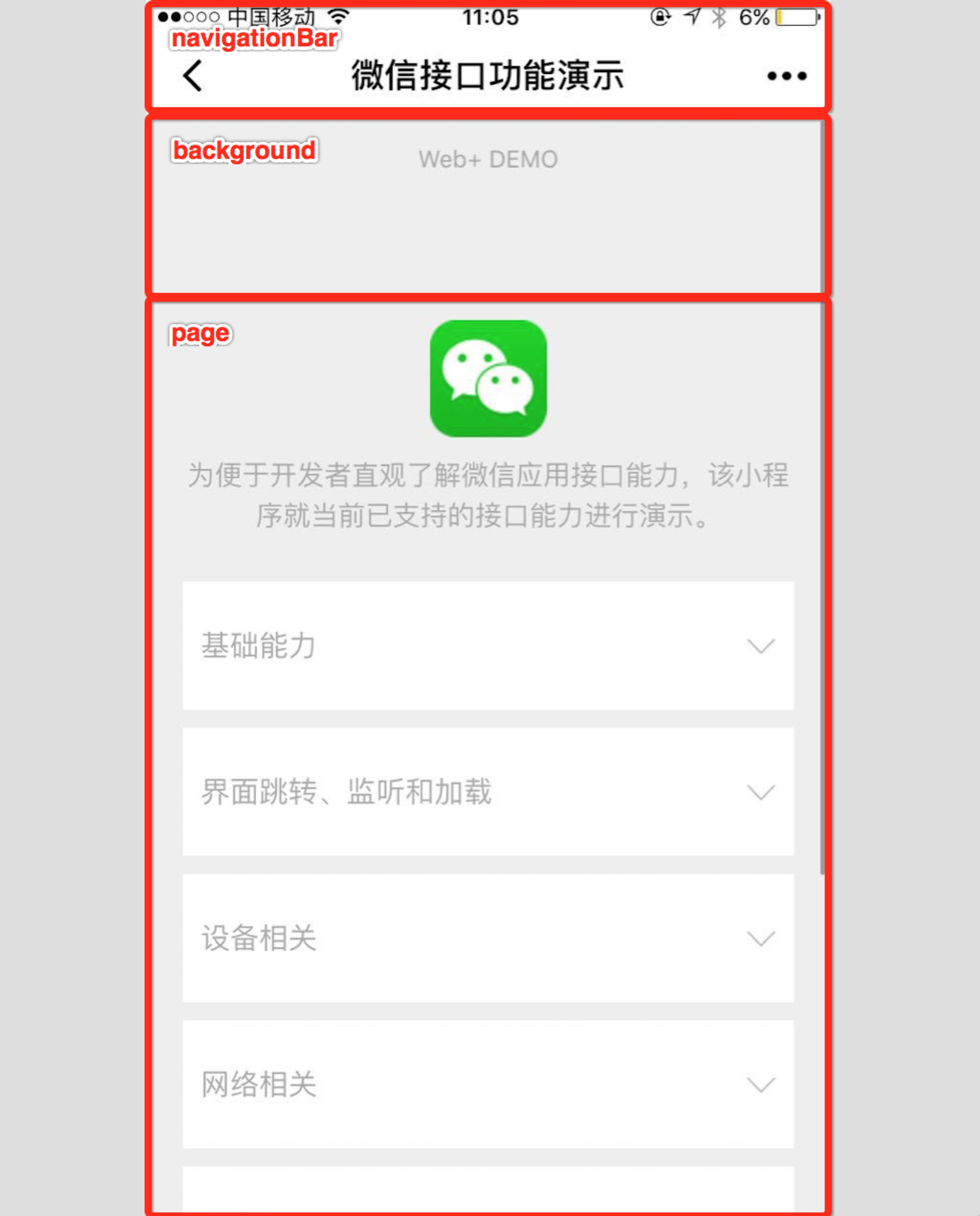
用于设置小程序的状态栏、导航条、标题、窗口背景色。配置如下:
| 属性 | 类型 | 默认值 | 描述 | 最低版本 |
|---|---|---|---|---|
| navigationBarBackgroundColor | HexColor | #000000 | 导航栏背景颜色,如 #000000 | |
| navigationBarTextStyle | string | white | 导航栏标题颜色,仅支持 black / white | |
| navigationBarTitleText | string | 导航栏标题文字内容 | ||
| navigationStyle | string | default | 导航栏样式,仅支持以下值:default 默认样式custom 自定义导航栏,只保留右上角胶囊按钮。参见注 2。 | 微信客户端 6.6.0 |
| backgroundColor | HexColor | #ffffff | 窗口的背景色 | |
| backgroundTextStyle | string | dark | 下拉 loading 的样式,仅支持 dark / light | |
| backgroundColorTop | string | #ffffff | 顶部窗口的背景色,仅 iOS 支持 | 微信客户端 6.5.16 |
| backgroundColorBottom | string | #ffffff | 底部窗口的背景色,仅 iOS 支持 | 微信客户端 6.5.16 |
| enablePullDownRefresh | boolean | false | 是否开启全局的下拉刷新。 详见 Page.onPullDownRefresh | |
| onReachBottomDistance | number | 50 | 页面上拉触底事件触发时距页面底部距离,单位为 px。 详见 Page.onReachBottom | |
| pageOrientation | string | portrait | 屏幕旋转设置,支持 auto / portrait / landscape 详见 响应显示区域变化 | 2.4.0 (auto) / 2.5.0 (landscape) |
在app.json中配置如下:
{
  "window": {
    "navigationBarBackgroundColor": "#ffffff",
    "navigationBarTextStyle": "black",
    "navigationBarTitleText": "微信接口功能演示",
    "backgroundColor": "#eeeeee",
    "backgroundTextStyle": "light"
  }
}
各种属性展示示意图如下
1.3 tabBar
如果小程序是一个多 tab 应用(客户端窗口的底部或顶部有 tab 栏可以切换页面),可以通过 tabBar 配置项指定 tab 栏的表现,以及 tab 切换时显示的对应页面。
| 属性 | 类型 | 必填 | 默认值 | 描述 | 最低版本 |
|---|---|---|---|---|---|
| color | HexColor | 是 | tab 上的文字默认颜色,仅支持十六进制颜色 | ||
| selectedColor | HexColor | 是 | tab 上的文字选中时的颜色,仅支持十六进制颜色 | ||
| backgroundColor | HexColor | 是 | tab 的背景色,仅支持十六进制颜色 | ||
| borderStyle | string | 否 | black | tabbar 上边框的颜色, 仅支持 black / white | |
| list | Array | 是 | tab 的列表,详见 list 属性说明,最少 2 个、最多 5 个 tab | ||
| position | string | 否 | bottom | tabBar 的位置,仅支持 bottom / top | |
| custom | boolean | 否 | false | 自定义 tabBar,见详情 | 2.5.0 |
其中 list 接受⼀个数组,只能配置最少 2 个、最多 5 个 tab。tab 按数组的顺序排序,每个项都是⼀个对象,其属性值如下:
| 属性 | 类型 | 必填 | 说明 |
|---|---|---|---|
| pagePath | string | 是 | 页面路径,必须在 pages 中先定义 |
| text | string | 是 | tab 上按钮文字 |
| iconPath | string | 否 | 图片路径,icon 大小限制为 40kb,建议尺寸为 81px * 81px,不支持网络图片。 当 position 为 top 时,不显示 icon。 |
| selectedIconPath | string | 否 | 选中时的图片路径,icon 大小限制为 40kb,建议尺寸为 81px * 81px,不支持网络图片。 当 position 为 top 时,不显示 icon。 |
1.3.1 底部选项卡图标(icon)下载
- icon字体图标 在 iconfont字体图标库 中选择需要的图标,然后选择下载
选择好自己需要的图标
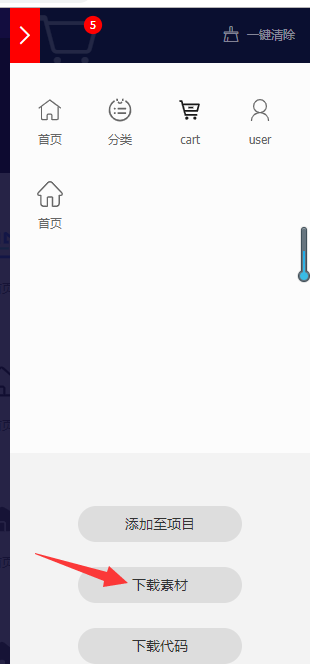
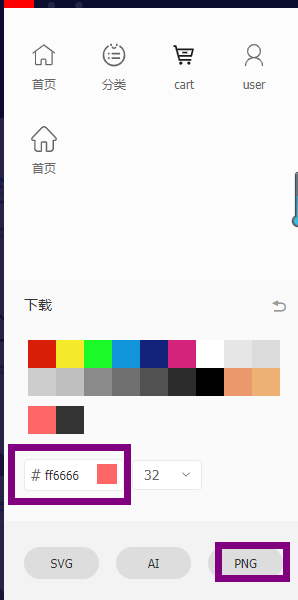
用于选中后的图标颜色,颜色旁边数字框为图片大小,输入81
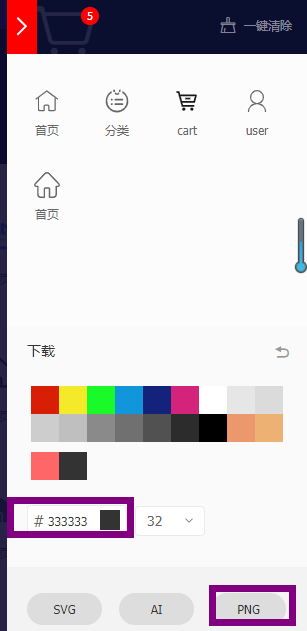
用于未选中时的图片颜色,颜色旁边数字框为图片大小,输入81
1.4 networkTimeout
各类网络请求的超时时间,单位均为毫秒。
| 属性 | 类型 | 必填 | 默认值 | 说明 |
|---|---|---|---|---|
| request | number | 否 | 60000 | wx.request 的超时时间,单位:毫秒。 |
| connectSocket | number | 否 | 60000 | wx.connectSocket 的超时时间,单位:毫秒。 |
| uploadFile | number | 否 | 60000 | wx.uploadFile 的超时时间,单位:毫秒。 |
| downloadFile | number | 否 | 60000 | wx.downloadFile 的超时时间,单位:毫秒。 |
1.5 debug
可以在开发者工具中开启 debug 模式,在开发者工具的控制台面板,调试信息以 info 的形式给出,其信息有 Page 的注册,页面路由,数据更新,事件触发等。可以帮助开发者快速定位一些常见的问题
1.6 permission
小程序接口权限相关设置。字段类型为 Object,结构为:
| 属性 | 类型 | 必填 | 默认值 | 描述 |
|---|---|---|---|---|
| scope.userLocation | PermissionObject | 否 | 位置相关权限声明 |
PermissionObject 结构
| 属性 | 类型 | 必填 | 默认值 | 说明 |
|---|---|---|---|---|
| desc | string | 是 | 小程序获取权限时展示的接口用途说明。最长 30 个字符 |
在app.json中配置如下:
{
  "pages": ["pages/index/index"],
  "permission": {
    "scope.userLocation": {
      "desc": "你的位置信息将用于小程序位置接口的效果展示"
    }
  }
}
展示效果如下

1.8 sitemapLocation
指明 sitemap.json 的位置;默认为 'sitemap.json' 即在 app.json 同级⽬录下名字的sitemap.json ⽂件
1.7 navigateToMiniProgramAppIdList
当⼩程序需要使⽤ wx.navigateToMiniProgram 接⼝跳转到其他⼩程序时,需要先在配置⽂件中声明需要跳转的⼩程序 appId 列表,最多允许填写 10 个。
二、 页面配置
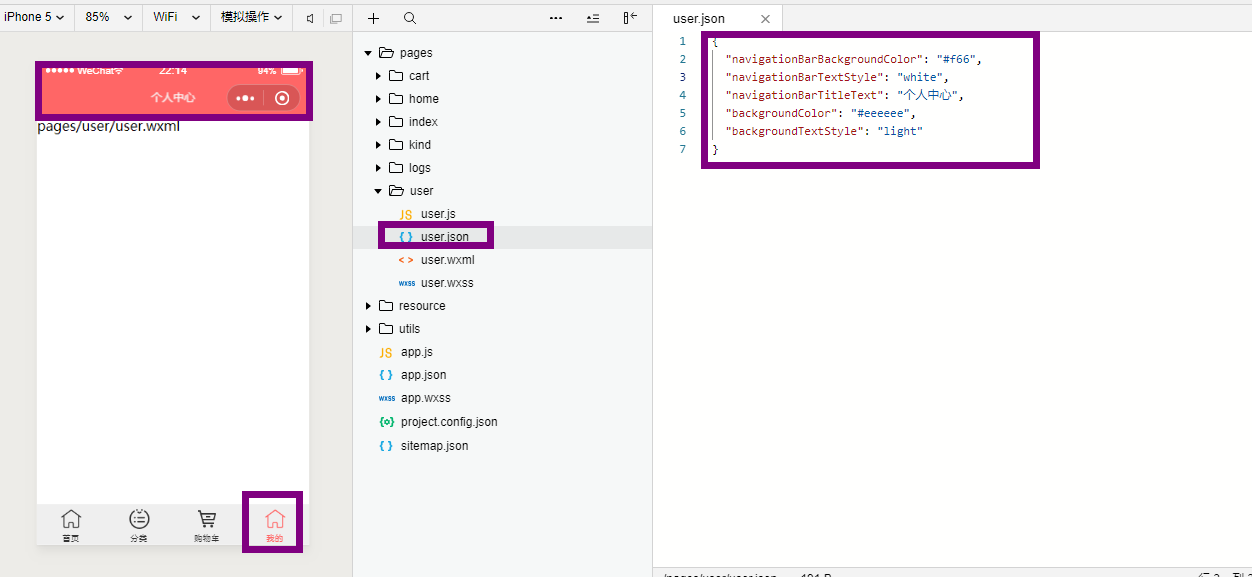
每⼀个⼩程序⻚⾯也可以使⽤ .json ⽂件来对本⻚⾯的窗⼝表现进⾏配置。⻚⾯中配置项在当前⻚⾯会覆盖 app.json 的 window 中相同的配置项。⽂件内容为⼀个JSON 对象,例如:
{
  "navigationBarBackgroundColor": "#ffffff",
  "navigationBarTextStyle": "black",
  "navigationBarTitleText": "微信接口功能演示",
  "backgroundColor": "#eeeeee",
  "backgroundTextStyle": "light"
}
有以下属性:
| 属性 | 类型 | 默认值 | 描述 | 最低版本 |
|---|---|---|---|---|
| navigationBarBackgroundColor | HexColor | #000000 | 导航栏背景颜色,如 #000000 | |
| navigationBarTextStyle | string | white | 导航栏标题颜色,仅支持 black / white | |
| navigationBarTitleText | string | 导航栏标题文字内容 | ||
| navigationStyle | string | default | 导航栏样式,仅支持以下值:default 默认样式custom 自定义导航栏,只保留右上角胶囊按钮 | 微信客户端 7.0.0 |
| backgroundColor | HexColor | #ffffff | 窗口的背景色 | |
| backgroundTextStyle | string | dark | 下拉 loading 的样式,仅支持 dark / light | |
| backgroundColorTop | string | #ffffff | 顶部窗口的背景色,仅 iOS 支持 | 微信客户端 6.5.16 |
| backgroundColorBottom | string | #ffffff | 底部窗口的背景色,仅 iOS 支持 | 微信客户端 6.5.16 |
| enablePullDownRefresh | boolean | false | 是否开启当前页面下拉刷新。 详见 Page.onPullDownRefresh | |
| onReachBottomDistance | number | 50 | 页面上拉触底事件触发时距页面底部距离,单位为px。 详见 Page.onReachBottom | |
| pageOrientation | string | portrait | 屏幕旋转设置,支持 auto / portrait / landscape 详见 响应显示区域变化 | 2.4.0 (auto) / 2.5.0 (landscape) |
| disableScroll | boolean | false | 设置为 true 则页面整体不能上下滚动。只在页面配置中有效,无法在 app.json 中设置 | |
| usingComponents | Object | 否 | 页面自定义组件配置 | 1.6.3 |
例如个人中心的页面配置:
以上就是微信小程序的全局配置及页面配置的API说明。(ps:逆战)
