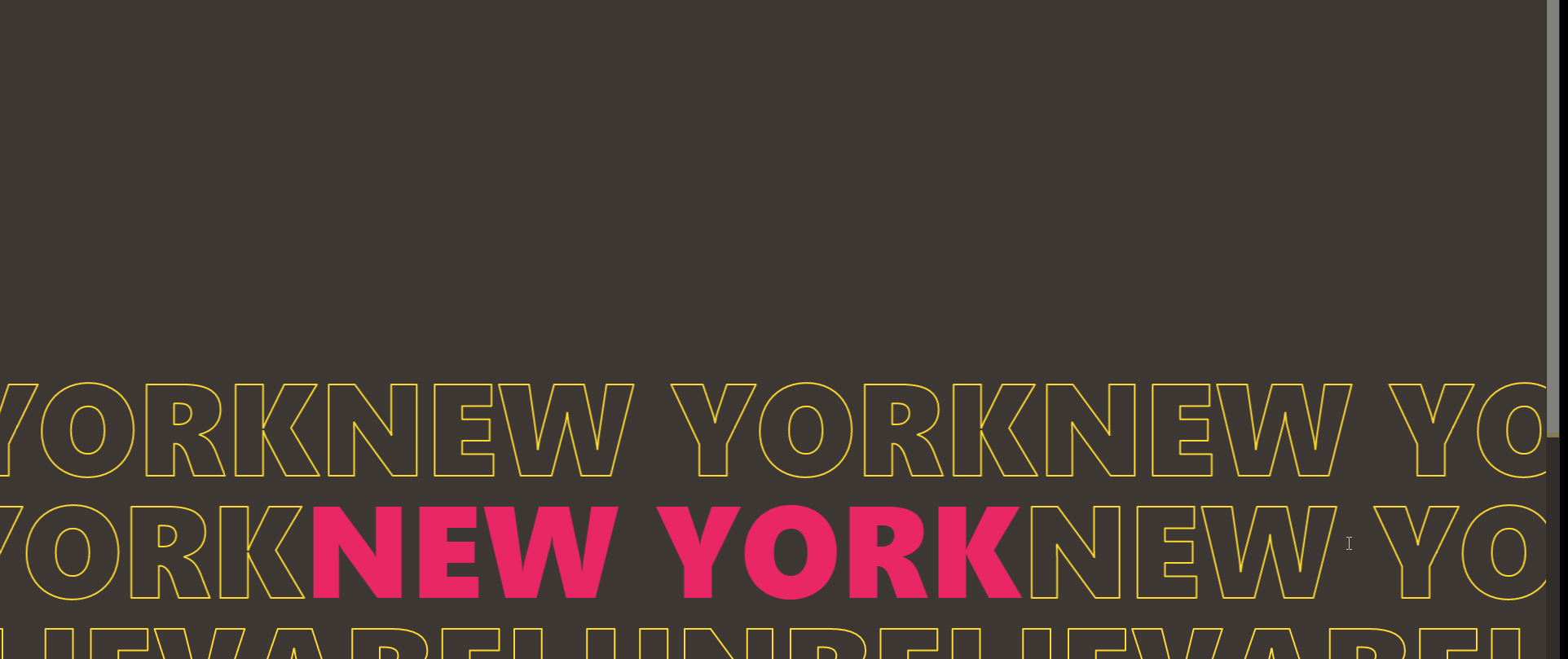
做一个随鼠标滑轮滑动文字向左右滑动的效果,滑轮向下第1,3排文字向右滑动,2排文字向左滑动,滑轮向上反之
思路:
- JS获取鼠标的滑动事件
- 获取元素的style样式
- 检查到滑动时修改元素的样式
注意点:浏览器兼容问题,元素归位
css
<style>
/* opacity: 1;
transition: all 1s cubic-bezier(.215,.61,.355,1); */
/* .detail_section-contact a:hover {
transform: scale(1.15);
letter-spacing: .15em;
color: #634c39;
text-shadow: none;
} */
.box{
white-space: nowrap;
margin-left: -500px;
transition: 1200ms ;
}
.stroke{
-webkit-text-stroke: 2px #FFDA32;
-webkit-text-fill-color: transparent;
font-weight: 800;
font-size: 160px;
font-family: ;
line-height: 150px;
text-transform: uppercase;
font-family: ;
display: inline-block;
margin: 0;
}
body{
background-color: #3D3834;
overflow-x: hidden;
}
.dian{
-webkit-text-stroke: 0px;
-webkit-text-fill-color: #EA2768;
/* color: #fff; */
}
.aera{
height: 500px;
}
</style>
html
<body>
<div class="aera"></div>
<div class="box" id="box1">
<h1 class="stroke" > New York </h1>
<h1 class="stroke" > New York</h1>
<h1 class="stroke" > New York</h1>
</div>
<div class="box" id="box2">
<h1 class="stroke "> New York</h1>
<h1 class="stroke dian" >New York</h1>
<h1 class="stroke" > New York</h1>
<h1 class="stroke" > New York</h1>
</div>
<div class="box" id="box3">
<h1 class="stroke "> unbelievabel</h1>
<h1 class="stroke" > unbelievabel</h1>
<h1 class="stroke" > unbelievabel</h1>
<h1 class="stroke" > unbelievabel</h1>
</div>
<div class="aera"></div>
</body>
JS
<script type="text/javascript">
let positon=0;
var scrollFunc = function (e) {
e = e || window.event;
let box1 = document.getElementById("box1")
let box2 = document.getElementById("box2")
let box3 = document.getElementById("box3")
if(positon==100||positon==(-100)){
positon=0
}
if (e.wheelDelta) { //第一步:先判断浏览器IE,谷歌滑轮事件
if (e.wheelDelta > 0) { //当滑轮向上滚动时
positon=positon-10
box1.style.transform='translateX('+positon+'%)';
box3.style.transform='translateX('+positon+'%)';
box2.style.transform='translateX('+(-positon)+'%)';
}
if (e.wheelDelta < 0) { //当滑轮向下滚动时
positon= positon+10
box1.style.transform='translateX('+positon+'%)';
box3.style.transform='translateX('+positon+'%)';
box2.style.transform='translateX('+(-positon)+'%)';
}
}
else if (e.detail) { //Firefox滑轮事件
if (e.detail> 0) { //当滑轮向下滚动时
positon= positon+10
box1.style.transform='translateX('+positon+'%)';
box3.style.transform='translateX('+positon+'%)';
box2.style.transform='translateX('+(-positon)+'%)';
}
if (e.detail< 0) { //当滑轮向上滚动时
positon=positon-10
box1.style.transform='translateX('+positon+'%)';
box3.style.transform='translateX('+positon+'%)';
box2.style.transform='translateX('+(-positon)+'%)';
}
}
}
//给页面绑定滑轮滚动事件
if (document.addEventListener) {//firefox
document.addEventListener('DOMMouseScroll', scrollFunc, false);
}
//滚动滑轮触发scrollFunc方法 //ie 谷歌
window.onmousewheel = document.onmousewheel = scrollFunc;
</script>