一.探索前需知
1.1 什么是KVO?
Key-value observing is a mechanism that allows objects to be notified of changes to specified properties of other objects.(键值观察是一种机制,允许对象在其他对象的指定属性发生更改时得到通知)
Important: In order to understand key-value observing, you must first understand key-value coding.(重要提示:要了解键值观察,必须首先了解键值编码.)
附:上篇关于KVC探索的地址 juejin.cn/post/684490….
二.KVO的初探(KVO 的常见使用场景)
2.1 常见函数中参数的作用
self.person  = [LGPerson new];
self.student = [LGStudent shareInstance];
[self.person addObserver:self forKeyPath:@"name" options:(NSKeyValueObservingOptionNew) context:NULL];
[self.person addObserver:self forKeyPath:@"nick" options:(NSKeyValueObservingOptionNew) context:NULL];
[self.student addObserver:self forKeyPath:@"name" options:(NSKeyValueObservingOptionNew) context:NULL];
在之前的开发中,context 我们一般都传nil,或者传NULL.(没特殊情况下,最好传NULL,因为context类型是 void *).但是在比较复杂的情况下,context有什么作用呢?我们看下苹果开发文档是怎么说的,关于苹果开发文档在上篇文章中也有介绍,这里就不做使用介绍了,直奔主题.
context
The context pointer in the addObserver:forKeyPath:options:context: message contains arbitrary data that will be passed back to the observer in the corresponding change notifications. You may specify NULL and rely entirely on the key path string to determine the origin of a change notification, but this approach may cause problems for an object whose superclass is also observing the same key path for different reasons.
A safer and more extensible approach is to use the context to ensure notifications you receive are destined for your observer and not a superclass.
The address of a uniquely named static variable within your class makes a good context. Contexts chosen in a similar manner in the super- or subclass will be unlikely to overlap. You may choose a single context for the entire class and rely on the key path string in the notification message to determine what changed. Alternatively, you may create a distinct context for each observed key path, which bypasses the need for string comparisons entirely, resulting in more efficient notification parsing. Listing 1 shows example contexts for the balance and interestRate properties chosen this way.
大致了解下是啥意思:您可以指定NULL并完全依赖于密钥路径字符串来确定更改通知的来源,但是这种方法可能会导致对象出现问题,该对象的超类由于不同的原因也在观察相同的密钥路径, 一种更安全、更可扩展的方法是使用上下文来确保接收到的通知是发送给观察者的,而不是一个超类.
当子类和父类同时观察类中的某个属性的时候,context 可以更好的进行区分.比如看代码里:
LGStudent是LGPerson的子类,有着相同属性name.在当属性发生改变时,当前的ViewController会得到相应的回调:
- (void)observeValueForKeyPath:(NSString *)keyPath ofObject:(id)object change:(NSDictionary<NSKeyValueChangeKey,id> *)change context:(void *)context{
    NSLog(@"LGViewController - %@",change);
}
如果按之前Context传NULL的写法:
if (object == self.student) {

    if ([keyPath isEqualToString:@"name"]) {

     }else if ([keyPath isEqualToString:@"nick"]){

     }
    }else if (object == self.person){

        if ([keyPath isEqualToString:@"name"]) {

        }else if ([keyPath isEqualToString:@"nick"]){

        }
    }
如果代码中传了context,代码如下:
static void *PersonNickContext = &PersonNickContext;
static void *PersonNameContext = &PersonNameContext;
static void *StundentNameContext = &StundentNameContext;
// OC -> c 超集
[self.person addObserver:self forKeyPath:@"name" options:(NSKeyValueObservingOptionNew) context:PersonNameContext];
[self.person addObserver:self forKeyPath:@"nick" options:(NSKeyValueObservingOptionNew) context:StundentNameContext];
[self.student addObserver:self forKeyPath:@"name" options:(NSKeyValueObservingOptionNew) context:NULL];
- (void)observeValueForKeyPath:(NSString *)keyPath ofObject:(id)object change:(NSDictionary<NSKeyValueChangeKey,id> *)change context:(void *)context{

    if (context == PersonNickContext) {

    }else if (context == PersonNameContext){

    }else if (context == StundentNameContext){

    }
    NSLog(@"LGViewController - %@",change);
}
我们在代理里是不是可以用context判断相应对象的属性变化,是一种更安全、更可扩展的方法.
2.2 在页面销毁的时候(dealloc时)移除当前被对象观察的属性
- (void)dealloc{
    [self.person removeObserver:self forKeyPath:@"name"];
    [self.person removeObserver:self forKeyPath:@"nick"];
    [self.student removeObserver:self forKeyPath:@"name"];

//    [self.timer invalidate];
//    self.timer = nil;
}
为什么要移除观察者呢?
- 接收到removeObserver:forKeyPath:context:message后,观察对象将不再接收任何observeValueForKeyPath:ofObject:change:context:messages(用于指定的密钥路径和对象).
- 如果尚未注册为观察者,则请求将其作为观察者删除会导致崩溃.
- 当解除分配时,观察者不会自动移除自身。观察到的对象继续发送通知,而忽略观察者的状态。但是,与任何其他消息一样,发送到已释放对象的更改通知会触发内存访问异常。因此,您可以确保观察者在从内存中消失之前将自己删除。
- 协议没有提供询问对象是观察者还是被观察者的方法。构造代码以避免与发布相关的错误。典型的模式是在观察者初始化期间(例如在in it或viewDidLoad中)注册为观察者,在释放期间(通常在dealloc中)注销观察者,确保正确配对和有序地添加和删除消息,并且在观察者从内存释放之前将其注销。
2.3 "自动挡" 与 "手动挡"
什么是"手动挡" 和 "自动挡"?
苹果开发文档上介绍:Manual change notification provides additional control over when notifications are emitted, and requires additional coding. You can control automatic notifications for properties of your subclass by implementing the class method automaticallyNotifiesObserversForKey.(手动更改通知提供了对何时发出通知的额外控制,并且需要额外的编码。通过实现类方法automaticallyNotifiesObserversForKey:,可以控制子类属性的自动通知)
NSObject provides a basic implementation of automatic key-value change notification. Automatic key-value change notification informs observers of changes made using key-value compliant accessors, as well as the key-value coding methods. Automatic notification is also supported by the collection proxy objects returned by, for example, mutableArrayValueForKey.(NSObject提供了自动键值更改通知的基本实现。自动键值更改通知通知观察员使用键值兼容访问器所做的更改,以及键值编码方法。由mutableArrayValueForKey返回的集合代理对象也支持自动通知。
清单1所示的示例将导致属性名的任何观察者收到更改通知)
那怎么触发”手动挡“和”自动挡“呢?
”自动挡“:
 // Call the accessor method.
    [account setName:@"Savings"];

    // Use setValue:forKey:.
    [account setValue:@"Savings" forKey:@"name"];

    // Use a key path, where 'account' is a kvc-compliant property of 'document'.
    [document setValue:@"Savings" forKeyPath:@"account.name"];

    // Use mutableArrayValueForKey: to retrieve a relationship proxy object.
    Transaction *newTransaction = <#Create a new transaction for the account#>;
    NSMutableArray *transactions = [account mutableArrayValueForKey:@"transactions"];

    [transactions addObject:newTransaction];
看上去是不是有些眼熟?没错,KVC的基本调用.原来KVC的调用过程就会自动触发键值观察(KVO).所以说要了解键值观察,必须首先了解键值编码.
”手动挡“:
+ (BOOL)automaticallyNotifiesObserversForKey:(NSString *)theKey {

    BOOL automatic = NO;
    if ([theKey isEqualToString:@"balance"]) {
        automatic = NO;
    }
    else {
        automatic = [super automaticallyNotifiesObserversForKey:theKey];
    }
    return automatic;
}
要实现手动观察者通知,请在更改值之前调用willChangeValueForKey,在更改值之后调用didChangeValueForKey。
- (void)setBalance:(double)theBalance {
    [self willChangeValueForKey:@"balance"];
    _balance = theBalance;
    [self didChangeValueForKey:@"balance"];
}
好的 ,好的 我们来一起验证下:
ViewController里:
[self.person addObserver:self forKeyPath:@"name" options:(NSKeyValueObservingOptionNew) context:PersonNameContext];
[self.person addObserver:self forKeyPath:@"nick" options:(NSKeyValueObservingOptionNew) context:StundentNameContext];
 // 1: context -- 多个对象 - 相同keypath
 // 更加便利 - 更加安全 - 直接
[self.student addObserver:self forKeyPath:@"name" options:(NSKeyValueObservingOptionNew) context:NULL];
- (void)observeValueForKeyPath:(NSString *)keyPath ofObject:(id)object change:(NSDictionary<NSKeyValueChangeKey,id> *)change context:(void *)context{

    if (context == PersonNickContext) {

    }else if (context == PersonNameContext){

    }else if (context == StundentNameContext){

    }
    NSLog(@"LGViewController - %@",change);
}
- (void)touchesBegan:(NSSet<UITouch *> *)touches withEvent:(UIEvent *)event{

    self.person.name  = @"null";
    [self.person setValue:@"xiang" forKey:@"nick"];
    self.student.name = @"森海北语";
//   //  KVO 建立在 KVC
//    [[self.person mutableArrayValueForKey:@"dateArray"] addObject:@"2"];
}
LGPerson里:
// 自动开关
+ (BOOL) automaticallyNotifiesObserversForKey:(NSString *)key{
    return YES;
}
看下运行结果: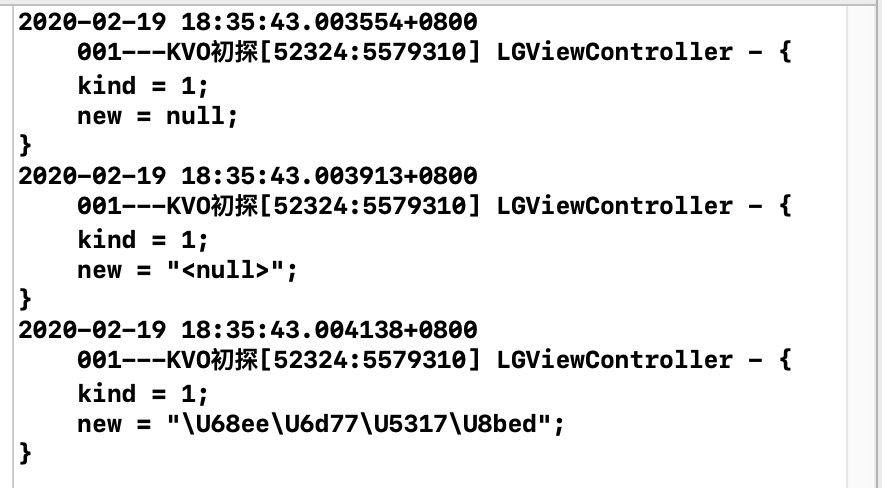
接着:
// 自动开关
+ (BOOL) automaticallyNotifiesObserversForKey:(NSString *)key{
    return NO;
}
再看下运行结果:
什么都没打印?说明automaticallyNotifiesObserversForKey 确实可以控制子类属性自动通知开关.
但是把自动开关关闭之后,依然想接收到指定属性发生更改时得到通知,该咋办呢?
// 自动开关
+ (BOOL) automaticallyNotifiesObserversForKey:(NSString *)key{
    if ([key isEqualToString:@"name"]||[key isEqualToString:@"nick"]) {
         return YES;
    }
    return NO;
}
我们可以如上面代码所示对Key进行判断,另外个方法如下(更改值之前调用willChangeValueForKey,在更改值之后调用didChangeValueForKey):
// 自动开关
+ (BOOL) automaticallyNotifiesObserversForKey:(NSString *)key{

    return NO;
}

- (NSString *)downloadProgress{
    if (self.writtenData == 0) {
        self.writtenData = 10;
    }
    if (self.totalData == 0) {
        self.totalData = 100;
    }
    return [[NSString alloc] initWithFormat:@"%f",1.0f*self.writtenData/self.totalData];

}

- (void)setNick:(NSString *)nick{
    [self willChangeValueForKey:@"nick"];
    _nick = nick;
    [self didChangeValueForKey:@"nick"];
}
三.KVO的进阶
我们再看下苹果开发文档上的介绍:
Key-Value Observing Implementation Details
Automatic key-value observing is implemented using a technique called isa-swizzling.
The isa pointer, as the name suggests, points to the object's class which maintains a dispatch table. This dispatch table essentially contains pointers to the methods the class implements, among other data.
When an observer is registered for an attribute of an object the isa pointer of the observed object is modified, pointing to an intermediate class rather than at the true class. As a result the value of the isa pointer does not necessarily reflect the actual class of the instance.
You should never rely on the isa pointer to determine class membership. Instead, you should use the class method to determine the class of an object instance.
自动键值观察是使用一种叫做isa swizzing的技术实现的。
顾名思义,isa指针指向维护分派表的对象类。这个分派表本质上包含指向类实现的方法的指针以及其他数据。
当观察者注册一个对象的属性时,观察对象的isa指针被修改,指向一个中间类,而不是真类。因此,isa指针的值不一定反映实例的实际类。
决不能依赖isa指针来确定类成员身份。相反,您应该使用类方法来确定对象实例的类.
在这里很多盆友不太理解,what’t is ? 这是啥?什么是isa swizzing, 这个中间类是什么类?话不多说,直接撸代码.
3.1 isa swizzing 与 中间类
LGPerson类:
@interface LGPerson : NSObject{
    @public
    NSString *name;
}
@property (nonatomic, copy) NSString *nickName;

- (void)sayHello;
- (void)sayLove;

@end
#import "LGPerson.h"

@implementation LGPerson
- (void)setNickName:(NSString *)nickName{
    _nickName = nickName;
}


- (void)sayHello{

}
- (void)sayLove{

}
@end
LGStudent里:
#import "LGStudent.h"

@implementation LGStudent
- (void)sayHello{

}
@end
#import "LGStudent.h"

@implementation LGStudent
- (void)sayHello{

}
@end
好的,准备工作做好了,创建两个类,LGPerson 和 LGStudent.
然后创建个LGViewController ,由工程里系统创建的 ViewController 跳转进入的.
LGViewController :
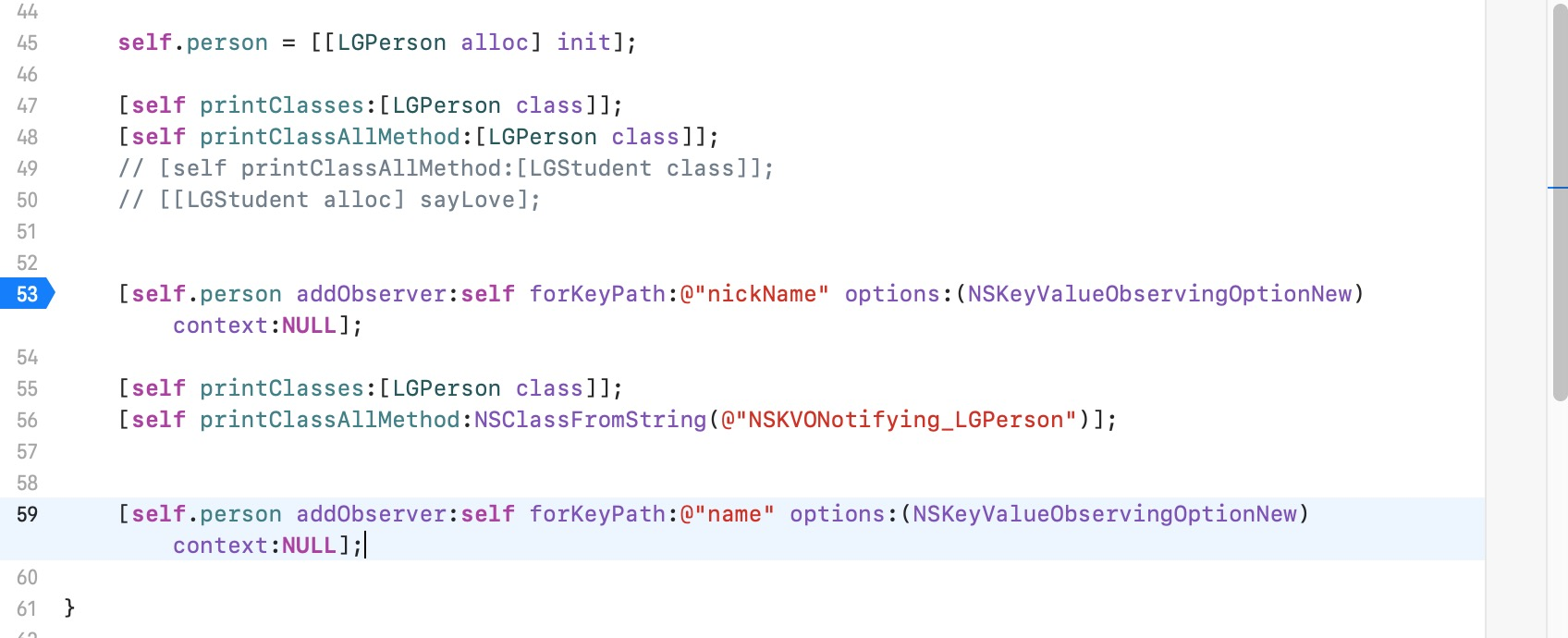
- (void)printClasses:(Class)cls{} 是 遍历类以及子类的方法
- (void)printClassAllMethod:(Class)cls{} 是 遍历类里面的方法-ivar-property
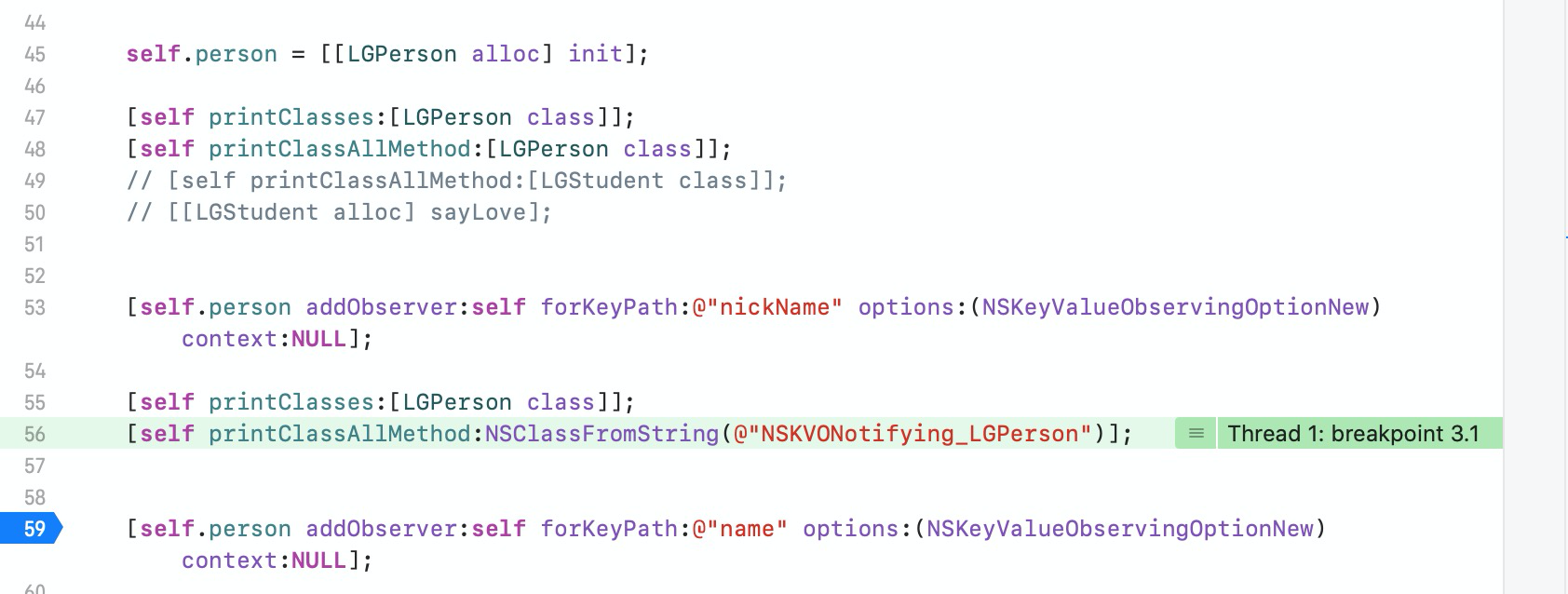
我们在53行打个断点,运行代码:
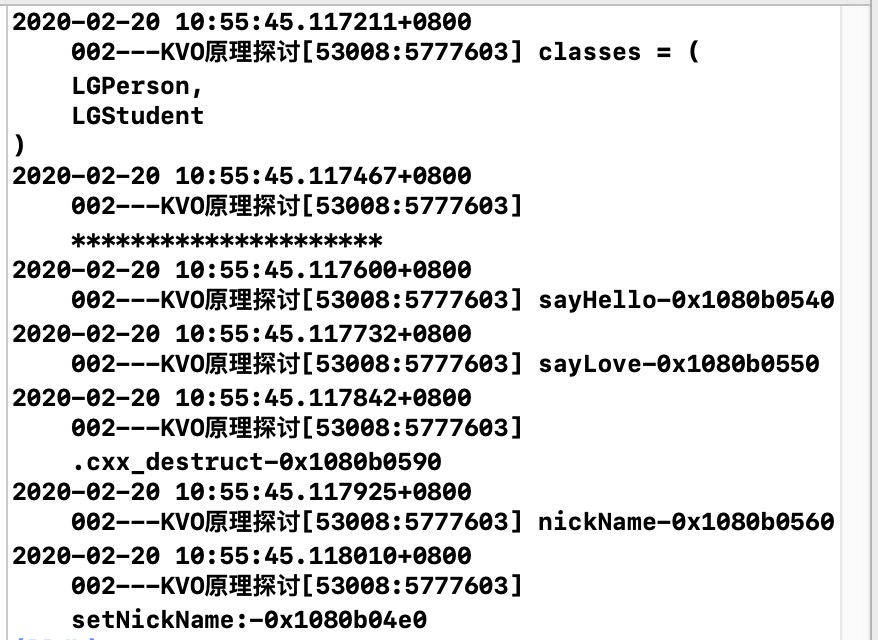
遍历LGPerson的类和子类是LGPerson 和 LGStudent .也打印了LGPerson.h里的方法。
然后我们再用LLDB指令打印下:
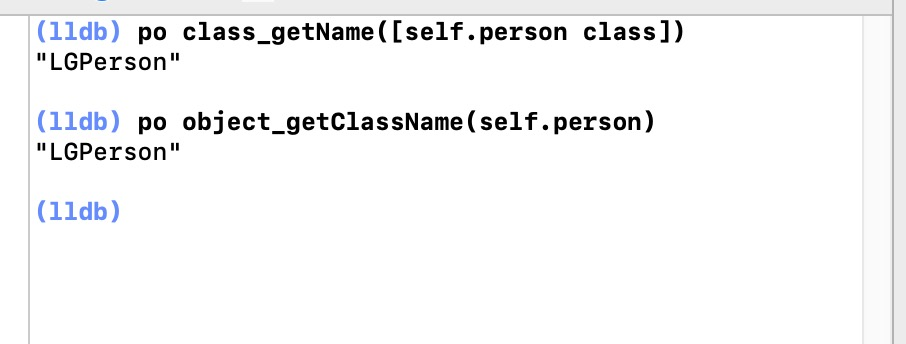
没问题吧接下来在55行再打个断点: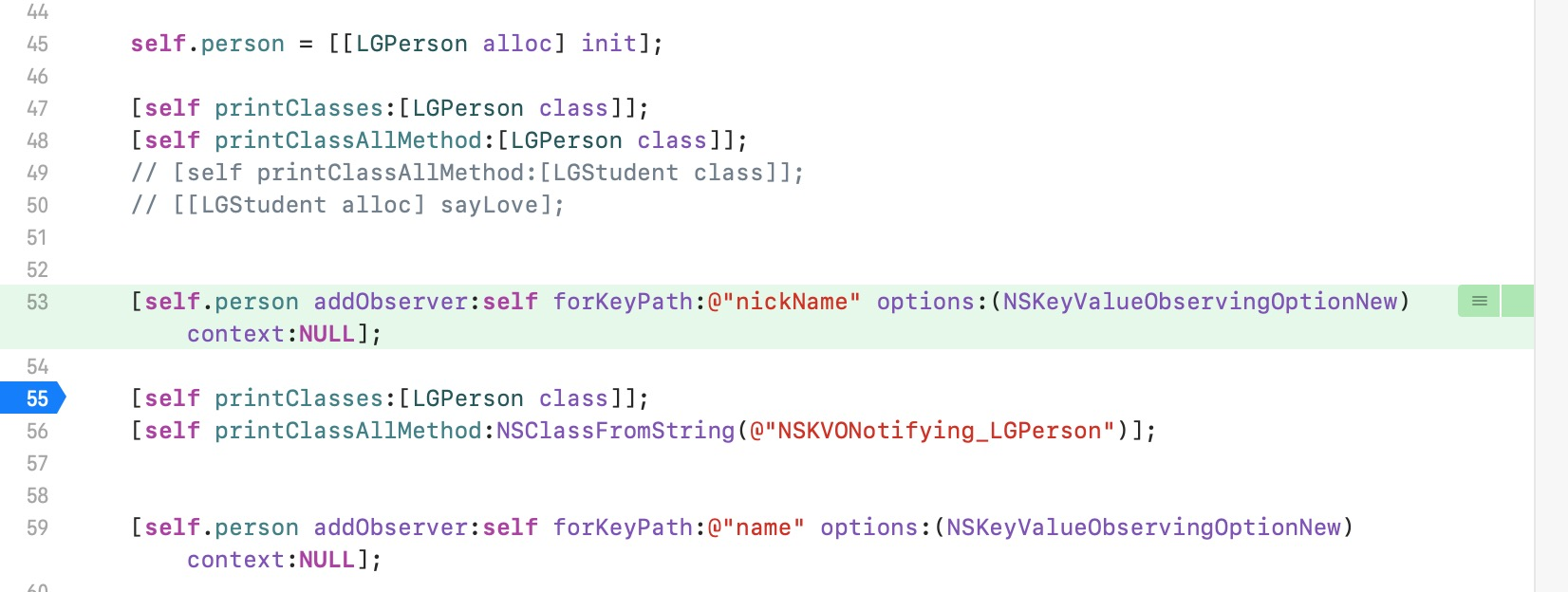
然后我们再用LLDB指令打印下: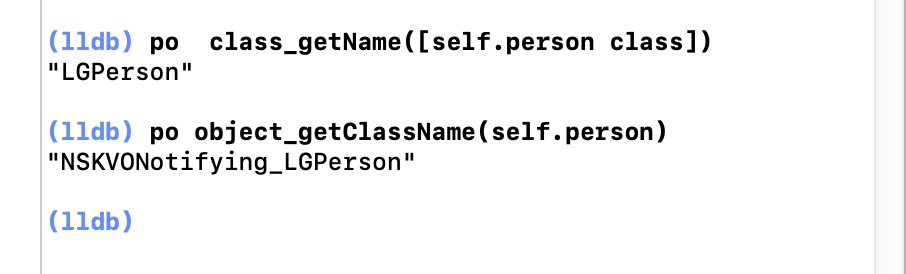
我的天,NSKVONotifying_LGPerson 这个是什么东西哟!!!我们现在再看刚刚提到的:
当观察者注册一个对象的属性时,观察对象的isa指针被修改,指向一个中间类,而不是真类。因此,isa指针的值不一定反映实例的实际类。 决不能依赖isa指针来确定类成员身份。
原来 NSKVONotifying_LGPerson 这个是个系统帮我们创建的派生类,前缀是NSKVONotifying_,self.person 对象的ISA 指向了这个派生类。
那么这个派生类和 LGPerson 有什么关系呢?我们把断点打在56行,看输出:
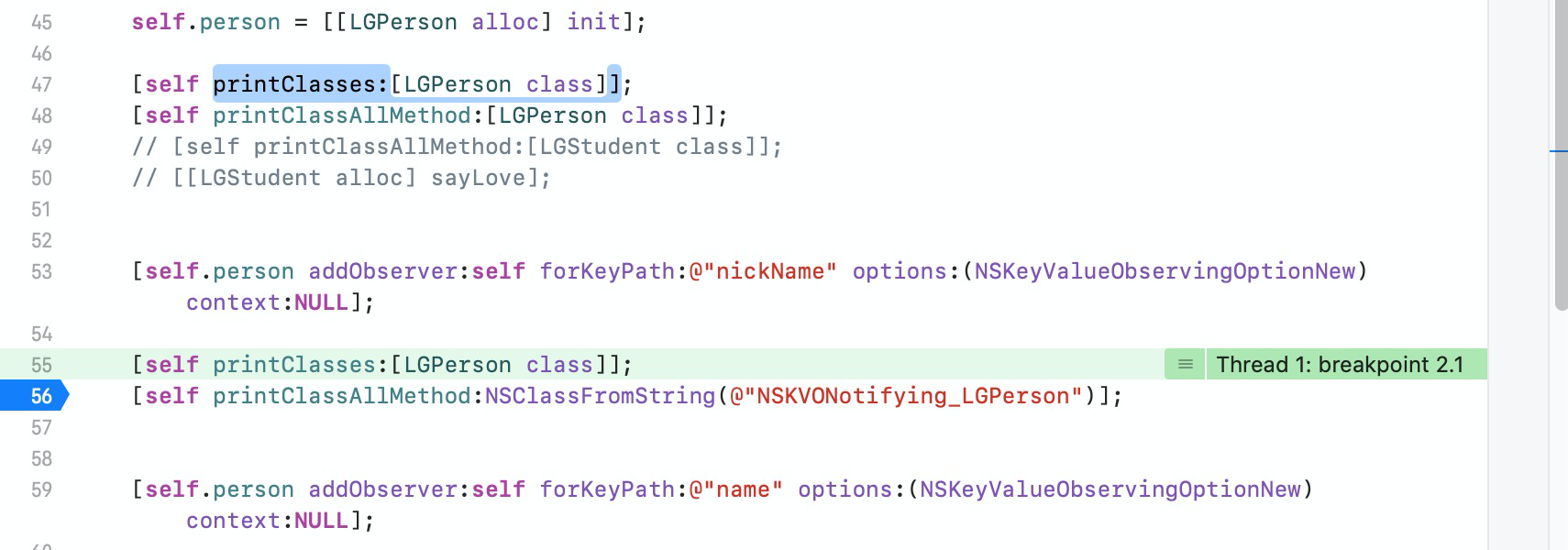
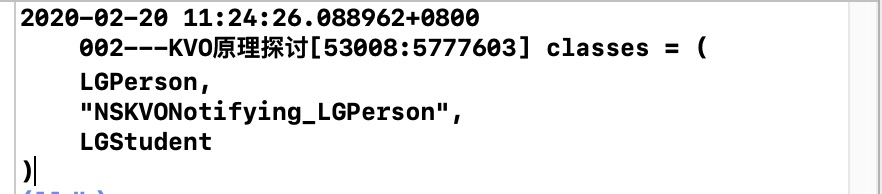
原来这个派生类 是 LGPerson 的子类.
3.2 NSKVONotifying_LGPerson 派生子类里做了什么?
来到这我们好好思考下,苹果为啥要注册一个对象的属性时创建个派生子类,这个子类有啥作用呢?其实在类结构里,最长用到的就是类结构里的bits里的data,这里面是关于类里面的实例方法,实例变量... 而方法、变量就是我们最常用到的.我们在59行里打上断点,看看NSKVONotifying_LGPerson派生子类里 的方法:
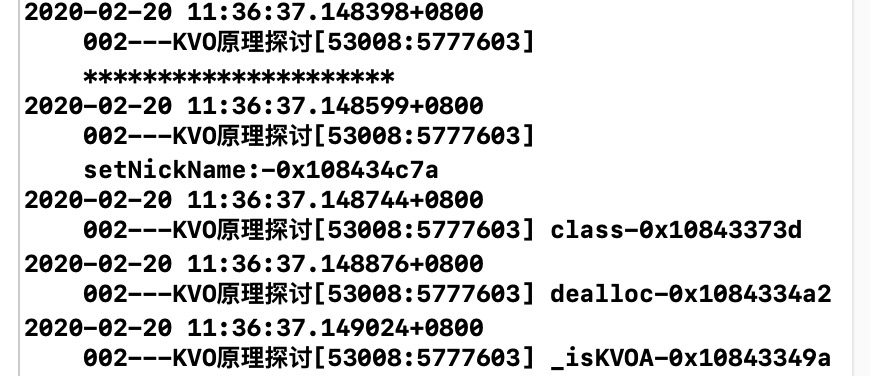
原来动态子类重写了很多方法 setNickName (setter)、 class、 dealloc、 _isKVOA这些方法.
为啥会重写setter 方法呢?大家一起思考下...原来重写setter 方法 对属性 nickName 做了修改被 KVO 监听到了.
而为啥要重写 class 方法呢?还记得这个图吗?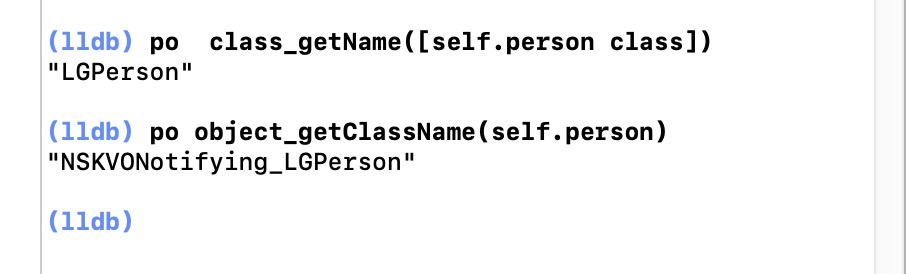
对象的isa指针被修改,指向一个中间类,而不是真类,那么这时候 po class_getName([self.person class]) 按道理 也应该返回 NSKVONotifying_LGPerson ,为什么 返回LGPerson 呢 、是因为NSKVONotifying_LGPerson 类 重写了 class 方法 、返回了它的父类 LGPerson .
至于 dealloc、 _isKVOA 这两个方法 在后面 KVO的自定义里会聊到.
3.3 对象 ISA 何时指回来?
当观察者注册一个对象的属性时,观察对象的isa指针被修改,指向一个中间类,而不是真类,那么这个观察对象的isa指针何时会指回来?难道永远都指向这个中间类了吗?
其实大家思考下,就可以得出答案.为啥isa指针被修改,因为观察者注册一个对象的属性。
那我不观察时(不用了移除时)不就指回来了嘛。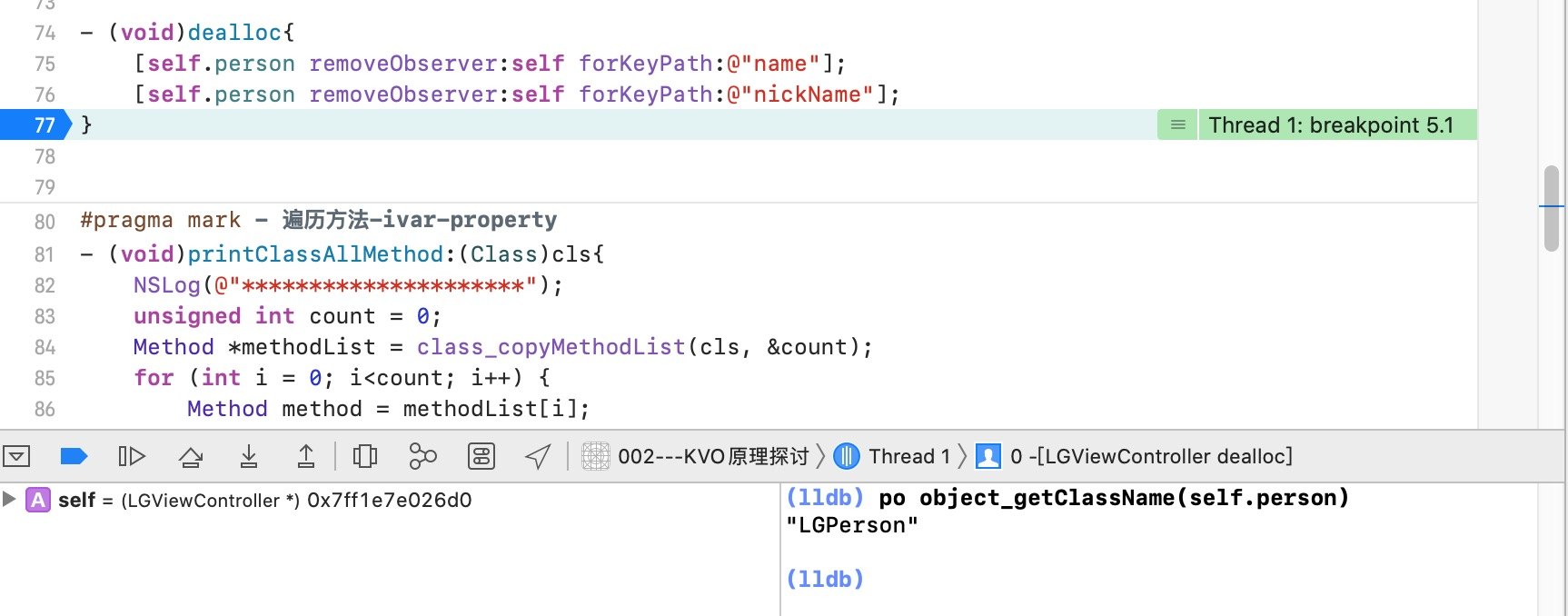
po object_getClassName(self.person) 是不是指回来了 指回了 LGPerson .
3.4 NSKVONotifying_LGPerson派生子类 会被销毁吗?
我们从LGViewController 回到 ViewController 里 ,遍历LGPerson类以及子类:
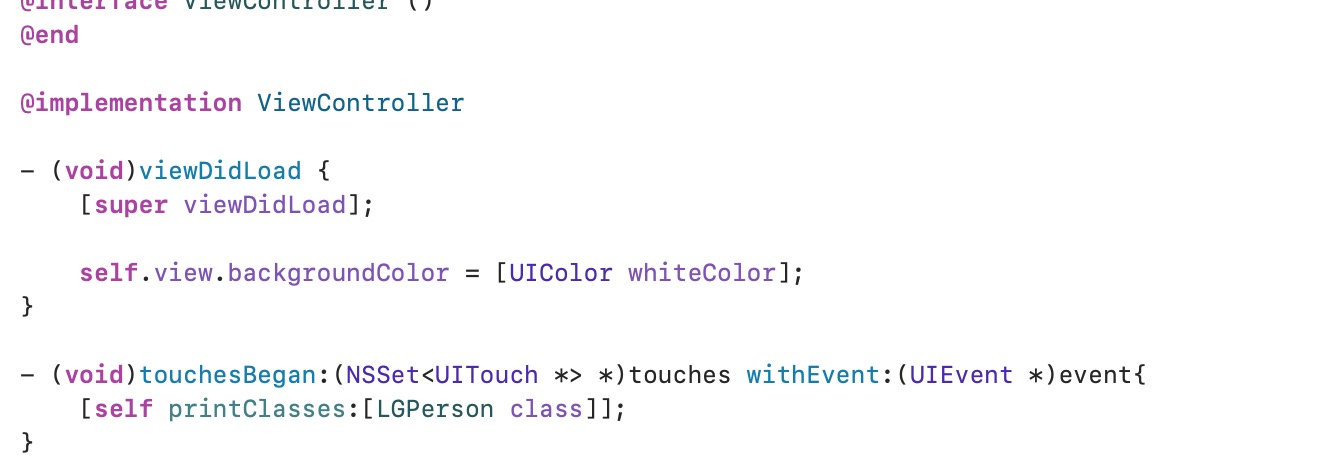
看下控制台: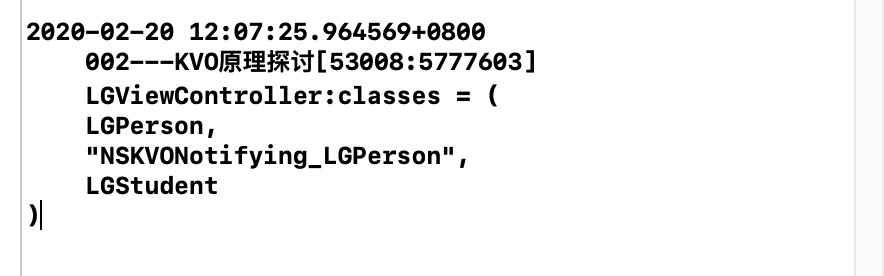
NSKVONotifying_LGPerson 这个 派生子类 是不是依然存在.其实也好理解动态创建类毕竟是个耗时操作、苹果公司特别注重性能优化这方面,不可能不用时就把这个派生子类给销毁,那下次进来 观察者注册一个对象的属性时,岂不是要再创建派生子类.
四.KVO的总结
1、当对对象A进行KVO观察时候,会动态生成一个子类,然后将对象的isa指向新生成的子类
2、KVO本质上是监听属性的setter方法,只要被观察对象有成员变量和对应的set方法,就能对该对象通过KVO进行观察
3、子类会重写父类的set、class、dealloc、_isKVOA方法
4、当观察对象移除所有的监听后,会将观察对象的isa指向原来的类
5、当观察对象的监听全部移除后,动态生成的类不会注销,而是留在下次观察时候再使用,避免反复创建中间子类