简介
Promise based HTTP client for the browser and node.js
Axios 是基于 Promise 的 HTTP 客户端,支持在浏览器端和 node.js 中使用。
其本质就是一个函数,即 Axios.prototype.request 函数(绑定 AxiosInstance 后的),同时合并 Axios.prototype 和 AxiosInstance 对象上的属性和方法。该函数内部实例化了一个 XMLHttpRequest 对象,调用相关 API 实现请求和响应,最终返回一个 promise 对象。
准备工作
首先,前端用 npx create-react-app axios-app --typescript 生成一个 ts react 项目
接下来,搭建用 node 搭建一个后台服务器
let express = require('express');
let bodyParser = require('body-parser');
let app = express();
app.use(bodyParser.json());
app.use(bodyParser.urlencoded({ extended: true }));
app.use(function (req, res, next) {
    res.set({
        'Access-Control-Allow-Origin': 'http://localhost:3000',// 设置跨越 react web服务器 端口号 3000
        'Access-Control-Allow-Credentials': true,
        'Access-Control-Allow-Methods': 'GET,POST, PUT, DELETE, OPTIONS',
        'Access-Control-Allow-Headers': 'Content-Type,name'
    });
    if (req.method === 'OPTIONS') return res.sendStatus(200);
    next();
});

app.get('/get', (req, res) => res.json(req.query));

app.post('/post', (req, res) => res.json(req.body));

app.post('/post_timeout', (req, res) => {
    let { timeout } = req.query;
    timeout = timeout ?  parseInt(timeout) : 0;
    setTimeout(() => res.json(req.body), timeout);
});

app.post('/post_status', (req, res) => {
    let { code } = req.query;
    code = code ? parseInt(code) : 200;
    res.statusCode = code;
    res.json(req.body);
});
app.listen(8000);
axios 库实现前后端的交互
安装前后端需要的模块
- 前端库需要的模块
qs调用qs.stringify(object)将参数 对象转为 查询字符串parseHeaders解析后端传入的请求头字符串 => 对象格式
- 后端
express基于http实现的后端服务body-parser解析 json 请求体和表单请求体
npx create-react-app axios-app
cd axios-app
yarn add axios qs parse-headers
yarn add express body-parser
使用
发送 get 请求
// index.js 文件
import axios from 'axios';

const user = {
    name: 'Stella',
    password: '123456',
}

const baseUrl = 'http://localhost:8000';

axios({
    url: `${baseUrl}/get`,
    params: user,
    method: 'get',
})
.then(response => console.log(response))
.catch(err => console.log(err))
实现
接下来,来分析分析 axios 调用过程以及 .then 成功回调中接收的相应结果,很显然这里的 axios 函数调用后返回的是一个 promise 对象
图解模型
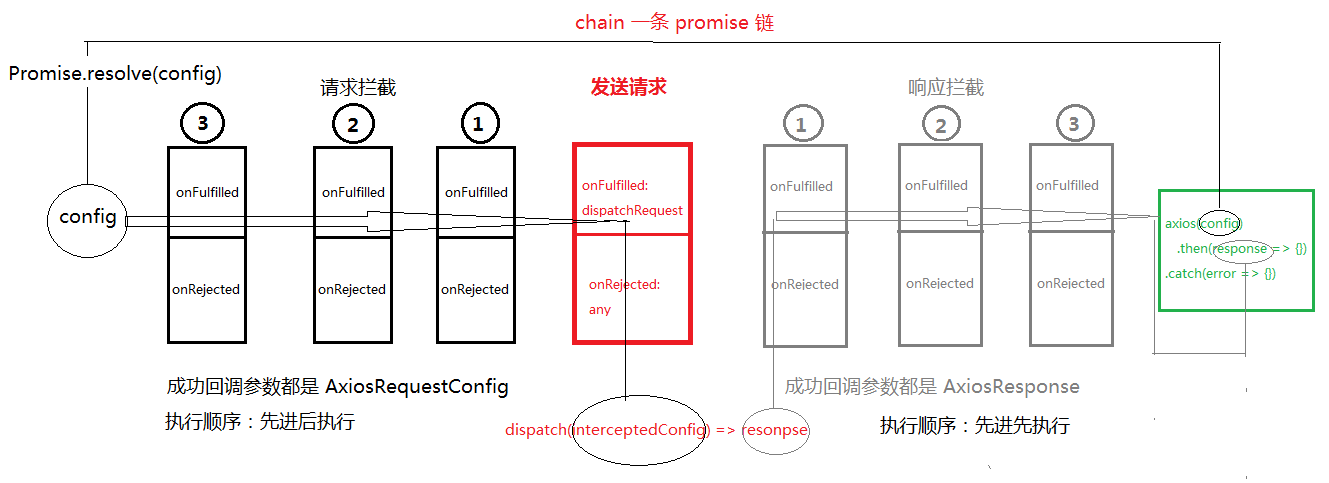
类型声明文件
index.d.ts
Cancel:取消请求
export class Cancel {
    constructor(public reason?: string){
    }
}
isCancel:判断是否取消的函数
export function isCancel(value: any): boolean {
    return value instanceof Cancel;
}
CancelToken:基于Promise实现,将resolve函数调用赋给实例属性,成功状态改变交给了用户
export class CancelToken {
    public resolve: any;

    source() {
        return {
            token: new Promise(resolve => this.resolve = resolve),
            cancel: (reason?: string) => this.resolve(new Cancel(reason))
        }
    }
}
Interceptor的两个参数,都为函数
interface onFulfilled<V> {
   (value: V): V | Promise<V>
}

interface onRejected {
    (error: any): any
}
解析: onFulfilled 参数 V 类型 根据实例化的对象不同传入不同的参数, request 参数为 AxiosRequestConfig 统一对请求选项进行拦截处理, response 参数为 AxiosResponse<T>
Interceptor:拦截器
export interface Interceptor<T = any> {
    onFulfilled?: onFulfilled<T>
    onRejected?: onRejected
}
解析:每个拦截器对象有两个属性,分别为成功和失败的函数,最终通过串行的方式给 promise 对象消费。
AxiosInterceptorManager:axios.interceptors.request|axios.interceptors.response的类
export default class AxiosInterceptorManager<T> {
    public interceptors: Array<Interceptor<T> | null> = []
    // 每个拦截器都有两个参数, 成功的回调 和失败的回调
    use(onFulfilled?: onFulfilled<T>, onRejected?: onRejected): number {
        this.interceptors.push({
            onFulfilled,
            onRejected
        })
        return this.interceptors.length - 1;
    }

    eject(index:number): void {
        this.interceptors[index] && (this.interceptors[index] = null);
    }
}
解析:
interceptors:数组类型,请求、响应的拦截通过调用use加入Interceptor类型,调用eject弹出加入的Interceptor类型为 nulluse:向interceptors数组中添加一个Interceptor,返回值为当前添加的下标interceptors.length - 1eject:接收要被弹出的Interceptor下标,将该下标在数组中对应的interceptor设置为null
Interceptors:拦截器类型
export interface Interceptors {
    request: AxiosInterceptorManager<AxiosRequestConfig>
    response: AxiosInterceptorManager<AxiosResponse>
}
axios请求方法及其器属性
export interface AxiosInstance {
  <T = any>(config: AxiosRequestConfig): Promise<AxiosResponse<T>>;
  interceptors: Interceptors;
  defaults: AxiosRequestConfig;
  CancelToken: CancelToken;
  isCancel(value: any): boolean;
  get<T, R = AxiosResponse<T>>(url: string, config?: AxiosRequestConfig): Promise<R>
}
逐一分析 axios 属性、方法
<T = any>(config: AxiosRequestConfig): Promise<AxiosResponse<T>>:请求函数,接收AxiosRequestConfig,发送请求interceptors::拦截器,
AxiosRequestConfig请求配置选项类型
规定用户传入的参数可以是以下类型
export interface AxiosRequestConfig {
  url?: string;
  method?: Methods;
  params?: any,
  // params: Record<string, any>;
  headers?: Record<string, any>;
  data?: Record<string, any>;
  timeout?: number;
  transformRequest?: (requestData:any, headers: any) => any;
  transformResponse?: (responseData: any) => any;
  cancelToken?: Promise<any>;
}
逐一分析下 AxiosRequestConfig 各个属性/ 方法的用途吧,划重点:这里传入的配置选项就是给 XMLHttpRequest 对象的(以下都用 request 简称)各种API使用哒
url: 请求路径的一部分 协议 + 域名 + 端口号method: 请求的方法名params: 请求路径的 查询字符串,调用qs.stringify()将对象类型的params转为字符串格式,如:
传入的
params = {
    name: 'Stella',
    password: '123456',
}
格式化后:
params = 'name=Stella&password=123456';
headers: 请求头信息data: 请求方法为POST时的请求体timeout: 请求超时时长,用于超时的
request.timeout = timeout;
request.onerror = function() {}
-
transformRequest: 这是一个用于转换请求的方法,接收两个参数,分别是用户传入的data和headers,可对这个属性进行操作,返回值为处理后的data -
transformResponse: 这是一个用于转换响应的方法,接收的参数为请求响应response的完整结果,返回值为处理后的response -
cancelToken: 这个不需要自己实现,值为axios.CancelToken.source().token,就是一个Promise实例对象,在实例化的时候并没有立即让其状态state变为FULFILLED或REJECTED,也就是没有执行resolve|reject函数,而是将resolve函数赋值给了CancelToken实例的方法。用户可调用axios.CancelToken.source().cancel(reason)传入reason变为成功态
AxiosResponse响应类型
接收泛型 T, 传入的动态数据类型会作为 Promise 类的执行器函数 executor(resolve, reject) 的第一个成功函数调用的参数,一旦变为成功态,axios 请求函数调用结果(就是刚才的 new 出来的 promise 对象),就能 .then(onFulfilled) 获取到哦
export interface AxiosResponse<T = any> {
  data: T;
  status: number;
  statusText: string;
  headers? : Record<string, any>;
  config?: AxiosRequestConfig;
  request?: XMLHttpRequest;
}
src 目录下创建 axios 目录,新增文件
- Axios.ts
import { AxiosRequestConfig, AxiosResponse } from './types';
import AxiosInterceptorManager, { Interceptor, Interceptors } from './AxiosInterceptorManager';
import qs from 'qs';
import parseHeaders from 'parse-headers';

// merge options
const defaults: AxiosRequestConfig = {
  method: 'get',
  timeout: 0,
  headers: {
    common: { // 针对所有的请求生效
      accept: 'application/json', // 指定服务器返回 JSON 格式的数据
      name: 'Stella'
    },
  }
}

let getStyleMethods = ['get', 'head', 'delete', 'options'];
let postStyleMethods = ['put', 'post', 'patch'];
getStyleMethods.forEach((method: string) => (defaults.headers![method] = {}));
postStyleMethods.forEach((method: string) => (defaults.headers![method] = { 'Content-Type': 'application/json' }));
const allMethods = [...getStyleMethods, ...postStyleMethods];

export default class Axios<T> {
  public defaults: AxiosRequestConfig = defaults;
  public interceptors: Interceptors = {
    request: new AxiosInterceptorManager<AxiosRequestConfig>(),
    response: new AxiosInterceptorManager<AxiosResponse<T>>(),
  }

  request<T>(config: AxiosRequestConfig): Promise<AxiosRequestConfig | AxiosResponse<T>> {
    config.headers = Object.assign(this.defaults.headers, config.headers);
    if (config.transformRequest && config.data) {
      config.data = config.transformRequest(config.data, config.headers);
    }
    const chain: Interceptor[] = [{
      onFulfilled: this.dispatchRequest,
      onRejected: undefined,
    }]
    this.interceptors.request.interceptors.forEach(interceptor => {
      interceptor && chain.unshift(interceptor);
    })
    this.interceptors.response.interceptors.forEach(interceptor => {
      interceptor && chain.push(interceptor);
    })

    let promise = Promise.resolve(config);

    while (chain.length) {
      let { onFulfilled, onRejected } = chain.shift()!;
      promise = promise.then(onFulfilled, onRejected);
    }

    return promise;
  }

  dispatchRequest<T>(config: AxiosRequestConfig): Promise<AxiosResponse<T>> {
    return new Promise<AxiosResponse<T>>((resolve, reject) => {
      let { method= 'get', url, params, data, headers, timeout = 0 } = config;
      let request = new XMLHttpRequest();
      if (params && typeof params == 'object') {
        params = qs.stringify(params);
        url += ((url!.indexOf('?') === -1 ? '?' : '&') + params);
      }
      request.open(method, url!, true);
      request.responseType = 'json';
      request.onreadystatechange = function () { // h5 API request.onload readystate = 4 status = 200
        if (request.readyState === 4 && request.status !== 0) {
          if (request.status >= 200 && request.status < 300) {
            let response: AxiosResponse<T> = {
              data: request.response ? request.response : request.responseText,
              status: request.status,
              statusText: request.statusText,
              headers: parseHeaders(request.getAllResponseHeaders()),
              config,
              request,
            }
            if (config.transformResponse) {
              response = config.transformResponse(response);
            }
            resolve(response);
          } else {
            reject(new Error(`Request failed with status code ${request.status}`));
          }
        }
      }
      //  POST method
      // headers && Object.keys(headers).forEach(key => request.setRequestHeader(key, headers![key]));
      if (headers) {
        // headers:
        //   common: {accept: "application/json"}
        //   get: {}
        //   head: {}
        //   delete: {}
        //   options: {}
        //   put: {Content-Type: "application/json"}
        //   post: {Content-Type: "application/json"}
        //   patch: {Content-Type: "application/json"}
        Object.keys(headers).forEach(key => {
          if (key === 'common' || allMethods.includes(key)) {
            if (key === 'common' || key === config.method) {
              for (let key2 in headers![key]) request.setRequestHeader(key2, headers![key][key2]);
            }
          } else request.setRequestHeader(key, headers![key]);
        })
      }
      let body: string | null = null;
      if (data) {
        if (typeof data === 'object') body = JSON.stringify(data);
        else if (typeof data === 'string') body = data;
      }
      /**
       * 错误处理
       *  - 网络异常 request.onerror
       *  - 超时异常 request.ontimeout
       *  - 错误状态码 request.status === 0
       */

      request.onerror = function() {
        reject(new Error(`net::ERR_INTERNET_DISCONNECTED`));
      }

      if (timeout) {
        request.timeout = timeout;
        request.ontimeout = function () {
          reject(new Error(`timeout of ${timeout}ms exceeded`))
        }
      }

      // cancelToken
      if (config.cancelToken) {
        config.cancelToken.then((reason: string) => {
            request.abort();
            reject(reason);
        });
      }

      request.send(body);
    })
  }

  get<T, R = AxiosResponse<T>>(url: string, config?: AxiosRequestConfig): Promise<AxiosRequestConfig | R> {
    config = {...config, url}
    return this.request<T>(config!);
  }
}
- index.js
import Axios from './Axios';
import { AxiosInstance } from './types';
import { CancelToken, isCancel } from './cancel';

function createInstance<T>(): AxiosInstance {
  let context: Axios<T> = new Axios();
  // 绑定 request this 永远指向当前实例
  let instance = Axios.prototype.request.bind(context);
  // 合并 Axios 原型对象 和 实例属性到 request 函数对象上。
  instance = Object.assign(instance, Axios.prototype, context);
  return instance as AxiosInstance;
}

let axios = createInstance();
axios.CancelToken = new CancelToken();
axios.isCancel = isCancel;

export default axios;