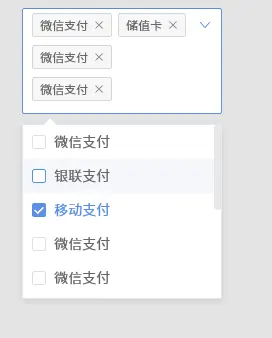
<template>
<div class="xmnel_newmultipleselect">
<span class="title_box">{{ title }}</span>
<el-select v-model="input" multiple
class="have_border"
:placeholder="placeholder"
:style="{ width: w + 'px' }"
:collapse-tags='height'
@visible-change="change"
ref="select">
<el-option
v-for="item in options"
:key="item.id"
:label="item[labelKey]"
:value="item[valueKey]"
>
</el-option>
</el-select>
</div>
</template>
<script>
export default {
name: 'xmnel-newmultipleselect',
model: {
prop: 'propinput',
event: 'inputchange'
},
props: {
title: {},
placeholder: {
default: ''
},
propinput: {},
width: {},
maxWidth: {},
minWidth: {},
options: {},
labelKey: {
default: 'label'
},
valueKey: {
default: 'value'
}
},
data() {
return {
input: [],
w: 0,
height:false
}
},
computed: {
},
watch: {
propinput: {
handler(cur, old) {
this.input = cur;
},
deep: true
},
input: {
handler(cur, old) {
let { width, minWidth, maxWidth } = this;
if(width) {
this.w = width;
return;
};
if(!minWidth || !maxWidth) return;
this.w = minWidth;
this.$nextTick(function() {
let el = this.$refs.select.$el;
let valueText = el.getElementsByClassName('value_text');
if(valueText && valueText[0]) {
let valueTextWidth = valueText[0].offsetWidth,
elWidth = el.offsetWidth;
if(valueTextWidth + 30 >= elWidth) {
this.w = valueTextWidth + 30 > maxWidth ? maxWidth : valueTextWidth + 30;
} else {
this.w = valueTextWidth + 30 < minWidth ? minWidth : valueTextWidth + 30;
};
}
});
},
immediate: true
},
},
methods: {
change(val) {
let valueText = document.getElementsByClassName('xmnel_newmultipleselect');
let box=valueText[0].querySelector('.el-select > .el-input--suffix > .el-input__inner');
let abc= valueText[0].querySelector('.el-select > .el-input--suffix');
let is_focus=(' ' + abc.className + ' ').indexOf(' ' + 'is-focus' + ' ') > -1
if(is_focus){
this.height=true;
box.style="height:35px;"
}else{
this.height=false;
}
},
},
created() {
this.input = this.propinput;
}
}
</script>
<style lang="less">
.xmnel_newmultipleselect {
font-size: @fontSize;
display: inline-block;
vertical-align: top;
padding-right: 40px;
.title_box {
color: #333;
padding-right: 8px;
width: 70px;
text-align: left;
display: inline-block;
}
input {
border:none;
padding:0;
color: @black;
}
.have_border{
padding-top: 1px;
border: 1px solid #ddd;
padding-left: 12px;
}
.el-input__prefix {
position: absolute;
left: 0;
right: 30px;
z-index: 3;
overflow: hidden;
white-space: nowrap;
overflow: hidden;
text-overflow: ellipsis;
text-align: left;
cursor: pointer;
.value_text {
height: 100%;
background-color: #fff;
display: inline-block;
line-height: @formHeight;
font-size: @fontSize;
color: @black;
}
}
}
.el-select__tags .el-tag{
width: 60px;
overflow:hidden;
text-overflow:ellipsis;
white-space:nowrap;
}
.multipleselect_all {
font-size: @fontSize;
padding: 0 20px;
height: @formHeight;
line-height: @formHeight;
cursor: pointer;
color: #606266;
}
.multipleselect_all:hover {
background-color: #f2f2f2;
}
.multipleselect_all:active {
background-color: #d4d3d3;
}
</style>