对于HTTP服务来说,不同的URL地址经常对应到不同的后端服务,Ingress类型资源可以满足此类需求。
什么是Ingress
简单说,是一个代理,可以根据配置转发请求到指定的服务上。
为什么需要Ingress资源
由于K8S集群拥有强大的副本控制能力,Pod随时可能从一个节点上被驱逐到另一个节点上,或者直接销毁再来一个新的。
然而伴随着Pod的销毁和重生,Pod的IP等信息不断地在改变,此时使用K8S提供的Service机制可以解决这一问题,Service通过标签选定指定的Pod作为后端服务,并监听这些Pod的变化。
在对外暴露服务时,使用Service的NodePort是一个方法
问题1 - 如何管理端口
当需要对外暴露的服务量比较多的时候,端口管理的问题便会暴露出来。
此时的一个处理方案是使用一个代理服务(例如Nginx)根据请求信息将请求转发到不同的服务上去。
问题2 - 如何管理转发配置
每当有新服务加入,都需要对该服务的配置进行修改、升级,在服务数量逐渐变多后,该配置项目会变得越来越大,手工修改的风险也会逐渐增高。
那么需要一个工具来简化这一过程,希望可以通过简单的配置动态生成代理中复杂的配置,最好还可以顺手重新加载配置文件。
K8S刚好也提供了此类型资源。
Ingress的工作方式
在使用普通的Service时,集群中每个节点的kube-proxy在监听到Service和Endpoints的变化时,会动态的修改相关的iptables的转发规则。 客户端在访问时通过iptables设置的规则进行路由转发达到访问服务的目的。
而Ingress则跳过了kube-proxy这一层,通过Ingress Controller中的代理配置进行路由转发达到访问目标服务的目的。
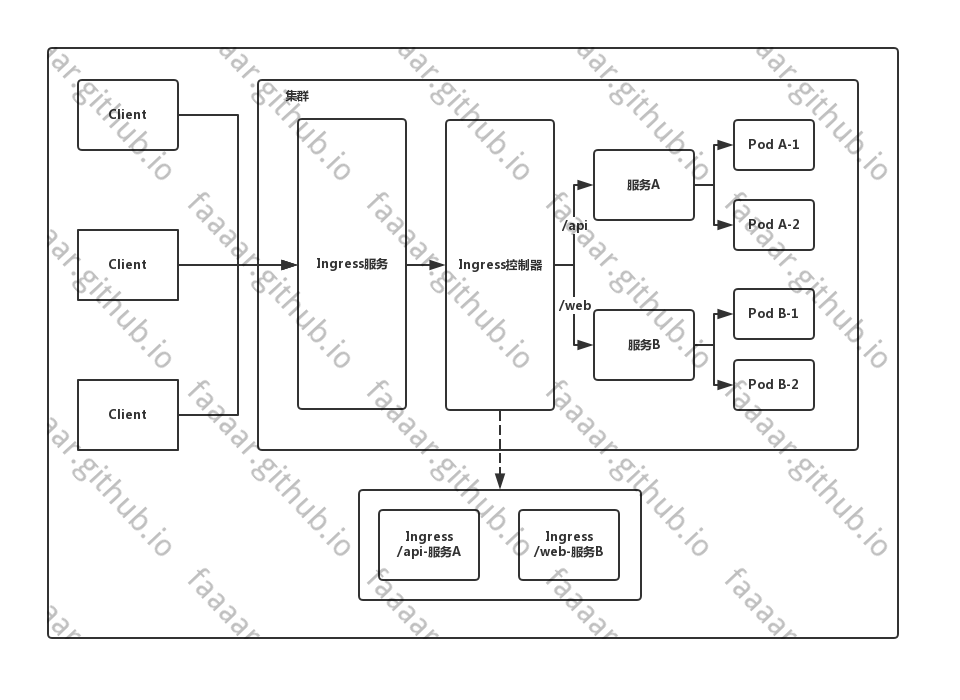
实际上可以把IngressController看做一个拥有默认处理后端的代理,根据Ingress资源的配置动态修改代理的配置文件,以实现按照规则转发请求的功能。
Ingress配置项
type Ingress struct {
    metav1.TypeMeta `json:",inline"`
    metav1.ObjectMeta `json:"metadata,omitempty"`

    // Ingess配置。
    Spec IngressSpec `json:"spec,omitempty"`

    // Ingress资源当前状态。
    Status IngressStatus `json:"status,omitempty"`
}
type IngressSpec struct {
    // 默认的后端服务,当不匹配所有的Ingress规则的时候使用。
    // 一般情况默认后端都在Ingress控制器中配置,该字段不进行声明配置。
    // 如果没有主机或路径与 Ingress 对象中的 HTTP 请求匹配,则流量将路由到您的默认后端。
    Backend *IngressBackend `json:"backend,omitempty"`

    // TLS配置。目前Ingress只支持443一种TLS端口。
    // 如果列表中有多个不同的hosts,将会在ingress controller支持SNI的情况下,
    // 通过使用SNI TLS扩展中声明的主机名,在同个端口下使用多路复用。
    TLS []IngressTLS `json:"tls,omitempty"`

    // Ingress的规则。未匹配到规则列表中规则的请求将会被转发到默认后端上。
    Rules []IngressRule `json:"rules,omitempty"`
}
type IngressBackend struct {
    // 服务名。
    ServiceName string `json:"serviceName"`

    // 服务的端口。
    ServicePort intstr.IntOrString `json:"servicePort"`
}
type IngressRule struct {
    // 域名。
    // 不能使用IP地址,不能使用端口。对HTTP服务使用80端口,HTTPS服务使用443端口。
    Host string `json:"host,omitempty"`

    // 域名下的具体转发规则。
    // 未定义的情况下会将请求转发至默认后端。
    IngressRuleValue `json:",inline,omitempty"`
}
type IngressRuleValue struct {
    HTTP *HTTPIngressRuleValue `json:"http,omitempty"`
}
type HTTPIngressRuleValue struct {
    Paths []HTTPIngressPath `json:"paths"`
}
type HTTPIngressPath struct {
    // 匹配的路径,必须以/为开头。
    // 未定义的情况下会将请求转发至默认后端。
    Path string `json:"path,omitempty"`

    // 处理请求的后端服务。
    Backend IngressBackend `json:"backend"`
}
部署使用Ingress
具体的创建步骤为
- 创建RBAC,为IngressController提供指定权限
- 创建IngressController,处理、分发请求到不同的服务
- 创建Ingess资源
创建RBAC资源
创建ServiceAccount、集群角色、角色,并进行绑定操作。
最开始尝试了未配置ServiceAccount的情况,发现nginx-ingress-controller启动时会报没有权限。
# work @ ali in ~/k8s/ingress_newest [16:40:39] C:1
$ kubectl get pods -n ingress-nginx
NAME                                       READY   STATUS             RESTARTS   AGE
nginx-ingress-controller-5bd975597-7wcvh   0/1     CrashLoopBackOff   2          41s

# work @ ali in ~/k8s/ingress_newest [16:40:42]
$ kubectl logs nginx-ingress-controller-5bd975597-7wcvh -n ingress-nginx
-------------------------------------------------------------------------------
NGINX Ingress controller
  Release:       0.28.0
  Build:         git-1f93cb8f3
  Repository:    https://github.com/kubernetes/ingress-nginx
  nginx version: nginx/1.17.7

-------------------------------------------------------------------------------

W0215 08:40:45.986921       6 flags.go:250] SSL certificate chain completion is disabled (--enable-ssl-chain-completion=false)
W0215 08:40:45.987053       6 client_config.go:543] Neither --kubeconfig nor --master was specified.  Using the inClusterConfig.  This might not work.
I0215 08:40:45.987390       6 main.go:193] Creating API client for https://10.96.0.1:443
I0215 08:40:46.009124       6 main.go:237] Running in Kubernetes cluster version v1.17 (v1.17.0) - git (clean) commit 70132b0f130acc0bed193d9ba59dd186f0e634cf - platform linux/amd64
F0215 08:40:46.014744       6 main.go:87] ✖ The cluster seems to be running with a restrictive Authorization mode and the Ingress controller does not have the required permissions to operate normally.
创建服务账号、集群角色、角色等内容,并进行相关绑定。 实际上对此部分内容目前也只是看的明白他在写啥...具体为什么需要这些权限、为什么这样绑定,留坑后面学习了解了权限相关的内容后再说。
# 后续的资源都在ingress-nginx空间内,此处需要提前创建好命名空间
apiVersion: v1
kind: Namespace
metadata:
  name: ingress-nginx
  labels:
    app.kubernetes.io/name: ingress-nginx
    app.kubernetes.io/part-of: ingress-nginx

---
apiVersion: v1
kind: ServiceAccount
metadata:
  name: nginx-ingress-serviceaccount
  namespace: ingress-nginx
  labels:
    app.kubernetes.io/name: ingress-nginx
    app.kubernetes.io/part-of: ingress-nginx

---
apiVersion: rbac.authorization.k8s.io/v1beta1
kind: ClusterRole
metadata:
  name: nginx-ingress-clusterrole
  labels:
    app.kubernetes.io/name: ingress-nginx
    app.kubernetes.io/part-of: ingress-nginx
rules:
  - apiGroups:
      - ""
    resources:
      - configmaps
      - endpoints
      - nodes
      - pods
      - secrets
    verbs:
      - list
      - watch
  - apiGroups:
      - ""
    resources:
      - nodes
    verbs:
      - get
  - apiGroups:
      - ""
    resources:
      - services
    verbs:
      - get
      - list
      - watch
  - apiGroups:
      - ""
    resources:
      - events
    verbs:
      - create
      - patch
  - apiGroups:
      - "extensions"
      - "networking.k8s.io"
    resources:
      - ingresses
    verbs:
      - get
      - list
      - watch
  - apiGroups:
      - "extensions"
      - "networking.k8s.io"
    resources:
      - ingresses/status
    verbs:
      - update

---
apiVersion: rbac.authorization.k8s.io/v1beta1
kind: Role
metadata:
  name: nginx-ingress-role
  namespace: ingress-nginx
  labels:
    app.kubernetes.io/name: ingress-nginx
    app.kubernetes.io/part-of: ingress-nginx
rules:
  - apiGroups:
      - ""
    resources:
      - configmaps
      - pods
      - secrets
      - namespaces
    verbs:
      - get
  - apiGroups:
      - ""
    resources:
      - configmaps
    resourceNames:
      # Defaults to "<election-id>-<ingress-class>"
      # Here: "<ingress-controller-leader>-<nginx>"
      # This has to be adapted if you change either parameter
      # when launching the nginx-ingress-controller.
      - "ingress-controller-leader-nginx"
    verbs:
      - get
      - update
  - apiGroups:
      - ""
    resources:
      - configmaps
    verbs:
      - create
  - apiGroups:
      - ""
    resources:
      - endpoints
    verbs:
      - get

---
apiVersion: rbac.authorization.k8s.io/v1beta1
kind: RoleBinding
metadata:
  name: nginx-ingress-role-nisa-binding
  namespace: ingress-nginx
  labels:
    app.kubernetes.io/name: ingress-nginx
    app.kubernetes.io/part-of: ingress-nginx
roleRef:
  apiGroup: rbac.authorization.k8s.io
  kind: Role
  name: nginx-ingress-role
subjects:
  - kind: ServiceAccount
    name: nginx-ingress-serviceaccount
    namespace: ingress-nginx

---
apiVersion: rbac.authorization.k8s.io/v1beta1
kind: ClusterRoleBinding
metadata:
  name: nginx-ingress-clusterrole-nisa-binding
  labels:
    app.kubernetes.io/name: ingress-nginx
    app.kubernetes.io/part-of: ingress-nginx
roleRef:
  apiGroup: rbac.authorization.k8s.io
  kind: ClusterRole
  name: nginx-ingress-clusterrole
subjects:
  - kind: ServiceAccount
    name: nginx-ingress-serviceaccount
    namespace: ingress-nginx

---
创建Ingress Controller
该控制器将不同的请求根据URI转发至不同的服务进行处理。
个人理解实际上在此位置的服务,只要包含一个代理程序,和一个监听ingress资源变更动态修改该代理程序配置文件的程序即可。 例如此处使用的nginx代理,当集群中Ingress资源发生变动时,动态修改nginx.conf配置,并重新加载配置文件,以实现转发请求的目的。
for {
    // 监听集群中Ingress资源的变动
    // 修改代理配置文件
    // 重新加载配置文件
}
apiVersion: apps/v1
kind: Deployment
metadata:
  name: nginx-ingress-controller
  namespace: ingress-nginx
  labels:
    app.kubernetes.io/name: ingress-nginx
    app.kubernetes.io/part-of: ingress-nginx
spec:
  replicas: 1
  selector:
    matchLabels:
      app.kubernetes.io/name: ingress-nginx
      app.kubernetes.io/part-of: ingress-nginx
  template:
    metadata:
      labels:
        app.kubernetes.io/name: ingress-nginx
        app.kubernetes.io/part-of: ingress-nginx
      annotations:
        prometheus.io/port: "10254"
        prometheus.io/scrape: "true"
    spec:
      # wait up to five minutes for the drain of connections
      terminationGracePeriodSeconds: 300
      serviceAccountName: nginx-ingress-serviceaccount
      nodeSelector:
        kubernetes.io/os: linux
      containers:
        - name: nginx-ingress-controller
          image: quay.io/kubernetes-ingress-controller/nginx-ingress-controller:0.28.0
          args:
            - /nginx-ingress-controller
            - --configmap=$(POD_NAMESPACE)/nginx-configuration
            - --tcp-services-configmap=$(POD_NAMESPACE)/tcp-services
            - --udp-services-configmap=$(POD_NAMESPACE)/udp-services
            - --publish-service=$(POD_NAMESPACE)/ingress-nginx
            - --annotations-prefix=nginx.ingress.kubernetes.io
          securityContext:
            allowPrivilegeEscalation: true
            capabilities:
              drop:
                - ALL
              add:
                - NET_BIND_SERVICE
            # www-data -> 101
            runAsUser: 101
          env:
            - name: POD_NAME
              valueFrom:
                fieldRef:
                  fieldPath: metadata.name
            - name: POD_NAMESPACE
              valueFrom:
                fieldRef:
                  fieldPath: metadata.namespace
          ports:
            - name: http
              containerPort: 80
            - name: https
              containerPort: 443
          livenessProbe:
            failureThreshold: 3
            httpGet:
              path: /healthz
              port: 10254
              scheme: HTTP
            initialDelaySeconds: 10
            periodSeconds: 10
            successThreshold: 1
            timeoutSeconds: 10
          readinessProbe:
            failureThreshold: 3
            httpGet:
              path: /healthz
              port: 10254
              scheme: HTTP
            periodSeconds: 10
            successThreshold: 1
            timeoutSeconds: 10
          lifecycle:
            preStop:
              exec:
                command:
                  - /wait-shutdown

---
apiVersion: v1
kind: Service
metadata:
  name: ingress-nginx-svc
  namespace: ingress-nginx
  labels:
    app.kubernetes.io/name: ingress-nginx
    app.kubernetes.io/part-of: ingress-nginx
spec:
  type: NodePort
  ports:
    - name: http
      port: 80
      targetPort: 80
      protocol: TCP
    - name: https
      port: 443
      targetPort: 443
      protocol: TCP
  selector:
    app.kubernetes.io/name: ingress-nginx
    app.kubernetes.io/part-of: ingress-nginx

---
此时该Pod中的nginx有一份默认的配置文件。
其中定义了默认后端、健康检查等请求内容。 实际上也可以通过ingress-nginx-controller的`default-backend-service`参数来指定默认后端。
http {
    upstream upstream_balancer {
        # ...
    }

    server {
        server_name _ ;

        listen 80 default_server reuseport backlog=511 ;
        listen 443 default_server reuseport backlog=511 ssl http2 ;

        location / {
            # ...
        }

        # health checks in cloud providers require the use of port 80
        location /healthz {
            access_log off;
            return 200;
        }

        location /nginx_status {
            allow 127.0.0.1;

            deny all;

            access_log off;
            stub_status on;
        }
    }
    ## end server _

    # backend for when default-backend-service is not configured or it does not have endpoints
    server {
        listen 8181 default_server reuseport backlog=511;

        set $proxy_upstream_name "internal";

        access_log off;

        location / {
            return 404;
        }
    }

    # default server, used for NGINX healthcheck and access to nginx stats
    server {
        listen 127.0.0.1:10246;
        set $proxy_upstream_name "internal";

        keepalive_timeout 0;
        gzip off;

        access_log off;

        location /healthz {
            return 200;
        }

        # ...
    }
}
创建Ingress资源
搞一个简单的服务来测试一下IngressController是否正常工作。
由于默认的nginx配置中只有`/`一个location,所以此配置中的path直接使用了`/`。 但是可以通过ingress-controller的nginx配置文件的变化来验证ingress资源对其的影响。
apiVersion: apps/v1
kind: Deployment
metadata:
  name: nginx
spec:
  replicas: 1
  selector:
    matchLabels:
      app: nginx
  template:
    metadata:
      labels:
        app: nginx
    spec:
      containers:
      - name: nginx
        image: nginx
        ports:
        - name: http
          containerPort: 80
---
apiVersion: v1
kind: Service
metadata:
  name: nginx
  labels:
    app: nginx
spec:
  ports:
  - port: 8080
    targetPort: 80
  selector:
    app: nginx
---
apiVersion: extensions/v1beta1
kind: Ingress
metadata:
  name: nginx-ingress
spec:
  rules:
  - host: ngx.myingress.com   #此service的访问域名
    http:
      paths:
      - path: /
        backend:
          serviceName: nginx
          servicePort: 8080
nginx配置文件发生了变化,多了一部分关于`ngx.myingress.com`的配置。
http {
    ## start server ngx.myingress.com
    server {
        server_name ngx.myingress.com ;

        listen 80  ;
        listen 443  ssl http2 ;

        set $proxy_upstream_name "-";

        location / {
            # ...
        }

    }
    ## end server ngx.myingress.com
}
绑定ngx.myingress.com到节点IP,然后进行访问,便可以看到对应的页面了。