GraphQL 服务器的结构和实现(第三部分)
如果您以前编写过 GraphQL 服务器,那么很可能已经遇到了传递到分解器中的 info 对象。 幸运的是,在大多数情况下,您实际上并不需要了解它在查询解析过程中的实际作用和作用。
然而在许多极端情况下,info 对象是造成许多困惑和误解的原因。本文的目的是揭开info对象的神秘面纱,并阐明它在GraphQL执行过程中的作用。
本文假定您已经熟悉 GraphQL 查询和变异的解析基础。如果您对此感到没有把握,您可以查看本系列的前几篇文章:第一部分:GraphQL schema(必需)第二部分:网络层(可选)
info对象的结构
回顾:GraphQL分解器函数的签名
快速回顾一下,使用GraphQL.js构建GraphQL服务器时,您有两个主要任务:
- 定义您的GraphQL Schema(用SDL或作为纯JS对象)
- 对于schema中的每个字段,实现一个分解器函数,该函数知道如何返回该字段的值
分解器函数接收四个参数(按此顺序):
parent:上一个分解器调用的结果(更多信息)。args:分解器字段的参数context:每个分解器函数可以读写的自定义对象info:这就是我们将在本文中讨论的内容
下图是一个简单的GraphQL查询的执行过程以及其所属分解器的调用的总览。由于第二层分解器的解析很简单,因此无需实际实现这些分解器 —— GraphQL.js会自动推断出它们的返回值:
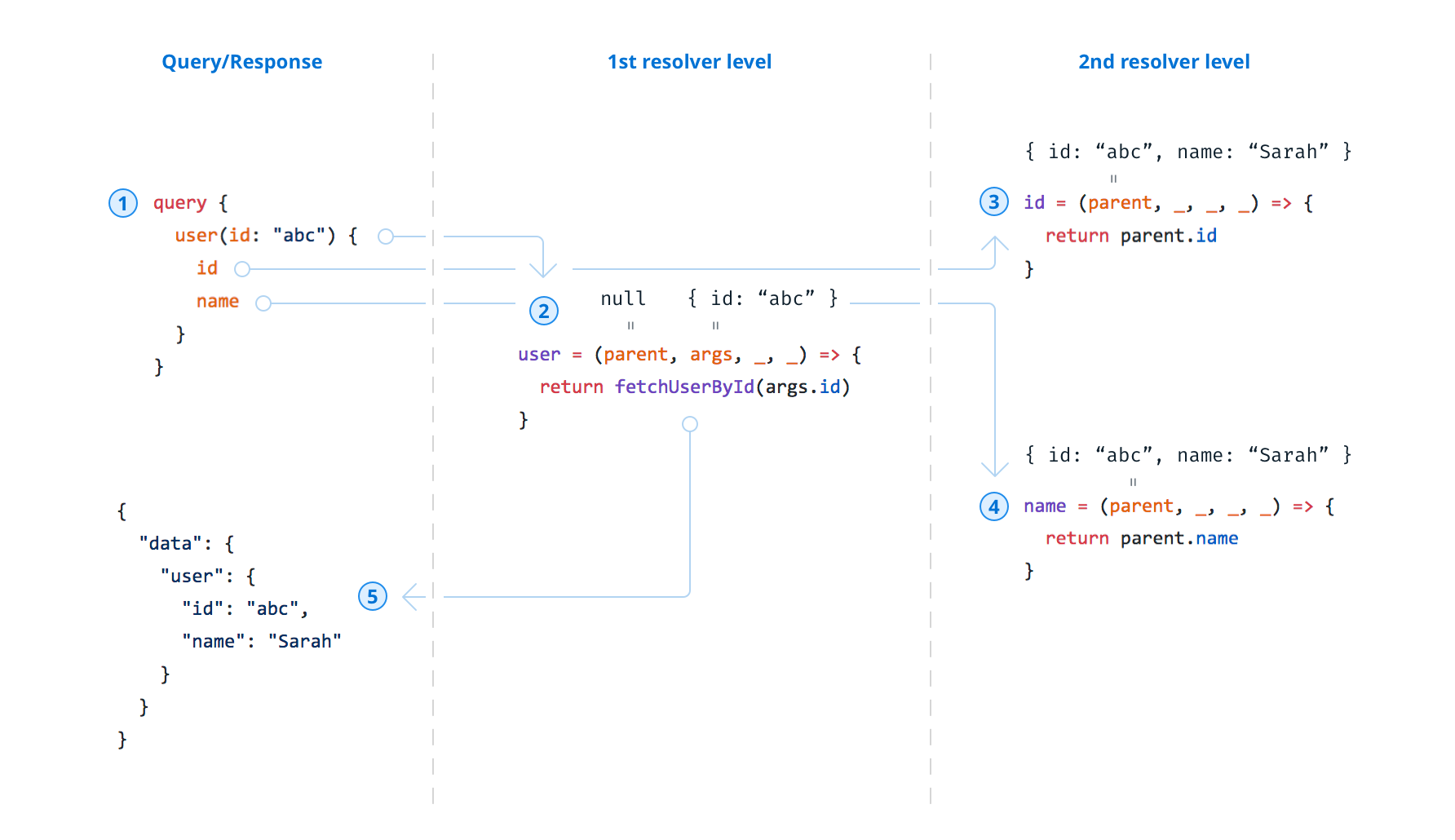
parent和args参数的总览
info包含查询AST和更多执行信息
关于info对象的结构和作用的那些疑问被遗忘了。官方规范和文档均未提及。曾经有一个GitHub issue要求提供更好的文档,但是该问题没有引起明显的行动就被关闭了。 因此,除了深入研究源码,别无他法。
在非常高的层次上,可以说info对象包含传入的GraphQL查询的AST。因此,分解器知道需要返回哪些字段。
要了解有关AST的更多信息,请务必查看Christian Joudrey的精彩文章GraphQL查询的一生——Lexing / Parsing以及Eric Baer的精彩演讲深入理解GraphQL。
为了理解info的结构,让我们来看下它的Flow type definition:
【译注】Flow是一个Javascript静态类型检查器。
/* @flow */

export type GraphQLResolveInfo = {
  fieldName: string,
  fieldNodes: Array<FieldNode>,
  returnType: GraphQLOutputType,
  parentType: GraphQLCompositeType,
  path: ResponsePath,
  schema: GraphQLSchema,
  fragments: { [fragmentName: string]: FragmentDefinitionNode },
  rootValue: mixed,
  operation: OperationDefinitionNode,
  variableValues: { [variableName: string]: mixed },
}
以下是每个键值的概述和简要说明:
fieldName:如前所述,您的GraphQL schema中的每个字段都需要分解器支持。fieldName包含属于当前分解器的字段的名称。fieldNodes:一个数组,其中每个对象代表其余选择集(selection set)中的一个字段。returnType:对应字段的GraphQL类型。parentType:该字段的父字段的GraphQL类型。path:跟踪遍历的字段,直到到达当前字段(即分解器)为止。schema:代表您的可执行schema的GraphQLSchema实例。fragments:属于查询文档的分片的映射。rootValue:传递给当前执行的rootValue参数。operation:整个查询的ASTvariableValues:对应于variableValues参数,与查询一起提供的任何变量的映射。
如果看起来还很抽象,不用担心。我们很快就会看到所有这些示例。
特定字段和全局(Field-specific vs Global)
对于上面的键(key),有一个有趣的发现。info对象上的键不是之于特定字段的就是全局的。
之于特定字段简单来说就是该键的值取决于info对象传递给的字段(及其背后的分解器)。明显的示例是fieldName,returnType和parentType。 考虑以下GraphQL类型的author字段:
type Query {
  author: User!
  feed: [Post!]!
}
该字段的fieldName只是author,returnType是User!并且parentType是Query。
对于feed字段,这些值当然有所不同:fieldName是feed,returnType是[Post!]! 并且parentType也是Query。
因此,这三个键的值是之于特定字段的。其他之于特定字段的键是:fieldNodes和path。 实际上,以上“流”定义的前五个键是之于特定字段的。
另一方面,全局意味着这些键的值不会改变 —— 无论我们在谈论哪个分解器。 schema,fragments,rootValue,operation和variableValues对于所有分解器将始终带有相同的值。
一个简单的例子
现在我们来看一个有关info对象内容的示例。首先,我们将在此示例中使用以下schema定义:
type Query {
  author(id: ID!): User!
  feed: [Post!]!
}

type User {
  id: ID!
  username: String!
  posts: [Post!]!
}

type Post {
  id: ID!
  title: String!
  author: User!
}
假设该schema的分解器实现如下:
const resolvers = {
  Query: {
    author: (root, { id }, context, info) => {
      console.log(`Query.author - info: `, JSON.stringify(info))
      return users.find(u => u.id === id)
    },
    feed: (root, args, context, info) => {
      console.log(`Query.feed - info: `, JSON.stringify(info))
      return posts
    },
  },
  Post: {
    title: (root, args, context, info) => {
      console.log(`Post.title - info: `, JSON.stringify(info))
      return root.title
    },
  },
}
注意这里实际上并不需要
Post.title的分解器,我们仍将其实现放在这里是为了查看调用分解器时info对象的更多信息。
现在考虑如下的查询:
query AuthorWithPosts {
  author(id: "user-1") {
    username
    posts {
      id
      title
    }
  }
}
为了简洁起见,我们仅讨论Query.author字段的分解器,而不讨论Post.title的分解器(执行上述查询时仍会调用该分解器)。
如果您想使用本示例,我们准备了一个带有上述schema的运行版本的仓库,因此您可以尝试一下!
接下来,让我们看一下info对象中的每个键,并查看它们在调用Query.author分解器时的内容(您可以在此处找到info对象的整个日志输出)。
fieldName
fieldName为author。
fieldNodes
请记住,fieldNodes是之于特定字段的。它实际上包含查询的AST的摘录。此摘录从当前字段(即author)而不是查询的根部开始。(从根开始的整个查询AST都在operation中存储,请参见下文)。
{
  "fieldNodes": [
    {
      "kind": "Field",
      "name": {
        "kind": "Name",
        "value": "author",
        "loc": { "start": 27, "end": 33 }
      },
      "arguments": [
        {
          "kind": "Argument",
          "name": {
            "kind": "Name",
            "value": "id",
            "loc": { "start": 34, "end": 36 }
          },
          "value": {
            "kind": "StringValue",
            "value": "user-1",
            "block": false,
            "loc": { "start": 38, "end": 46 }
          },
          "loc": { "start": 34, "end": 46 }
        }
      ],
      "directives": [],
      "selectionSet": {
        "kind": "SelectionSet",
        "selections": [
          {
            "kind": "Field",
            "name": {
              "kind": "Name",
              "value": "username",
              "loc": { "start": 54, "end": 62 }
            },
            "arguments": [],
            "directives": [],
            "loc": { "start": 54, "end": 62 }
          },
          {
            "kind": "Field",
            "name": {
              "kind": "Name",
              "value": "posts",
              "loc": { "start": 67, "end": 72 }
            },
            "arguments": [],
            "directives": [],
            "selectionSet": {
              "kind": "SelectionSet",
              "selections": [
                {
                  "kind": "Field",
                  "name": {
                    "kind": "Name",
                    "value": "id",
                    "loc": { "start": 81, "end": 83 }
                  },
                  "arguments": [],
                  "directives": [],
                  "loc": { "start": 81, "end": 83 }
                },
                {
                  "kind": "Field",
                  "name": {
                    "kind": "Name",
                    "value": "title",
                    "loc": { "start": 90, "end": 95 }
                  },
                  "arguments": [],
                  "directives": [],
                  "loc": { "start": 90, "end": 95 }
                }
              ],
              "loc": { "start": 73, "end": 101 }
            },
            "loc": { "start": 67, "end": 101 }
          }
        ],
        "loc": { "start": 48, "end": 105 }
      },
      "loc": { "start": 27, "end": 105 }
    }
  ]
}
returnType & parentType
如前所示,returnType和parentType相当微不足道:
{
  "returnType": "User!",
  "parentType": "Query"
}
path
path跟踪直到当前字段之前都已遍历的字段。对于Query.author,它仅为"path": { "key": "author" }。
{
  "path": { "key": "author" }
}
作为对比, 在Post.title的分解器中, path如下:
{
  "path": {
    "prev": {
      "prev": { "prev": { "key": "author" }, "key": "posts" },
      "key": 0
    },
    "key": "title"
  }
}
剩余五个字段属于“全局”类别,因此对于
Post.title分解器而言也是相同的。
schema
schema是对可执行schema的一个引用。
fragments
fragments包含分片定义,因为查询文档中没有任何分片的定义,所以它只是一个空映射:{}。
rootValue
如前所述,rootValue键的值首先与传递给graphql执行函数的rootValue参数相对应。 在此示例中,该字段为null。
operation
operation包含传入查询的完整查询AST。回想一下,除其他信息外,该信息包含与上述fieldNodes相同的值:
{
  "operation": {
    "kind": "OperationDefinition",
    "operation": "query",
    "name": {
      "kind": "Name",
      "value": "AuthorWithPosts"
    },
    "selectionSet": {
      "kind": "SelectionSet",
      "selections": [
        {
          "kind": "Field",
          "name": {
            "kind": "Name",
            "value": "author"
          },
          "arguments": [
            {
              "kind": "Argument",
              "name": {
                "kind": "Name",
                "value": "id"
              },
              "value": {
                "kind": "StringValue",
                "value": "user-1"
              }
            }
          ],
          "selectionSet": {
            "kind": "SelectionSet",
            "selections": [
              {
                "kind": "Field",
                "name": {
                  "kind": "Name",
                  "value": "username"
                }
              },
              {
                "kind": "Field",
                "name": {
                  "kind": "Name",
                  "value": "posts"
                },
                "selectionSet": {
                  "kind": "SelectionSet",
                  "selections": [
                    {
                      "kind": "Field",
                      "name": {
                        "kind": "Name",
                        "value": "id"
                      }
                    },
                    {
                      "kind": "Field",
                      "name": {
                        "kind": "Name",
                        "value": "title"
                      }
                    }
                  ]
                }
              }
            ]
          }
        }
      ]
    }
  }
}
variableValues
该键表示已传递给查询的所有变量。由于我们的示例中没有变量,因此它的值再次只是一个空映射:{}。
如果查询使用了变量编写:
query AuthorWithPosts($userId: ID!) {
  author(id: $userId) {
    username
    posts {
      id
      title
    }
  }
}
variableValues键会有以下值:
{
  "variableValues": { "userId": "user-1" }
}
使用GraphQL绑定时info的作用
如本文开头所述,在大多数情况下,您完全不需要担心info对象。它只是分解器签名的一部分,但实际上并没有用于任何用途。那么,它何时才有意义?
将info传递给绑定函数
如果您以前使用过GraphQL bindings,那么您已经见过将info对象作为生成的绑定函数的一部分。 考虑以下schema:
type Query {
  users(): [User]!
  user(id: ID!): User
}

type Mutation {
  createUser(username: String!): User!
  deleteUser(id: ID!!): User
}

type User {
  id: ID!
  username: String!
}
使用graphql-binding,您现在可以通过调用专用的绑定函数来发送可用的查询和变异,而不是通过原始查询和变异进行发送。
例如,考虑以下原始查询,检索特定的用户:
query {
  user(id: "user-100") {
    id
    username
  }
}
使用绑定函数实现相同效果如下所示:
binding.query.user({ id: 'user-100' }, null, '{ id username }')
通过在绑定实例上调用user函数并传递相应的参数,我们传达的信息与上述原始GraphQL查询完全相同。
graphql-binding中的绑定函数接受三个参数:
args: 包含字段的参数(例如,上述createUser突变的username)。context: 沿分解器链传递的上下文对象。info:info对象。 请注意,除了传递GraphQLResolveInfo的实例(信息的类型)之外,您还可以传递仅定义选择集的字符串。
使用Prisma将应用程序schema映射到数据库schema
info对象可能引起困惑的另一个常见用例是基于Prisma和prisma-binding的GraphQL服务器的实现。
在这种情况下,这种实现包含两个GraphQL层:
- 数据库层由Prisma自动生成,并提供通用且功能强大的CRUD API
- 应用程序层定义了GraphQL API,该API公开给客户端应用程序,并根据您的应用程序的需求量身定制
作为后端开发人员,您有责任为应用程序层定义应用程序schema并实现其分解程序。 由于有了prisma-binding,分解程序的实现仅是将传入查询委派给基础数据库API的过程,而且没有大量开销。
让我们考虑一个简单的示例 —— 假设您是从Prisma数据库服务的以下数据模型开始的:
type Post {
  id: ID! @unique
  title: String!
  author: User!
}

type User {
  id: ID! @uniqe
  name: String!
  posts: [Post!]!
}
Prisma基于此数据模型生成的数据库schema类似于以下内容:
type Query {
  posts(
    where: PostWhereInput
    orderBy: PostOrderByInput
    skip: Int
    after: String
    before: String
    first: Int
    last: Int
  ): [Post]!
  postsConnection(
    where: PostWhereInput
    orderBy: PostOrderByInput
    skip: Int
    after: String
    before: String
    first: Int
    last: Int
  ): PostConnection!
  post(where: PostWhereUniqueInput!): Post
  users(
    where: UserWhereInput
    orderBy: UserOrderByInput
    skip: Int
    after: String
    before: String
    first: Int
    last: Int
  ): [User]!
  usersConnection(
    where: UserWhereInput
    orderBy: UserOrderByInput
    skip: Int
    after: String
    before: String
    first: Int
    last: Int
  ): UserConnection!
  user(where: UserWhereUniqueInput!): User
}

type Mutation {
  createPost(data: PostCreateInput!): Post!
  updatePost(data: PostUpdateInput!, where: PostWhereUniqueInput!): Post
  deletePost(where: PostWhereUniqueInput!): Post
  createUser(data: UserCreateInput!): User!
  updateUser(data: UserUpdateInput!, where: UserWhereUniqueInput!): User
  deleteUser(where: UserWhereUniqueInput!): User
}
现在,假设您要构建一个类似于以下内容的应用程序schema:
type Query {
  feed(authorId: ID): Feed!
}

type Feed {
  posts: [Post!]!
  count: Int!
}
feed查询不仅返回Post元素的列表,而且还可以返回列表的count。 请注意,它可以选择使用authorId来过滤信息,以仅返回由特定User写的Post元素。
实现此应用程序scehma的第一直觉可能如下所示。
实现1:此实现方案看似正确,但有一个细微的缺陷:
const resolvers = {
  Query: {
    async feed(parent, { authorId }, ctx, info) {
      // build filter
      const authorFilter = authorId ? { author: { id: authorId } } : {}

      // retrieve (potentially filtered) posts
      const posts = await ctx.db.query.posts({ where: authorFilter })

      // retrieve (potentially filtered) element count
      const postsConnection = await ctx.db.query.postsConnection({ where: authorFilter }, `{ aggregate { count } }`)
      return {
        count: postsConnection.aggregate.count,
        posts: posts,
      }
    },
  },
}
这种实现似乎挺合理。在Feed分解器内部,我们根据可能传入的authorId构造authorFilter 然后使用authorFilter来执行posts查询和检索Post元素,以及postsConnection查询,该查询提供对列表计数的访问。
也可以仅使用
postsConnection查询来检索实际的Post元素。 为简单起见,我们仍在使用Post查询,而将另一种方法留给专心的读者练习。
实际上,使用此实现启动GraphQL服务器时,乍一看似乎情况不错。 您会注意到,简单的查询已正确被处理,例如以下查询将成功:
query {
  feed(authorId: "cjdbbsepg0wp70144svbwqmtt") {
    count
    posts {
      id
      title
    }
  }
}
当你尝试查询Post的author时,问题开始出现:
query {
  feed(authorId: "cjdbbsepg0wp70144svbwqmtt") {
    count
    posts {
      id
      title
      author {
        id
        name
      }
    }
  }
}
好了,由于某种原因,该实现无法返回author,因此会触发错误“Cannot return null for non-nullable Post.author.”。 而Post.author字段在应用程序schema中被标记为必填。
让我们再次看一下该实现的相关部分:
// retrieve (potentially filtered) posts
const posts = await ctx.db.query.posts({ where: authorFilter })
这是我们检索Post元素的地方。但是,我们没有将选择集传递给Posts绑定函数。如果没有将第二个参数传递给Prisma绑定函数,则默认行为是查询该类型的所有scalar字段。
这确实解释了这种行为。对ctx.db.query.posts的调用返回正确的Post元素集,但仅返回其id和title值 —— 不包含author的相关数据。
那么,我们该如何解决呢?显然,需要一种方法来告诉posts绑定函数需要返回哪些字段。但是该信息要放在feed分解器的上下文中哪里?你能猜得到吗?
正确:在info对象内部!由于Prisma绑定函数的第二个参数可以是字符串,也可以是info对象,因此我们只需将传递到feed分解器中的info对象传递到posts绑定函数。
实现2下的该查询失败:“Field ‘posts’ of type ‘Post’ must have a sub selection.”
const resolvers = {
  Query: {
    async feed(parent, { authorId }, ctx, info) {
      // build filter
      const authorFilter = authorId ? { author: { id: authorId } } : {}

      // retrieve (potentially filtered) posts
      const posts = await ctx.db.query.posts({ where: authorFilter }, info) // pass `info`

      // retrieve (potentially filtered) element count
      const postsConnection = await ctx.db.query.postsConnection({ where: authorFilter }, `{ aggregate { count } }`)
      return {
        count: postsConnection.aggregate.count,
        posts: posts,
      }
    },
  },
}
但是,使用此实现,将无法正确处理任何请求。例如,考虑以下查询:
query {
  feed {
    count
    posts {
      title
    }
  }
}
错误消息“Field ‘posts’ of type ‘Post’ must have a sub selection.”。 由上述实现的第8行生成。
那么,这里发生了什么?之所以失败,是因为信息对象中之于特定字段的键与posts查询不匹配。
在feed分解器内部打印信息对象可以使您更加了解情况。让我们只考虑fieldNodes中的特定字段的信息:
{
  "fieldNodes": [
    {
      "kind": "Field",
      "name": {
        "kind": "Name",
        "value": "feed"
      },
      "arguments": [],
      "directives": [],
      "selectionSet": {
        "kind": "SelectionSet",
        "selections": [
          {
            "kind": "Field",
            "name": {
              "kind": "Name",
              "value": "count"
            },
            "arguments": [],
            "directives": []
          },
          {
            "kind": "Field",
            "name": {
              "kind": "Name",
              "value": "posts"
            },
            "arguments": [],
            "directives": [],
            "selectionSet": {
              "kind": "SelectionSet",
              "selections": [
                {
                  "kind": "Field",
                  "name": {
                    "kind": "Name",
                    "value": "title"
                  },
                  "arguments": [],
                  "directives": []
                }
              ]
            }
          }
        ]
      }
    }
  ]
}
此JSON对象也可以表示为字符串形式的选择集:
{
  feed {
    count
    posts {
      title
    }
  }
}
现在这一切都说得通了!我们会将上述选择集发送到Prisma数据库schema的posts查询中,该数据库当然不知道feed和count字段。诚然,产生的错误消息并没有多大帮助,但至少我们知道现在发生了什么。
那么,该问题的解决方案是什么?解决此问题的一种方法是手动解析出fieldNodes选择集的正确部分,并将其传递给posts绑定函数(例如,作为字符串)。
对于该问题,有一个更为优雅的解决方案,那就是从应用程序schema中为Feed类型实现专用的分解器。 这是正确的实现方式。
实现3:该实现解决了上述问题
const resolvers = {
  Query: {
    async feed(parent, { authorId }, ctx, info) {
      // build filter
      const authorFilter = authorId ? { author: { id: authorId } } : {}

      // retrieve (potentially filtered) posts
      const posts = await ctx.db.query.posts({ where: authorFilter }, `{ id }`) // second argument can also be omitted

      // retrieve (potentially filtered) element count
      const postsConnection = await ctx.db.query.postsConnection({ where: authorFilter }, `{ aggregate { count } }`)
      return {
        count: postsConnection.aggregate.count,
        postIds: posts.map(post => post.id), // only pass the `postIds` down to the `Feed.posts` resolver
      }
    },
  },
  Feed: {
    posts({ postIds }, args, ctx, info) {
      const postIdsFilter = { id_in: postIds }
      return ctx.db.query.posts({ where: postIdsFilter }, info)
    },
  },
}
此实现解决了上面讨论的所有问题。 有几件事要注意:
- 在第8行中,我们现在传递了一个字符串选择集(
{id})作为第二个参数。 这只是为了提高效率,否则所有scalar值都将在我们仅需要ID的情况下获取(在我们的示例中不会有很大的不同)。 - 我们不是从Query.feed分解器中返回
posts,而是返回postIds,后者只是一个ID数组(表示为字符串)。 - 现在,在
Feed.posts分解器中,我们可以访问父分解器返回的postId。这次,我们可以使用传入的info对象,然后将其简单地传递到posts绑定函数。
如果您想使用此示例,则可以查看该仓库,其中包含上述示例的运行版本。 随意尝试本文中提到的不同实现,并亲自观察行为!
总结
在本文中,您深入了解了在基于 GraphQL.js 实现 GraphQL API 时使用的 info 对象。
该 info 对象没有很好的官方文档 —— 要进一步了解它,您需要深入研究源码。在本教程中,我们首先概述其内部结构并了解其在GraphQL分解器函数中的作用。然后,我们介绍了一些需要深入了解info的极端情况和潜在陷阱。
本文中显示的所有代码都可以在相应的 GitHub 仓库中找到,因此您可以自己实验并观察info对象的行为。