

一、目录结构以及用处
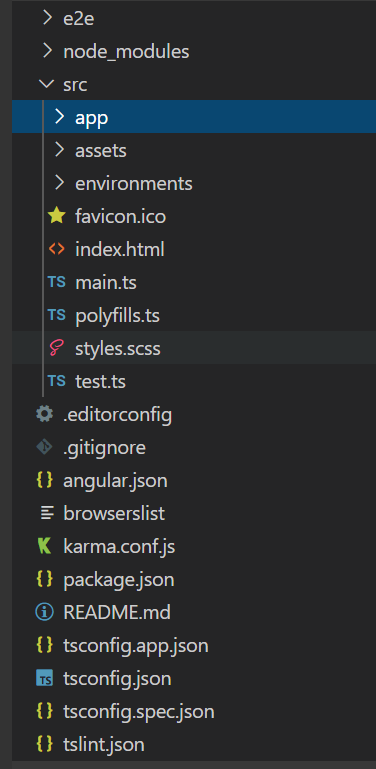
- e2e 端到端测试
- node_modules 安装的第三方依赖包
- src 应用源代码目录
- app 应用的组件和模块,我们主要代码都是在这个里面
- app-routing.module.ts 主路由路由
- app.component.html 主组件html文件
- app.component.scss 主组件样式文件
- app.component.spec 主组件测试文件
- app.component.ts 主组件ts文件
- app.module.ts 主模块文件,用来全局导入声明模块组件和服务等
- assets 静态资源
- enviroments 环境文件
- favicon.ico shortcut图标
- index.html 主页面
- main.ts 主要入库口
- polyfills.ts 导入一些必要的库,兼容老版本
- styles.scss 全局样式文件
- test.ts 自动化测试用的
- app 应用的组件和模块,我们主要代码都是在这个里面
- .editorconfig 编辑器配置
- .gitignore git提交忽略文件配置
- angular.json angular cli 配置文件
- package.json 项目配置文件
- README.md 说明文档
- tsconfig.json typeScript配置
- tslint.json tslint配置
二、相关概念
模块
// 导入需要的模块,组件
import { BrowserModule } from '@angular/platform-browser';
import { NgModule } from '@angular/core';
import { AppComponent } from './app.component';

//装饰器
@NgModule({
declarations: [AppComponent],
    imports: [BrowserModule],
    providers: [],
    exports: [],
    bootstrap: [AppComponent]
})
export class AppModule {}
@NgModule是一个装饰器:
- 表示AppModule是模块类
- 为模块类指定元素据
- declarations 声明属于这个模块的内容:只能是组件,指令,管道
- imports 导入该模块依赖的模块
- providers 声明模块中提供的服务
- exports 导出组件,指令,管道,用于其他模块使用
- bootstrap 根组件,最终插入到index.html页面中
组件
import { Component } from '@angular/core';

@Component({
    selector: 'app-root',
    templateUrl: './app.componentComponent.html',
    styleUrls: ['./app.component.scss']
})
export class AppComponent {
    title = 'ngdemo';
}
@Component是一个装饰器:
- 表示AppComponent是组件类
- 为组件类指定元数据
- selector— 组件的选择器(CSS 元素选择器)
- templateUrl— 组件模板文件的位置。
- styleUrls— 组件私有 CSS 样式表文件的位置。

