对于组件中render函数的watcher的实例化是在beforeMount之后。
//core/instance/lifecycle.js
updateComponent = () => {
  vm._update(vm._render(), hydrating)
}
new Watcher(vm, updateComponent, noop, {
  before () {
    if (vm._isMounted && !vm._isDestroyed) {
      callHook(vm, 'beforeUpdate')
    }
  }
}, true /* isRenderWatcher */)
vm._render的执行用来生成vnode。vm._update的执行会将vnode生成真实的dom。这里先不做深究怎么实现。
依赖的收集
<div id="demo">
  <p>{{name}}</p>
</div>
上面的模版通过Vue.complie编译之后生成如下的render函数。即此时的vm.render如下:
function anonymous() {
  with(this) {
    return _c('div', {
        attrs: {
          "id": "demo"
        }
      },
      [_c('p', [_v(_s(name))])])
  }
}
当updateComponent函数的执行的时候会间接的触发vm._render的执行。而vm.render的执行会触发name的 get 操作。在此时数据已经被处理为了响应式的,即name的getter/setter已经被处理。因此获取name时触发自身的依赖收集。将此时的watcher收集到自身的dep中。
dep收集watcher的路线
dep来进行收集当前的watcher路线可能有点绕。
get: function reactiveGetter () {
  const value = getter ? getter.call(obj) : val
  if (Dep.target) {
    dep.depend()
    if (childOb) {
      childOb.dep.depend()
      if (Array.isArray(value)) {
        dependArray(value)
      }
    }
  }
  return value
}
此时的Dep.target就是渲染函数的watcher实例。因此进入if判断。执行dep.depend()。
class Dep{
  depend () {
    if (Dep.target) {
      Dep.target.addDep(this)
    }
  }
}
class Watcher{
  //....
  addDep (dep: Dep) {
    const id = dep.id
    if (!this.newDepIds.has(id)) {
      this.newDepIds.add(id)
      this.newDeps.push(dep)
      if (!this.depIds.has(id)) {
        dep.addSub(this)
      }
    }
  }
}
绕来绕去。最终在Watcher进行收集的操作。此时的dep依然是name自身的getter/setter形成闭包封装起来的dep。这么做的目的是,在watcher中进行了过滤的操作,避免重复收集同一个依赖。同时可以做到。dep中收集需要通知的watcher。同时watcher中收集到都会被谁所通知(储存在watcher自身的deps中)。
依赖收集过程中的过滤
修改上面的html模版如下:
<div id="demo">
  <p>{{name}}{{name}}</p>
</div>
生成的渲染函数如下。此时需要触发两次name的get操作。
function anonymous() {
  with(this) {
    return _c('div', {
        attrs: {
          "id": "demo"
        }
      },
      [_c('p', [_v(_s(name) + _s(name))])])
  }
}
按照依赖收集的路线。同一个属性只会在自己的getter/setter的闭包中生成一个dep,也就是说每一个属性的dep.id都是唯一的。因此对于第二次的获取name时避免掉了重复收集,此时就完成了同一次数据多次获取时候的依赖收集过滤。
同时watcher中使用deps、depIds永远保存着上次数据的deps。当name的数据变化时触发重新获取的操作时,会拿最新一次数据的newDepIds、newDeps与上一次的deps来进行对比。不需要的就删除,需要得就继续添加。所以对于if (!this.depIds.has(id)) { dep.addSub(this) }的作用其实就是,数据变化多次求值的时候避免调重复收集依赖。
路线图如下:

class Watcher{
  //...
  addDep (dep: Dep) {
    const id = dep.id
    if (!this.newDepIds.has(id)) {
      this.newDepIds.add(id)
      this.newDeps.push(dep)
      if (!this.depIds.has(id)) {
        dep.addSub(this)
      }
    }
  }
  get () {
    pushTarget(this)
    let value
    const vm = this.vm
    try {
      value = this.getter.call(vm, vm)
    } catch (e) {
      // 省略...
    } finally {
      // 省略...
      popTarget()
      this.cleanupDeps()
    }
    return value
  }
  cleanupDeps () {
    let i = this.deps.length
    while (i--) {
      const dep = this.deps[i]
      if (!this.newDepIds.has(dep.id)) {
        dep.removeSub(this)
      }
    }
    let tmp = this.depIds
    this.depIds = this.newDepIds
    this.newDepIds = tmp
    this.newDepIds.clear()
    tmp = this.deps
    this.deps = this.newDeps
    this.newDeps = tmp
    this.newDeps.length = 0
  }
}
触发依赖的过程
加入模版如下;
<div id="demo">
  <p>{{name}}今年{{age}}</p>
</div>
<script>
var app = new Vue({
  el: '#demo',
  data: {
    name: 'xiaopingbuxiao',
    age: 18
  },
  methods: {
    dataChange() {
      this.name = 'xiaoping'
      this.age = 19
    }
  },
})
</script>
则通过Vue编译之后生产的render函数如下:
function anonymous() {
  with(this) {
    return _c('div', {
      attrs: {
        "id": "demo"
      }
    }, [_c('p', [_v(_s(name) + "今年" + _s(age))])])
  }
}
此时在name和age自身的getter/setter闭包中的dep中都收集到了render函数生成的watcher。所以当name、age变化的时候会通知watcher进行重新渲染。
像上面的例子中,调用dataChange函数同时改变了name、age。如果分别通知两次数据变化,watcher都去执行更新然后重新渲染的话显然是比较耗费性能的。因此Vue是不会这么做的,而是通过异步更新的策略来进行处理
异步更新
通过上面知道name、age的deps中都会收集到渲染函数的watcher实例。因此name、age变化时,触发更新。
class Watcher{
  //...
  update () {
    if (this.lazy) {
      this.dirty = true
    } else if (this.sync) {
      console.log(this.cb,'同步形式')
      this.run()
    } else {
      console.log(this.cb,'队列形式')
      queueWatcher(this)
    }
  }
}
对于渲染函数的watcher实例this.lazy为false(其实只会在computed中属性中为true)。同时this.sync也为false(同步更新的时候为true)。因此对于渲染函数的watcher执行了queueWatcher(this)。如下是queueWatcher的实现
//core/observer/scheduler.js
let has = {}
let waiting = false
let flushing = false
let index = 0

export function queueWatcher (watcher: Watcher) {
  const id = watcher.id
  if (has[id] == null) {
    has[id] = true
    if (!flushing) {
      queue.push(watcher)
    } else {
      // if already flushing, splice the watcher based on its id
      // if already past its id, it will be run next immediately.
      let i = queue.length - 1
      while (i > index && queue[i].id > watcher.id) {
        i--
      }
      queue.splice(i + 1, 0, watcher)
    }
    // queue the flush
    if (!waiting) {
      waiting = true
      if (process.env.NODE_ENV !== 'production' && !config.async) {
        flushSchedulerQueue()
        return
      }
      nextTick(flushSchedulerQueue)
    }
  }
}
继续拿上面的例子。当name、age变化的时候,因此他们自身需要通知的watcher是同一个,通过has对象,避免渲染函数watcher实例多次的入队。同时定义了flushing一开始为false代表当前还没有开始队列的更新。此时如果有新的watcher入队直接放在队列尾部。如果已经开始队列的更新之后,又有新的watcher入队。则应该保证观察者watcher的执行顺序。
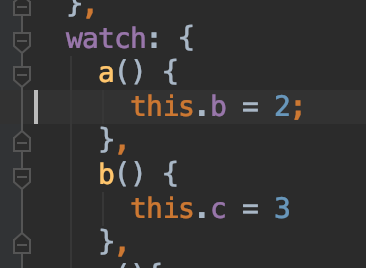
按照我的理解,所有的触发watcher入队的操作都是在宏任务中收集,但是队列的更新是在nextTick的微任务中触发,所以此处没有想到什么场景下会出现flushing===true之后又进行了入队的操作。这里如果有了解的大佬请给我留言,不胜感激,谢谢谢谢🙏。
两天后更新:此种场景就会出现flushing===true之后又进行了入队的操作
同步更新
对于上面我们知道对于渲染函数的处理,是采用的异步更新策略,同样对于用户的watch默认也是放入队列异步更新的。但是其实我们自己的watch是可以这么玩的:
watch:{
  name:{
    handler(){
      console.log('name发生变化')
    },
    sync:true
  }
}
强制指定watch采用同步更新。只是可以这么玩,迄今为止并没有碰到使用场景,同样强烈不推荐这么玩
暂时先不去关心nextTick的实现,把它当做事一个setTimeout理解。继续看flushSchedulerQueue,不需要关注的已经删除了,只看下面一部分。
function flushSchedulerQueue () {
  currentFlushTimestamp = getNow()
  flushing = true
  let watcher, id

  queue.sort((a, b) => a.id - b.id)
  for (index = 0; index < queue.length; index++) {
    watcher = queue[index]
    if (watcher.before) { // beforeUpdate就是这里
      watcher.before()
    }
    id = watcher.id
    has[id] = null
    watcher.run()
  }
}
其中 queue的排序是为了:
- Vue中的组件的创建与更新有点类似于事件捕获,都是从最外层向内层延伸,所以要先调用父组件的创建与更新
- userWatcher比renderWatcher创建要早,这件的 renderWatch 永远在最后
- 如果父组件的watcher调用run时将父组件干掉了,那其子组件的watcher也就没必要调用了
同时通过上面我们可以知道watch还可以这么玩。
watch:{
  name:{
    handler(){
      console.log('name发生变化')
    },
    before(){
      console.log('name发生改变之前触发')
    },
  }
}
// 输出
//name发生改变之前触发
//name发生变化
此篇文章更多的倾向于作为笔记,如果您有需要建议对照vue源码中beforeMount钩子之后render函数实例化watcher处开始。