前面的章节介绍了Vue.js是如何实现数据渲染和组件化的,主要是一个初始化的过程,并没有涉及到数据变化影响DOM变化的部分。而这也是Vue的核心之一。接下来我们就来探讨Vue如何实现数据发生变化重新对页面进行渲染的。
<div id="app" @click="changeMsg">
    {{message}}
</div>
const vm = new Vue({
    el: '#app',
    data: {
        message: 'Hello World'
    },
    methods: {
        changeMsg() {
            this.message = 'Hello Dude'
        }
    }
})
以上是一个简单示例,最初网页中显示Hello World,鼠标点击div,内容会更改为Hello Dude。我们的点击事件只是更改了数据,并没有操作 DOM,那 DOM 是如何知道数据被更改,又是如何重新渲染的呢?想要搞清楚这一流程,需要先了解一个概念,响应式对象。
响应式对象
朋友们都知道 Vue.js 实现响应式的核心是利用了ES5的Object.defineProperty(Vue 3.0换做了Proxy),我们先来对它做个了解。
Object.defineProperty(obj, prop, descriptor)
这是它的基本语法。其中obj表示要在其上定义属性的对象,prop表示要定义或修改的属性的名称,descriptor表示将被定义或修改的属性描述符(具体可查看 MDN),整个表达式返回一个对象。
对于 Vue 而言,响应式对象利用的是descriptor的Setters和Getters。一旦对象的属性拥有了Setters和Getters,当我们访问到对象的属性时,就会执行Getters,当我们对属性赋值时,就会执行Setters,这时它就成为了一个响应式对象。
接下来从源码的角度探讨一下具体实现。在初始化的过程中,会调用initState对data、props、computed等等进行初始化。以data为例,
function initData (vm: Component) {
  let data = vm.$options.data

  // check if data is a function or object
  data = vm._data = typeof data === 'function'
    ? getData(data, vm)
    : data || {}

  // proxy data on instance
  const keys = Object.keys(data)
  let i = keys.length
  while (i--) {
    const key = keys[i]
    if (!isReserved(key)) {
      proxy(vm, `_data`, key)
    }
  }
  // observe data
  observe(data, true /* asRootData */)
}
在initData中,首先对data做了格式统一,名称校验,并代理到实例上。我们要重点关注的是接下来要探讨的observe。
export function observe (value: any, asRootData: ?boolean): Observer | void {
  // value must be an object but not a vnode instance
  if (!isObject(value) || value instanceof VNode) {
    return
  }
  let ob: Observer | void
  if (hasOwn(value, '__ob__') && value.__ob__ instanceof Observer) {
    ob = value.__ob__
  } else if (
    shouldObserve &&
    !isServerRendering() &&
    (Array.isArray(value) || isPlainObject(value)) &&
    Object.isExtensible(value) &&
    !value._isVue
  ) {
    ob = new Observer(value)
  }
  if (asRootData && ob) {
    ob.vmCount++
  }
  return ob
}
在observe中,先判断data如果不是对象或 vnode 实例,直接返回。value.__ob__之后才会存在(下面的def(value, '__ob__', this)可以简单认为是value.__ob__ = new Observer()),所以会进入else if逻辑,最终返回new Observer()。那Observer又是什么鬼?其实就是我们所说的观察者,继续往下看。
export class Observer {
  value: any;
  dep: Dep;
  vmCount: number; // number of vms that have this object as root $data

  constructor (value: any) {
    this.value = value
    this.dep = new Dep()
    this.vmCount = 0
    // defineProperty()
    def(value, '__ob__', this)
    if (Array.isArray(value)) {
      if (hasProto) {
        // value.__proto__ = arrayMethods
        protoAugment(value, arrayMethods)
      } else {
        // for loop,defineProperty(value, arrayKey[i], arrayMethods[arrayKeys[i]])
        copyAugment(value, arrayMethods, arrayKeys)
      }
      this.observeArray(value)
    } else {
      this.walk(value)
    }
  }
  walk (obj: Object) {
    const keys = Object.keys(obj)
    for (let i = 0; i < keys.length; i++) {
      defineReactive(obj, keys[i])
    }
  }
  observeArray (items: Array<any>) {
    for (let i = 0, l = items.length; i < l; i++) {
      observe(items[i])
    }
  }
}
在Observer中,判断 data 如果是数组,则调用observeArray,即遍历数组并递归调用observe(直到数据不为对象为止)。否则调用walk,即遍历对象并对属性调用defineReactive。该方法对每个属性设置了Getters和Setters。这样数据就具有的响应式的特性,在访问数据时会进行依赖收集,在修改数据时会进行派发更新。接下来我们分别来探讨。
export function defineReactive (
  obj: Object,
  key: string,
  val: any,
  customSetter?: ?Function,
  shallow?: boolean
) {
  const dep = new Dep()
  // ...
  let childOb = !shallow && observe(val)
  Object.defineProperty(obj, key, {
    enumerable: true,
    configurable: true,
    get: function reactiveGetter () {
      // ...
    },
    set: function reactiveSetter (newVal) {
      // ...
    }
  })
}
依赖收集
通俗来讲,依赖收集就是在访问到对象的属性时,会执行数据的getter,此时判断如果Dep.target(当前正在计算的 Watcher)存在,就调用dep.depend把 Watcher(订阅这个数据变化的 Watcher)收集起来。
get: function reactiveGetter () {
    const value = getter ? getter.call(obj) : val
    if (Dep.target) {
        dep.depend()
        if (childOb) {
            // this is for Vue.set
            // for instance : _data : {msg : {a : 1}}
            // childOb is what Observe(msg) return, also means msg.__ob__
            // here execute msg.__ob__.dep.depend()
            // when we execute Vue.set(msg, b, 2), in Vue.set, msg.__ob__.dep.notify
            childOb.dep.depend()
            if (Array.isArray(value)) {
                dependArray(value)
            }
        }
    }
    return value
}
而Dep类主要用于存储依赖(数据和 Watcher 之间的桥梁),类中定义了几个方法addSub、removeSub、depend、notify,分别用存储依赖、移除依赖、依赖收集、派发更新。还定义了静态属性Dep.target,表示当前正在计算的 Watcher。
export default class Dep {
  static target: ?Watcher;
  id: number;
  subs: Array<Watcher>;

  constructor () {
    this.id = uid++
    this.subs = []
  }
  addSub (sub: Watcher) {
    this.subs.push(sub)
  }
  removeSub (sub: Watcher) {
    remove(this.subs, sub)
  }
  depend () {
    if (Dep.target) {
      Dep.target.addDep(this)
    }
  }
  notify () {
    // stabilize the subscriber list first
    const subs = this.subs.slice()
    if (process.env.NODE_ENV !== 'production' && !config.async) {
      // subs aren't sorted in scheduler if not running async
      // we need to sort them now to make sure they fire in correct
      // order
      subs.sort((a, b) => a.id - b.id)
    }
    for (let i = 0, l = subs.length; i < l; i++) {
      subs[i].update()
    }
  }
}

// The current target watcher being evaluated.
// This is globally unique because only one watcher
// can be evaluated at a time.
Dep.target = null
const targetStack = []
export function pushTarget (target: ?Watcher) {
  targetStack.push(target)
  Dep.target = target
}
export function popTarget () {
  targetStack.pop()
  Dep.target = targetStack[targetStack.length - 1]
}
那什么时候会触发数据的getter呢,其实是在挂载阶段执行mountComponent时(会执行new Watcher(),执行到 Watcher 中的get方法,执行pushTarget(把当前的 Watcher 赋值给Dep.target,或者是推入targetStack)),调用vm._render(执行render函数)的时候会访问到定义在模板中的数据(即会触发数据的getter),此时会将 Watcher 添加到subs中,成为数据的订阅者(dep.depend() -> Dep.target.addDep(this) -> dep.addSub(this) )。等到mountComponent执行结束,再通过popTarget将Dep.target恢复到上一个值。执行 Watcher 类的cleanupDeps清除依赖(为什么???每次数据改变,都要重新调用一次render,重新调用addDep添加依赖,所以每次要清除依赖)
export default class Watcher {
    constructor(){}
    get () {
        pushTarget(this)
        let value
        const vm = this.vm
        try {
            value = this.getter.call(vm, vm)
        } finally {
            popTarget()
            this.cleanupDeps()
        }
        return value
    }
    addDep (dep: Dep) {
        const id = dep.id
        // self-notes: re-execute at each render,new represents newDeps
        if (!this.newDepIds.has(id)) {
            this.newDepIds.add(id)
            this.newDeps.push(dep)
            if (!this.depIds.has(id)) {
                dep.addSub(this)
            }
        }
    }
    cleanupDeps () {
        let i = this.deps.length
        while (i--) {
          const dep = this.deps[i]
          if (!this.newDepIds.has(dep.id)) {
            // self-notes: remove old dependencies,which are not included in newDeps..
            dep.removeSub(this)
          }
        }
        // self-notes: exchange and reserve newXXX
        let tmp = this.depIds
        this.depIds = this.newDepIds
        this.newDepIds = tmp
        this.newDepIds.clear()
        tmp = this.deps
        this.deps = this.newDeps
        this.newDeps = tmp
        this.newDeps.length = 0
    }
    update () {
        /* istanbul ignore else */
        if (this.lazy) {
            this.dirty = true
        } else if (this.sync) {
            // ...
        } else {
            queueWatcher(this)
        }
    }
    run () {
        if (this.active) {
            // execute getter
            const value = this.get()
            if (value !== this.value || isObject(value) || this.deep) {
                const oldValue = this.value
                this.value = value
                if (this.user) {
                    try {
                        this.cb.call(this.vm, value, oldValue)
                    } catch(e) { <!----> }
                } else {
                    // noop
                    this.cb.call(this.vm, value, oldValue)
                }
            }
        }
    }
}
派发更新
在数据发生改变时,会触发数据的setter,进入派发更新过程。要特别关注dep.notify。在该函数中,遍历subs并分别执行 Watcher 类的update方法。执行到queueWatcher方法。
set: function reactiveSetter (newVal) {
    const value = getter ? getter.call(obj) : val
    /* eslint-disable no-self-compare */
    if (newVal === value || (newVal !== newVal && value !== value)) {
        return
    }
    // #7981: for accessor properties without setter
    if (getter && !setter) return
    if (setter) {
        setter.call(obj, newVal)
    } else {
        val = newVal
    }
    childOb = !shallow && observe(newVal)
    dep.notify()
}
在queueWatcher中,并没有立即进行更新,而是把要更新的 Wathcer 推入一个队列。在nextTick中进行更新。
export function queueWatcher (watcher: Watcher) {
  const id = watcher.id
  // 推入队列统一更新
  if (has[id] == null) {
    has[id] = true
    if (!flushing) {
      queue.push(watcher)
    } else {
      // if already flushing, splice the watcher based on its id
      // if already past its id, it will be run next immediately.
      let i = queue.length - 1
      while (i > index && queue[i].id > watcher.id) {
        i--
      }
      queue.splice(i + 1, 0, watcher)
    }
    // queue the flush
    if (!waiting) {
      waiting = true
      nextTick(flushSchedulerQueue)
    }
  }
}
说到nextTick,朋友们都比较熟悉了。Vue.js暴露出两个API:Vue.nextTick和vm.$nextTick就是使用了该方法,这个我们之后会提到。此处nextTick是用作派发更新,传入一个函数作为参数。我们看这个函数中做了什么。
function flushSchedulerQueue () {
  currentFlushTimestamp = getNow()
  flushing = true
  let watcher, id

  // Sort queue before flush.
  // This ensures that:
  // 1. Components are updated from parent to child. (because parent is always
  //    created before the child)
  // 2. A component's user watchers are run before its render watcher (because
  //    user watchers are created before the render watcher)
  // 3. If a component is destroyed during a parent component's watcher run,
  //    its watchers can be skipped.
  queue.sort((a, b) => a.id - b.id)

  // do not cache length because more watchers might be pushed
  // as we run existing watchers
  for (index = 0; index < queue.length; index++) {
    watcher = queue[index]
    if (watcher.before) {
      watcher.before()
    }
    id = watcher.id
    has[id] = null
    watcher.run()
    // in dev build, check and stop circular updates.
    if (process.env.NODE_ENV !== 'production' && has[id] != null) {
      circular[id] = (circular[id] || 0) + 1
      if (circular[id] > MAX_UPDATE_COUNT) {
        // throw a Error
        break
      }
    }
  }
  // ...
}
在flushSchedulerQueue中,首先根据id对 Watcher 进行排序(考虑到嵌套组件、userWatcher等等,确保按照正确的顺序执行),随后遍历队列,分别调用watcher.run方法(在run中执行了watcher.get,还是会调用到vm._update(),重新渲染组件),那flushSchedulerQueue显然是在nextTick中进行了调用。以上是整个响应式原理的大致流程。
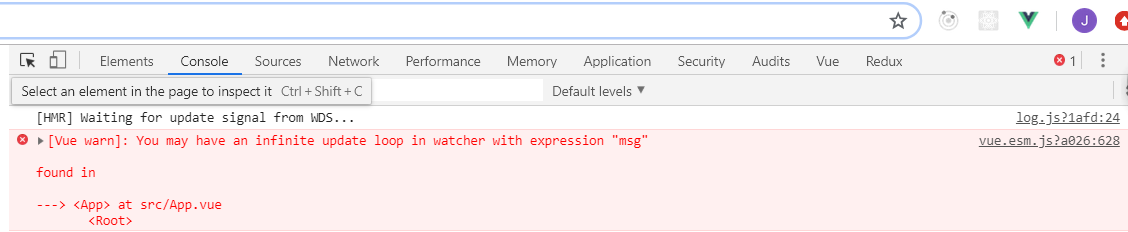
但还没有结束,我们注意到watcher.run之后还有还有一个if判断,抛出一个错误。这是在做什么呢?其实是为了防止代码中出现无限循环更新,比如如下代码。当点击h1时,数据发生变化,触发派发更新。此时有两个 watcher 订阅了数据的变化(一个自定义的watch(user Watcher)、一个渲染Watcher),执行到watcher.run时,对于user Watcher来说,回调函数就是我们定义的函数,会执行函数,再次改变数据,再次调用queueWacther,此时flushing状态为true,会在队列中向user Watcher后添加一个同样的user Watcher,此时has[id] != null,会进入if判断,计数加一,此过程循环往复,源码规定当计数超过100时,抛出错误,循环终止。
<h1 @click="changeMsg">{{msg}}</h1>
export default {
  data() {
    return { msg: "Hello World" };
  },
  watch: {
    msg() {
      this.msg = Math.random();
    }
  },
  methods: {
    changeMsg() {
      this.msg = Math.random();
    }
  }
}
nextTick中发生的,那么除了用作数据更新,我们在开发过程中也可以调用该方法,接下来我们探讨一下。
export function nextTick (cb?: Function, ctx?: Object) {
  let _resolve
  callbacks.push(() => {
    if (cb) {
      try {
        cb.call(ctx)
      } catch (e) {
        handleError(e, ctx, 'nextTick')
      }
    } else if (_resolve) {
      _resolve(ctx)
    }
  })
  if (!pending) {
    pending = true
    timerFunc()
  }
  // $flow-disable-line
  if (!cb && typeof Promise !== 'undefined') {
    return new Promise(resolve => {
      _resolve = resolve
    })
  }
}
有两种方式调用nextTick(回调函数和Promise),无论使用哪种方式。均是将函数推入一个数组中,等到执行timerFunc时统一执行。那么timerFunc又执行了什么呢?这里需要了解两个概念:宏任务和微任务(在此不做详细解释,可以搜索一下js 的执行机制)。常见的微任务有Promise、MutationObserver,常见的宏任务有setImmediate、setTimeout。在2.6版本中和2.5版本中的实现略有不同,此处是2.6版本。判断如果支持Promise,优先使用Promise,否则使用MutationObserver,之后再是setImmediate、setTimeout。所以说组件更新的过程是异步的,如果想要获取更新后的DOM的相关数据,则需要在数据更改之后调用nextTick来获取(如果在数据更改之前调用也是没有意义的)。
<div ref="msg">{{msg}}</div>
<button @click="next">按钮</button>
export default {
  data() {
    return { msg: "Hello World" };
  },
  methods: {
    next() {
      this.msg = 123;
      console.log(this.$refs.msg.innerText);
      this.$nextTick(() => {
        console.log("nextTick: " + this.$refs.msg.innerText);
      });
      this.$nextTick().then(() => {
        console.log("nextTick: " + this.$refs.msg.innerText);
      })
    }
  }
}
至此,已经慢慢接近尾声了。前面我们了解到,在开发过程中,开发人员可以只关心数据,数据修改之后Vue.js会自动更新DOM,那是不是我们就可以高枕无忧了。其实不然,对于有些更改方式,Vue.js是没有办法监测到的,比如下列代码:
export default {
  data() {
    return {
      msg: { a: 1 },
      list: [1, 2, 3]
    };
  },
  methods: {
    change() {
      this.msg.b = 2;
      this.list.length = 0;
      this.list[2] = 1;
    }
  }
};
插播一条消息。
// 测试发现这样是可以改变数组的(同时要更改对象的已有属性的值,否则length方法和索引方法还是无效)
export default {
  data() {
    return {
      msg: { a: 1,b : 3 },
      list: [1, 2, 3]
    };
  },
  methods: {
    change() {
      this.msg.b = 2;
      this.list.length = 0;
      this.list[2] = 1;
    }
  }
};
如果我们想要对一个对象/数组做增加/删除操作,我们直接访问属性或者改变数组 length 并不会起到作用。对于这些数据,Vue.js给我们提供了一个Vue.set方法。接下来我们来看。
export function set (target: Array<any> | Object, key: any, val: any): any {
  // self-notes : target is an Array and key is a valid index
  if (Array.isArray(target) && isValidArrayIndex(key)) {
    target.length = Math.max(target.length, key)
    target.splice(key, 1, val)
    return val
  }
  // self-notes : target is an Object and key already exists
  if (key in target && !(key in Object.prototype)) {
    target[key] = val
    return val
  }
  // self-notes : const ob = target.__ob__ (actually is new Observer()), reactive object has this property
  const ob = (target: any).__ob__
  // if target is not a reactive object
  if (!ob) {
    target[key] = val
    return val
  }
  // self-notes : all of the above missed
  defineReactive(ob.value, key, val)
  ob.dep.notify()
  return val
}
我们在使用时一般是这样:Vue.set(target, prop, value),如果target是数组,就对数组的 length 做调整,并调用splice方法(Vue.js重写了数组原型上的方法)。如果target是对象,并且属性已经存在,直接赋值。如果target是一个响应式对象,调用defineReactive将属性和值写入ob.value(进行依赖收集),手动调用notify更新。那么数组的方法是什么时候重写的呢?见下面代码。
export class Observer {
  value: any;
  dep: Dep;
  vmCount: number; // number of vms that have this object as root $data

  constructor (value: any) {
    this.value = value
    this.dep = new Dep()
    this.vmCount = 0
    def(value, '__ob__', this)
    // if value is an Array
    if (Array.isArray(value)) {
      // '__proto__' in {}, if we use __proto__
      if (hasProto) {
        // value.__proto__ = Object.create(Array.prototype)
        protoAugment(value, arrayMethods)
      } else {
        // def(value, arrayKey[i], arrayMethods[arrayKey[i]])
        copyAugment(value, arrayMethods, arrayKeys)
      }
      // observe(value[i])
      this.observeArray(value)
    } else {
      // defineReactive(value, keys[i])
      this.walk(value)
    }
  }
}
function protoAugment (target, src: Object) {
  target.__proto__ = src
}
function copyAugment (target: Object, src: Object, keys: Array<string>) {
  for (let i = 0, l = keys.length; i < l; i++) {
    const key = keys[i]
    def(target, key, src[key])
  }
}
调用new Observe(value),如果value是数组,会调用protoAugment增强数组的原型。然后再循环数组对每一个元素调用observe
const arrayProto = Array.prototype
const arrayMethods = Object.create(arrayProto)
const arrayKeys = Object.getOwnPropertyNames(arrayMethods)
const methodsToPatch = ['push', 'pop', 'shift', 'unshift', 'splice', 'sort', 'reverse']

methodsToPatch.forEach(function (method) {
  // cache original method
  const original = arrayProto[method]
  def(arrayMethods, method, function mutator (...args) {
    const result = original.apply(this, args)
    const ob = this.__ob__
    let inserted
    switch (method) {
      case 'push':
      case 'unshift':
        inserted = args
        break
      case 'splice':
        inserted = args.slice(2)
        break
    }
    if (inserted) ob.observeArray(inserted)
    // notify change
    ob.dep.notify()
    return result
  })
})