Service可以为一组具有相同功能的容器应用提供一个统一的入口地址,并且将请求负载分发到后端的各个容器应用上。
为什么需要Service
Service的存在主要为了解决 客户端无法确定为它提供服务的Pod的地址 的问题。
可能由于一些问题(Pod调度、异常等),该Pod从该节点被驱逐到其他节点上,此时Pod的IP可能会变; 或者由于Pod的水平伸缩,多出来或者少几个提供同样服务的Pod。
此时需要一个中间层转发客户端的请求,为客户端提供稳定的服务。 同时该中间层也可以做负载均衡、服务暴露等工作。
Service是如何工作的
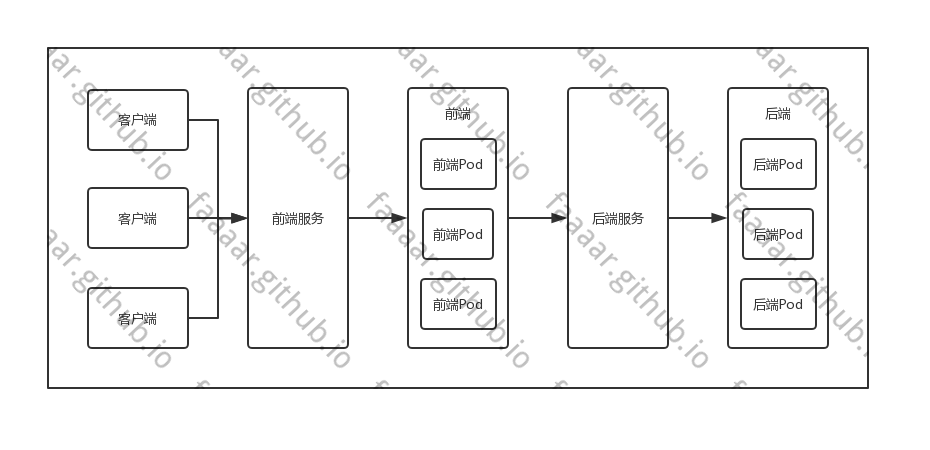
Service在配置过程中,会要求配置一个Pod选择规则。通过该规则找到提供服务的Pod列表。 然后客户端不会直接访问这些Pod,而是通过Service来访问这些Pod。
例如客户端要访问前端,前端要访问后端。
外部客户端不关心前端Pod数量,而直接连接到前端服务上,由前端服务选择一个Pod来提供服务。 前端服务也不关心后端Pod数量,而直接连接到后端服务商,由后端服务选择一个Pod来提供服务。 在此期间,不论是Pod变更、迁移,上游都不需要关心。
Service配置定义
通过Service的结构可以清晰地了解Service完整的配置内容。
更多说明可以通过kubernetes.io/docs/concep…查看。
列出常用的Service配置结构。
type Service struct {
    metav1.TypeMeta `json:",inline"`
    metav1.ObjectMeta `json:"metadata,omitempty"`

    // Service的定义
    Spec ServiceSpec `json:"spec,omitempty"`

    // Service最近的状态,由系统维护。只读。
    Status ServiceStatus `json:"status,omitempty"`
}

type ServiceSpec struct {
    // 服务暴露端口配置列表
    Ports []ServicePort `json:"ports,omitempty"`

    // 服务的路由配置
    // 使用该字段配置和Pod的Label配置进行匹配
    // 如果该字段为空或者未定义,会假设有一个外部的Endpoints
    // 只能在Type字段为ClusterIP、NodePort和LoadBalancer时生效,在Type是ExternalName时被忽略
    Selector map[string]string `json:"selector,omitempty"`

    // 集群IP。
    // 通常情况下该值是由master随机分配的,但是如果手动声明了,就要保证在集群中未被使用,否则该服务会创建失败。
    // 该字段不能被更新
    // 有效值为None,空字符串("")和有效的IP地址
    // 如果使用Headeless服务,不需要代理时,可以使用None
    // 该字段只在Type为ClusterIP、NodePOrt和LoadBalancer生效,在Type是ExternalName时被忽略
    ClusterIP string `json:"clusterIP,omitempty"`

    // 服务类型,声明了服务如何暴露出去
    // 有效值为ClusterIP(默认)、ExternalName、NodePort和LoadBalancer时起作用
    // ClusterIP 分配一个集群内网IP给该服务。通过Selector配置选择指定的服务Pod,如果未配置Selector,则根据已有的Endpoints对象来确定。
    // 如果cluserIP为None,则不会分配虚拟IP,endpoints也会被定为一组endpoints而非一个确定的IP
    // NodePort 在分配了集群IP的基础上(不管是指定的还是master分配的),额外在节点上分配一个端口,可以该端口将请求路由到该集群IP上
    // LoadBalancer 在NodePort的基础上,额外创建一个负载均衡器来路由到该集群IP上
    Type ServiceType `json:"type,omitempty"`

    // 集群中节点的IP地址列表。
    // 服务将会在该列表中的节点上暴露服务端口。
    // 这些端口暴露行为不属于K8S系统的管理部分。
    ExternalIPs []string `json:"externalIPs,omitempty"`

    // Session亲和配置
    // 该字段可以使用ClientIP和None(默认)作为值
    // ClientIP,则相同IP每次访问都会访问到同一个Pod
    SessionAffinity ServiceAffinity `json:"sessionAffinity,omitempty"`

    // Only applies to Service Type: LoadBalancer
    // LoadBalancer will get created with the IP specified in this field.
    // This feature depends on whether the underlying cloud-provider supports specifying
    // the loadBalancerIP when a load balancer is created.
    // This field will be ignored if the cloud-provider does not support the feature.
    LoadBalancerIP string `json:"loadBalancerIP,omitempty"`

    // If specified and supported by the platform, this will restrict traffic through the cloud-provider
    // load-balancer will be restricted to the specified client IPs. This field will be ignored if the
    // cloud-provider does not support the feature."
    // More info: https://kubernetes.io/docs/tasks/access-application-cluster/configure-cloud-provider-firewall/
    LoadBalancerSourceRanges []string `json:"loadBalancerSourceRanges,omitempty"`

    // 使用该字段后,服务在被访问的时候kubedns将会将该字段的值作为CNAME返回。
    // 使用该字段Type必须为ExternalName
    ExternalName string `json:"externalName,omitempty"`

    // 定义了服务将外部请求路由到本地节点还是集群中其他节点。
    // 该字段值可以为Local和Cluster
    // 如果该字段值为Local,则可以保留客户端的IP,并且避免了Loadbalancer和Nodeport中网络的第二跳,但存在流量不均衡的问题。
    // 如果该字段为Cluster,则不会保留真正客户端的IP,但是流量分布均匀
    ExternalTrafficPolicy ServiceExternalTrafficPolicyType `json:"externalTrafficPolicy,omitempty"`

    // 该字段为服务健康检查使用的端口
    // 如果未定义,则service api后端会自动分配一个端口
    // 如果定义了,则使用用户定义的端口
    // 该字段只会在Type设置为LoadBalancer 和 ExternalTrafficPolicy设置为Local时生效
    HealthCheckNodePort int32 `json:"healthCheckNodePort,omitempty"`

    // publishNotReadyAddresses,意为发布未准备好的地址到DNS,默认为false
    // 当该字段设置为true时,DNS则会为Endpoints查找Service发布notReadyAddresses。
    // 防止readinessProbe在服务没启动时找不到DNS。
    PublishNotReadyAddresses bool `json:"publishNotReadyAddresses,omitempty"`

    // sessionAffinityConfig可以配置Session的最大过期时间,默认为3小时
    SessionAffinityConfig *SessionAffinityConfig `json:"sessionAffinityConfig,omitempty"`

    // 定义了服务的IP类型偏好(IPv4、IPv6)
    // 如果定义了该字段并且集群支持该IP类型,则clusterIP字段将会被分配该类的IP
    // 如果未定义,则使用集群IP的类型
    IPFamily *IPFamily `json:"ipFamily,omitempty"`
}

type ServicePort struct {

    // 服务内端口的名称,必须是一个DNS_LABEL
    // 所有在ServiceSpec中声明的端口必须有一个唯一名称
    // 如果需要定义Endpoint的话,该名字必须和定义的Endpoint中的EndpointPort一样
    Name string `json:"name,omitempty"`

    // 该端口的IP协议,当前支持TCP(默认)、UDP和SCTP
    Protocol Protocol `json:"protocol,omitempty"`

    // 要暴露的服务端口
    Port int32 `json:"port"`

    // 与服务对应的Pod上的端口号或者端口名
    // 端口号需要在1-65535之间,名字必须是一个IANA_SVC_NAME
    // 如果是名字(字符串),将会在Pod的容器中查找与之对应的端口。如果未找到,则port字段的值将会被使用
    // 当Service的ClusterIP=None时,忽略此字段,会缺省为port字段的值
    // 更多信息 : https://kubernetes.io/docs/concepts/services-networking/service/#defining-a-service
    TargetPort intstr.IntOrString `json:"targetPort,omitempty"`

    // 节点端口
    // 当type=NodePort或者LoadBalancer时会使用该值。通常情况下该字段的值由操作系统来分配。
    // 如果定义了,如果端口被占用,则服务创建失败
    // 在需要该字段的时候,默认为自动分配
    // 更多信息:https://kubernetes.io/docs/concepts/services-networking/service/#type-nodeport
    NodePort int32 `json:"nodePort,omitempty"`
}

// 服务类型
type ServiceType string
const (
    // 集群IP,服务只能在集群内被发现
    ServiceTypeClusterIP ServiceType = "ClusterIP"

    // ClusterIP的扩展,额外使用节点端口,将会在所有部署了该服务的节点上都暴露一个端口
    ServiceTypeNodePort ServiceType = "NodePort"

    // NodePort的扩展,额外使用负载均衡,服务将会被暴露在一个已经存在的负载均衡器中,由负载均衡器负责分发访问
    ServiceTypeLoadBalancer ServiceType = "LoadBalancer"

    // 额外的名字,在访问服务的时候将会返回一个CNAME记录。使用该字段的Service不会暴露或者代理任何的Pod。
    ServiceTypeExternalName ServiceType = "ExternalName"
)

// Session亲和类型
type ServiceAffinity string
const (
    ServiceAffinityClientIP ServiceAffinity = "ClientIP"
    ServiceAffinityNone ServiceAffinity = "None"
)

// Service External Traffic Policy Type string
type ServiceExternalTrafficPolicyType string
const (
    // 该值定义了使用节点本地的行为
    ServiceExternalTrafficPolicyTypeLocal ServiceExternalTrafficPolicyType = "Local"

    // 该值定义了使用节全局节点的行为
    ServiceExternalTrafficPolicyTypeCluster ServiceExternalTrafficPolicyType = "Cluster"
)

type SessionAffinityConfig struct {
    // 针对客户端IP的配置信息
    ClientIP *ClientIPConfig `json:"clientIP,omitempty"`
}

type ClientIPConfig struct {
    // 超时时间定义,单位秒,值必须在0~86400之间
    TimeoutSeconds *int32 `json:"timeoutSeconds,omitempty"`
}

type IPFamily string
const (
    // IPv4Protocol IPv4协议
    IPv4Protocol IPFamily = "IPv4"
    // IPv6Protocol IPv6协议
    IPv6Protocol IPFamily = "IPv6"
    // 服务最多支持的拓扑域个数
    MaxServiceTopologyKeys = 16
)
基本用法
以此Deployment配置为基础,进行Service的测试
apiVersion: apps/v1
kind: Deployment
metadata:
  name: nginx
spec:
  replicas: 2
  selector:
    matchLabels:
      app: nginx
  template:
    metadata:
      labels:
        app: nginx
    spec:
      containers:
      - name: nginx
        image: nginx
        ports:
        - name: http
          containerPort: 80
---
apiVersion: v1
kind: Service
metadata:
  name: nginx
spec:
  ports:
  - name: web-8080
    port: 8080
    targetPort: http
  selector:
    app: nginx
创建该Service,再创建一个busybox执行 wget nginx:8080 进行验证
上述配置创建了一个名称为nginx的Service对象,该对象对外暴露了8080端口。Service会将请求代理到使用具有标签app=nginx的Pod的80端口上。
服务的默认协议是tcp,除此之外也支持udp和sctp。
由于许多服务需要公开多个端口,因此在服务对象上支持多个端口定义。每个端口定义的协议可以不同。
需要注意的是 如果配置的是多端口Service,那么配置端口的时候需要配置每个端口的name属性,单端口则不需要 。
$ kubectl run -it --rm --generator=run-pod/v1 busybox --image=busybox /bin/sh
If you don't see a command prompt, try pressing enter.
/ # wget nginx:8080
Connecting to nginx:8080 (10.96.100.16:8080)
saving to 'index.html'
index.html           100% |*******************************|   612  0:00:00 ETA
'index.html' saved