前言
本文的源码分析基于Glide版本4.9.0
Glide是一个非常强大的图片加载框架,可以从网络、硬盘等等中加载显示图片,还具有非常多可以配置的接口。而且实现起来也非常的简单,通常如果我们需要从网络加载一张图片显示到ImageView中,只需要一行代码,
Glide.with(this)
    .load(url)
    .into(imageView);
但殊不知Glide框架在背后为我们处理了成吨的工作,今天我们就进入上面一行代码中,分析一下Glide加载图片的主要流程。
源码
with
with是Glide类中的一组静态方法,它拥有很多个重载方法,
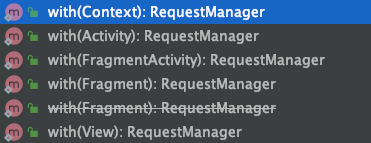
就拿我们最常见的,在Activity中使用Glide会调用这个重载方法,
@NonNull
public static RequestManager with(@NonNull Activity activity) {
    return getRetriever(activity).get(activity);
}
阅读源码发现,with的这些重载方法都是调用Glide单例获取到RequestManagerRetriever对象,
@NonNull
private static RequestManagerRetriever getRetriever(@Nullable Context context) {
    ...
    return Glide.get(context).getRequestManagerRetriever();
}
RequestManagerRetriever对象是在Glide单例初始化的时候通过GlideBuilder实例化的,这一段就不贴源码了。
RequestManagerRetriever对象是一个为了创建RequestManager们,或者是获取已经存在的Activities和Fragment实例的一个静态方法集合。
这里需要注意的地方,如果是在子线程调用Glide和主线程是有区别的,主要在于生命周期的不同,
- 如果是子线程调用Glide,返回的
RequestManager的生命周期是整个应用的生命周期,而且这个RequestManager只会存在一个。 - 如果是主线程,会创建一个空UI的Fragment来与其生命周期绑定,其目的也很明确,为了避免Activity关闭时Glide还在执行。
public RequestManager get(@NonNull Activity activity) {
    if (Util.isOnBackgroundThread()) {
        return get(activity.getApplicationContext());
    } else {
        ...
        android.app.FragmentManager fm = activity.getFragmentManager();
        return fragmentGet(activity, fm, null, isActivityVisible(activity));
    }
}

private RequestManager fragmentGet(@NonNull Context context,
  @NonNull android.app.FragmentManager fm,
  @Nullable android.app.Fragment parentHint,
  boolean isParentVisible) {
    //RequestManagerFragment是一个空UI的Fragment
    RequestManagerFragment current = getRequestManagerFragment(fm, parentHint, isParentVisible);
    RequestManager requestManager = current.getRequestManager();
    if (requestManager == null) {
      Glide glide = Glide.get(context);
      requestManager =
          factory.build(
              glide, current.getGlideLifecycle(), current.getRequestManagerTreeNode(), context);
      current.setRequestManager(requestManager);
    }
    return requestManager;
}
综上,with方法最终返回了一个RequestManager对象,正常情况下该对象拥有和当前Activity同样的生命周期。
load
根据上面的流程,with方法最终返回了一个RequestManager对象,所以load实际上调用的是RequestManager对象中的load方法。其实我们根据平常的使用可以推测出来,load也应该有很多个重载方法,如下,
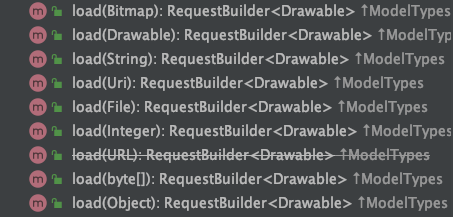
因为我们的例子是通过网络加载图片,这里就拿load(Uri)这个方法分析一下,
public RequestBuilder<Drawable> load(@Nullable Uri uri) {
    //asDrawable()创建了一个RequestBuilder对象
    //其内部的transcodeClass为Drawable.class后面会提到
    return asDrawable().load(uri);
}
into
@NonNull
public ViewTarget<ImageView, TranscodeType> into(@NonNull ImageView view) {
    ...
    return into(
    	//构建了一个ViewTarget, ViewTarget是Glide中很重要的一个概念
    	//刚才提到的transcodeClass,本例子中传入的是Drawable.class
    	glideContext.buildImageViewTarget(view, transcodeClass),
    	/*targetListener=*/ null,
    	//一些可配置的参数
    	requestOptions,
    	Executors.mainThreadExecutor());
}

@NonNull
public <X> ViewTarget<ImageView, X> buildImageViewTarget(
	@NonNull ImageView imageView, @NonNull Class<X> transcodeClass) {
	//实际调用的是底下的方法
	return imageViewTargetFactory.buildTarget(imageView, transcodeClass);
}

public <Z> ViewTarget<ImageView, Z> buildTarget(@NonNull ImageView view,
    @NonNull Class<Z> clazz) {
    if (Bitmap.class.equals(clazz)) {
    	return (ViewTarget<ImageView, Z>) new BitmapImageViewTarget(view);
    } else if (Drawable.class.isAssignableFrom(clazz)) {
    	//本例子中传入的是Drawable.class, 可见最终返回的是一个DrawableImageViewTarget
    	//源码中封装了ImageView.setImageDrawable()方法
    	return (ViewTarget<ImageView, Z>) new DrawableImageViewTarget(view);
    } else {
    	throw new IllegalArgumentException(
    			"Unhandled class: " + clazz + ", try .as*(Class).transcode(ResourceTranscoder)");
    }
}
into(ImageView)方法中的参数target是Glide框架中一个很重要的概念,它代表一个可被 Glide 加载并且具有生命周期的资源。从上面的源码可以看出,当我们调用RequestBuilder.into 方法时会根据传入的transcodeClass创建对应类型的target实现类。
Target中有两点值得一提,
DrawableImageViewTarget的父类ImageViewTarget中的onLoadStarted和onLoadFailed方法,实现了我们在Glide使用时配置的「加载图片前展示展位图」、「加载失败展示加载错误图」的逻辑。ImageViewTarget中的父类ViewTarget中的监听类SizeDeterminerLayoutListener,要将图片填充ImageView时可能会使用到。这是因为Glide需要获取到对应控件的大小来填充ImageView,但有时刚进入Activity,Glide已经获取到图片资源了,此时布局树还没有渲染完成,当布局渲染完成时会回调SizeDeterminerLayoutListener中的onPreDraw方法,之后Glide才会根据获取到的控件大小来执行加载任务。
上述源码into返回了一个内部方法into,我们继续往下看,
//简化后的代码
private <Y extends Target<TranscodeType>> Y into(
    @NonNull Y target,
    @Nullable RequestListener<TranscodeType> targetListener,
    BaseRequestOptions<?> options,
    Executor callbackExecutor) {

    //构建了一个Request
    //本例子最终会返回一个SingleRequest对象
    Request request = buildRequest(target, targetListener, options, callbackExecutor);
    Request previous = target.getRequest();

    if (...) {
        //这里获取之前的Request是一种优化,省略代码
        previous.begin();
        return target;
    }

    target.setRequest(request);

    return target;
}
Request
Request是一个接口,可见Request也是Glide中一种高度抽象的概念,简单看一下接口的定义,
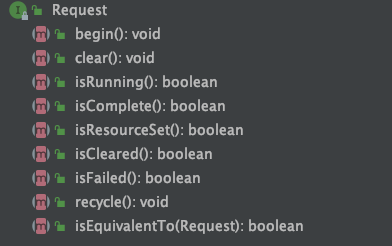
定义了对请求的一些操作,包括开始、结束、回收、获取状态等。
Request 主要的实现类有三个:
SingleRequest通常使用的Request实现ThumbnailRequestCoordinator该请求可以同时加载原图和缩略图ErrorRequestCoordinator该请求用来在加载错误时加载某种图片资源
Request.begin方法会调用Engine.load,其中构建两个重要的对象EngineJob, DecodeJob,
EngineJob, 用来执行DecodeJob以及管理加载完成的回调, 可以添加很多监听器。DecodeJob, 负责从缓存或者数据源中加载资源,并通过解码器转换为指定的资源类型。其中获取资源是通过DataFetcher抽象来完成的。
DataFetcher
DataFetcher是Glide对获取数据源的一种接口抽象,核心的接口方法是loadData,它拥有很多个实现类实现了从不同的源获取数据,比如从文件、网络、资源AssetManager等等。
阅读源码可见,我们从网络上获取资源的实现类是HttpUrlFetcher,其内部实际是通过HttpURLConnection来完成的。
ResourceDecoder
当我们通过DataFetcher获取到对应的流之后, 会回调onDataFetcherReady,在其中调用decode方法对流进行解码,
//简化后的代码
@Override
public void onDataFetcherReady(Key sourceKey, Object data, DataFetcher<?> fetcher,
    DataSource dataSource, Key attemptedKey) {
    ...
    decodeFromRetrievedData();
}


//简化后的代码
private <Data> Resource<R> decodeFromData(DataFetcher<?> fetcher, Data data,
    DataSource dataSource) throws GlideException {
    ...
    //其中data是从回调方法里来的,这里例子中是InputStream流数据
    //dataSource是一个枚举类,这里是REMOTE,指数据来自于外部网络
    Resource<R> result = decodeFromFetcher(data, dataSource);
    return result;
}

//简化后的代码
@NonNull
private Resource<ResourceType> decodeResourceWithList(DataRewinder<DataType> rewinder, int width,
    int height, @NonNull Options options, List<Throwable> exceptions) throws GlideException {
    for (int i = 0, size = decoders.size(); i < size; i++) {
        ResourceDecoder<DataType, ResourceType> decoder = decoders.get(i);
        DataType data = rewinder.rewindAndGet();
        if (decoder.handles(data, options)) {
            data = rewinder.rewindAndGet();
            //核心解码方法 ResourceDecoder接口
            //遍历List,根据DataType找到对应ResourceDecoder接口的实现
            result = decoder.decode(data, width, height, options);
        }
    }
    return result;
}
查看源码发现ResourceDecoder接口有很多实现, 包括解码Bitmap、VideoBitmap、Gif等等,我们这里是ByteBufferBitmapDecoder,
public Resource<Bitmap> decode(@NonNull ByteBuffer source, int width, int height,
    @NonNull Options options) throws IOException {
    InputStream is = ByteBufferUtil.toStream(source);
    //最终是在DownSampler的decodeStream()方法中使用了BitmapFactory.decodeStream()来得到Bitmap对象
    return downsampler.decode(is, width, height, options);
}
解码之后,会调用到ImageViewTarget.onResourceReady中(看上面分析的DrawableImageViewTarget类中的方法),展示出图片来。
总结
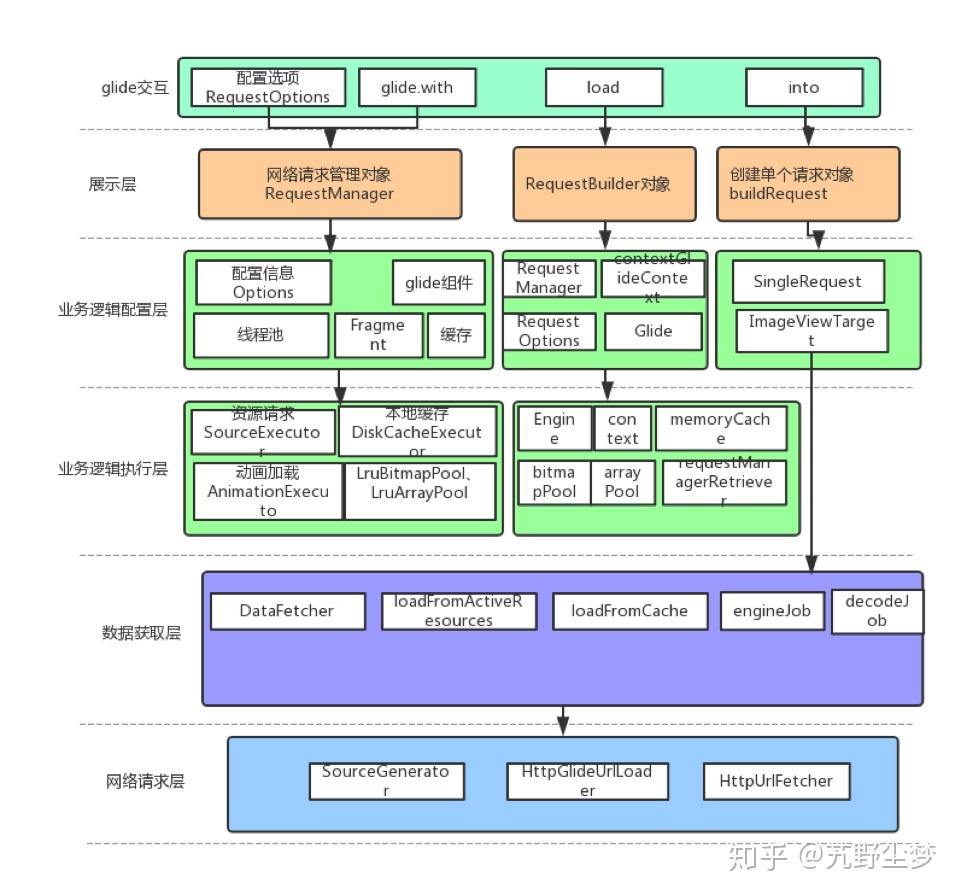
Glide图片加载框架源码非常的庞大,如果不能够抽丝剥茧,一味的钻入代码中可能会晕头转向。很多人开始读源码时都会感觉读不懂,不是因为代码写的质量差,而是因为它的实现非常复杂。正是因为Glide这种实现架构,将加载图片的各个阶段都高度抽象,使得我们做需求,实现自定义化变得非常灵活。Glide的强大同样表现于它的缓存机制,下一节讲。这里用一张图对Glide架构做一个总结(图片来自于知乎用户艽野尘梦),