前言
当开发遇上产品(甲方),时常会遇到不可思议的需求。但就产品的实现效果而言,任何不合图的实现,都算是
bug。
故事开局一张图
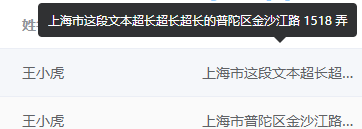
产品提出:table的行高不变,文字要是超出就显示气泡,且气泡中的文本可以被鼠标选中。
文字溢出显示气泡
- 因为element自带
show-overflow-tooltip配置,很轻松的就能让文字过长显示气泡。
      <el-table
        :data="tableData"
        stripe
        style="width: 100%">
        <el-table-column
          show-overflow-tooltip
          prop="date"
          label="日期"
          width="180">
        </el-table-column>
      </el-table>
- 但是,该配置仅鼠标在单元格上显示tooltip,移除单元格时,tooltip会消失。
- 查阅相关可得资料.发现github上已经有人提过这个问题,element bug,但
Sorry, we have no plan to support this.,所以,只有自己动手丰衣足食了。
造tooltip
打开控制台可以get到tooltip得dom结构如下:

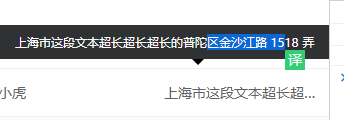
思考:可以根据,鼠标移入单元格,判断单元格长度和文本长度,若文本溢出,则显示tooltip-dom,反之则不显示;且鼠标位置在单元格内,获取单元格位置,计算气泡需要显示的位置定位显示tooltip;鼠标移出单元格和tooltip这两区域,则隐藏tooltip。
准备
- 鼠标移入事件
- 鼠标移除事件
- 获取单元格内容
- 根据单元格text的宽度,动态计算tooltip的位置
相关代码如下(基于vue+elementUI)
<!--引入table-tooltip的组件-->
<template>
  <div class="home">
    <!-- <button class="btn gray">这是个按钮</button> -->
      <el-table
        :data="tableData"
        stripe
        style="width: 100%"
        @cell-mouse-enter="showTooltip"
        @cell-mouse-leave="hiddenTooltip">
        <el-table-column
          prop="address"
          label="地址">
        </el-table-column>
      </el-table>
      <table-tooltip :tableCellMouse="tableCellMouse"></table-tooltip>
  </div>
</template>

<script>
import tableTooltip from './table-tooltip'

export default {
  name: 'home',
  components: {
    tableTooltip
  },
  data() {
    return {
      tableData: [{
        address: '上海市这段文本超长超长超长的普陀区金沙江路 1518 弄'
      }}],
      tableCellMouse: {
        cellDom: null, // 鼠标移入的cell-dom
        hidden: null, // 是否移除单元格
        row: null, // 行数据
      },
    }
  },
  methods: {
      // 鼠标移入cell
      showTooltip(row, column, cell) {
          this.tableCellMouse.cellDom = cell;
          this.tableCellMouse.row = row;
          this.tableCellMouse.hidden = false;
      },

      // 鼠标移出cell
      hiddenTooltip() {
          this.tableCellMouse.hidden = true;
      }
  }
}
</script>

<style lang="scss">
// 定义单元格文本超出不换行
.el-table .cell {
  overflow: hidden !important;
  white-space: nowrap !important;
}
</style>
<!--table-tooltip.vue-->
<template>
    <!-- 文案溢出,显示tooltip -->
    <div id="table-toolTip" class="el-tooltip__popper is-dark" style="transform-origin: center top; z-index: 2003; position: fixed; display: none;">
        {{ tableCellTooltipText }}
        <div id="toolTip-arrow" class="popper__arrow"></div>
    </div>
</template>

<script>
export default {
    props: {
        tableCellMouse: {
            type: Object,
            default() {
                return {};
            },
        }
    },

    data() {
        return {
            toolDom: null,
            arrowDom: null,
            tableCellTooltipText: null, // 溢出文案
            mouseLeaveVal: {
                tooltip: 0, // 1-鼠标移入,2-鼠标移出,0-无焦点
                cell: false // 单元格
            }
        };
    },

    computed: {},

    watch: {
        mouseLeaveVal: {
            deep: true,
            handler(nv) {
                setTimeout(() => {
                    if (nv.cell && 1 != nv.tooltip) {
                        this.toogleActiveTooltip(false, this.toolDom);
                    }
                }, 100);
            }
        },

        tableCellMouse: {
            deep: true,
            handler(nv, ov) {
                if (nv.hidden) {
                    this.hiddenTooltip();
                } else if (nv.row && !nv.hidden) {
                    this.showTooltip(nv.cellDom);
                }
            }

        }
    },

    created() {},

    mounted() {
        this.$nextTick(() => {
            this.toolDom = document.getElementById("table-toolTip");
            this.arrowDom = document.getElementById("toolTip-arrow");
            const _this = this;
            this.toolDom.addEventListener("mouseleave", event => {
                _this.mouseLeaveVal.tooltip = 2;
            });
            this.toolDom.addEventListener("mouseenter", event => {
                _this.mouseLeaveVal.tooltip = 1;
            });
        });
    },

    methods: {
        // 文字溢出显示tooltip  动态计算top和left
        showTooltip(cell) {
            this.tableCellTooltipText = cell.innerText || cell.textContent;
            const textWidth = this.textSize("12px", this.tableCellTooltipText);
            if (textWidth > cell.clientWidth - 25) {
                const cellLeft = cell.getBoundingClientRect().left,
                    cellTop = cell.getBoundingClientRect().top;
                const computedPositonNum = this.hiddenToolPosition(textWidth, cell.clientWidth, cellLeft, cellTop);
                this.toolDom.style.top = `${computedPositonNum.top}px`;
                this.toolDom.style.left = `${computedPositonNum.left}px`;
                this.toolDom.style.width = `${computedPositonNum.width}px`;
                this.arrowDom.style.left = `${computedPositonNum.arrowLeft}px`;
                this.toogleActiveTooltip(true, this.toolDom);
                this.mouseLeaveVal.cell = false;
                this.mouseLeaveVal.tooltip = 0;
                this.toolDom.style.display = "";
            } else {
                this.toolDom.style.display = "none";
            }
        },

        // toolTip定位计算
        hiddenToolPosition(txtWidth, cellWidth, cellLeft, cellTop) {
            const toolHight = Math.ceil((txtWidth + 8) / 310) * 24 + 20,
                toolWidth = 300 < txtWidth ? 350 : (txtWidth + 50),
                webWidth = document.body.offsetWidth;
                // webHeight = document.body.offsetHeight;
            let expectLeft = cellLeft - (toolWidth - cellWidth) / 2;
            const toolWidthAndLeft = expectLeft + toolWidth,
                expectTop = cellTop - toolHight;
            let arrowLeft; // arrow left
            if (toolWidthAndLeft > webWidth) {
                const moreWidth = toolWidthAndLeft - webWidth;
                expectLeft -= (toolWidthAndLeft - webWidth);
                arrowLeft = (toolWidth - moreWidth) / 2 + moreWidth - 6;
            } else {
                arrowLeft = (toolWidth / 2) - 6;
            }
            return { left: expectLeft, top: expectTop, width: toolWidth, arrowLeft };
        },

        hiddenTooltip() {
            this.mouseLeaveVal.cell = true;
        },

        //tooltip样式
        toogleActiveTooltip(show, toolDom) {
            if (show) {
                toolDom.classList.add("el-fade-in-linear-enter-active", "el-fade-in-linear-enter-to", 'el-popper');
                setTimeout(() => {
                    toolDom.classList.remove("el-fade-in-linear-enter-active", "el-fade-in-linear-enter-to");
                }, 500);
                toolDom.style.display = "";
            } else {
                toolDom.classList.add("el-fade-in-linear-leave-active", "el-fade-in-linear-leave-to");
                setTimeout(() => {
                    toolDom.classList.remove("el-fade-in-linear-leave-active", "el-fade-in-linear-leave-to", 'el-popper');
                }, 500);
                toolDom.style.display = "none";
            }
        },

        textSize(fontSize, text) {
            const span = document.createElement("span");
            let width = span.offsetWidth;
            span.style.visibility = "hidden";
            span.style.fontSize = fontSize;
            span.style.display = "inline-block";
            document.body.appendChild(span);
            if ("undefined" != typeof span.textContent) {
                span.textContent = text;
            } else {
                span.innerText = text;
            }
            width = Math.ceil(span.clientWidth);
            document.body.removeChild(span);
            return width;
        },
    }
};
</script>

<style lang="scss" scoped>
#table-toolTip {
    .el-tooltip__popper {
        max-width: 350px !important;
        box-sizing: border-box;
    }
    .popper__arrow {
        bottom: -6px;
        left: 50%;
        margin-right: 3px;
        border-bottom-width: 0;
        border-top-color: $blue;
        &::after {
            border-bottom-width: 0;
            border-top-color: $blue-dark-90;
            bottom: 1px;
            margin-left: -6px;
        }
    }
}
</style>
这样就能选中啦~