

#Stack
##First In Last Out(FILO)
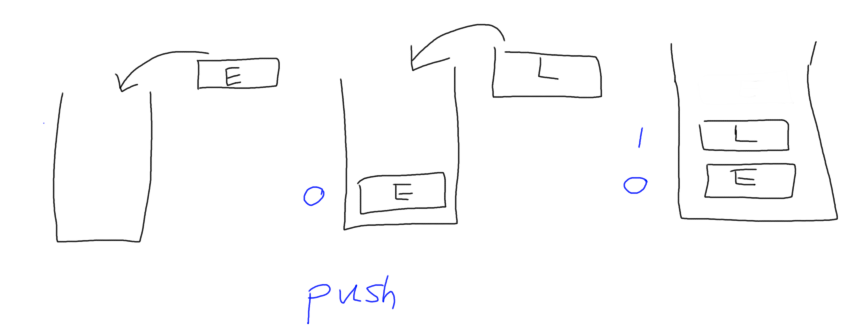
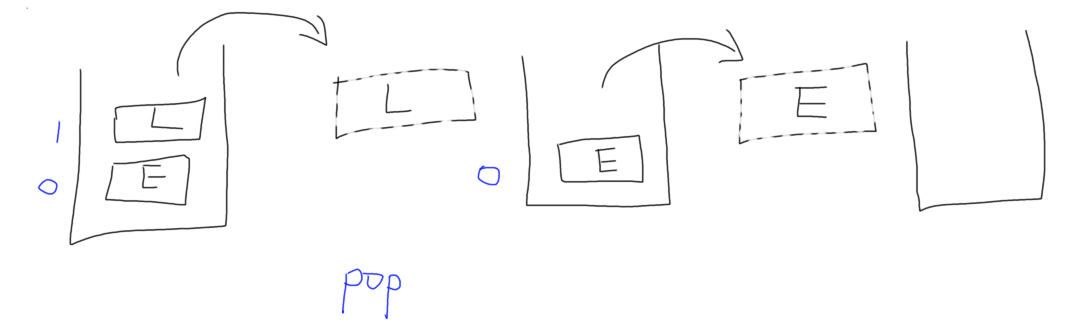
We can implement Stack with data structure, Array. Here it is:
<!DOCTYPE html>
<html lang="en">
<head>
    <meta charset="UTF-8">
    <meta name="viewport" content="width=device-width, initial-scale=1.0">
    <meta http-equiv="X-UA-Compatible" content="ie=edge">
    <title>Document</title>
</head>
<body>
    <script>
        //1. creating a class called Stack
        function Stack(){
            this.items = []

            //2. Adding oprating methods in it
            //push-Pushing an element in the array
            Stack.prototype.push = function(element){
                this.items.push(element);
            }
            //pop-Poping an element from array
            Stack.prototype.pop = function(){
                return this.items.pop();
            }
            //Peek-Return the toppest element the aarray
            Stack.prototype.peek = function(){
                return this.items[this.items.length -1]
            }
            //size-Return size of array
            Stack.prototype.size = function(){
                return this.items.length
            }
            //isEmpty-If it's empty return true, otherwise false
            Stack.prototype.isEmpty = function(){
                return this.items.length == 0
            }
            //toStr-Return String of the arary
            Stack.prototype.toStr = function(){
                var resultStr =  ''
                for(var i = 0; i < items.length; i++){
                    resultStr += this.items[i] + ""
                }
                return resultStr
            }
        }
		//Testing
    var stack = new Stack();
    stack.push("a")
    stack.push("b")
    stack.push("c")
    console.log(stack)

    console.log(stack.pop())
    console.log(stack.peek())
    console.log(stack.size())
    console.log(stack.isEmpty())

    </script>
</body>
</html>
Thanks for reading!
