

回顾
首先回顾一下未学习Spring之前的Mybatis配置.
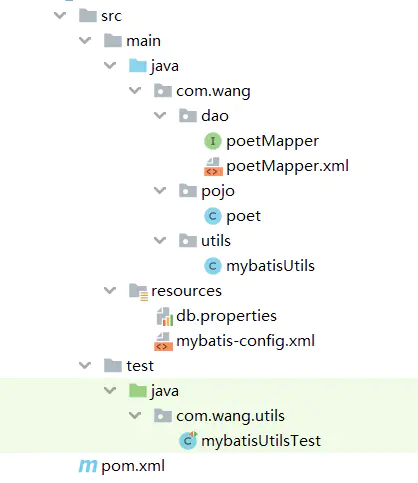
- 首先我们创建了 mybatis-config.xml文件用来配置数据库连接的相关信息,以及注册了相关的Mapper映射文件.
    <?xml version="1.0" encoding="UTF-8" ?>
<!DOCTYPE configuration
        PUBLIC "-//mybatis.org//DTD Config 3.0//EN"
        "http://mybatis.org/dtd/mybatis-3-config.dtd">
<configuration>
    <properties resource="db.properties"/>
    <typeAliases>
        <package name="com.wang.pojo"/>
    </typeAliases>

    <environments default="development">
        <environment id="development">
            <transactionManager type="JDBC"/>
            <dataSource type="POOLED">
                <property name="driver" value="${driver}"/>
                <property name="url" value="${url}"/>
                <property name="username" value="${username}"/>
                <property name="password" value="${password}"/>
            </dataSource>
        </environment>
    </environments>

    <mappers>
        <mapper resource="com/wang/dao/poetMapper.xml"/>
    </mappers>
</configuration>
然后编写了一个工具类,用于获得sqlSession连接.
public class mybatisUtils {
   private static SqlSessionFactory sqlSessionFactory;

   static {
       String res = "mybatis-config.xml";
       InputStream inputStream = null;
       try {
           inputStream = Resources.getResourceAsStream(res);
       } catch (IOException e) {
           e.printStackTrace();
       }
       sqlSessionFactory = new SqlSessionFactoryBuilder().build(inputStream);
   }

   public static SqlSession getSession() {
       return sqlSessionFactory.openSession();
   }
}
最后测试
public class mybatisUtilsTest {
    //注意此处的 @Test 注解,不可少。
    @Test
    public void test() {
        //下边两行就是我们创建的工厂类的使用,从工厂类中获得一个session。
        SqlSession sqlSession = mybatisUtils.getSession();
        poetMapper poetMapper = sqlSession.getMapper(com.wang.dao.poetMapper.class);

        List<poet> poets = poetMapper.getList();
        for (poet poet : poets) {
            System.out.println(poet);
        }
    }
}
在Spring中,自然要将一部分托管给Spring容器.
Spring整合Mybatis
虽然 Spring 可以将mybatis整合,但是答题的思路是不会变的.
首先创建一个数据源,再创建一个SQLSession工厂,最后获取sqlSession.
类似传统方式的Spring模式实现
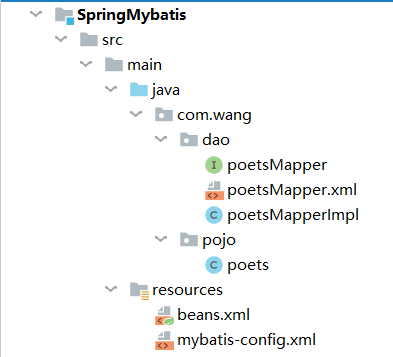
- 创建数据源
Spring框架中,有一个org.springframework.jdbc.datasource.DriverManagerDataSource bean,我们只需要显式的将数据注入其中即可.
<bean id="dataSource" class="org.springframework.jdbc.datasource.DriverManagerDataSource">
        <property name="username" value="XXX"/>
        <property name="password" value="XXX"/>
        <property name="url"  value="XXX"/>
        <property name="driverClassName" value="XXX"/>
</bean>
- 创建sqlSession工厂
同上,Spring也有一个内置的org.mybatis.spring.SqlSessionFactoryBean,我们将第一步获得的数据源以引用的方式注入即可. 在这一步,仅有 "datasource"属性是必须注入的,其余无要求.
    <bean id="sqlSessionFactory" class="org.mybatis.spring.SqlSessionFactoryBean">
        <property name="dataSource" ref="dataSource"/>
        <property name="configLocation" value="classpath:mybatis-config.xml"/>
        <property name="mapperLocations" value="com/wang/dao/poetsMapper.xml"/>
    </bean>
- 获取session
Spring真是万能啊,感叹一下,这一步它又替我们解决了.
    <bean id="sqlSession" class="org.mybatis.spring.SqlSessionTemplate">
        <constructor-arg name="sqlSessionFactory" ref="sqlSessionFactory"/>
    </bean>
上边这三个步骤在整合时100%会使用到,且不会有太大的变化.下边需要我们编写一些自己的东西
- 实现一个接口
public class poetsMapperImpl implements poetsMapper {

    private SqlSessionTemplate sqlSession;

    public void setSqlSession(SqlSessionTemplate sqlSession) {
        this.sqlSession = sqlSession;
    }

    @Override
    public List<poets> getPoets() {
        return sqlSession.getMapper(poetsMapper.class).getPoets();
    }
}
与之前不同的是,在实现接口的同时,我们在类的内部增加了一个属性SqlSessionTemplate sqlSession ,并且增加了相应的set方法.这是为了将SQLSession工厂生产的sqlSession注入到类中.当然,使用构造器注入的方式也是可行的.
最后我们需要将这个类注册到Spring容器中.
    <bean id="poetsMapper" class="com.wang.dao.poetsMapperImpl">
        <property name="sqlSession" ref="sqlSession"/>
    </bean>
- 测试
    public static void main(String[] args) {
        ApplicationContext cpx = new ClassPathXmlApplicationContext("beans.xml");
        poetsMapper poetsMapper = cpx.getBean("poetsMapper", poetsMapper.class);
        List<poets> poets = poetsMapper.getPoets();
        for (com.wang.pojo.poets poet : poets) {
            System.out.println(poet);
        }
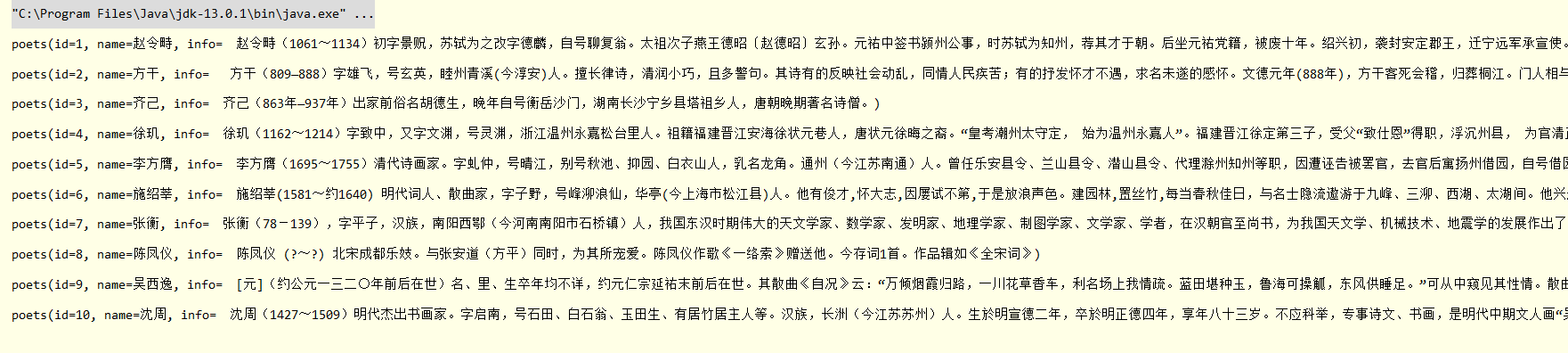
- 完成
继承SqlSessionDaoSupport类实现
和上边方法相比,这种方法更为简单,但是本质是一样的.
只需要在实现接口的时候继承 SqlSessionDaoSupport 类,然后再注入依赖即可,
public class poetsMapperImpl extends SqlSessionDaoSupport implements poetsMapper  {
    @Override
    public List<poets> getPoets() {
        return getSqlSession().getMapper(poetsMapper.class).getPoets();
    }
}
sqlSessionTemplate和sqlSessionFactory两个属性任意注入一个即可,两个都注入也不会报错.
    <bean id="poetsMapper" class="com.wang.dao.poetsMapperImpl">
        <property name="sqlSessionTemplate" ref="sqlSession"/>
        <property name="sqlSessionFactory" ref="sqlSessionFactory"/>
    </bean>
