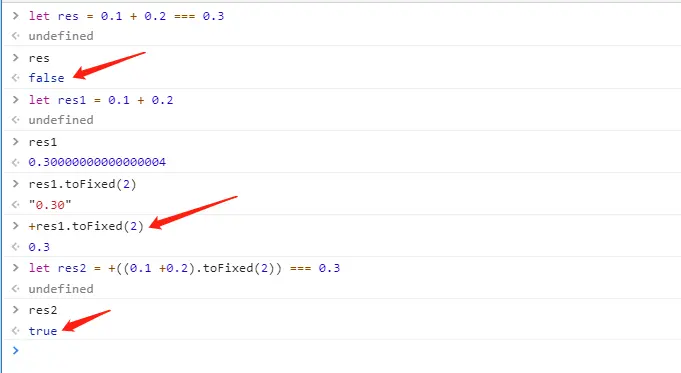
1、使用精确至两位解决浮点数相加值不准确
+res1.toFixed(2)
// toFixed()方法返回值为string
2、超出部分省略号...
.className {
    text-overflow: -o-ellipsis-lastline;
    overflow: hidden;
    text-overflow: ellipsis;
    display: -webkit-box;
    -webkit-line-clamp: 1;
    -webkit-box-orient: vertical;
  }
3、格式化文件大小函数
renderSize(value: any) {
  if (value == null || value === '' || value === 0) {
    return '0 Bytes';
  }
  const unitArr = ['Bytes', 'KB', 'MB', 'GB', 'TB', 'PB', 'EB', 'ZB', 'YB'];
  let index = 0;
  const srcsize = parseFloat(value);
  index = Math.floor(Math.log(srcsize) / Math.log(1024));
  let size: any = srcsize / Math.pow(1024, index);
  //  保留的小数位数
  size = size.toFixed(2);
  return size + unitArr[index];
}
4、浏览器滚动到底部执行函数
// 浏览器滚动加载
private handleScroll() {
  /**
   * scrollTop滚动条距离浏览器顶部高度
   * scrollTop滚动条距离浏览器顶部高度
   * scrollHeight=this.$el.offsetHeight=this.$el.scrollHeight可视区高度
   * window.innerHeight浏览器高度
   */
  const scrollTop = window.pageYOffset || document.documentElement.scrollTop || document.body.scrollTop;
  const scrollHeight = this.$el.clientHeight;
  if (scrollTop + window.innerHeight + 2 > scrollHeight && this.isScroll) {
    this.fn(); //执行函数
  }
}
5、滚动条样式更改,有兼容问题
<style lang="less" >
.className {
.className-child {
textarea {
border: none;
resize:vertical;//可以自行调节大小
overflow:auto;
background-color: transparent;
&::-webkit-scrollbar-track-piece {
background-color:
}
&::-webkit-scrollbar {
width: 8px;
height: 8px;
}
&::-webkit-scrollbar-thumb {
background-color:
background-clip: padding-box;
min-height: 28px;
}
}
}
}
</style>
6、引入文件并应用(变量形式)
<story-mdfile :file="docSrc"></story-mdfile>
data () {
  return {
    docSrc: () => import('./docs/doc Starter.md')
    // 或docSrc: require('./docs/doc Starter.md')
  }
}
7、网页链接小图标设置
// 注意:图片的后缀名必须要是 .ico 格式的。
<link rel="icon" href="img/logo.ico" type="images/x-ico" />
8、底部固定的组件路由设置
import Bar from './components/bottomBar.vue';
{
  path: '/',
  name: 'home',
  components: {
    default: () => import('./views/home.vue'),
    Bar,
  },
},
9、监听屏幕尺寸变化执行函数
mounted () {
  const that = this
  window.onresize = () => {
    return (() => {
      window.screenHeight = window.innerHeight
      // ...
    })()
  }
},
10、$set
// vue直接在json数据中添加属性是不行的,无法生成get和set方法,而需要使用vue的set方法。
this.$set(obj, 'isExpand', false);
/**
** 对象obj
** key值isExpand
** 所赋值false
**/