-
Elasticsearch[6.5.0]中的概念与关系型数据库对比

index dataSource document rows type table
field column
mapping 处理数据的方式或者规则, 比如 某字段的数据类型。默认值, 分析器 是否被索引
因为按照最优规则处理数据对性能提高很大,因此才需要建立映射
分片和复制 shards replicas
2. ES创建数据
PUT localhost:9200/blog1
{"mappings":{
    //设立表名
	"article":{
	    //列
		"properties":{
		//创建id列
			"id":{
				"type":"long",
				"store":"true",
				//默认不索引,此处可以不指明
				"index":"not_analyzed"
			},
			//创建title列
			"title":{
				"type":"text",
				"store":true,
				"index":"analyzed",
				"analyzer":"standard"
			},
			//创建content列
			"content":{
				"type":"text",
				"store":"true",
				"index":"analyzed",
				"analyzer":"standard"
			}
		}
	}
}}
新建一条记录的话就用post,非幂等用post 更新一条记录的话就用put. 幂等用put
POST localhost:9200/blog/hello/_mappings
GET events_202001/_mappings 查看结构和索引
{
	"hello":{
		"properties":{
			"id":{
				"type":"long",
				"store":"true"
			},
			"title":{
				"type":"text",
				"store":true,
				"index":"true",
				"analyzer":"standard"
			},
			"content":{
				"type":"text",
				"store":"true",
				"index":"true",
				"analyzer":"standard"
			}
		}
	}
}
tips: 6.X不支持一个index多个type了,7.0直接废弃mappings
删除index
DELETE localhost:9200/blog2
写入document
POST localhost:9200/blog/hello/1
{
	"id":1,
	"content":"www.youtube.com 新华网讯",
	"title":"赤壁之战"
}
删除文档ID(_id) 为1的document
DELETE localhost:9200/blog2/hello/1
更新document 针对_id
POST localhost:9200/blog/hello/1
{
	"id":122222,
	"content":"www.youtube.com 新华网讯2222",
	"title":"赤壁之战222222"
}
根据_ID查询
GET localhost:9200/blog2/hello/1
根据Term查询
localhost:9200/blog/hello/_search
{
	"query":{
		"term":{
			"content":"中"
		}
	}
}
filter和query查询的区别
elasticsearch·中分为filter和query,
所有的filter是不进行打分的,因为她只是一个筛选,对不感兴趣的直接筛选掉,所以他没必要对不感兴趣的东西进行一个打分,而query刚好相反。
https://blog.csdn.net/oryjk/article/details/50750850
queryString
基于分词器
localhost:9200/blog/hello/_search
{
	"query":{
		"query_string":{
		    //2.再对
			"default_field":"content",
			//1.先对query内容分词
			"query":"搜到的到中非吗"
		}
	}
}
ik分词
http://127.0.0.1:9200/_analyze?analyzer=ik_smart&pretty=true&text=我是程序员
ik分词 建立一条docment
POST http://127.0.0.1:9200/blog1/iktable/1
{
	"id":1,
	"title":"ElasticSearch是一个基于Lucene的搜索服务器",
	"content":"它提供了一个分布式多用户能力的全文搜索引擎"
}
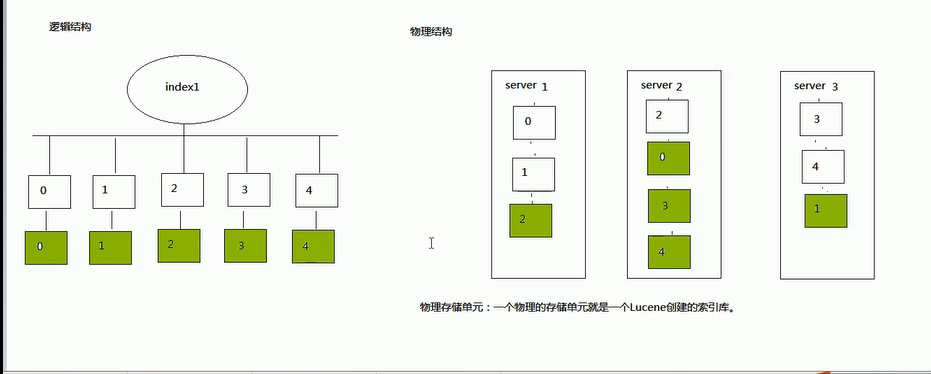
一个index索引库,默认分为5片 0 1 2 3 4
一个物理的存储单元就是一个Luence创建的索引库
java客户端管理ES
http.port: 9201
#集群间通信端口号,在同一机器下必须不一样
transport.tcp.port: 9301
1、创建索引库
1.创建Settings对象

2.创建client客户端

3.创建索引

4.关闭客户端