

一、 简介
1.1 什么是异步绘制
把绘制过程中的部分内容交给异步线程,减小主线程开销
1.2 如何实现异步绘制
- 系统默认绘制流程默认都在主线程,在适当的时机接管系统绘制流程(手动画重点)
- 接管后,在异步线程中将页面元素生成图片(仅这一步可交给异步线程)
- 将生成的图片设置为设置CALayer.content
二、系统绘制流程和接管节点
系统绘制流程 涉及UIView 和CALayer 两个模块互相配合完成。
2.1 系统绘制流程
系统绘制流程图
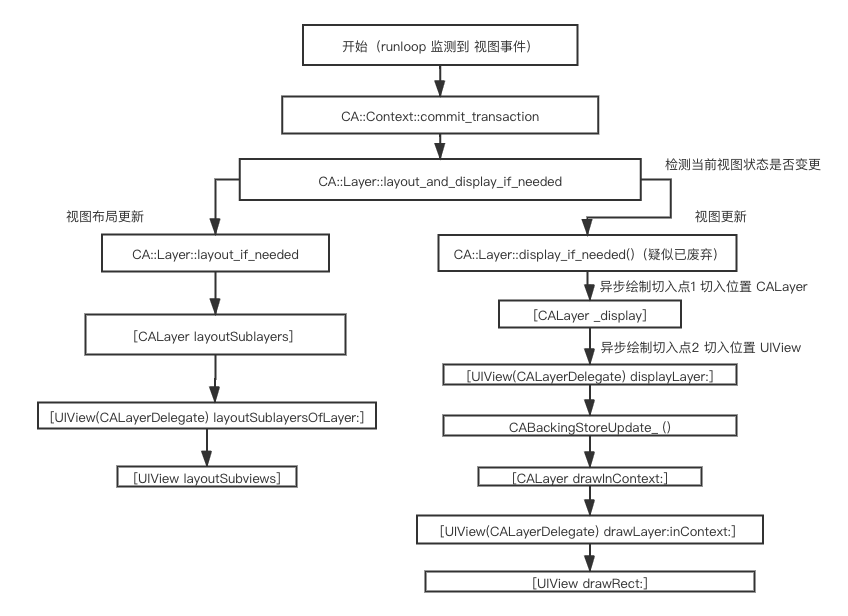
CABackingStoreUpdate() 是系统建立的一个后台存储区域。提供给Core Graphic 提交上下文给GPU使用,该后台存储区域只作用与主线程,所以异步绘制接管系统流程的节点要在CABackingStoreUpdate()创建之前
-
PS01 本文 中所说的CA::Layer::display_if_needed().函数,可能已经被废弃了。因为Time Profiler 获得的信息如下
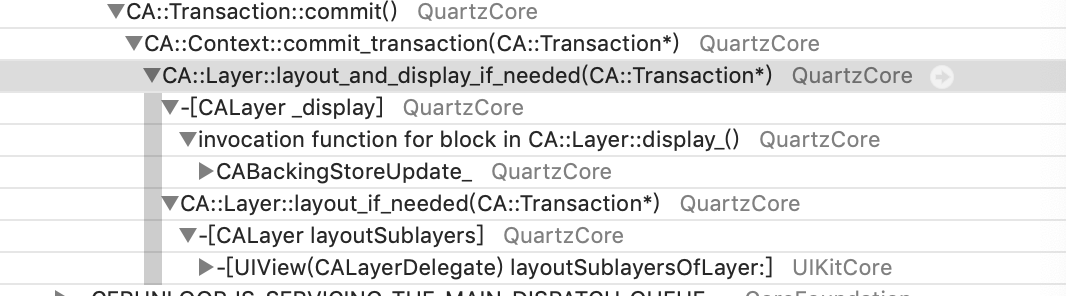
-
PS02 关于系统绘制流程图中左侧分支(layoutSubViews部分),仅列出部分内容,其他内容建议参考本篇文章
2.2 异步绘制设置
跳过系统绘制流程,需要自定义实现绘制,如上图所示,有两个切入点
- 在CALayer中重写[CALayer display]
- UIView中重写[UIView(CALayerDelegate) displayLayer:]
在这两个方法中,设置layer.content 即可完成页面绘制
使用用CoreGraphic 将页面元素生成图片 (对应API线程安全)
借用YYAsyncLayer的源码。
        UIGraphicsBeginImageContextWithOptions(self.bounds.size,self.opaque, self.contentsScale);
        CGContextRef context = UIGraphicsGetCurrentContext();
        if (self.opaque) {
            CGSize size = self.bounds.size;
            size.width *= self.contentsScale;
            size.height *= self.contentsScale;
            CGContextSaveGState(context); {
                if (!self.backgroundColor || CGColorGetAlpha(self.backgroundColor) < 1) {
                    CGContextSetFillColorWithColor(context, [UIColor whiteColor].CGColor);
                    CGContextAddRect(context, CGRectMake(0, 0, size.width, size.height));
                    CGContextFillPath(context);
                }
                if (self.backgroundColor) {
                    CGContextSetFillColorWithColor(context, self.backgroundColor);
                    CGContextAddRect(context, CGRectMake(0, 0, size.width, size.height));
                    CGContextFillPath(context);
                }
            } CGContextRestoreGState(context);
        }
        task.display(context, self.bounds.size, ^{return NO;});
        UIImage *image = UIGraphicsGetImageFromCurrentImageContext();
        UIGraphicsEndImageContext();
        self.contents = (__bridge id)(image.CGImage);
三 runloop在 绘制中的作用
-
调用视图的setNeedsDisplay 方法,(包括视图改变、 frame 变更、直接调用等)
-
对应对view或者layer会被注册到一个全局容器。
-
runloop 低级别监听主线程(observer) wait/exit 状态。
-
通过 source1 触发source0 执行回调函数提交commit (CoreAnimotion)
-
执行绘制流程
