独立vue3开发记录中遇到的问题和思考
2020.04.28
Vue中使用base64编码和解码
npm install --save js-base64

import base64 from 'js-base64'

Vue.prototype.$Base64 = base64.Base64;

let query_1 = this.$Base64.encode(corpId),
    query_2 = this.$Base64.encode(userId)

this.$router.push({ path:to,query:{query_1,query_2} });

const {query_1,query_2} = this.$route.query
let corpId = this.$Base64.decode(query_1),
    userId = this.$Base64.decode(query_2);
问题:
通过getSearch()方法获取的query_1,query_2会出现编译问题
url需要用过encodeURIComponent()进行转译。
所以直接通过this.$route.query获取即可
export function getSearch() {
    var search = window.location.search.slice(1).split('&')
    var params = {}
    for (var i = 0; i < search.length; i++) {
        var param = search[i].split('=')
        params[param[0]] = param[1]
    }
    return params
}
2020.04.27
input输入框type=search,软键盘搜索按钮
在ios中input输入内容后搜索,html提供type=search的模式,但是软键盘弹起后,键盘上没有“搜索”,必须在input外层加上form,必须有action
<form action="/">
    <input type="search" placeholder="" placeholder="请输入搜索" />
</form>
<form action="/">
  <van-search v-model="parmas.name" shape="round"     placeholder="请输入客户昵称"
      background="#4378BE"
      clearable
      @search="onSearch"
      @clear="onCancel"
      @input="onInput" >
  </van-search>
</from>
vue页面分离
我在app.vue中 会进行微信授权,这样所有的页面都需要进行了授权,但是我想要wechatMoments这个页面不进行授权,这个怎么判断啊。
我现在在http://localhost:8080/wechatMoments页面刷新时获取到的this.$route.path 为‘/’
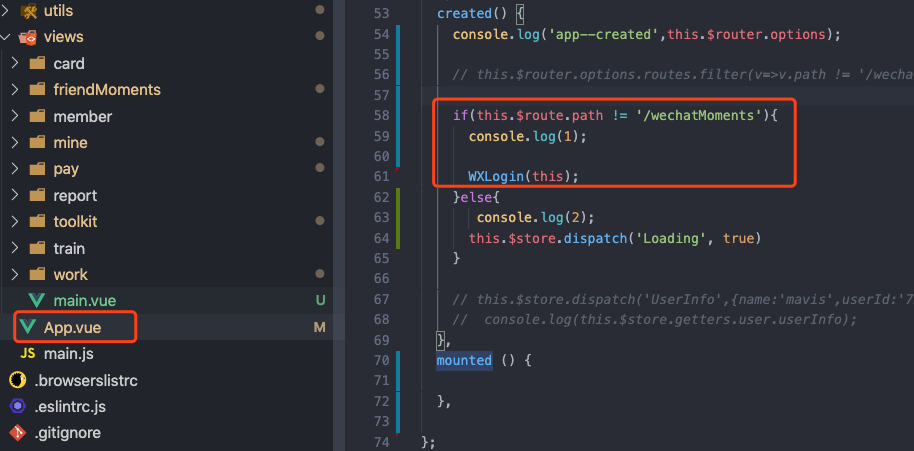
问:在生命周期里app.vue里 this.$route.meta打印出来是{},但是在<span>{{$route.meta.nowechat}}</span>中就可以取得到值。所以我应该在哪个里面获取啊。因为授权是个方法 所以是要在created中调用.
答:
- 因为你的app组件created执行优先于当前route注入;
- $route这个东西是和当前routerview渲染的组件挂钩;
- 不在app中用,app时和路由其实没一毛钱关系;
- app只初始化一次,一直作为父组件存在
- 建议在
router.afterEach中修改
router.afterEach((to, from, next)=>{
  console.log('afterEach', to, from);
  const wechat = to.meta&&to.meta.wechat;//true 需要授权  false 不需要授权
  if (to.path=='/work'){
    WXLogin();
  }else{
    store.dispatch('Loading', true)
  };
})
测试结果:
在router.afterEach中,只要切换路由,都要进行一次授权,不是自己想要的效果。
最终结果:
还是继续用路由判断,但是不是用this.$route判断,而是直接用window.location.pathname进行判断。
多蠢啊,一直都依赖了vue的路由,忽略的本省路由的获取。
vue 路由(二级)配置
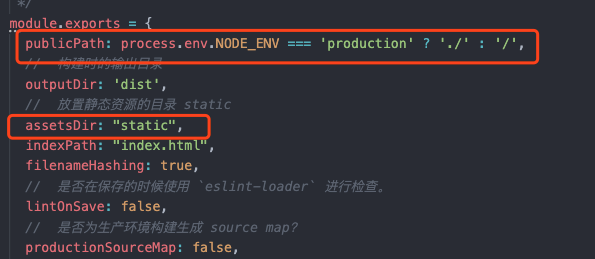
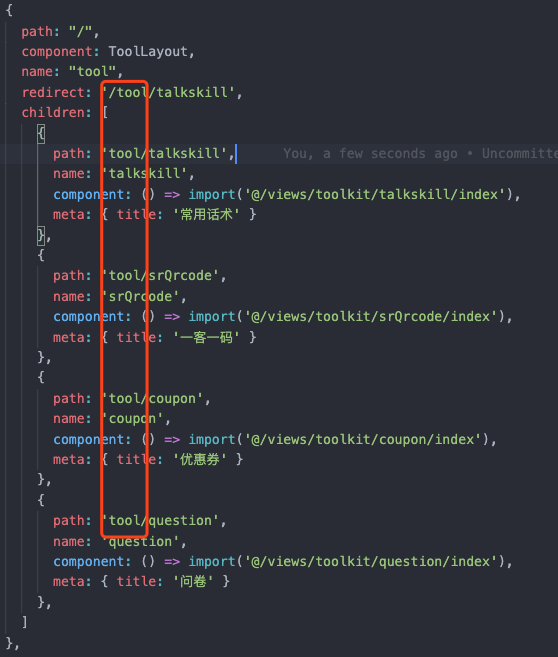
vue配置路由,打包之后引入路径不对

打包配置:
router.js
配置了二级路由,导致打包之后的引入路径多了/tool/
2020.04.26
vue跳转路由,关闭当前路由
路由跳转:A-B-C-B
问题:用push跳转,C返回到B时,点击h5返回按钮,还是会跳转到C页面。
因为,需要在C-B时关闭B
B-C:this.$router.push({path:'/publish'})
C-B:this.$router.back(-1)或者this.$router.go(-1);
beforeRouteLeave next 指定路由
在beforeRouteLeave钩子中跳转不到指定链接。
设置next('/some/path')会进入到死循环
beforeRouteLeave (to, from, next) {
 // 必须调用next(),next(true)进入原计划的下个页面
 // next(false)进入from页面(即原本的页面)
}
beforeRouteLeave(to, from, next) {
  const {backStatus,parmas} = this
  if(backStatus){//直接返回
   if(parmas.content !== ""|| parmas.urlList.length>0){//需要提醒
      Dialog.confirm({
        title: '温馨提示',
        message: '返回所填数据不保留哦~',
      }).then(() => {
        next(true);
      }).catch(() => {
        next(false);
      });
   }else{
    next(true);
   }
  }else{//发布成功之后返回
    next(true);
  }
},
2020.04.23
我传了true. 但是拿到的还是default的值

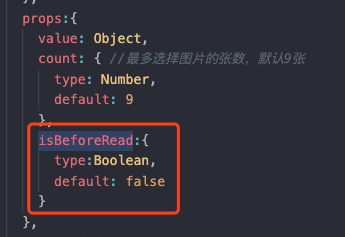
is-before-read:格式保持一致
<uploadImages v-model="data[parmas.type]" :count="1"  :is-before-read='true' ></uploadImages>

isBeforeRead:{
    type: Boolean,
    default: false
  },
校验 以 http 或者 https 开头的url
export const verifyUrl = (url)=>{
    let reUrl = /(http|https):\/\/([\w.]+\/?)\S*/
    return reUrl.test(url) ;// true /false
}
vue传递布尔值参数
传入一个布尔值
<!-- 包含该 prop 没有值的情况在内,都意味着 `true`。-->
<blog-post is-published></blog-post>

<!-- 即便 `false` 是静态的,我们仍然需要 `v-bind` 来告诉 Vue -->
<!-- 这是一个 JavaScript 表达式而不是一个字符串。-->
<blog-post v-bind:is-published="false"></blog-post>

<!-- 用一个变量进行动态赋值。-->
<blog-post v-bind:is-published="post.isPublished"></blog-post>
vue v-modal 能不能传递数组
vue props type类型
props: {
  title: String,
  likes: Number,
  isPublished: Boolean,
  commentIds: Array,
  author: Object,
  callback: Function,
  contactsPromise: Promise // or any other constructor
}
我父组件传入数组,通过v-modal传入的,上传图片之后直接修改了父组件数组,提示错误信息如下:

传入数组就会报错。传入对象就不会
2020.04.15
document.documentElement.scrollTop 始终为0
设置了最高父级
#app {
  width: 100%;
  height: 100%;
  overflow-y: scroll; //自动撑起
}
2020.04.09
vue路由模式:mode:history模式
Vue-router 中有hash模式和history模式,vue的路由默认是hash模式,一般开发的单页应用的URL都会带有#号的hash模式.
在微信JSSDK授权时,因为hash模式,导致验证失败 ,需要修改为history模式
router/index.js
const router = new VueRouter({
  scrollBehavior:()=>({y:0}),
  mode: 'history',
  routes: routes
});
2020.04.02
application/x-www-form-urlencoded 和application/json区别
- 首先,Content-Type 被指定为application/x-www-form-urlencoded;其次,提交的数据以键值对形式
?key1=val1&key2=val2的方式进行编码,key 和 val 都进行了 URL 转码,然后发送到服务器。
/list?pageNum=1&pageSize=5000
- JSON 格式支持比键值对复杂得多的结构化数据,把数据 JSON 序列化之后来提交的。
{
    id:1,
    name:'2'
}
- application/x-www-form-urlencoded方式是Jquery的Ajax请求默认方式,这种方式的好处就是浏览器都支持,在请求发送过程中会对数据进行序列化处理,以键值对形式?key1=value1&key2=value2的方式发送到服务器,如果用Jquery,它内部已经进行了处理,如果自己写原生的Ajax请求,就需要自己对数据进行序列化。
- application/json,随着json规范的越来越流行,并且浏览器支持程度原来越好,许多开发人员易application/json作为请求content-type,告诉服务器请求的主题内容是json格式的字符串,服务器端会对json字符串进行解析,这种方式的好处就是前端人员不需要关心数据结构的复杂度,只要是标准的json格式就能提交成功,application/json数据格式越来越得到开发人员的青睐。
前端基于vue企业微信JS-SDK能开发
2020.04.01
Vue引入图片路径
vue cli3 图片放在 public目录好还是放在assets目录好
- 推荐使用assets 这样的话打包可以压缩、减少代码包体积
- 在引用第三方js npm没有包的情况下、放在public更好
2020.03.31
v-charts
vue可视化图表 基于Echarts封装好的v-charts,真的不好用,写的不明确
- v-charts
- vue中使用v-chart时放大缩小屏幕,echarts图自适应
- vue中使用v-charts
- 使用vue+v-chart制作一个漂亮的饼状图
- vue可视化图表 基于Echarts封装好的v-charts简介
vue-cli3项目打包
vue3构建需要配置vue.config.js
-
除了通过命令行参数,你也可以使用 vue.config.js 里的 devServer 字段配置开发服务器
-
问题:vue.config.js文件没有生效
-
原因:知道为什么无效了 module.exports 写错了
vue cli 3 build 打包之后路径错误问题
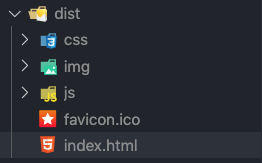
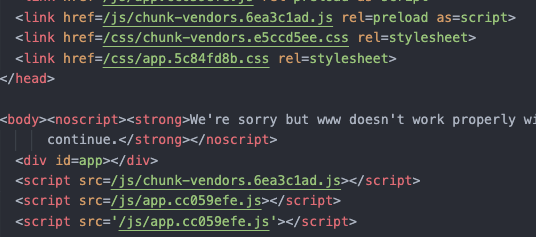
baseUrl:从 Vue CLI 3.3 起已弃用,请使用
publicPath。
publicPath: process.env.NODE_ENV === 'production' ? './' : '/'
module.exports = {
  publicPath: process.env.NODE_ENV === 'production' ? './' : '/',
  //  构建时的输出目录
  outputDir: 'dist',
  //  放置静态资源的目录 static
  assetsDir: "static",
  indexPath: "index.html",
  filenameHashing: true,
  //  是否在保存的时候使用 `eslint-loader` 进行检查。
  lintOnSave: false,
  //  是否为生产环境构建生成 source map?
  productionSourceMap: false,
  css: {
    // 是否使用css分离插件 ExtractTextPlugin
    extract: true,
    // 开启 CSS source maps?
    sourceMap: false,
    loaderOptions: {
      sass: {
        // @/ 是 src/ 的别名 ~是必须有要加的
        // data: '@import "~@/assets/css/haigui-variable";'
        // 如果没有设置别名可以这么写
        // data: '@import "./src/assets/css/haigui-variable";'
      }
    }
  },
  pages: {
    index: {
      // page 的入口
      entry: 'src/main.js',
      // 模板来源
      template: 'public/index.html',
      // 在 dist/index.html 的输出
      filename: 'index.html',
      title: '服务平台'
    }
  }
};
npm run build 时报错
166:7 error Unexpected console statement
在package.json中添加规则eslintConfig
{
  "name": "www",
  "version": "0.1.0",
  "private": true,
  "scripts": {
    "serve": "vue-cli-service serve",
    "build": "vue-cli-service build",
    "lint": "vue-cli-service lint"
  },
  "dependencies": {
    "echarts": "^4.7.0",
    "v-charts": "^1.19.0",
    "vant": "^2.5.7",
    "vue": "^2.6.11",
    "vue-router": "^3.1.5",
    "vuex": "^3.1.2"
  },
  "devDependencies": {
    "@vue/cli-plugin-babel": "~4.2.0",
    "@vue/cli-plugin-eslint": "~4.2.0",
    "@vue/cli-plugin-router": "~4.2.0",
    "@vue/cli-plugin-vuex": "~4.2.0",
    "@vue/cli-service": "~4.2.0",
    "@vue/eslint-config-prettier": "^6.0.0",
    "babel-eslint": "^10.0.3",
    "eslint": "^6.7.2",
    "eslint-plugin-prettier": "^3.1.1",
    "eslint-plugin-vue": "^6.1.2",
    "less": "^3.0.4",
    "less-loader": "^5.0.0",
    "prettier": "^1.19.1",
    "vue-template-compiler": "^2.6.11",
    "sass": "^1.3.0",
    "sass-loader": "^8.0.2",
    "node-sass": "^4.0.0",
    "fibers": "^3.1.0"
  },
  "eslintConfig": {
    "root": true,
    "env": {
      "browser": true
    },
    "extends": [
      "plugin:vue/essential",
      "eslint:recommended"
    ],
    "rules": {
      "no-console": "off"
    },
    "parserOptions": {
      "parser": "babel-eslint"
    }

  }

}
或者
To disable the next line:
// eslint-disable-next-line no-console
console.log('hello world');
To disable the current line:
console.log('hello world'); // eslint-disable-line no-console