- 在没有使用fastFDS之前我们是这样上传回显图片的
外置tomcat ——>内置SpringBoot内置tomcat
介绍使用外置tomcat配置过程
- 在你的本地磁盘中创建需要存放图片位置 例如我的图片位置是在(如图)

- 在tomcat中配置虚拟路径,是在tomcat的安装目录下的conf目录下的server.xml文件(如图)

 <Context  path="/imgAddr"
		   docBase="E:\zhangxiyu\JiuJiuMuYang\Document\imgAddr" debug="0" reloadable="true"/>
- 如果你不进行第一步在本地磁盘配置tomcat虚拟路径,在启动tomcat会出现闪退。
- 在SpringBoot主启动类里面加入图片存入路径(如图)

 @Bean
    MultipartConfigElement multipartConfigElement() {
        MultipartConfigFactory factory = new MultipartConfigFactory();
        factory.setLocation("E:\\zhangxiyu\\JiuJiuMuYang\\Document\\");
        return factory.createMultipartConfig();
    }
//图片上传
    public ResultResponse uploadImg(MultipartFile file) throws IOException {
        long statTime = System.currentTimeMillis();
        logger.info("===start===");
        if (file.isEmpty()) {
            return ResultResponse.fail("上传文件为空");

        }
        //使用时间给上传的文件命名,这种方式没有用uuid命名好,因为同一时间有可能会上传多个文件
        SimpleDateFormat sdf = new SimpleDateFormat("yyyyMMddHHmmssSS");
        String res = sdf.format(new Date());
        String originaFilename = file.getOriginalFilename();
        //获取文件的后缀名
        String newFileName = res + originaFilename.substring(originaFilename.lastIndexOf("."));
        String rootPath = "/imgAddr/";
        File newFile = new File(rootPath + newFileName);
        System.out.println(rootPath + newFileName);
        //定义向数据库中存取的文件路径
        String src = rootPath + newFileName;
        if (!newFile.getParentFile().exists()) {
            newFile.getParentFile().mkdirs();
        } else {
            System.out.println(newFile.getParentFile());
        }
        if (!newFile.exists()) {
            //使用transferTo()方法将文件存到所在服务器上
            file.transferTo(newFile);
        }
        String finSrc = "http://127.0.0.1:8088" + "/" + "imgAddr" + "/" + newFileName;
        logger.error("test1 Error");
        long endTime = System.currentTimeMillis();
        logger.debug("cost:[{}ms]", endTime - statTime);
        logger.info("===end===");
        return ResultResponse.success(finSrc);
    }
- 在代码中8088是tomcat端口号 finSrc 是回显给前端路径
- 拿到回显路径例如 http:127.0.0.1:8088/imgAddr/20200109102532640.jpg 在浏览器地址上就可以访问了
使用SpringBoot内置tomcat
- 在SpringBoot的配置文件中进行如下配置(如图)
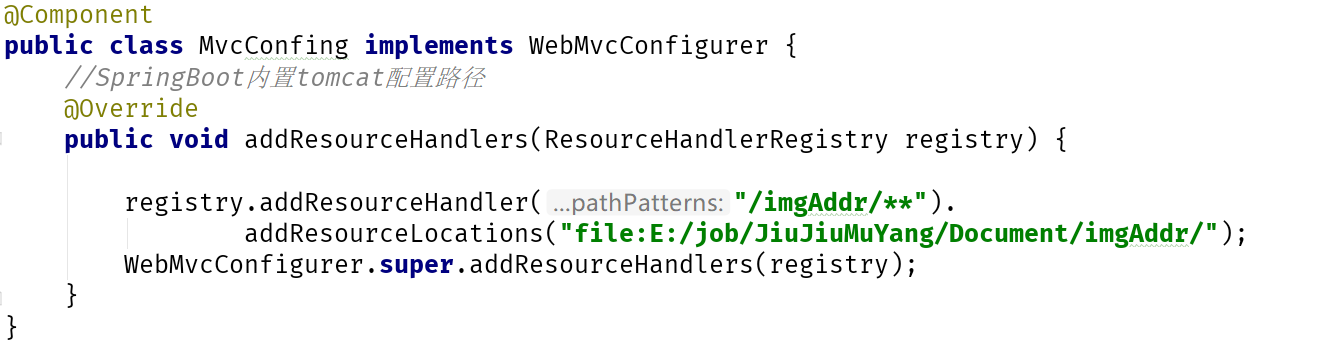
@Component
public class MvcConfing implements WebMvcConfigurer {
    //SpringBoot内置tomcat配置路径
    @Override
    public void addResourceHandlers(ResourceHandlerRegistry registry) {
        registry.addResourceHandler("/imgAddr/**").
                addResourceLocations("file:E:/zhangxiyu/JiuJiuMuYang/Document/imgAddr/");
        WebMvcConfigurer.super.addResourceHandlers(registry);
    }
}
    //图片上传
    public ResultResponse uploadImg(MultipartFile file) throws IOException {
        long statTime = System.currentTimeMillis();
        logger.info("===start===");
        if (file.isEmpty() || file.equals("")) {
            return ResultResponse.fail("上传文件为空");
        }
        //使用时间给上传的文件命名,这种方式没有用uuid命名好,因为同一时间有可能会上传多个文件
        SimpleDateFormat sdf = new SimpleDateFormat("yyyyMMddHHmmssSS");
        String res = sdf.format(new Date());
        String originaFilename = file.getOriginalFilename();
        //获取文件的后缀名
        String newFileName = res + originaFilename.substring(originaFilename.lastIndexOf("."));
        String rootPath = "E:/zhangxiyu/JiuJiuMuYang/Document/imgAddr/";
        File newFile = new File(rootPath + newFileName);
        System.out.println(rootPath + newFileName);
        //定义向数据库中存取的文件路径
        String src = rootPath + newFileName;
        if (!newFile.getParentFile().exists()) {
            newFile.getParentFile().mkdirs();
        } else {
            System.out.println(newFile.getParentFile());
        }
        if (!newFile.exists()) {
            //使用transferTo()方法将文件存到所在服务器上
            file.transferTo(newFile);
        }
        String finSrc = "http://127.0.0.1:8080" + "/zhangxiyu"+"/imgAddr"+"/"+newFileName;
        logger.error("test Error");
        long endTime = System.currentTimeMillis();
        logger.debug("cost:[{}ms]", endTime - statTime);
        logger.info("===end===");
        return ResultResponse.success(finSrc);
    }
- 这里的rootPath注意路径的书写。和外置tomcat存入图片路径区别开
- 这里的回显路径是finSrc,SpringBoot端口是8080
- 拿到回显路径是http://127.0.0.1:8080/zhangxiyu/imgAddr/20200109102532640.jpg 在浏览器地址上访问可以拿到图片
有错误的代码可以联系我哈!谢谢


