

1.引入google map (vue)
npm install google-maps
main.js 中 引入
  import GoogleMapsLoader from "google-maps";
  GoogleMapsLoader.URL = "http://ditu.google.cn/maps/api/js";
  GoogleMapsLoader.LIBRARIES = ["geometry", "places", "drawing"];
  GoogleMapsLoader.KEY = "";
  GoogleMapsLoader.LANGUAGE = "en";
  GoogleMapsLoader.REGION = "id";
  Vue.prototype.GoogleMapsLoader = GoogleMapsLoader;
2.根据地点查询经纬度
`https://maps.googleapis.com/maps/api/geocode/json?&key=${youKey}=${address}`
3.initMap
- 创建地图
this.GoogleMapsLoader.load(google => { let options = { zoom: 15, center: { lat: latitude, lng: longitude }, disableDefaultUI: true, //禁用默认ui gestureHandling: "greedy" //鼠标滚动 }; this.map = new google.maps.Map( document.getElementById("map"), options ); )} - 创建搜索框
var input = document.getElementById("input"); //自定义搜索框位置 var searchBox = new google.maps.places.SearchBox(input); - 模糊搜索
searchBox.addListener("places_changed", function() { var places = searchBox.getPlaces(); if (places.length == 0) { return; } //对于每个位置,获取图标、名称和位置。 var bounds = new google.maps.LatLngBounds(); places.forEach(function(place) { if (!place.geometry) { console.log("Returned place contains no geometry"); return; } var icon = { url: place.icon, size: new google.maps.Size(71, 71), origin: new google.maps.Point(0, 0), anchor: new google.maps.Point(17, 34), scaledSize: new google.maps.Size(25, 25) }; if (place.geometry.viewport) { // 只有地理代码有viewport。 bounds.union(place.geometry.viewport); } else { bounds.extend(place.geometry.location); } }); this.map.fitBounds(bounds) //bounds中能获取模糊搜索地点的经纬度 定位到查询位置 this.marker = new google.maps.Marker({ map: this.map, position: new google.maps.LatLng(this.latitude, this.longitude) }); }); - 创建标记
 this.infowindow = new google.maps.InfoWindow({
    content:
        "经度:" +
        this.longitude +
        "," +
        "纬度:" +
        this.latitude
});
this.infowindow.open(this.map, this.marker);
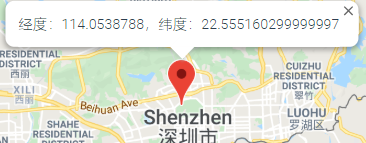
-
初始化地图锁定位置
this.addMarker(new google.maps.LatLng(latitude, longitude), this.map); function addMarker(latLng, map) { this.marker = new google.maps.Marker({ position: latLng, map: map }); this.markersArray.push(this.marker); //保存点击或者模糊搜索的位置信息 }, -
点击事件
点击地图时锁定地图位置和创建标记操作
google.maps.event.addListener(this.map, "click", this.mapMarker); function mapMarker(e) { this.longitude = e.latLng.lng(); this.latitude = e.latLng.lat(); this.addMarker(e.latLng, this.map); this.infowindow = new google.maps.InfoWindow({ content: "经度:" + e.latLng.lng() + "," + "纬度:" + e.latLng.lat() }); this.infowindow.open(this.map, this.marker); this.infowindow = null; }, -
点击地图获取对应的地址
this.geocoder = new google.maps.Geocoder(); this.geocoder = new google.maps.Geocoder(); if (this.geocoder) { //e 为点击时的对象 看上面 this.geocoder.geocode({location: e.latLng}, function(results, status) { if (status == google.maps.GeocoderStatus.OK) { //results中有需要的地址信息 } else { alert("Geocoder failed due to: " + status); } } ); } -
删除标记
点击地图或者模糊搜索的时候都会创建新的标记,我们需要在创建的时候保存,同时保存之前删除之前保存的标记
this.markersArray.push(this.marker);if (this.markersArray.length > 0) { this.markersArray[0].setMap(null); }
最后,有什么疑问或建议欢迎指出~

