设置属性
- prop用来设置特性
- attr 用来设置共性,attr对待特性问题只执行一次
应用实例如下
<!DOCTYPE html>
<html lang="en">
<head>
    <meta charset="UTF-8">
    <meta name="viewport" content="width=device-width, initial-scale=1.0">
    <meta http-equiv="X-UA-Compatible" content="ie=edge">
    <title>Document</title>
</head>
<body>
    <div>
        <input type="checkbox">香蕉
        <input type="checkbox">苹果
        <input type="checkbox">西瓜
        <input type="checkbox">桃子
    </div>
    <div>
        <button id="all">全选</button>
        <button id= "none">全不选</button>
       <button id="reverse">反选</button>
    </div>
    <script src="./jquery-1.11.3.js"></script>
    <script>
        // 这里需要介绍添加属性的两种方法
        // prop添加特性
        // attr添加共性,共性执行特性操作的时候只能够执行一次
        // 全选操作
        $("#all").on("click",function(){
            $(":checkbox").prop("checked",true)
        })

        // 全不选操作
        $("#none").on("click",function(){
            $(":checkbox").prop("checked",false)
        })

        // 反选操作
        $("#reverse").on("click",function(){
            $(":checkbox").each(function(index,element){
                // dom对象原生方法
                // element.checked = !element.checked
                // 第二种利用jQuery方法(先把dom对象变成jquery对象)
                var tag = $(element).prop("checked")
                $(element).prop("checked",!tag)


            })
        })
    </script>
</body>
</html>
位置val
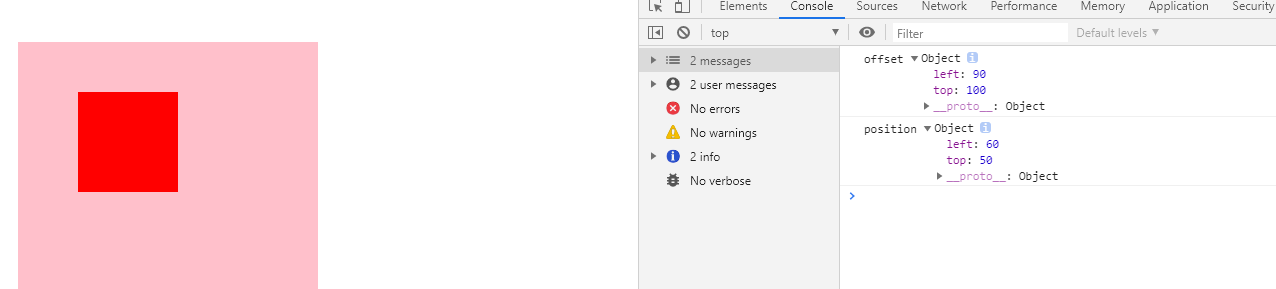
位置
- offset 距离页面的位置
- position 距离父元素的距离
<script>
    console.log('offset',$('#child').offset())
    console.log('position',$('#child').position())

    $('li').eq(1).css('color', '#f00')
</script>
效果