

title:Redux使用
是否使用Redux
不需要使用的情况
- 用户的使用方式非常简单
- 用户之间没有协作
- 不需要与服务器大量交互,没有websocket
- 视图层只从单一来源获取数据 相反需要使用redux情况
- 用户的使用方式复杂
- 不同身份的用户有不同的使用方式
- 多个用户之间可以协作
- 与服务器大量交互,使用webscoket
- 视图层要从多个来源获取数据
安装redux
npm i --save redux
npm install --save react-redux
npm install --save-dev redux-devtools
使用
- 新建一个redux文件夹,新建一个index.js文件 react应用中所有的state都以对象树的形式储存在store中,只能通过action去改变state中的状态,为了描述action如何去改变state,则需要reducer函数
import{createStore} from 'redux'
//引入创建函数
//reducer函数,就是描述action如何转变state状态
function counter(state={},action) {
  switch (action.type) {
    case '':
        return
    case '':
        return
    default:
        return state
  }
}

//使用reducer创建store
let store = createStore(counter)
//store有API{subscribe,dispatch,getState}
store.subscribe(()=>{
    //监听State状态的改变,有改变了就会触发这个函数
    console.log(store.getState())
})
store.dispatch({type:'INCREMENT'})
store.dispatch({type:'INCREMENT'})
const action = {
  type: 'ADD_TODO',
  payload: 'Learn Redux'
}
//reducer就是action
Store收到Action以后必须给出一个新的State,这样View才会发生变化。这种State的计算过程就叫做Reducer。 Reducer是一个函数它接受Action和当前State作为参数返回一个新的State
const defaultState = 0;
const reducer = (state = defaultState, action) => {
  switch (action.type) {
    case 'ADD':
      return state + action.payload;
    default:
      return state;
  }
};

const state = reducer(1, {
  type: 'ADD',
  payload: 2
});
API
使用createStore和reducer函数创建的store实例提供了3个API store.subscribe(()=>{}),当state发生变化后就会触发,执行里面的函数 store.getState()获取当前的state状态 store.dispatch()用来触发action,接收一个action对象为参数 可以使用一个函数,来创建action,actions是一个对象
function Actions(text){
    return{
       type:'Add',
        text
    }
}
store.dispatch(Actions('hahaha'))
为什么叫做reducer
因为它可以作为数组的reduce方法的参数。请看下面的例子,一系列 Action 对象按照顺序作为一个数组。
const actions = [
  { type: 'ADD', payload: 0 },
  { type: 'ADD', payload: 1 },
  { type: 'ADD', payload: 2 }
];

const total = actions.reduce(reducer, 0);
####注意事项(合并多个reducer) redux中只有一个store,随着应用越来越复杂,可以考虑将reducer拆分成多个单独的函数,每个函数分别管理state combineReducers 辅助函数的作用是,把一个由多个不同 reducer 函数作为 value 的 object,合并成一个最终的 reducer 函数,然后就可以对这个 reducer 调用 createStore 方法。
import {combineReducers} from 'redux'
function todos(state=[],action){
 switch (action.type) {
    case 'Add_Todo':
        return state.concat([action.text])
    default:
         return state
 }
}
function counter(state=[],action){
    switch (action.type) {
        case'INCREMENT':
            return state+1
    default :
        return state
    }
}
export default combineReducers({
    todos,
counter
})
使用
import {createStore} from 'redux'
import reducer from 'index'
let store = createStore(reducer)
将所有的reducer函数最终合并成一个reducer,使用createStore(reducer)创建store
redux的流程
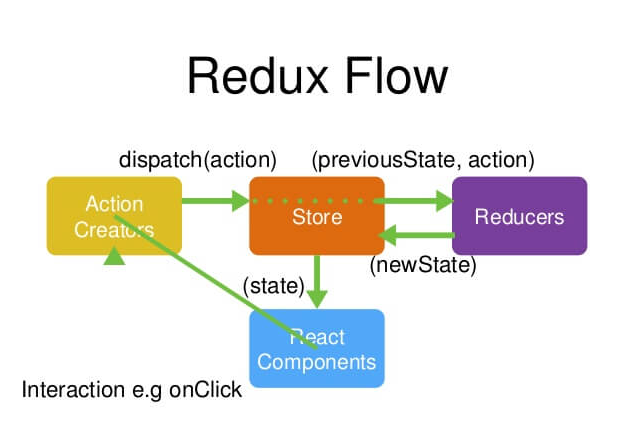
例子
const Counter = ({ value, onIncrement, onDecrement }) => (
  <div>
  <h1>{value}</h1>
  <button onClick={onIncrement}>+</button>
  <button onClick={onDecrement}>-</button>
  </div>
);

const reducer = (state = 0, action) => {
  switch (action.type) {
    case 'add': return state + 1;
    case 'sub': return state - 1;
    default: return state;
  }
};

const store = createStore(reducer);

const render = () => {
  ReactDOM.render(
    <Counter
      value={store.getState()}
      onIncrement={() => store.dispatch({type: 'add'})}
      onDecrement={() => store.dispatch({type: 'sub'})}
    />,
    document.getElementById('root')
  );
};

render();
store.subscribe(render);//监控state的变化,state变化了就重新渲染
