

背景
最近团队打算将公用组件库进行迁移,需要分析组件库在项目中的使用情况,由于我们是分模块部署,那么就需要知道每一个模块使用该组件的情况。在生产环境中分析的话,我们就要想到babel强大的ast。并且需要利用gitlab ci生成文档。
技术方案梳理
- 首先,我们需要准备一个专门存放文档的仓库
component-in-use-doc - 其次,写一个Babel 插件来分析组件的使用情况
- 最后,将动态生成的.md文件,利用vuepress生成文档(此处需要用到gitlab ci,提交代码的同时会自动触发ci构建部署)
知识储备
babel plugin
说到babel, 我们首先会想到抽象语法树,也就是常说的ast,附ast地址。我们写入以下代码观察以下ast是如何分析我们的代码的。
import a from 'seller-service';
a.b();
我需要分析的就是引用到seller-service中的a,并且调用了a的b方法。那么我们再来看以下ast的解析结果
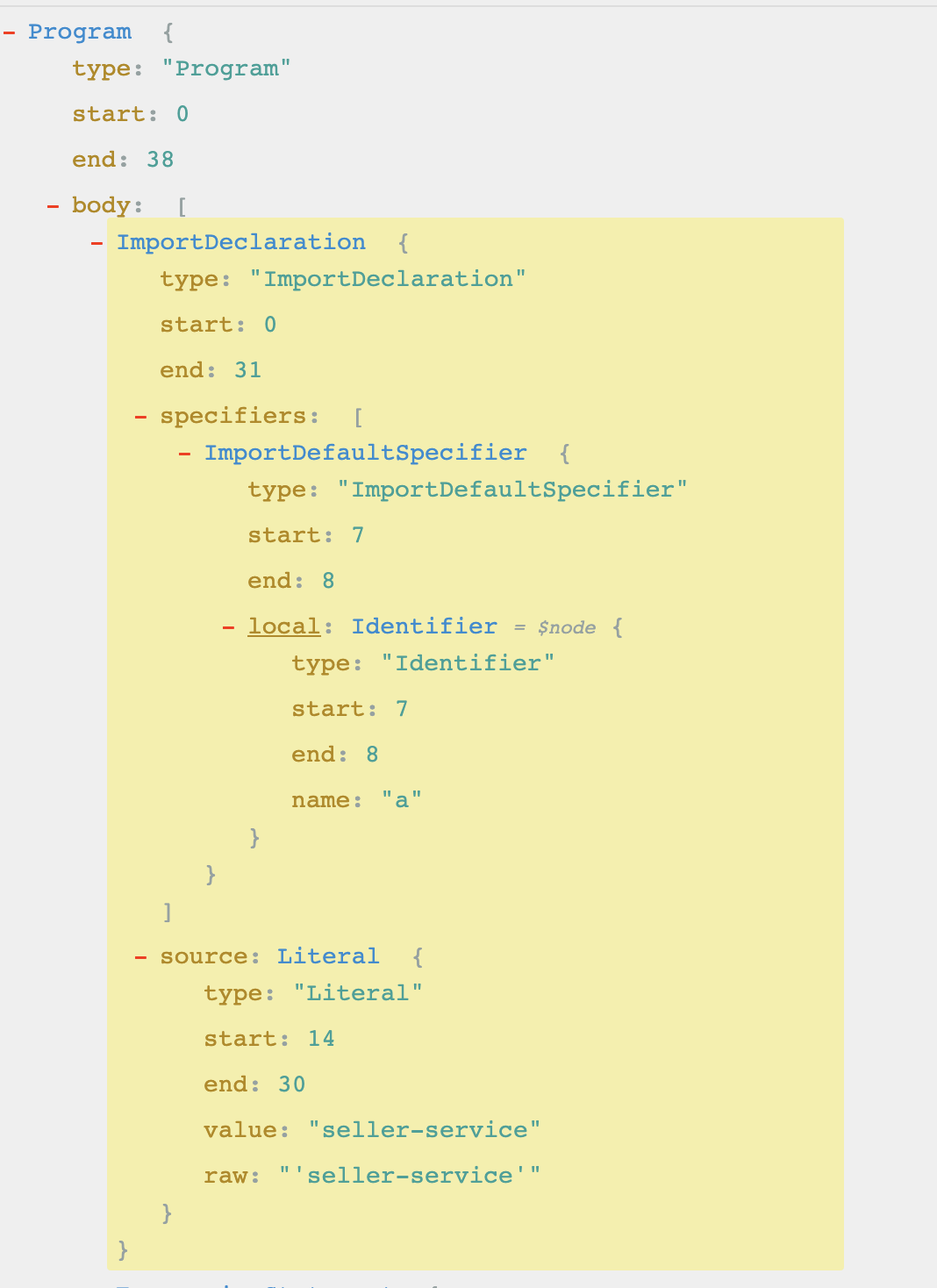
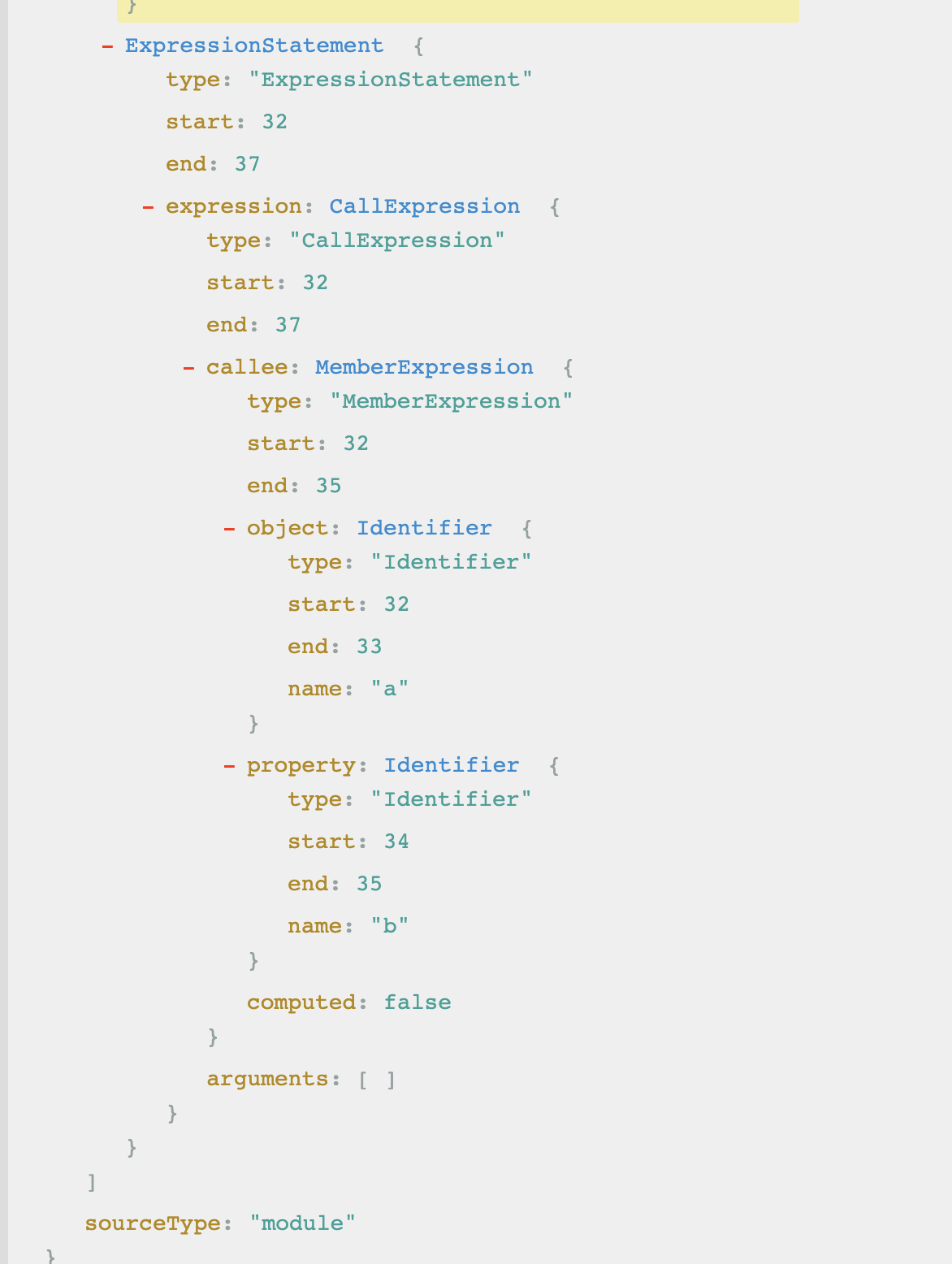
从上述图中,我们可以从ImportDeclaration以及CallExpression中着手进行分析
那么我们就可以进入开发阶段了
- 首先基于团队提供的脚手架(关于脚手架,此文不做论述)新增一个命令
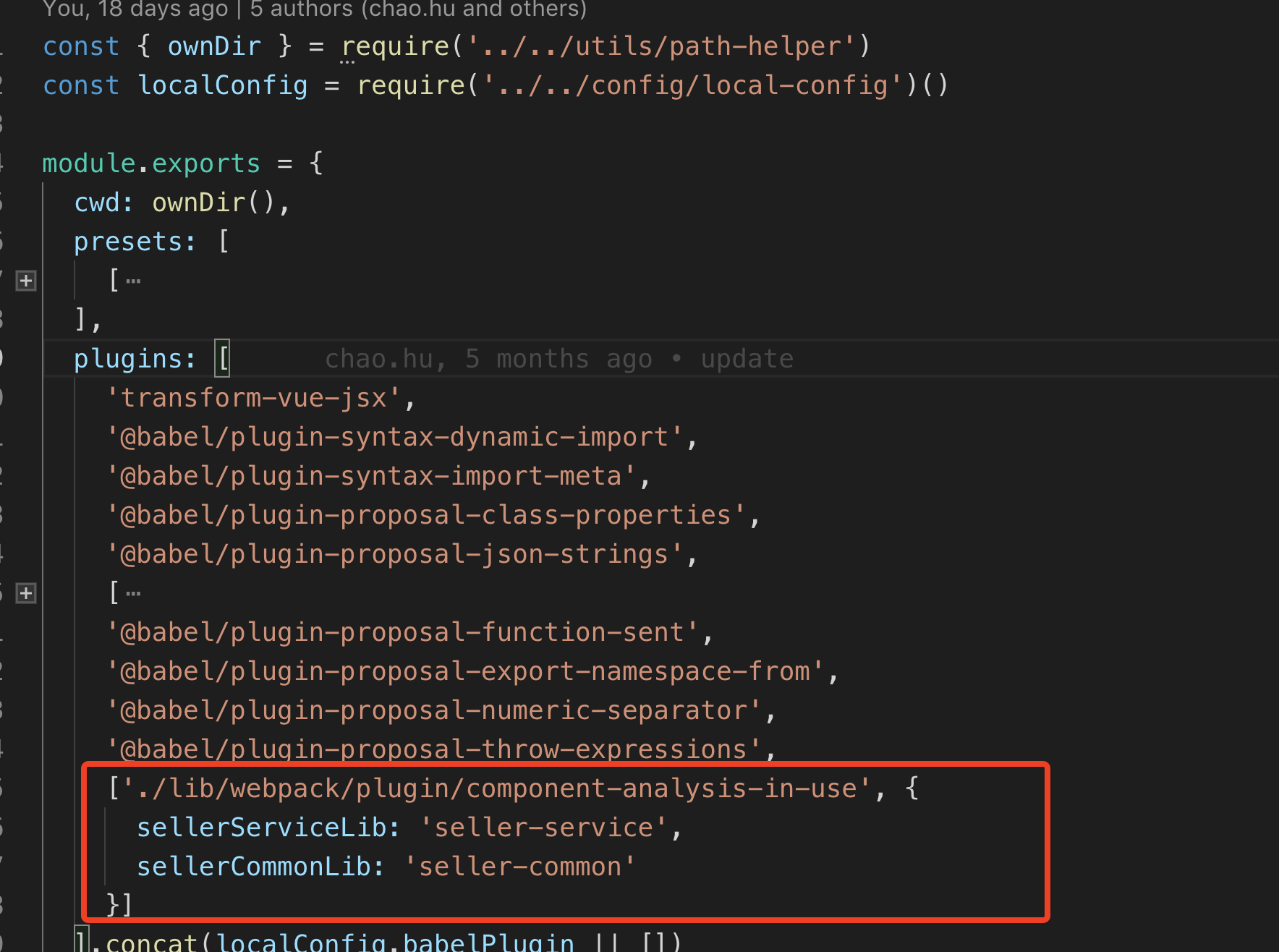
scc build:docs,新增build-docs.js文件新增babel.config.js文件以及component-analysis-in-use.js文件,在plugin中引入我们写的插件component-analysis-in-use.js,目前Babel已经支持引入路径的方式,本次也将采用改方式引入插件。设置好lib名字,以便分分析(本次要分析两个包)
- 其次,我们分析
visitor也就是观察者模式中的ImportDeclaration方法和CallExpression方法。具体如果写一个babel插件,本次不做分析,本次只分析如何利用观察者模式中的这两个阶段。详情请参考文章如何编写自己的babel plugin插件
先上代码。
const { writeFile } = require('../../utils/command');
const { cwd } = require('../../utils/path-helper');
function ComponentAnalysisInUsePlugin(babel) {
  const componentInUse = {
    'seller-service': {},
    'seller-common': {}
  };
  return {
    name: 'component-analysis-in-use',
    visitor: {
      ImportDeclaration(path, _ref = { opts: {} }) {
        const specifiers = path.node.specifiers;
        const source = path.node.source;
        // 只有libraryName满足才会转码
        if (_ref.opts.sellerServiceLib == source.value && (!babel.types.isImportDefaultSpecifier(specifiers[0]))) { //_ref.opts是传进来的参数
          specifiers.map((specifier) => {// 遍历specifier获取local.name
            componentInUse[source.value][specifier.local.name] = {};
          })
        } else if (_ref.opts.sellerCommonLib === source.value && (!babel.types.isImportDefaultSpecifier(specifiers[0]))) {
          specifiers.map((specifier) => {// 遍历specifier获取local.name
            if (!['Utils', 'config', 'constants', 'core', 'directives', 'filters', 'mixins', 'utils', 'locale'].includes(specifier.local.name)) {
              componentInUse[source.value][specifier.local.name] = specifier.local.name;
            }
          })
        }
      },
      CallExpression(path, options) {
        const node = path.node;
        const callee = node.callee;
        if (callee.object && Object.keys(componentInUse['seller-service']).includes(callee.object.name)) {
          componentInUse['seller-service'][callee.object.name][callee.property.name] = callee.property.name;
        }
      }
    },
    post(state) {
      writeFile(cwd(`../../docs/componentInUse.md`), JSON.stringify(componentInUse));
    }
  }
}

module.exports = ComponentAnalysisInUsePlugin;
我们需要一个对象componentInUse存储seller-common以及seller-service的分析结果。此处存在一个问题,我们无法监听到babel解析结束事件(暂时没有找到,如有知道的同学可以评论区告诉我呀,^_^),因为我在post阶段会将本次的解析结果写入文件,在需要生成文档的地方,再读取文件进行分析。
ImportDeclaration将会对import进行分析,根据我们在babel.config.js文件中配置的libraryName来过滤出seller-common以及seller-service。将分析结果存储到componentInUse对象中。CallExpression将会分析方法的调用情况,这里我们需要获取到调用到了seller-service类中的哪些方法,将结果存储到componentInUse对象中。- 分析结果大致如下所示
{seller-service: {OrderListTypes: {…}, orderService: {…}, OrderByCreateDateDesc: {…}, OrderByShipByDateAsc: {…}, transactionService: {…}, …}
seller-common: {InfiniteScroll: "InfiniteScroll", OrderPaymentInfo: "OrderPaymentInfo", UserViewItem: "UserViewItem", Divider: "Divider", AddressSelect: "AddressSelect", …}
}
将babel插件的分析方法写好之后,我们需要拉取项目。由于我们是每个业务模块都单独一个仓库管理,所以如果要去遍历每一个group下有哪些project,gitlab也给我们提供了api,我们在build-docs.js文件中拉取项目,并且根据babel的分析结果生成.md文件。先上代码
const { execCommand, readFile, writeFile } = require('../utils/command');
const { cwd } = require('../utils/path-helper');
const fetch = require('node-fetch');
const fs = require('fs');
// 拉取releaseUrl和tagUrl,后面会将XXXX进行替换
const releaseUrl = `https://git.garena.com/api/v4/projects/XXXXX/repository/branches/release`;
const tagUrl = `https://git.garena.com/api/v4/projects/XXXXX/repository/tags`;

const axios = require('axios');
const token = 'XXXXX';(此处不便提供token,只做方法展示)
// 排除不需要分析的模块
const exceptReposReg = new RegExp('seller-center-root|seller-center-vendor|seller-center-cli|root');
const diff = async () => {
// 先删除component-in-use-doc项目,再重新拉取最新的代码
  await execCommand('rm -rf component-in-use-doc', { cwd: cwd('../') })();
  await execCommand('git clone --single-branch --branch master ssh://gitlab@git.garena.com:2222/shopee/seller-fe/tech/component-in-use-doc.git', { cwd: cwd('../') })();
  // 将每次分析的模块拉取到本地,存储到modules文件中进行分析
  await execCommand('rm -rf modules', { cwd: cwd('../component-in-use-doc') })();
  await execCommand('mkdir modules', { cwd: cwd('../component-in-use-doc') })();
  await execCommand('rm -rf componentInUse', { cwd: cwd(`../component-in-use-doc/docs`)})();
  await execCommand('mkdir componentInUse', { cwd: cwd(`../component-in-use-doc/docs`)})();
  // 调用接口,https://git.garena.com/api/v4/groups/2443,拉取该groups下所有的project,并且过滤掉不需要分析的模块
  const { data } = await axios.get('https://git.garena.com/api/v4/groups/2443', { headers: { 'PRIVATE-TOKEN': token }});
  const repos = data.projects.filter(item => !exceptReposReg.test(item.ssh_url_to_repo));
  for (const v of repos) {
    const releaseUrls = releaseUrl.replace(/XXXXX/, v.id);
    const tagsurl = tagUrl.replace(/XXXXX/, v.id);
    const releaseRaw = await fetch(releaseUrls, {
        headers: {
            "PRIVATE-TOKEN": token
        }
    });
    const tagRaw = await fetch(tagsurl, {
        headers: {
            "PRIVATE-TOKEN": token
        }
    });
    const tagRes = await tagRaw.json();
    const releaseRes = await releaseRaw.json();
    const lastTagCommitId = tagRes[0] && tagRes[0].commit.id;
    const currentCommitId = releaseRes.commit && releaseRes.commit.id;
    if (currentCommitId && lastTagCommitId) {
      await execCommand(`rm -rf ${v.name}`, { cwd: cwd('../component-in-use-doc/modules') })();
      await execCommand(`git clone --single-branch --branch release ${v.ssh_url_to_repo}`, { cwd: cwd('../component-in-use-doc/modules') })();
      await execCommand('scc init -b', { cwd: cwd(`../component-in-use-doc/modules/${v.name}`) })();
      await execCommand('cid=sg env=test scc build', { cwd: cwd(`../component-in-use-doc/modules/${v.name}`) })();
      const componentInUse = await readFile(cwd(`../component-in-use-doc/docs/componentInUse.md`));
      let str = '';
      for (const libName in JSON.parse(`${componentInUse}`)) {
        if (JSON.parse(`${componentInUse}`).hasOwnProperty(libName)) {
          const element = JSON.parse(`${componentInUse}`)[libName];
          str += '\n**`'+ libName + '`**\n';
          for (const component of Object.keys(element)) {
            str += `- ${component}\n`;
            if (typeof element[component] === 'object') {
              const methodObj = element[component];
              for (const methodName of Object.keys(methodObj)) {
                  str += `  - ${methodName}\n`;
              }
            }
          }
        }
      }
      fs.stat(cwd(`../component-in-use-doc/docs/componentInUse/${tagRes[0] && tagRes[0].name}`), async (err, stats) => {
        if (err) {
          await execCommand(`mkdir ${tagRes[0] && tagRes[0].name}`, { cwd: cwd(`../component-in-use-doc/docs/componentInUse`) })();
        }
        await execCommand(`mkdir ${v.name}`, { cwd: cwd(`../component-in-use-doc/docs/componentInUse/${tagRes[0] && tagRes[0].name}`) })();
        await writeFile(cwd(`../component-in-use-doc/docs/componentInUse/${tagRes[0] && tagRes[0].name}/${v.name}/index.md`), `${str}`);
      })
    }
  }
}

diff();
vuepress
上述将文档生成好之后,我们就需要借助vuepress来帮助我们构建静态页面。gitlab和github都支持pages,这里我们用到了gitlab pages。
component-in-use-docs的项目目录如下
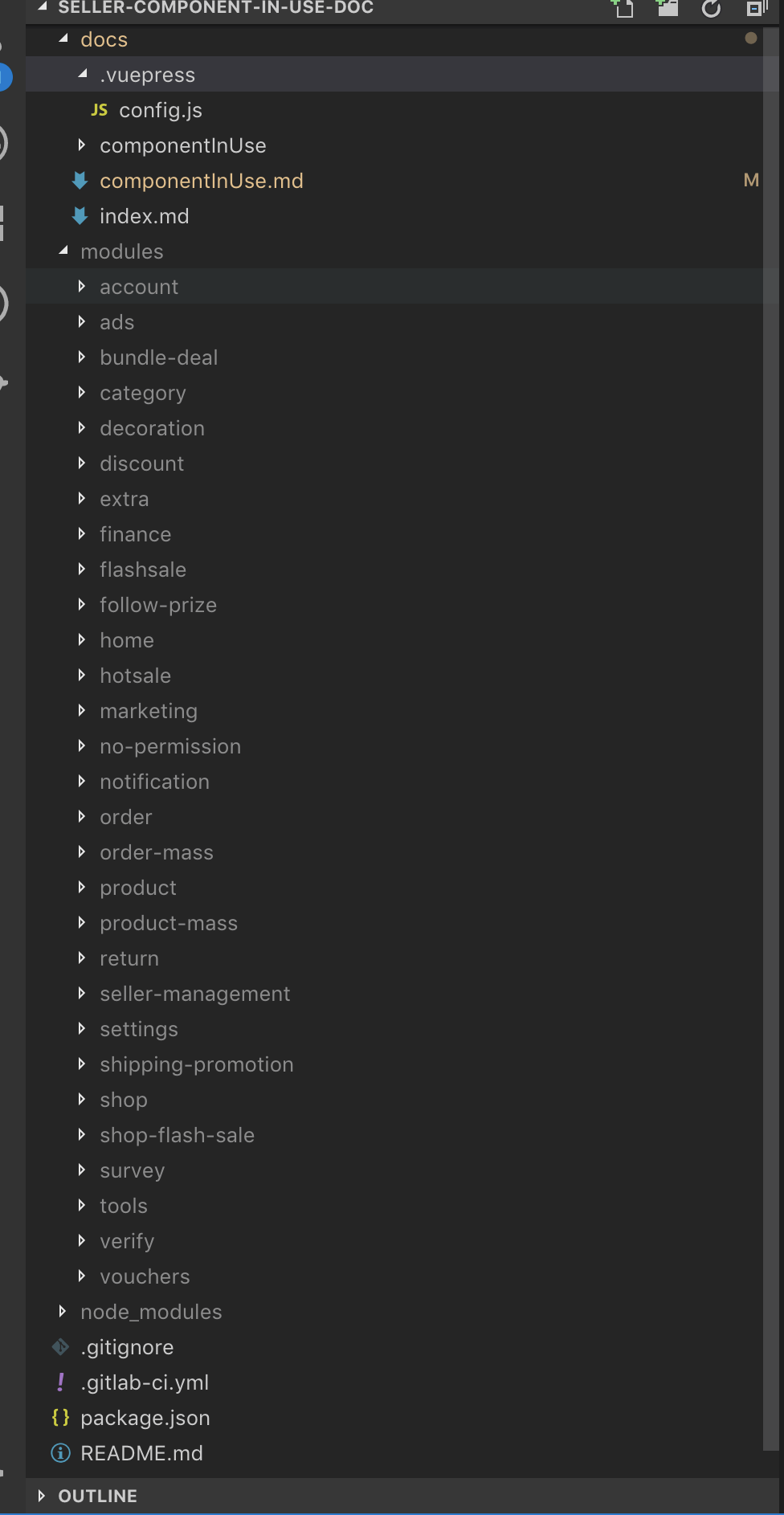
- docs目录是存放文档的文件
- modules是存放要分析的模块将不会上传到
gitlabb上, .vuepress文件用来存放vuepress配置文件
那我们先来看一下config.js文件都如何配置,上代码
var  fs  =  require("fs");
var  path  =  require("path");
var  rootpath  = path.dirname(__dirname);

// 侧边栏
var sidebar = [];
/**
* string比较工具类
*/
var  str  = {
  contains: function(string, substr, isIgnoreCase) {
    if (isIgnoreCase) {
      string = string.toLowerCase();
      substr = substr.toLowerCase();
    }
    var startChar = substr.substring(0,  1);
    var strLen = substr.length;
    for (var j =  0; j < string.length  - strLen +  1; j++) {
      if (string.charAt(j) == startChar) {
        //如果匹配起始字符,开始查找
        if (string.substring(j, j + strLen) == substr) {
          //如果从j开始的字符与str匹配,那ok
          return  true;
        }
      }
    }
    return  false;
  }
};
/**
* 文件助手: 主要用于读取当前文件下的所有目录和文件
*/
var  filehelper  = {
  getAllFiles: function(rpath) {
    let filenames = [];
    fs.readdirSync(rpath).forEach(file  => {
      fullpath = rpath +  '/'  + file;
      var fileinfo = fs.statSync(fullpath);
      // 过滤 .DS_Store
      if (fileinfo.isFile() &&  !str.contains(file,  "DS_Store",  true)) {
        if (file ===  "README.md"  || file ===  "readme.md") {
          file =  '';
        } else {
          file = file.replace(".md",  '');
        }
        filenames.push(file);
      }
    });
    filenames.sort();
    return filenames;
  },
  getAllDirs: function  getAllDirs(mypath  =  ".") {
    var  items  = fs.readdirSync(mypath);
    // console.log(mypath, items);
    let result = [];
    // 遍历当前目录中所有文件夹
    items.map(item  => {
      let temp = path.join(mypath, item);
      // 过滤无关的文件夹
      if (fs.statSync(temp).isDirectory() && !item.startsWith(".") && !str.contains(item,  "DS_Store",  true)) {
        let path = mypath +  '/'  + item +  '/';
        result.push(path);
        result = result.concat(getAllDirs(temp));
        diffDirname(path)
      }
    });
    return result;
  }
};
// nav的链接路径
var navLinks = [];
// 导航栏
var nav =  getNav();
function  genSideBar() {
  var allDirs = filehelper.getAllDirs(rootpath);
  allDirs.forEach(item  => {
    var dirname = item.replace(rootpath,  '');
    navLinks.push(dirname);
  });
}
/**
 * 查找parent形成side bar树
 * @param {*} dirname
 */
function diffDirname(path) {
  var ss = path.toString().split('/');
  var name = ss[ss.length - 2];
  var parent = path.replace(name +  '/',  '');
  var parentNameSs = parent.toString().split('/');
  var parentName = parentNameSs[parentNameSs.length - 2];
  if (name !== 'componentInUse') {
    if (filehelper.getAllFiles(path).length >= 1) {
      var parentDir = sidebar.find(item => item.title === parentName);
      if (!parentDir) {
        sidebar.push({
          title: parentName,
          children: [
            {
              title: name,
              path: path.replace(rootpath, '')
            }
          ]
        })
      } else {
        var index = sidebar.findIndex(item => item.title === parentName);
        sidebar[index]['children'].push({
          title: name,
          path: path.replace(rootpath, '')
        })
      }
    }
  }
}
/**
* 先生成所有nav文件链接;
* @param  filepaths
* @returns  {Array}
*/
function  genNavLink(filepaths) {
  genSideBar();
  var navLinks = [];
  filepaths.forEach(p  => {
    var ss = p.toString().split('/');
    var name = ss[ss.length  -  2];
    var parent = p.replace(name +  '/',  '');
    navLinks.push({
      text: name,
      link: p,
      items: [],
      parent: parent
    });
  });
  return navLinks;
}
/**
* 自定义排序文件夹
* @param  a
* @param  b
* @returns  {number}
*/
function  sortDir(a, b) {
  let al = a.parent.toString().split('/').length;
  let bl = b.parent.toString().split('/').length;
  if (al > bl) {
    return  -1;
  }
  if (al === bl) {
    return  0;
  }
  if (al < bl) {
    return  1;
  }
}
/**
* 生成最终的 nav配置信息
* @param  navLinks
* @returns  {Array}
*/
function  getNav() {
  let nnavs =  genNavLink(navLinks);
  nnavs.sort(sortDir);
  var iniMap = {};
  var result = [];
  var delMap = {};
  nnavs.forEach(l  => {
    iniMap[l.link] = l;
  });
  nnavs.forEach(l  => {
    var parentLink = l.parent;
    if (parentLink !==  '/') {
      iniMap[parentLink].items.push(l);
      delMap[l.link] = l;
    }
  });
  for (var k in iniMap) {
    if (delMap[k] !=  null) {
    delete iniMap[k];
    continue;
  }
  result.push(iniMap[k]);
  }
  return result;
}
/**
* Vuepress 最终需要的配置信息, 修改其他信息在此处配置
*/
var config = {
  base: '/seller-fe/tech/seller-component-in-use-doc/',
  title: "Component in use analysis tool",
  description: "Analysis seller-common component use in seller-center",
  lang: "zh-CN",
  dest: 'public',
  head: [["link", { rel: "icon", href: "/logo.png" }]],
  markdown: {
    // markdown-it-anchor 的选项
    anchor: { permalink: false },
    // markdown-it-toc 的选项
    toc: { includeLevel: [1, 2, 3] },
  },
  themeConfig: {
    sidebar: {
      '/': [
        {
          title: 'componentInUse',
          path: '/',
          children: sidebar
        }
      ]
    },
    nav: nav,
    sidebarDepth: 3
  }
};
module.exports  = config;
gitlab-ci
参考文章
对于gitlab-ci,我需要在两个项目中进行配置:seller-center-root以及component-in-use-docs
这两个项目的用途分别是:
seller-center-root是遍历每一个模块,并利用我们脚手架去对每一个模块进行build分析生成文档,并触发component-in-use-docs。component-in-use-docs需要将生成的.md文件生成文档。这个时候需要开启runner
配置如下:
seller-center-root
image: 这里需要配上自己的镜像

pages:
  cache:
    key: ${CI_COMMIT_REF_NAME} # CI_COMMIT_REF_NAME for ^9.0, CI_BUILD_REF_NAME for 8
    paths:
      - node_modules/
  stage: deploy
  script:
  - scc init:docs
  - scc build:docs
  - cd .. && cd seller-component-in-use-doc
  - git config --global user.name "componentInUse"
  - git config --global user.email "componentInUse@shopee.com"
  - git add . && git commit -m "update docs"
  - git push origin master

  artifacts:
    paths:
    - public

  only:
    - release
component-in-use-docs
image: 这里需要配上自己的镜像

pages:
  cache:
    key: ${CI_COMMIT_REF_NAME} # CI_COMMIT_REF_NAME for ^9.0, CI_BUILD_REF_NAME for 8
    paths:
      - node_modules/
  stage: deploy
  script:
  - yarn install
  - yarn build:docs

  artifacts:
    paths:
    - public

  only:
    - master
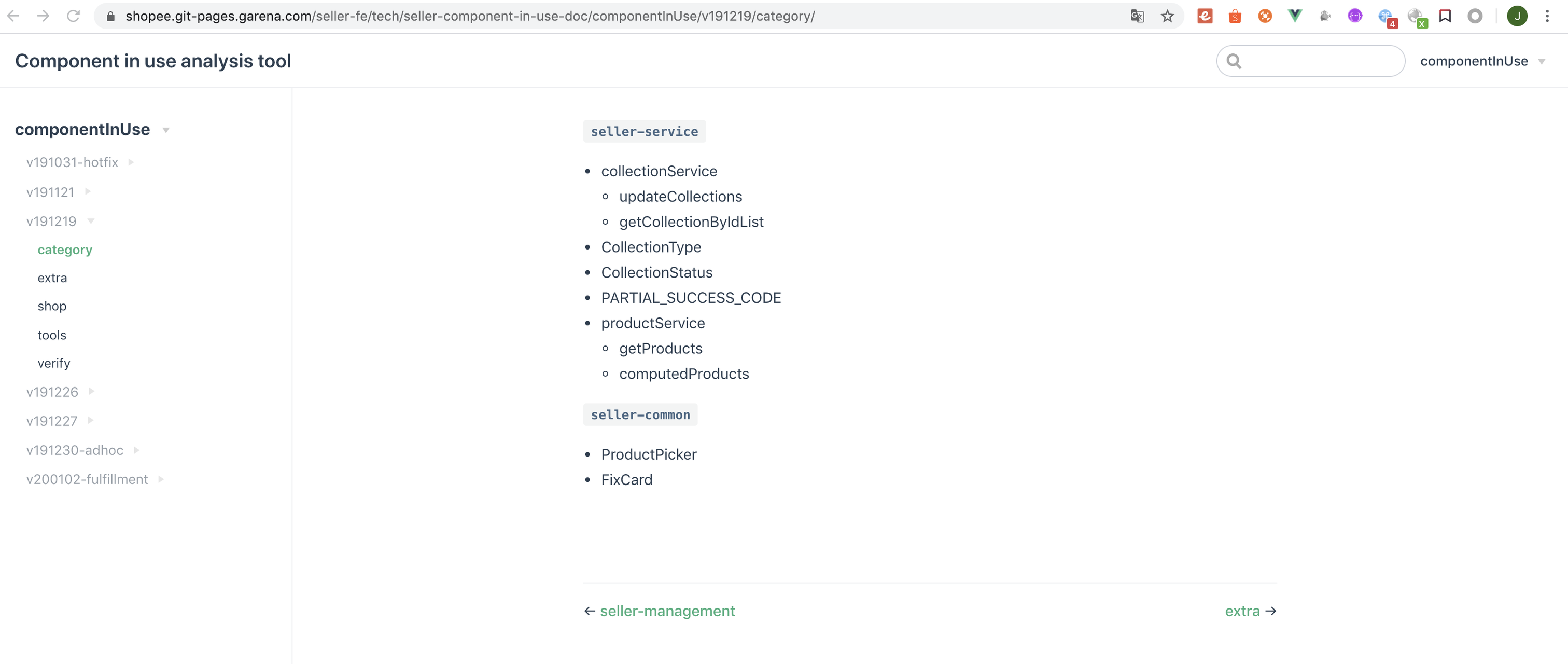
最后
附上文档效果图
好啦,上述就是我在工作中的一个小结,只是方法思路上的总结,并没有涉及太多的知识,本人是小白,如有不对的地方,欢迎评论区评论,一起学习交流。
