先说一下我为什么写这篇文章: 在网上搜索了很多这个问题,都没有找到答案,找了老半天好不容易找到个一样的标题,这个问题来自segmentfault.的@xdlumia用户;但是。。。。它连回答的人都没有,在评论区只找到---
‘谁教你把 script 写到 body 外面的?
- 不要把任何页面内容写到 body、head 外面。
- app.js 插入到了你写的 script 的前面,获取不到 Vue。’的回答,以下是问题地址
而事实上控制台一样会报vue is not defined, 下面我们就看一下解决办法。
以下是错误的做法:
在项目根目录下的index.html
<html lang="en">
<head>
<meta charset="UTF-8" />
<meta name="viewport" content="width=device-width, initial-scale=1.0" /> <meta http-equiv="X-UA-Compatible" content="ie=edge" />
<title><%= htmlWebpackPlugin.options.title %></title>
<script src="https://cdn.bootcss.com/vue/2.6.10/vue.min.js"></script>
<script src="https://unpkg.com/element-ui/lib/index.js"></script>
<script src="https://cdn.bootcss.com/vue-router/3.1.2/vue-router.min.js"></script>
<script src="https://unpkg.com/axios/dist/axios.min.js"></script>
<script src="https://cdn.bootcss.com/vuex/3.1.0/vuex.min.js"></script> </head>
<body>
<div id="app"></div>
</body>
</html>webpack的config.js配置文件, 至于是prod.js还是dev这里不作细分:
{
    //...
    externals: {            // 左侧vue是我们自己引入时候要用的,右侧是开发依赖库的主人定义的不能修改            'vue': 'Vue',            'vue-router': 'VueRouter',            'vuex': 'Vuex',            'axios': 'axios',                'element-ui': 'element-ui'            // 'crypto-js': 'CryptoJS'        },
   //....
    plugins: [
       new VueLoaderPlugin(),
       // 最新版的vue-loader需要配置插件
       new HtmlWebpackPlugin()
    ]
}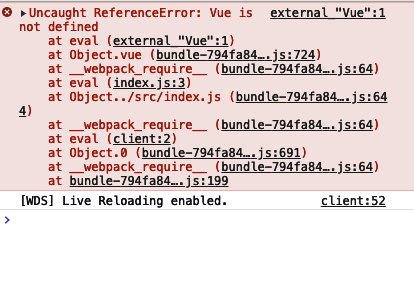
那么问题在哪里呢?打开控制台的elments面板你就发现,我的script引入标签去哪里了?只留下了bundle.js
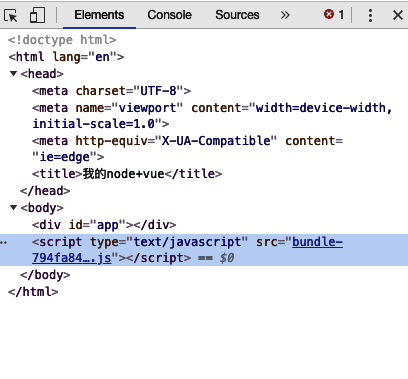
这时候我们就想我的代码去哪里了,被狗吃了吗?
我的天,但是我们打包生成的代码是通过htmlWebpackPlugin这个插件去生成的。我就想着其实这个htmlWebpackPlugin是不是有配置项可以配置些什么东西可以让它不去除我们的引入script的标签,网上一查,果然有具体的地址我忘了这里不贴出来了。
以下是正确的写法:
根目录下面的index.html
<!DOCTYPE html><html lang="en">
<head>
<meta charset="UTF-8">
   <meta name="viewport" content="width=device-width, initial-scale=1.0">
   <meta http-equiv="X-UA-Compatible" content="ie=edge">
   <title><%= htmlWebpackPlugin.options.title %></title>
    <!-- import cdn css -->
<% if(htmlWebpackPlugin.options.cdn) {%>
<% for(var css of htmlWebpackPlugin.options.cdn.css) { %>
<link rel="stylesheet" href="<%=css%>">        <% } %>
<% } %></head>
<body>
<div id="app"></div>
<!-- <script></script> -->
<!-- 使用 CDN 的 JS 文件 -->
<% for (var i in htmlWebpackPlugin.options.cdn && htmlWebpackPlugin.options.cdn.js) { %>
        <!-- console.log(htmlWebpackPlugin.options.cdn) -->
        <script src="<%= htmlWebpackPlugin.options.cdn.js[i] %>"></script>
    <% } %>
</body>
</html>
webpack配置文件config.js:
externals: {            // 左侧vue是我们自己引入时候要用的,右侧是开发依赖库的主人定义的不能修改            'vue': 'Vue',            'vue-router': 'VueRouter',            'vuex': 'Vuex',            'axios': 'axios',                'element-ui': 'ELEMENT'            // 'crypto-js': 'CryptoJS'        },
plugins: [
 new VueLoaderPlugin(), // 最新版的vue-loader需要配置插件
 new HtmlWebpackPlugin({
    title: '我的node+vue',
    template: path.join(__dirname, 'index.html'),
     // cdn(自定义属性)加载的资源,不需要手动添加至index.html中,
   // 顺序按数组索引加载
    cdn: {
    css:['https://cdn.bootcss.com/element-ui/2.8.2/theme-chalk/index.css'],
     js: [
        'https://cdn.bootcss.com/vue/2.6.10/vue.min.js',
        'https://unpkg.com/element-ui/lib/index.js',
        'https://cdn.bootcss.com/vue-router/3.1.2/vue-router.min.js',
        'https://unpkg.com/axios/dist/axios.min.js',
        'https://cdn.bootcss.com/vuex/3.1.0/vuex.min.js'
     ]
    }
 })
]
记得externals的配置项和cdn的配置项对应哦,不然还是识别不了。
嗯,还有个题外解答,为什么在错误写法里面我的externals里的element-ui: 'element-ui'和修正之后的'element-ui': 'ELEMENT'不一样,因为在cdn引入的js里面element默认是‘ELEMENT’而不是‘element-ui‘,否则控制台会报另外一个错误。element is not defined。
好了,这个问题解决了,希望各位大神多指教,顺便问一下,现在有其他的更好的解决办法吗?htmlWebPackPlugin被其他插件替代没?