

当 Element 本身不为null或者是false,也不是Object,而是string。这里string就是完全的纯文本。也就是没有任何html包裹的 文本。也就是text node。
关于 text node的处理:
Element 本身为 string。
    else if (typeof node === 'string' || typeof node === 'number') {
        instance = ReactNativeComponent.createInstanceForText(node);
    }
这里是调用了 ReactNativeComponent 模块的 createInstanceForText 方法。
createInstanceForText 方法
该方法是 ReactNativeComponent 模块的方法。
    function createInstanceForText(text) {
        return new textComponentClass(text);
    }
textComponentClass 类
textComponentClass 也是通过注入机制注入进来的--ReactDOMTextComponent。
这个类本身没有做什么事情,只是提供了一些原型属性。
    var ReactDOMTextComponent = function (props) {

    };
    construct: function (text) {

        this._currentElement = text;
        this._stringText = '' + text;

        this._rootNodeID = null;
        this._mountIndex = 0;
    },

    mountComponent:function (rootID, transaction, context) {}
    receiveComponent: function (nextText, transaction) {},
    unmountComponent: function(){}
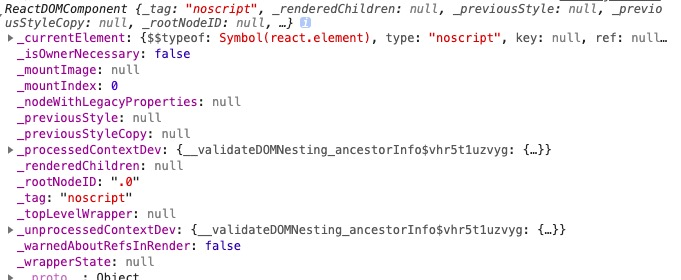
直观的来看一个例子: 当 element.type === 'string'=== 'noscript'的时候生成的 要挂载的实例入。
再来看看一个普通的div代表的挂载实例:
当:element.type === 'string'=== 'div'
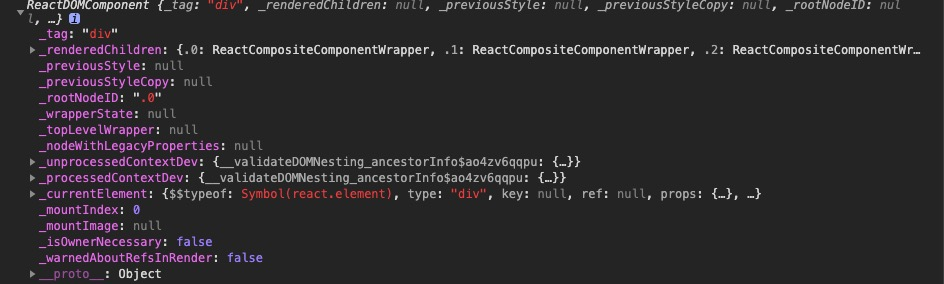
接下来一个个的来看看 这个 挂载实例的内容。
construct
这个方法就是提供了四个属性。
    construct: function (text) {

        this._currentElement = text;
        this._stringText = '' + text;


        this._rootNodeID = null;
        this._mountIndex = 0;
    },
mountComponent
    mountComponent: function (rootID, transaction, context) {
        '
            为_rootNodeID 赋值。也就是当前的挂载实例最终要挂载的位置。
        '
        this._rootNodeID = rootID;

        '
            transaction.useCreateElement 的值始终是 false。目前也是没有任何使用,应是为了以后准备。
        '
        if (transaction.useCreateElement) {
          var ownerDocument = context[ReactMount.ownerDocumentContextKey];
          var el = ownerDocument.createElement('span');
          DOMPropertyOperations.setAttributeForID(el, rootID);
          // Populate node cache
          ReactMount.getID(el);
          setTextContent(el, this._stringText);
          return el;

        } else {

          var escapedText = escapeTextContentForBrowser(this._stringText);
        '
            如果 renderToStaticMarkup值为true,就直接返回 escapedText。否则的话就给 escapedText 外边套一层 span,而span上加入了一个 id。
        '
          if (transaction.renderToStaticMarkup) {
            return escapedText;
          }

          return '<span ' + DOMPropertyOperations.createMarkupForID(rootID) + '>' + escapedText + '</span>';
    }
escapeTextContentForBrowser 方法
先看看这个方法的参数 this._stringText。 这个this._stringText就是当前要包装的 text node。
这个方法的主要作用是转译文本,以防止脚本攻击。
比如一个text node为 "" 那么转译之后为:"<script>asasdasd</script>"
    function escapeTextContentForBrowser(text) {
        return ('' + text).replace(ESCAPE_REGEX, escaper);
    }
DOMPropertyOperations.createMarkupForID(rootID)
这个方法的作用就是为 span 添加一个id。
    createMarkupForID: function (id) {
        return DOMProperty.ID_ATTRIBUTE_NAME + '=' + quoteAttributeValueForBrowser(id);
    },
这里 DOMProperty.ID_ATTRIBUTE_NAME 为 data-reactid,是React为组件id定义的属性名称。
quoteAttributeValueForBrowser模块
    function quoteAttributeValueForBrowser(value) {
        return '"' + escapeTextContentForBrowser(value) + '"';
    }
escapeTextContentForBrowser 方法上边已经说过了,这个方法用来检验value的值,对其进行转换,目的是为了防止 脚本攻击
最后再说一下:text node 是没有任何HTMl元素包裹的纯文本,这里React会对其进行了单独的处理。这里对text node单独处理生成的挂载实例,其本身除了包含text外是没有任何功能的。
receiveComponent 方法
这个方法的作用是 通过更新文本内容来更新此组件。
    receiveComponent: function (nextText, transaction) {
        '
            判断要更新的 text和当前的text是否一样。
        '
        if (nextText !== this._currentElement) {
            '
                为属性_currentElement赋值
            '
            this._currentElement = nextText;
            '
                将 nextText转换为字符串形式。
            '
            var nextStringText = '' + nextText;
            '
                再比较一下两个字符串
            '
            if (nextStringText !== this._stringText) {
            '
                赋值
            '
            this._stringText = nextStringText;
            '
                这时候的node是更新之后的node。
            '
            var node = ReactMount.getNode(this._rootNodeID);

            '

            '
            DOMChildrenOperations.updateTextContent(node, nextStringText);
            }
        }
    },
DOMChildrenOperations.updateTextContent
该方法是使用的是 setTextContent 模块 将获取到的node textContent 替换为新的。
    var setTextContent = function (node, text) {
      node.textContent = text;
    };
unmountComponent
顾名思义这个方法是卸载组件。
    unmountComponent: function () {
        ReactComponentBrowserEnvironment.unmountIDFromEnvironment(this._rootNodeID);
    }
unmountIDFromEnvironment
    unmountIDFromEnvironment: function (rootNodeID) {
        ReactMount.purgeID(rootNodeID);
    }
purgeID
purgeID就是从缓存的nodeCache中删掉当前组件。
    function purgeID(id) {
        delete nodeCache[id];
    }
