

filebeat.yml
配置文件开头的一句话:

You can find the full configuration reference here:

https://www.elastic.co/guide/en/beats/filebeat/index.html
常用命令:
启动filebeat
nohup /opt/efk/filebeat-7.5.1-linux-x86_64/filebeat -e -c filebeat.yml > filebeat.log &

启动kibana
nohup /opt/efk/kibana-7.5.1-linux-x86_64/bin/kibana --allow-root > kibana.log &


查看kibana 端口
netstat -antp |grep 5601

启动 elasticsearch

service elasticsearch start
service elasticsearch stop
service elasticsearch restart
环境
系统:
CentOS7.6
安装jdk
参考:
https://juejin.cn/post/6844904022420226062
安装elasticsearch
elasticsearch
https://www.elastic.co/cn/downloads/
Version:7.5.1

找到对应的 LINUX 64位版本

cd
/opt/efk
找到下载地址
wget 下载地址
tar -zxvf  目录名

创建elasticsearch data的存放目录,并修改该目录的属主属组
mkdir -p /data/es-data   (自定义用于存放data数据的目录)
chown -R elasticsearch:elasticsearch /data/es-data

修改elasticsearch的日志属主属组
mkdir -p /var/log/elasticsearch/   (自定义用于存放log数据的目录)
chown -R elasticsearch:elasticsearch /var/log/elasticsearch/
修改elasticsearch的配置文件
vim /opt/efk/elasticsearch-7.5.1/config/elasticsearch.yml

找到配置文件中的cluster.name,打开该配置并设置集群名称
cluster.name: my-application

找到配置文件中的node.name,打开该配置并设置节点名称
node.name: node-1

修改data存放的路径
path.data: /data/es-data

修改logs日志的路径
path.logs: /var/log/elasticsearch/

配置内存使用用交换分区
bootstrap.memory_lock: true

监听的网络地址
network.host: 0.0.0.0

开启监听的端口
http.port: 9200

增加新的参数,这样head插件可以访问es (5.x版本,如果没有可以自己手动加)
http.cors.enabled: true
http.cors.allow-origin: "*"
启动elasticsearch服务
没有明白此参数的作用,但是要加上
bootstrap.system_call_filter: false


elasticsearch使用的内存大小为2G,我们把它改小点:
修改参数:
vim /opt/efk/elasticsearch-7.5.1/config/jvm.options
-Xms512m
-Xmx512m


需要修改几个参数,不然启动会报错

vim /etc/security/limits.conf
在末尾追加以下内容(elk为启动用户,当然也可以指定为*)
elk soft nofile 65536
elk hard nofile 65536
elk soft nproc 2048
elk hard nproc 2048
elk soft memlock unlimited
elk hard memlock unlimited

继续再修改一个参数
vim /etc/security/limits.d/20-nproc.conf
将里面的
 soft    nproc     4096
改为:
 soft    nproc     2048


对于systemd service的资源限制,现在放在 /etc/systemd/system.conf
vim /etc/systemd/system.conf
在末尾追加以下内容
DefaultLimitNOFILE=65536
DefaultLimitNPROC=32000
DefaultLimitMEMLOCK=infinity


设置开机启动:

1、在/etc/init.d/目录创建es文件 vim /etc/init.d/elasticsearch

文件内容:


#!/bin/bash
#
#chkconfig: 345 63 37
#description: elasticsearch
#processname: elasticsearch-7.5.1

ES_HOME=/opt/e**ffe*k/elasticsearch-7.5.1

case $1 in
  start)
    su - elasticsearch -c "$ES_HOME/bin/elasticsearch -d -p pid"
    echo "elasticsearch is started"
    ;;
  stop)
    pid=`cat $ES_HOME/pid`
    kill -9 $pid
    echo "elasticsearch is stopped"
    ;;
  restart)
    pid=`cat $ES_HOME/pid`
    kill -9 $pid
    echo "elasticsearch is stopped"
    sleep 1
    su - elasticsearch -c "$ES_HOME/bin/elasticsearch -d -p pid"
    echo "elasticsearch is started"
    ;;
  *)
    echo "start|stop|restart"
    ;;
esac
exit 0


2、修改上面文件的权限,执行命令

chmod 777 /etc/init.d/elasticsearch
3、添加和删除服务并设置启动方式(chkconfig具体使用另行百度)

chkconfig --add elasticsearch
chkconfig --del elasticsearch
4、启动和关闭服务

service elasticsearch start    // 启动服务
service elasticsearch stop     // 关闭服务
service elasticsearch restart  // 重启服务
5、设置服务的启动方式

chkconfig elasticsearch on  // 设置开机启动
chkconfig elasticsearch off // 关闭开机启动


先检查9200端口是否起来
netstat -antp |grep 9200


浏览器访问测试是否正常(以下为正常)
curl http://127.0.0.1:9200/
[root@zpf ~]# curl http://127.0.0.1:9200/
{
  "name" : "elk-1",
  "cluster_name" : "demon",
  "cluster_uuid" : "t8-0566XQuaCsp_V3Q315A",
  "version" : {
    "number" : "5.6.16",
    "build_hash" : "3a740d1",
    "build_date" : "2019-03-13T15:33:36.565Z",
    "build_snapshot" : false,
    "lucene_version" : "6.6.1"
  },
  "tagline" : "You Know, for Search"
}
filebeat 安装
https://www.elastic.co/cn/downloads/
Version:7.5.1

找到对应的 LINUX 64位版本

cd
/opt/efk
找到下载地址
wget 下载地址

tar -zxvf  目录名
filebeat 配置文件修改
进入主目录,修改配置
vim /opt/efk/filebeat-7.5.1-linux-x86_64/filebeat.yml


filebeat 多索引配置:
以nginx 的日志为例
/var/log/nginx/access.log
/var/log/nginx/error.log


filebeat.inputs:
- type: log
  enabled: true
  paths:
    - /var/log/nginx/access.log
  fields:
    type: "nginx-access"

- type: log
  enabled: true
  paths:
    - /var/log/nginx/error.log
  fields:
    type: "nginx-error"


output.elasticsearch:
  # Array of hosts to connect to.
  hosts: ["localhost:9200"]
  indices:
    - index: "nginx-access"
      when.equals:
        fields.type: "nginx-access"
    - index: "nginx-error"
      when.equals:
        fields.type: "nginx-error"


注意:
enabled默认为false,需要改成true才会收集日志。
/var/xxx/*.log修改为自己的日志路径

关于filebeat 的一些配置
可以参考:
https://www.cnblogs.com/cjsblog/p/9495024.html
启动filebeat
filebeat启动命令
# 前台启动
./filebeat -e -c filebeat.yml

# 后台启动 不输出日志/输出日志
nohup ./filebeat -e -c filebeat.yml >/dev/null 2>&1 &
nohup ./filebeat -e -c filebeat.yml > filebeat.log &

设置开机启动时:
没问题:
cd /opt/efk/filebeat-7.5.1-linux-x86_64
nohup ./filebeat -e -c filebeat.yml > filebeat.log &

有问题:
nohup /opt/efk/filebeat-7.5.1-linux-x86_64/filebeat -e -c filebeat.yml > filebeat.log &
不能开机启动
Kibana的安装
https://www.elastic.co/cn/downloads/
Version:7.5.1

找到对应的 LINUX 64位版本

cd
/opt/efk
找到下载地址
wget 下载地址

tar -zxvf  目录名
修改kibana的配置文件
vim  /opt/efk/kibana-7.5.1-linux-x86_64/config/kibana.yml

server.port: 5601

# 内网ip
server.host: "192.168.0.3"

elasticsearch.hosts: ["http://localhost:9200"]

kibana.index: ".kibana"
启动kibana
nohup /opt/efk/kibana-7.5.1-linux-x86_64/bin/kibana --allow-root > kibana.log &


注意:kibana 要求不能用root用户启动 如果要root用户启动需要加: --allow-root

查看端口监听:
netstat -antp |grep 5601
tcp        0      0 0.0.0.0:5601                0.0.0.0:*                   LISTEN      17007/node

打开浏览器并设置对应的index
http://IP:5601
添加kibana 索引
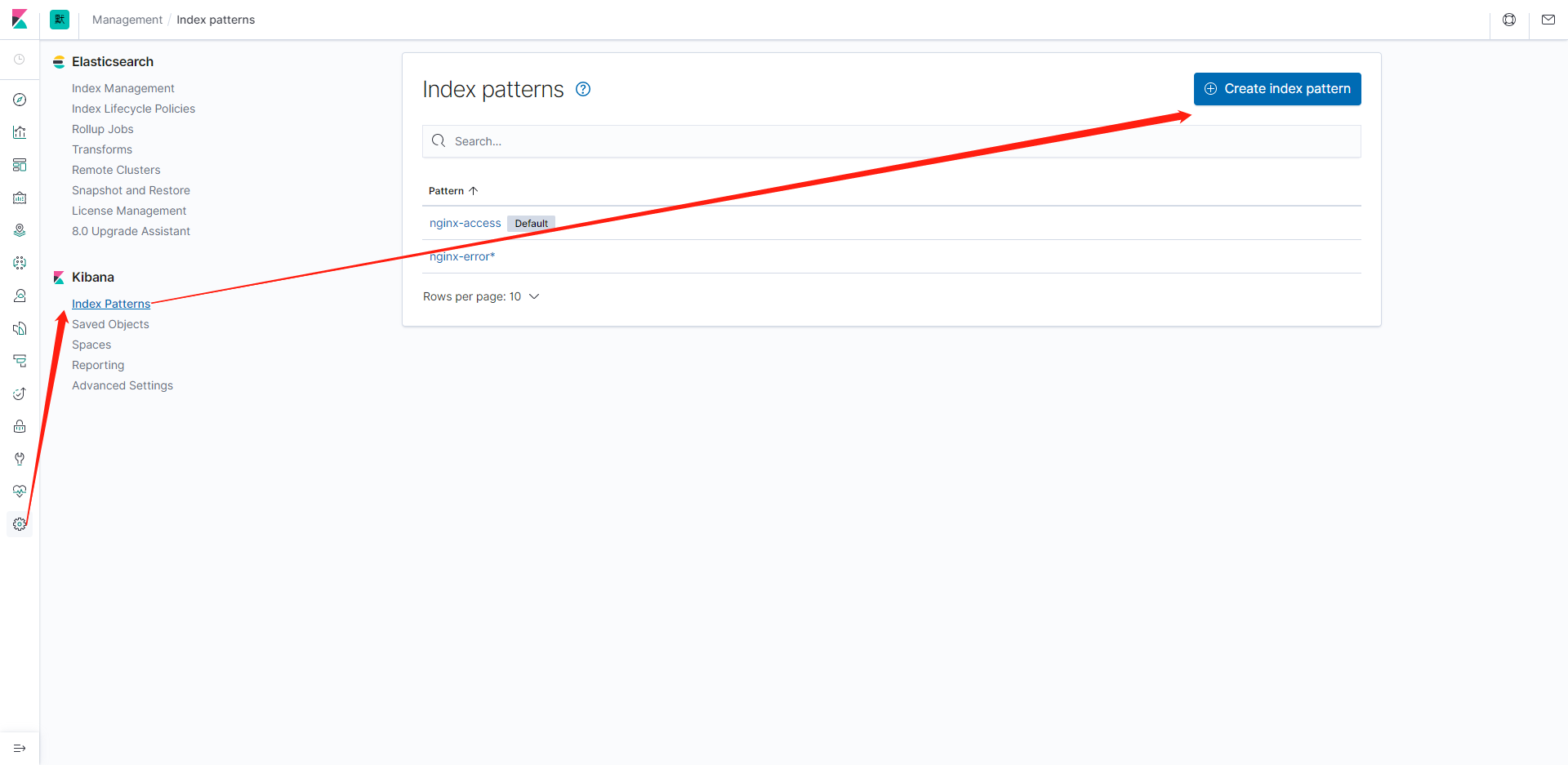
参考:
You can find the full configuration reference here:
