9102年12月25日
设计选型
最近工作上一个新需求,做一个审计日志页面,显示系统各模块的操作(增删改)记录。查阅资料,确定了两种思路:
1.spring aop拦截controller层实现
2.mybatis拦截插件实现
比较了一下两种思路:
aop需要给每个接口上添加注解,这样整个系统的接口都要做变动;
mybatis插件只需要做一个拦截器,代码改动小。
最后还是确定了使用AOP方式,因为这个需求重业务,不重SQL。如果审计表还需要记录更改前的内容,更改后的内容,变更内容等SQL相关的字段,那么可以使用mybaits拦截插件实现。
表设计
审计表建表语句如下:
因为要求大参数(长度超过1000的参数)不做记录,故参数字段长度设为了1000
DROP TABLE IF EXISTS `audit_log`;
CREATE TABLE `audit_log` (
  `id` int(11) NOT NULL AUTO_INCREMENT COMMENT 'ID',
  `record_type` tinyint(1) DEFAULT NULL COMMENT '记录类型:0-操作记录;1-异常记录',
  `operation_type` tinyint(1) DEFAULT NULL COMMENT '操作类型:0-新增;1-修改;2-删除',
  `uid` int(11) DEFAULT NULL COMMENT '操作人ID',
  `uname` varchar(30) CHARACTER SET utf8mb4 DEFAULT NULL COMMENT '操作人',
  `ip` varchar(255) DEFAULT NULL COMMENT '操作人IP',
  `desc` varchar(255) CHARACTER SET utf8mb4 DEFAULT NULL COMMENT '操作描述',
  `create_date` datetime DEFAULT NULL COMMENT '操作时间',
  `method` varchar(255) DEFAULT NULL COMMENT '请求方法名',
  `params` varchar(1000) DEFAULT NULL COMMENT '请求方法参数',
  `time` int(11) DEFAULT NULL COMMENT '请求时长',
  `exception_desc` varchar(1000) CHARACTER SET utf8mb4 DEFAULT NULL COMMENT '异常描述',
  PRIMARY KEY (`id`)
) ENGINE=InnoDB AUTO_INCREMENT=6 DEFAULT CHARSET=utf8 COMMENT='审计日志表';
项目结构图
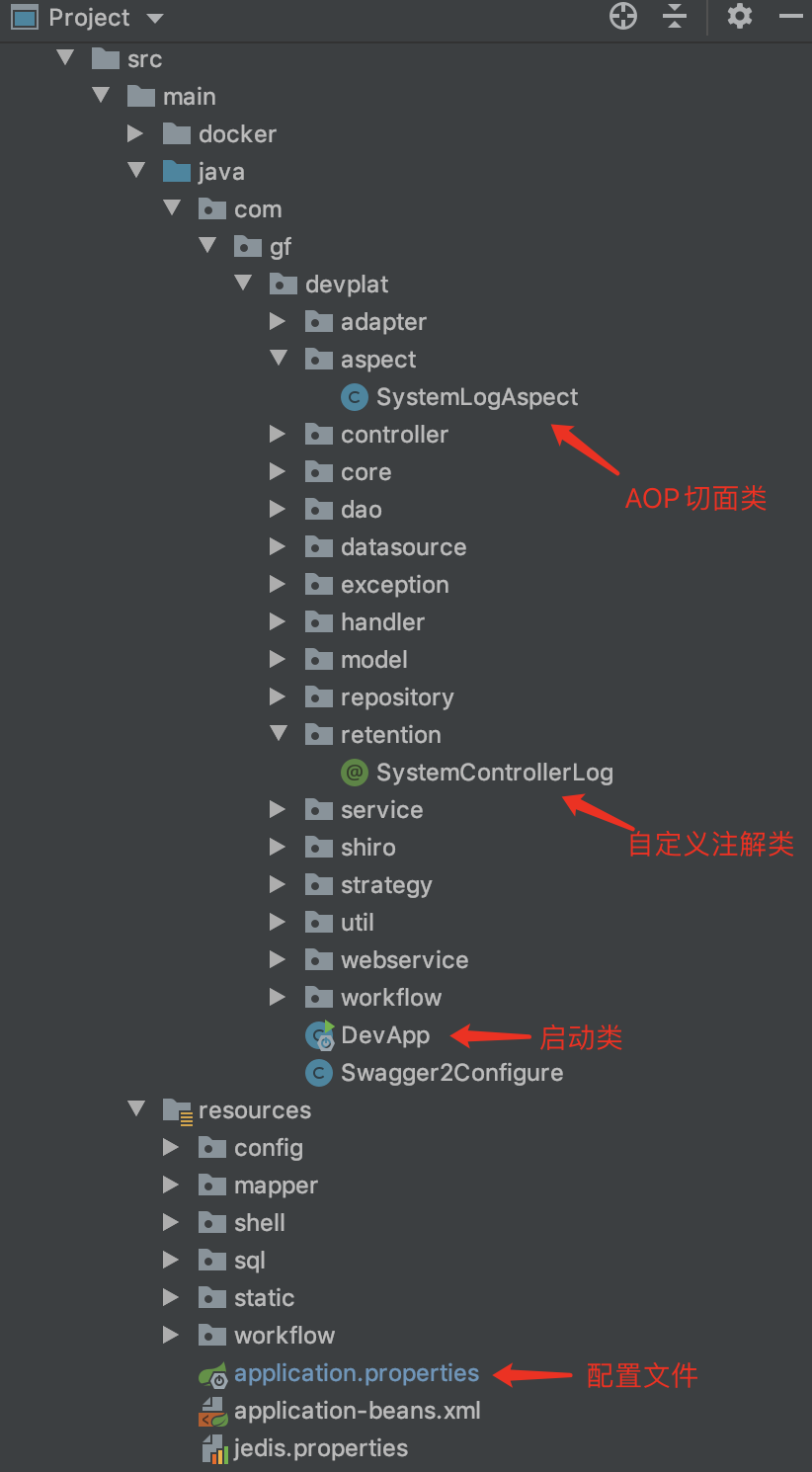
代码实现
一、配置文件
1.引入对应的maven依赖
<!--aop依赖-->
<dependency>
    <groupId>org.springframework.boot</groupId>
    <artifactId>spring-boot-starter-aop</artifactId>
</dependency>
2.修改application.properties配置文件,开启aop
spring.aop.auto=true
二、创建实体类
@Alias("AuditLogModel")
@Data
public class AuditLogModel {

    private DateFormat format = new SimpleDateFormat("yyyy-MM-dd HH:mm:ss");

    private int id;

    private int recordType;

    private int operationType;

    private int uid;

    private String uname;

    private String ip;

    private String desc;

    private Date createDate;

    private String method;

    private String params;

    private long time;

    private String exceptionDesc;

    // 格式化日期
    public String getCreateDateStr() {
        if (createDate != null) {
            return format.format(createDate);
        } else {
            return "";
        }
    }
}
三、定义日志记录元注解
@Documented
@Target(ElementType.METHOD)
@Retention(RetentionPolicy.RUNTIME)
public @interface SystemControllerLog {

    /**
     * 描述业务方法 例:Xxx管理-执行Xxx操作
     * @return
     */
    // 方法描述
    String description() default "";

    // 是否需要记录方法参数
    boolean recordParams() default true;

    // 方法类型(0-新增,1-修改,2-删除)
    int operationType();
}
元注解三个属性:
- 请求方法描述
- 是否记录请求方法参数(敏感方法:登陆、退出、修改密码以及大参数不作记录)
- 方法类型(0-新增,1-修改,2-删除)
四、aop切点类
这个是最主要的类,可以使用自定义注解或针对包名实现AOP增强。
- 这里实现了对自定义注解的环绕增强切点和抛出异常增强切点,对使用了自定义注解的方法进行AOP切面处理;
- 对方法名,参数名,参数值,日志描述的优化处理;
- 对方法运行时间进行监控
具体:
- 使用@Aspect注解在类上声明切面
- 使用@PointCut注解定义切点,标记方法
- 使用@Around,@AfterThrowing标明切点时机
@Aspect
@Component
public class SystemLogAspect {

    @Autowired(required=false)
    HttpServletRequest request;

    @Autowired
    private AuditLogService auditLogService;

    private static final int MAX_LENGTH_TO_RECORD_PARAMS = 1000;

    /**
     * Controller层切点 注解拦截
     */
    @Pointcut("@annotation(com.gf.devplat.retention.SystemControllerLog)")
    public void controllerAspect(){}


    /**
     * 环绕增强
     * @param joinPoint
     * @return
     * @throws Throwable
     */
    @Around("controllerAspect()")
    public Object doAround(ProceedingJoinPoint joinPoint) throws Throwable{

        Object res = null;
        long time = System.currentTimeMillis();

        try {
            res = joinPoint.proceed();
            // 执行时长(毫秒)
            time = System.currentTimeMillis() - time;
            return res;
        } finally {
            try {
                //方法执行完成后增加日志
                addAuditLog(joinPoint, time);
            }catch (Exception e){
                System.out.println("LogAspect 操作失败:" + e.getMessage());
                e.printStackTrace();
            }

        }
    }


    /**
     * 插入操作记录
     * @param joinPoint
     * @param time
     */
    public void addAuditLog(JoinPoint joinPoint, long time) {
        UserInfo userInfo = SessionUtils.getUserInfo();

        AuditLogModel log = new AuditLogModel();

        // 操作记录
        log.setRecordType(Constants.OperateRecordType.OPERATE_RECORD_NORMAL);
        // 操作记录,会记录方法请求时间
        log.setTime(time);

        if (userInfo != null) {
            // Log对象封装值
            setLogValue(joinPoint, userInfo, log);
            // 插入操作记录
            auditLogService.addAuditLog(log);
        }
    }

    /**
     * 异常通知,插入异常记录
     * @param joinPoint
     * @param e
     */
    @AfterThrowing(pointcut = "controllerAspect()", throwing = "e")
    public void doAfterThrowing(JoinPoint joinPoint, Throwable e){
        UserInfo userInfo = SessionUtils.getUserInfo();

        AuditLogModel log = new AuditLogModel();

        // 1,表示异常记录
        log.setRecordType(Constants.OperateRecordType.OPERATE_RECORD_EXCEPTION);
        log.setExceptionDesc(e.toString());

        if (userInfo != null) {
            // Log对象封装值
            setLogValue(joinPoint, userInfo, log);
            // 插入异常记录
            auditLogService.addAuditLog(log);
        }
    }

    /**
     * Log对象封装值
     * @param joinPoint
     * @param userInfo
     * @param log
     */
    public void setLogValue(JoinPoint joinPoint, UserInfo userInfo, AuditLogModel log){
        // 是否记录参数
        boolean recordParams = true;

        log.setUname(userInfo.getName());
        log.setUid(userInfo.getUid());
        log.setCreateDate(new Date());
        String ip = SessionUtils.getIpAddress(request);
        log.setIp(ip);

        MethodSignature signature = (MethodSignature) joinPoint.getSignature();
        // 请求方法
        Method method = signature.getMethod();
        SystemControllerLog controllerLog = method.getAnnotation(SystemControllerLog.class);
        if (controllerLog != null) {
            // 请求方法上的注解
            String description = controllerLog.description();
            recordParams = controllerLog.recordParams();
            log.setDesc(description);
            log.setOperationType(controllerLog.operationType());
        }

        // 请求方法名
        String className = joinPoint.getTarget().getClass().getName();
        String methodName = signature.getName();
        log.setMethod(className + "." + methodName);
        // 请求方法参数值
        Object[] args = joinPoint.getArgs();

        // 请求方法参数名称
        LocalVariableTableParameterNameDiscoverer u = new LocalVariableTableParameterNameDiscoverer();
        String[] paramNames = u.getParameterNames(method);
        if (args != null && paramNames != null && recordParams) {
            String params = "";
            for (int i = 0; i < args.length; i++) {
                params += "  " + paramNames[i] + ": " + args[i];
            }
            // 长度超过1000字符串的大参数也不记录
            if (params.length() <= MAX_LENGTH_TO_RECORD_PARAMS) {
                log.setParams(params);

            }
        }
    }


}
五、新增日志业务
业务比较简单,直接贴代码
1.controller层
@RestController
@RequestMapping(value = "/auditLog")
@Api
public class AuditLogController {
    @Autowired
    private AuditLogService auditLogService;

    @RequestMapping(value = {"/getAuditLogList"}, method = RequestMethod.POST)
    @RequiresPermissions("*:user:view")
    @ResponseBody
    public ResponseEntity<JSONObject> getAuditLogList() {
        List<AuditLogModel> resultList = auditLogService.getAuditLogList();
        JSONObject resultJson = ResponseUtils.successJson();
        JSONArray jsonArray = (JSONArray) JSONArray.toJSON(resultList);
        resultJson.put("auditLogList", jsonArray);
        return RestResponse.success(resultJson);
    }

}
2.service层
public interface AuditLogService {

    /**
     * 获取审计日志列表
     * @return
     */
    public List<AuditLogModel> getAuditLogList();

    /**
     * 新增操作记录
     */
    AuditLogModel addAuditLog(AuditLogModel logModel);

}
@Service("auditLogService")
public class AuditLogServiceImpl implements AuditLogService {

    @Autowired
    private AuditLogRepository auditLogRepository;

    @Override
    public List<AuditLogModel> getAuditLogList() {
        return auditLogRepository.getAll();
    }

    @Override
    public AuditLogModel addAuditLog(AuditLogModel logModel) {
        auditLogRepository.add(logModel);
        return logModel;
    }
}
3.dao层
@Mapper
public interface AuditLogRepository {

    /**
     * 新增操作记录
     * @param logModel
     */
    void add(AuditLogModel logModel);

    /**
     * 获取审计日志列表
     * @return
     */
    public List<AuditLogModel> getAll();

}
<?xml version="1.0" encoding="UTF-8" ?>
<!DOCTYPE mapper PUBLIC "-//mybatis.org//DTD Mapper 3.0//EN" "http://mybatis.org/dtd/mybatis-3-mapper.dtd">

<mapper namespace="com.gf.devplat.repository.AuditLogRepository">

	<resultMap id="AuditLogResultMap" type="AuditLogModel">
		<id column="id" property="id" jdbcType="INTEGER"/>
		<result column="record_type" property="recordType" jdbcType="INTEGER"/>
		<result column="operation_type" property="operationType" jdbcType="INTEGER"/>
		<result column="uid" property="uid" jdbcType="INTEGER"/>
		<result column="uname" property="uname" jdbcType="VARCHAR"/>
		<result column="ip" property="ip" jdbcType="VARCHAR"/>
		<result column="desc" property="desc" jdbcType="VARCHAR"/>
		<result column="create_date" property="createDate" jdbcType="TIMESTAMP"/>
		<result column="method" property="method" jdbcType="VARCHAR"/>
		<result column="params" property="params" jdbcType="VARCHAR"/>
		<result column="time" property="time" jdbcType="INTEGER"/>
		<result column="exception_desc" property="exceptionDesc" jdbcType="VARCHAR"/>
	</resultMap>

	<sql id="AuditLog_Column_List">
	  id, record_type, operation_type, uid, uname, ip, `desc`, create_date, method, params, time, exception_desc
	</sql>

	<insert id="add" parameterType="AuditLogModel" useGeneratedKeys="true" keyProperty="id">
	  insert into audit_log (<include refid="AuditLog_Column_List"/>)
	  values (#{id}, #{recordType}, #{operationType}, #{uid}, #{uname}, #{ip}, #{desc}, #{createDate}, #{method},
	  #{params}, #{time}, #{exceptionDesc})
	</insert>

	<select id="getAll" resultMap="AuditLogResultMap">
	  select <include refid="AuditLog_Column_List"/>
	  from audit_log
	  order by create_date
	</select>
</mapper>
测试
- 在测试方法上贴上自定义的注解
    @SystemControllerLog(description = "系统模块管理-功能管理-新增功能", operationType = Constants.OperationType.ADD)
    @RequestMapping(value = "/addFrontModuleInfo", method = RequestMethod.POST)
    @ResponseBody
    public ResponseEntity<JSONObject> addFrontModuleInfo(int appId, String svrVer, String code, String name, String caption) {
        UserInfo userInfo = SessionUtils.getUserInfo();
        Boolean isExistCode = frontModuleInfoService.isExistCode(code);
        if (isExistCode) {
            if (LOGGER.isErrorEnabled()) {
                LOGGER.error("add frontModule info fail for duplicated frontModule code: {}", code);
            }
            return RestResponse.success(ResponseUtils.errorJson("AIC-AAI-001", String.format("前端模块代码 [%s] 已经存在!", code)));
        }
        FrontModuleInfoModel info = new FrontModuleInfoModel();
        info.setAppId(appId);
        info.setCode(code);
        info.setName(name);
        info.setCaption(caption);
        info.setStatus(FrontModuleInfoModel.STATUS_NORMAL);
        frontModuleInfoService.addFrontModuleInfo(info, svrVer, userInfo.getName());
        return RestResponse.success(ResponseUtils.successJson());
    }
- 启动项目并访问测试方法,结果如下
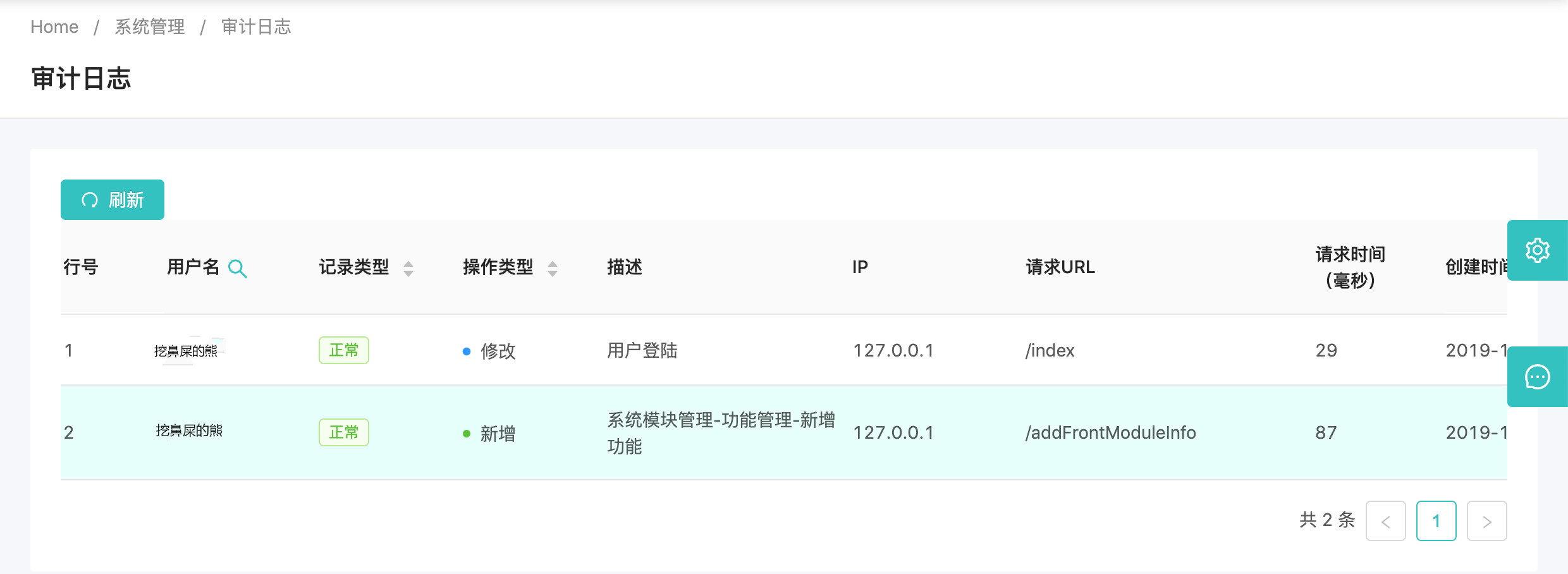
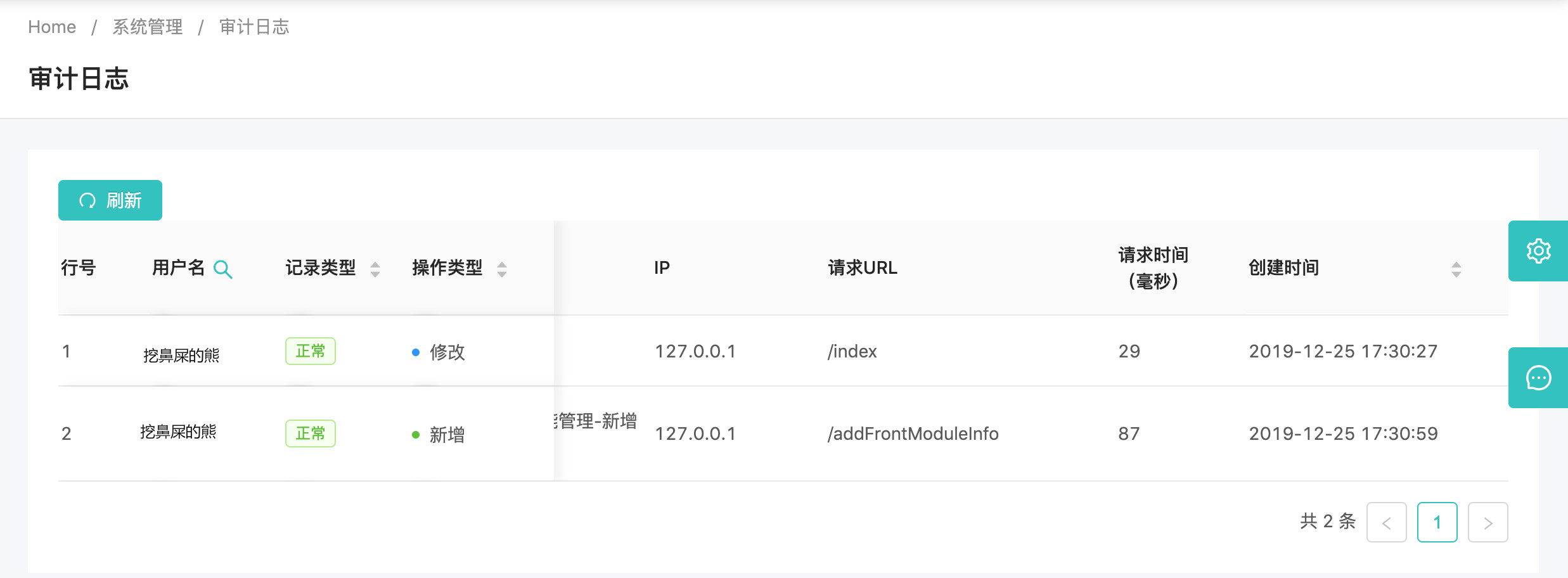
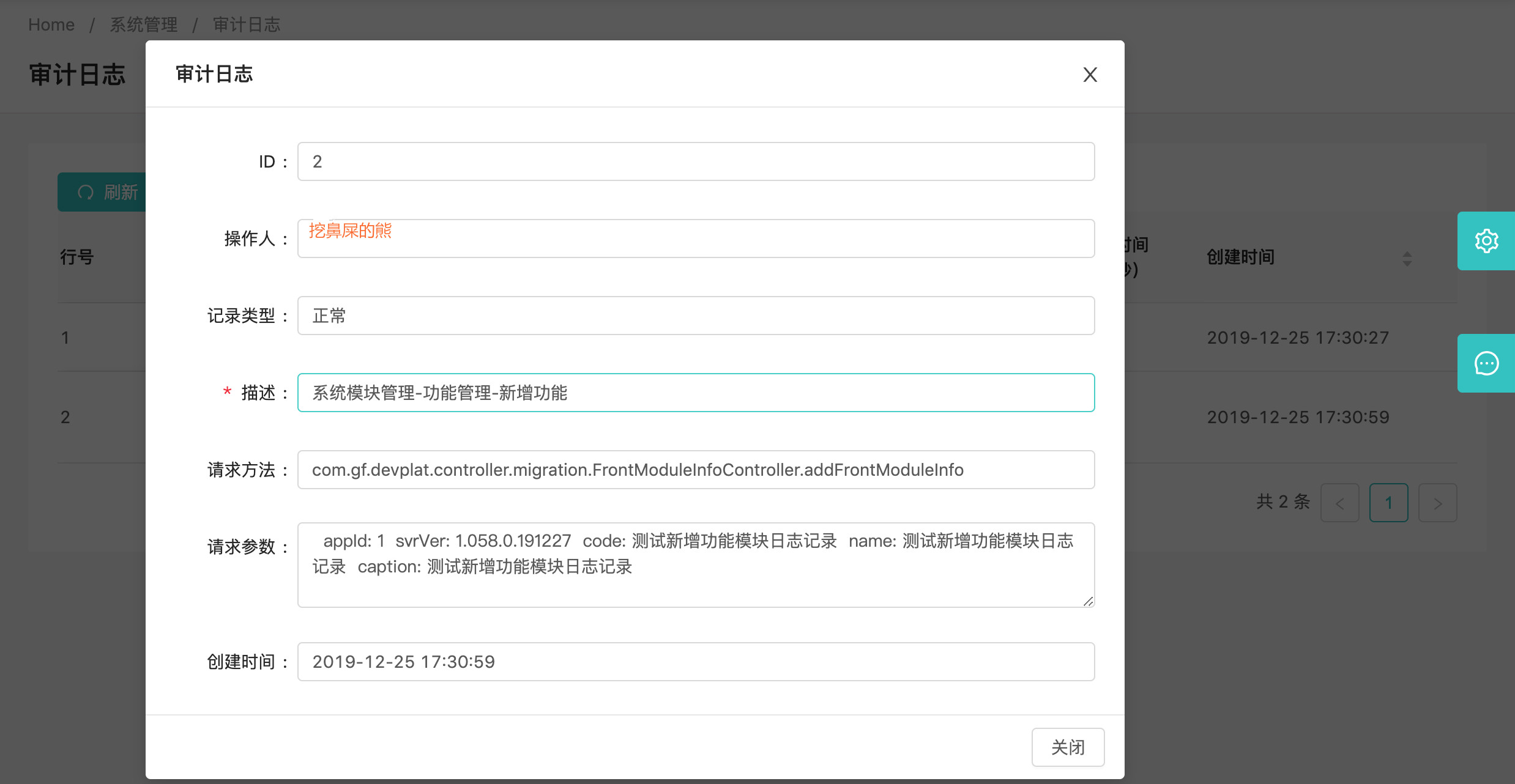
单击行,显示详情,可看到参数或异常(如果有)详细信息
总结
有待完善的地方,保存日志可以做成多线程的方式,大家可以自己试试。
感谢您的关注和点赞,欢迎转载,请注明作者和链接。
更新
2020-01-09
由于某个Controller上贴了事务注解,则发生异常的时候,插入的异常记录也被回滚了。解决方法用的是异步,步骤如下:
- 启动类上添加注解@EnableAsync
- 异步方法,使用注解@Async,注意该方法不能和调用方法在同一个类
@Component
public class AsyncTask {

    @Autowired
    private AuditLogService auditLogService;

    @Async
    public void addExceptionLog(AuditLogModel log) throws InterruptedException {
        Thread.sleep(3000);
        auditLogService.addAuditLog(log);
    }
}
- 修改原来调用写入异常记录的方法
@AfterThrowing(pointcut = "controllerAspect()", throwing = "e")
    public void doAfterThrowing(JoinPoint joinPoint, Throwable e) throws InterruptedException {
        UserInfo userInfo = SessionUtils.getUserInfo();

        AuditLogModel log = new AuditLogModel();

        // 1,表示异常记录
        log.setTime(time);
        log.setRecordType(Constants.OperateRecordType.OPERATE_RECORD_EXCEPTION);
        log.setExceptionDesc(e.toString());

        if (userInfo != null) {
            // Log对象封装值
            setLogValue(joinPoint, userInfo, log);
            // 插入异常记录
            // auditLogService.addAuditLog(log);
            // 异步插入异常记录,避免记录被回滚
            asyncTask.addExceptionLog(log);
        }

    }
到此,异常记录被回滚的问题就解决啦!
敬请期待后续...