title属性
title 属性规定关于元素的额外信息。
这些信息通常会在鼠标移到元素上时显示一段工具提示文本(tooltip text)。
react-quill中添加操作提示最简单的就是使用title属性。
实现
通过审查页面元素得到每个操作的class的值
定义class和title的映射关系
const toolbarTips = [
			{Choice: '.ql-bold', title: '加粗'},
			{Choice: '.ql-italic', title: '倾斜'},
			{Choice: '.ql-underline', title: '下划线'},
			{Choice: '.ql-header', title: '段落格式'},
			{Choice: '.ql-strike', title: '删除线'},
			{Choice: '.ql-blockquote', title: '块引用'},
			{Choice: '.ql-code', title: '插入代码'},
			{Choice: '.ql-code-block', title: '插入代码段'},
			{Choice: '.ql-size', title: '字体大小'},
			{Choice: '.ql-list[value="ordered"]', title: '编号列表'},
			{Choice: '.ql-list[value="bullet"]', title: '项目列表'},
			{Choice: '.ql-header[value="1"]', title: 'h1'},
			{Choice: '.ql-header[value="2"]', title: 'h2'},
			{Choice: '.ql-align', title: '对齐方式'},
			{Choice: '.ql-color', title: '字体颜色'},
			{Choice: '.ql-background', title: '背景颜色'},
			{Choice: '.ql-image', title: '图像'},
			{Choice: '.ql-video', title: '视频'},
			{Choice: '.ql-link', title: '添加链接'},
			{Choice: '.ql-formula', title: '插入公式'},
			{Choice: '.ql-clean', title: '清除格式'},
			{Choice: '.ql-direction', title: '文字方向'},
			{Choice: '.ql-indent[value="-1"]', title: '向左缩进'},
			{Choice: '.ql-indent[value="+1"]', title: '向右缩进'},
			{Choice: '.ql-header .ql-picker-label', title: '标题大小'},
			{Choice: '.ql-script[value="sub"]', title: '下标'},
			{Choice: '.ql-script[value="super"]', title: '上标'},
			{Choice: '.ql-redo', title: '前进'},
			{Choice: '.ql-undo', title: '撤销'},
			{Choice: '.ql-header .ql-picker-item[data-value="1"]', title: '标题一'},
			{Choice: '.ql-header .ql-picker-item[data-value="2"]', title: '标题二'},
			{Choice: '.ql-header .ql-picker-item[data-value="3"]', title: '标题三'},
			{Choice: '.ql-header .ql-picker-item[data-value="4"]', title: '标题四'},
			{Choice: '.ql-header .ql-picker-item[data-value="5"]', title: '标题五'},
			{Choice: '.ql-header .ql-picker-item[data-value="6"]', title: '标题六'},
			{Choice: '.ql-header .ql-picker-item:last-child', title: '标准'},
			{Choice: '.ql-size .ql-picker-item[data-value="small"]', title: '小号'},
			{Choice: '.ql-size .ql-picker-item[data-value="large"]', title: '大号'},
			{Choice: '.ql-font', title: '字体'},
			{Choice: '.ql-font .ql-picker-item[data-value="serif"]', title: '有衬线体'},
			{Choice: '.ql-font .ql-picker-item[data-value="sans-serif"]', title: '无衬线体'},
			{Choice: '.ql-font .ql-picker-item[data-value="monospace"]', title: '等宽字体'},
			{Choice: '.ql-size .ql-picker-item[data-value="huge"]', title: '超大号'},
			{Choice: '.ql-size .ql-picker-item:nth-child(2)', title: '标准'},
			{Choice: '.ql-align .ql-picker-item:first-child', title: '居左对齐'},
			{Choice: '.ql-align .ql-picker-item[data-value="center"]', title: '居中对齐'},
			{Choice: '.ql-align .ql-picker-item[data-value="right"]', title: '居右对齐'},
			{Choice: '.ql-align .ql-picker-item[data-value="justify"]', title: '两端对齐'}
		]
添加到对应的dom元素上
for (let item of toolbarTips) {
			let tip = document.querySelector(item.Choice)
			if (!tip) {
				continue
			}
			tip.setAttribute('title', item.title)
		}
项目中使用的是react框架,在ComponetDidMount生命周期中执行上述代码即可
图标不对齐方案
在Form表单中的常用方式是
	<FormItem
	  label='报表说明'
	>
	{
     	getFieldDecorator('remark', {
     	rules: [{
    	required: true,
		}],
     	initialValue: remark,
	})(<Editor placeholder='请填写报表说明'/>)
    	}
	</FormItem>
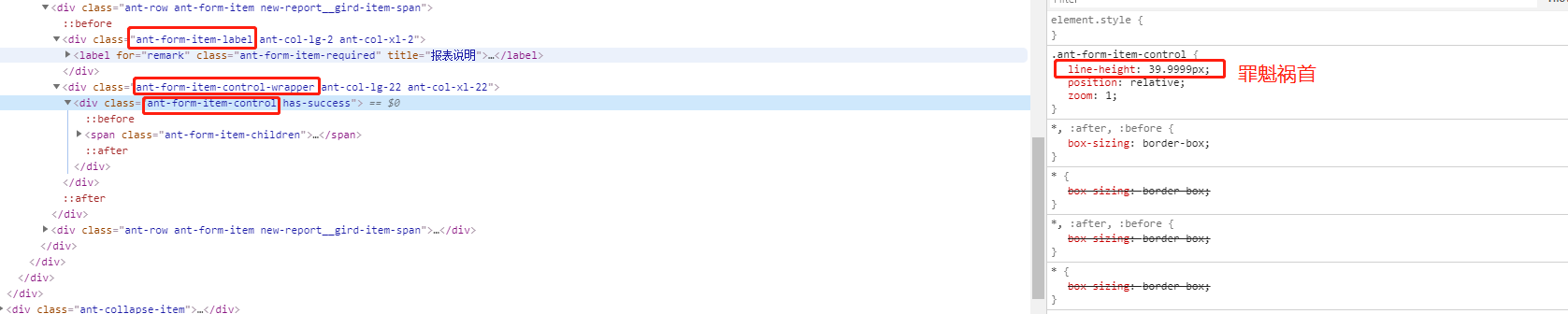
通过审查页面发现Ant Design会自动生成label和wrapper及其自带的样式,其中class为ant-form-item-control中改变了行高导致了富文本编辑框中的图标不对齐,因此需要单独改变富文本编辑框中的行高为normal即可。