背景
自己做了一点点的小尝试:基于前馈神经网络 LSTM 的个体出行目的地预测模型,基于个体历史出行数据,模型可以实现出行目的地的实时动态预测功能。
模型其实具有实际应用功能,为了对其应用场景进行探索,拟开发一个全栈的项目,在Web客户端实现用户出行的动态预测效果,同时能够提供数据可视分析等功能。
前端结构设计
下图是整个项目的结构,也就是采用Vue-cli脚手架搭建的前端项目结构
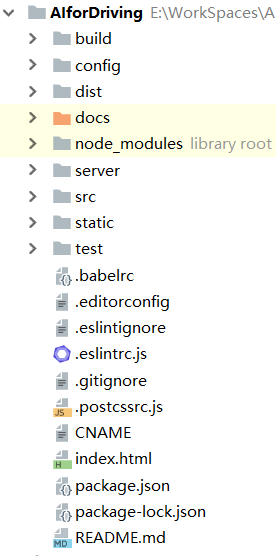
buile 文件夹存放项目构建脚本。
config 文件夹存放项目的配置信息,包括webpack配置及端口转发等。
dist/docs 文件夹存放的是项目构建后的内容,即编译出的项目代码。
node_modules 这个目录存放的是项目的所有依赖,即 npm install 命令下载下来的文件。
server 文件夹存放的是服务器相关代码与数据。
src 存放前端项目的源码。
static 存放项目的静态资源。
index.html 项目的入口页,也是唯一的HTML页面。
package.json 定义了项目的所有依赖,包括开发时依赖和发布时依赖。
其中前端开发的大多工作是在 src 文件夹下进行的,它的目录结构如下:
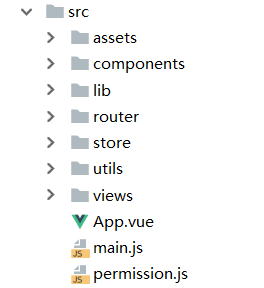
assets 文件夹存放资产文件。
components 文件夹存放项目公共的组件(.vue文件)。
lib 文件夹存放的是第三方库暴露出来的接口。
router 存放前端界面的路由逻辑js文件。
store 文件夹存放的是全局共享的变量。
utils 存放辅助函数脚本。
view 存放项目各独立界面(.vue文件)。
App.vue 一个vue组件,是第一个vue组件。
main.js 定义了项目启动的入口。
permission.js 界面初始化工作,包括动态界面的加载。
界面模版
前端界面模版是基于 vue-admin-template修改的,去除了登录功能,精简了界面逻辑。
界面模版最大的特点可以实现菜单栏的个性定制。
首先在 src/components/Index.vue文件夹内,定义动态菜单栏。
<template>
  <div class="index-vue">
    <!-- 侧边栏 -->
    <aside :class="asideClassName">
      <!-- logo -->
      <div class="logo-c pointer" @click="isShrinkAside" title="收缩/展开">
        <img src="../assets/imgs/logo.png" alt="logo" class="logo">
        <span v-show="isShowAsideTitle">驾驶分析系统</span>
      </div>
      <!-- 菜单栏 -->
      <Menu class="menu" ref="asideMenu" theme="dark" width="100%" @on-select="gotoPage"
            accordion :open-names="openMenus" :active-name="currentPage" @on-open-change="menuChange">
        <!-- 动态菜单 -->
        <div v-for="(item, index) in menuItems" :key="index">
          <Submenu v-if="item.children" :name="index">
            <template slot="title">
              <Icon :size="item.size" :type="item.type"/>
              <span v-show="isShowAsideTitle">{{item.text}}</span>
            </template>
            <div v-for="(subItem, i) in item.children" :key="index + i">
              <Submenu v-if="subItem.children" :name="index + '-' + i">
                <template slot="title">
                  <Icon :size="subItem.size" :type="subItem.type"/>
                  <span v-show="isShowAsideTitle">{{subItem.text}}</span>
                </template>
                <MenuItem class="menu-level-3" v-for="(threeItem, k) in subItem.children"
                          v-if="!threeItem.hidden" :name="threeItem.name" :key="index + i + k">
                  <Icon :size="threeItem.size" :type="threeItem.type"/>
                  <span v-show="isShowAsideTitle">{{threeItem.text}}</span>
                </MenuItem>
              </Submenu>
              <MenuItem v-else-if="!subItem.hidden" :name="subItem.name">
                <Icon :size="subItem.size" :type="subItem.type"/>
                <span v-show="isShowAsideTitle">{{subItem.text}}</span>
              </MenuItem>
            </div>
          </Submenu>
          <MenuItem v-else-if="!item.hidden" :name="item.name">
            <Icon :size="item.size" :type="item.type"/>
            <span v-show="isShowAsideTitle">{{item.text}}</span>
          </MenuItem>
        </div>
      </Menu>
    </aside>
  </div>
</template>
<script>
  export default {
    name: 'index',
    data () {
      return {
        // 用于储存页面路径
        paths: {},
        // 当前显示页面
        currentPage: '',
        openMenus: [], // 要打开的菜单名字 name属性
        menuCache: [], // 缓存已经打开的菜单
        showLoading: false, // 是否显示loading
        isShowRouter: true,
        isShowAsideTitle: true, // 是否展示侧边栏内容
        main: null, // 页面主要内容区域
        asideClassName: 'aside-big', // 控制侧边栏宽度变化
        asideArrowIcons: [], // 缓存侧边栏箭头图标 收缩时用
      };
    },
    created () {
      // 已经为ajax请求设置了loading 请求前自动调用 请求完成自动结束
      // 添加请求拦截器
      this.$axios.interceptors.request.use(config => {
        this.showLoading = false;
        // 在发送请求之前做些什么
        return config;
      }, error => {
        this.showLoading = false;
        // 对请求错误做些什么
        return Promise.reject(error);
      });
      // 添加响应拦截器
      this.$axios.interceptors.response.use(response => {
        // 可以在这里对返回的数据进行错误处理 如果返回的 code 不对 直接报错或退出登陆
        // 就可以省去在业务代码里重复判断
        // 例子
        // if (res.code != 0) {
        //     this.$Message.error(res.msg)
        //     return Promise.reject()
        // }
        this.showLoading = false;
        const res = response.data;
        return res;
      }, error => {
        this.showLoading = false;
        // 对响应错误做点什么
        return Promise.reject(error);
      });
    },
    mounted () {
      // 第一个标签
      const name = this.$route.name;
      this.currentPage = name;

      // 根据路由打开对应的菜单栏
      this.openMenus = this.getMenus(name);
      this.$nextTick(() => {
        this.$refs.asideMenu.updateOpened();
      });

      this.main = document.querySelector('.sec-right');
      this.asideArrowIcons = document.querySelectorAll('aside .ivu-icon-ios-arrow-down');

      // 监听窗口大小 自动收缩侧边栏
      this.monitorWindowSize();
    },
    watch: {
      $route (to) {
        const name = to.name;
        this.currentPage = name;
      }
    },
    computed: {
      // 菜单栏
      menuItems () {
        return this.$store.state.menuItems;
      },

      // 由于iView的导航菜单比较坑 只能设定一个name参数
      // 所以需要在这定义组件名称和标签栏标题的映射表 有多少个页面就有多少个映射条数
      nameToTitle () {
        const obj = {};
        this.menuItems.forEach(e => {
          this.processNameToTitle(obj, e);
        });

        return obj;
      },
    },
    methods: {
      getMenus (name) {
        let menus;
        const tagTitle = this.nameToTitle[name];
        for (let i = 0, l = this.menuItems.length; i < l; i++) {
          const item = this.menuItems[i];
          menus = [];
          menus[0] = i;
          if (item.text == tagTitle) {
            return menus;
          }

          if (item.children) {
            for (let j = 0, ll = item.children.length; j < ll; j++) {
              const child = item.children[j];
              menus[1] = i + '-' + j;
              menus.length = 2;
              if (child.text == tagTitle) {
                return menus;
              }

              if (child.children) {
                for (let k = 0, lll = child.children.length; k < lll; k++) {
                  const grandson = child.children[k];
                  menus[2] = i + '-' + j + '-' + k;
                  if (grandson.text == tagTitle) {
                    return menus;
                  }
                }
              }
            }
          }
        }
      },

      monitorWindowSize () {
        let w = document.documentElement.clientWidth || document.body.clientWidth;
        if (w < 1300) {
          this.shrinkAside();
        }

        window.onresize = () => {
          // 可视窗口宽度太小 自动收缩侧边栏
          if (w < 1300 && this.isShowAsideTitle
            && w > (document.documentElement.clientWidth || document.body.clientWidth)) {
            this.shrinkAside();
          }

          w = document.documentElement.clientWidth || document.body.clientWidth;
        };
      },

      // 判断当前标签页是否激活状态
      isActive (name) {
        return this.$route.name === name;
      },

      // 判断
      isShrinkAside () {
        this.isShowAsideTitle ? this.shrinkAside() : this.expandAside();
      },
      // 收缩
      shrinkAside () {
        this.asideArrowIcons.forEach(e => {
          e.style.display = 'none';
        });

        this.isShowAsideTitle = false;
        this.openMenus = [];
        this.$nextTick(() => {
          this.$refs.asideMenu.updateOpened();
        });

        setTimeout(() => {
          this.asideClassName = '';
          this.main.style.width = 'calc(100% - 80px)';
        }, 0);
      },
      // 展开
      expandAside () {
        setTimeout(() => {
          this.isShowAsideTitle = true;
          this.asideArrowIcons.forEach(e => {
            e.style.display = 'block';
          });

          this.openMenus = this.menuCache;
          this.$nextTick(() => {
            this.$refs.asideMenu.updateOpened();
          });
        }, 200);
        this.asideClassName = 'aside-big';
        this.main.style.width = 'calc(100% - 220px)';
      },

      // 菜单栏改变事件
      menuChange (data) {
        this.menuCache = data;
      },
      processNameToTitle (obj, data, text) {
        if (data.name) {
          obj[data.name] = data.text;
          this.paths[data.name] = text ? `${text} / ${data.text}` : data.text;
        }
        if (data.children) {
          data.children.forEach(e => {
            this.processNameToTitle(obj, e, text ? `${text} / ${data.text}` : data.text);
          });
        }
      }
    }
  };
</script>
任务栏是根据 this.$store.state.menuItems 定义的内容循环更新,包括子任务栏,其定义在src/store/index.js文件内,需利用Vuex状态管理插件。
import Vue from 'vue';
import Vuex from 'vuex';

Vue.use(Vuex);

const store = new Vuex.Store({
  state: {
    // 左侧菜单栏数据
    menuItems: [
      {
        name: 'home', // 要跳转的路由名称 不是路径
        size: 22, // icon大小
        type: 'md-home', // icon类型
        text: '主页', // 文本内容
      }
      {
        text: '数据视图',
        type: 'md-globe',
        size: 22,
        children: [
          {
            text: '可视化',
            type: 'ios-eye',
            size: 20,
            children: [
              {
                type: 'logo-steam',
                name: 'trajectory',
                text: '轨迹'
              }
            ]
          }
        ]
      }
    ],
  },
  mutations: {
    setMenus (state, items) {
      state.menuItems = [...items];
    }
  }
});

export default store;
然后在src/router/index.js文件中定义每个组件的路由规则。
import Vue from 'vue';
import Router from 'vue-router';

Vue.use(Router);

export const commonRouters = [
  {
    path: '/',
    redirect: 'home'
  }
];
// 需要动态定制的任务栏,包括子任务栏
export const asyncRouters = {
  'home': {
    path: 'home',
    name: 'home',
    component: () => import('@/views/Home.vue')
  },
  'trajectory': {
    path: 'trajectory',
    name: 'trajectory',
    component: () => import('@/views/Trajectory.vue')
  }
};

const createRouter = () => new Router({
  routes: commonRouters
});

export function resetRouter () {
  const newRouter = createRouter();
  router.matcher = newRouter.matcher;
}

const router = createRouter();

export default router;
然后在 src/views 文件夹下定义对应路口的界面vue组件。
// Home.vue
<template>
    ...
</template>

<script>
  export default {
    name: 'home'
  };
</script>

<style scoped>

</style>

// Trajectory.vue
<template>
    ...
</template>

<script>
  export default {
    name: 'home'
  };
</script>

<style scoped>

</style>
之后,在src/permission.js文件中,定义界面初始化逻辑:
import router from '@/router'
import store from '@/store'
import {menusToRouters} from '@/utils';
import {LoadingBar} from 'iview'

let hasMenus = false;
router.beforeEach(async (to, from, next)=>{
  LoadingBar.start();
  if(hasMenus){
    next()
  }else{
    try{
      const routers = menusToRouters(store.state.menuItems);
      router.addRoutes(routers);
      hasMenus = true;
      next({path: to.path || '/'});
    }catch (e) {
      console.log(e.toString());
    }
  }
});

router.afterEach(()=>{
  LoadingBar.finish()
});
其中 menusToRouters 方法是将定义的任务栏转化为对应的router对象:
import {asyncRouters} from '@/router';

export function menusToRouters (data) {
  const res = [];
  const children = [];

  res.push({
    path: '/',
    component: () => import('@/components/Index.vue'),
    children,
  });

  data.forEach(item => {
    generateRouters(children, item);
  });

  children.push({
    path: 'error',
    name: 'error',
    component: () => import('@/components/Error.vue')
  });

  return res;
}

function generateRouters (children, item) {
  if (item.name) {
    children.push(asyncRouters[item.name]);
  } else if (item.children) {
    item.children.forEach(e => {
      generateRouters(children, e);
    });
  }
}
最后,在入口文件 src/main.js 文件中导入permission.js文件:
// The Vue build version to load with the `import` command
// (runtime-only or standalone) has been set in webpack.base.conf with an alias.
import Vue from 'vue';
import App from '@/App';
import router from '@/router';
import iView from 'iview';
import axios from 'axios';
import store from '@/store';
import 'iview/dist/styles/iview.css'
import '@/permission';

// 全局注册
Vue.config.productionTip = false;
Vue.prototype.$axios = axios;
Vue.use(iView);

/* eslint-disable no-new */
new Vue({
  el: '#app',
  router,
  store,
  render: h => h(App) // 相当于 components: { App }  vue1.0的写法
});
初始化的菜单栏就定义完成了。