<template>
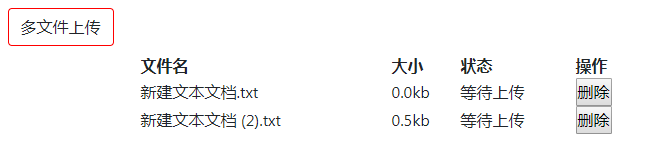
  <label for="file" class=" btn btn-default" style="border:1px solid red">多文件上传</label>
  <input type="file" style="display:none;" id="file" multiple @change="file()" name="multipartFiles">
  <table style="width:500px;margin:0 auto;" id="wenjian">
    <tr style="" id="col">
      <th class="name">文件名</th>
      <th class="size">大小</th>
      <th class="zhuangtai">状态</th>
      <th>操作</th>
    </tr>
    <tr :class="isactive?aaa:''" v-for="(dd,index) in wenjian" :key="index" id="tr">
      <td>{{dd.name}}</td>
      <td>{{(dd.size/1024).toFixed(1)}}kb</td>
      <td>等待上传</td>
      <td><button @click="del(index)">删除</button></td>
    </tr>
  </table>
</template>

date(){
  return{
    wenjian:[],
    isactive:true,
    aaa:'aaaclass'
  }
}

methods:{
 file(){
      var that = this;
      for(var ff=0;ff<$("#file")[0].files.length;ff++){
        that.wenjian.push($("#file")[0].files[ff])
      }
      that.isactive = false;
      //console.log($("#file")[0].files)
      //console.log(that.wenjian)
    },
del(index){
      //console.log(111)
      var that = this;
      //console.log(that.wenjian)
      that.wenjian.splice(index,1)
    },
}


<style>.aaaclass{display:none;}</style>
这是效果图。